当前位置:网站首页>微信小程序之下拉菜单场景
微信小程序之下拉菜单场景
2022-06-23 13:14:00 【qq_45911550】
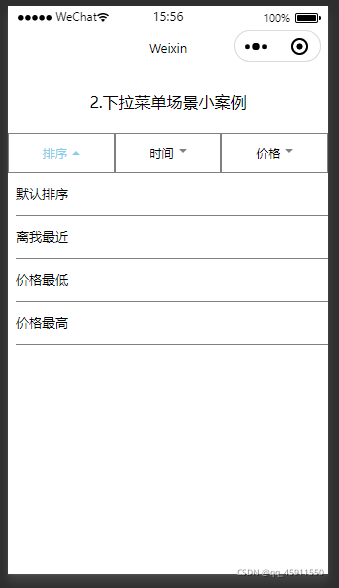
效果图: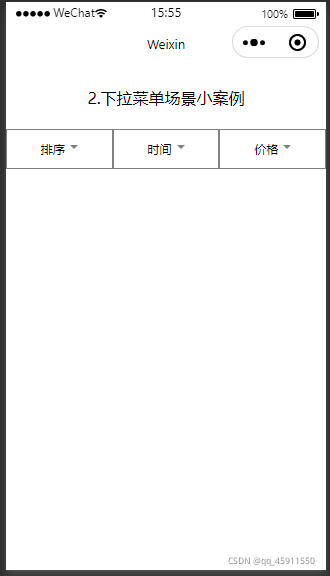
app.wxss文件
.title{

    display:flex;
    flex-direction: row;
    margin:50rpx;
    justify-content: center;
}
js文件
Page({

    data:{

        li:['默认排序','离我最近','价格最低','价格最高'],
        shownavindex:0
    },
    // 下拉事件
    listmenu: function(e) {

        if (this.data.openif) {

            this.setData({

                openif: false,
                shownavindex: 0
            })
        } else {

            this.setData({

                content: this.data.li,
                openif: true,
                shownavindex: e.currentTarget.dataset.nav
            })
        }
    }
})
wxml文件
<view class="title">2.下拉菜单场景小案例</view>
<view class="page">
    <!--导航内容-->
    <view class="nav">
        <view class="nav-item {
    {shownavindex == 1? 'active' : ''}}" bindtap="listmenu" data-nav="1">
            <view class="content">排序</view>
            <view class="icon"></view>
        </view>
        <view class="nav-item">
            <view class="content">时间</view>
            <vew class="icon"></vew>
        </view>
        <view class="nav-item">
            <view class="content">价格</view>
            <vew class="icon"></vew>
        </view>
    </view>
    <!--下拉内容-->
    <view class="list {
    {openif ? 'down' : 'up'}} ">
        <view wx:for="{
    {content}}">
            {
    {
    item}}
        </view>
    </view>
</view>
josn文件
{

  "usingComponents": {
    }
}
wxss文件
.page{

    overflow: hidden;  /*页面溢出隐藏*/
}
.nav{

    position: relative;
    z-index: 1;  /*页面元素谁覆盖在谁的上面*/
    display: flex;
    flex-direction: row;
    background: white;
}
.nav-item{

    display: flex;
    flex: 1;  /*几个内容等分屏幕*/
    text-align: center;
    height: 90rpx;
    align-items: center;
    justify-content: center;
    font-size: 30rpx;
    border: 1px solid gray;
}
.icon{

    border: 10rpx solid transparent;
    border-top: 10rpx solid gray;
    margin-left: 12rpx;
}
.list{

    display: none;  /*刚开始尚未显示,所以显示none*/
    width: 100%;
    /*overflow-y: scroll;*/
    padding: 0 0 0 20rpx;
    line-height: 100rpx;
    background: white;
}
.list view{

    border-bottom: 1px solid gray;
    font-size: 32rpx;
}
.nav-item.active .content{
      /*注意有空格*/
    color: skyblue;
}
.nav-item.active .icon{

    border-bottom: 10rpx solid skyblue;
    border-top: 0;
}
.down{

    display: block;
    animation: slidown 0.001s ease-in both;  /*添加动画*/
}
@keyframes slidown{

    from{

        transform: translateY(-100%);
    }
    to{

        transform: translateY(0%);
    }
}
.up{

    display: block;
    animation: slidup 0.001s ease-in both;
}
@keyframes slidup{

    from{

        transform: translateY(0%);
    }
    to{

        transform: translateY(-100%);
    }
}
边栏推荐
- 腾讯的技术牛人们,是如何完成全面上云这件事儿的?
- Runtime application self-protection (rasp): self-cultivation of application security
- Hanyuan high tech USB2.0 optical transceiver USB2.0 optical fiber extender USB2.0 optical fiber transmitter USB2.0 interface to optical fiber
- How to correctly calculate the number of rows imported into EXCEL (poi/npoi)
- . Net how to use log framework NLog
- Simplify deployment with openvino model server and tensorflow serving
- 20000 words + 30 pictures | MySQL log: what is the use of undo log, redo log and binlog?
- How to solve the task cache compilation problem caused by gradle build cache
- Stick to five things to get you out of your confusion!
- 深入剖析MobileNet和它的变种
猜你喜欢

64 channel telephone +2-channel Gigabit Ethernet 64 channel PCM telephone optical transceiver voice telephone to optical fiber

在線文本過濾小於指定長度工具

leetcode:42.接雨水
kubernetes日志监控系统架构详解

quartus調用&設計D觸發器——仿真&時序波驗證

How to use androd gradle module dependency replacement

What are the conditions for a mature knowledge management?

90%的人都不懂的泛型,泛型的缺陷和应用场景

MySQL single database and table splitting using MYCAT

前AMD芯片架构师吐槽,取消 K12 处理器项目是因为 AMD 怂了!

随机推荐
[Yunzhou said live room] - digital security special session will be officially launched tomorrow afternoon
Filtre de texte en ligne inférieur à l'outil de longueur spécifiée
Detailed explanation of serial port, com, UART, TTL, RS232 (485) differences
Service stability governance
Gary Marcus wrote: three perspectives from linguists that AI researchers need to know
微信小程序之flex属性
Basic data types of C language and their printouts
父母-子女身高数据集的线性回归分析
leetcode:242. 有效的字母异位词
爱思唯尔-Elsevier期刊的校稿流程记录(Proofs)(海王星Neptune)(遇到问题:latex去掉章节序号)
实战 | 如何制作一个SLAM轨迹真值获取装置?
Modelsim 安装步骤详解
618's money saving technology strategy is coming - experience the scene and get a 10 yuan cat super card!
你管这破玩意儿叫 MQ?
腾讯的技术牛人们,是如何完成全面上云这件事儿的?
kubernetes日志监控系统架构详解
Intelligent digital signage solution
OpenVINOTM 2022.1中AUTO插件和自动批处理的最佳实践
Broadcast level E1 to aes-ebu audio codec E1 to stereo audio XLR codec
React query tutorial ④ - cache status and debugging tools