当前位置:网站首页>uni-app 背景音频 熄屏或者退回桌面之后不在播放
uni-app 背景音频 熄屏或者退回桌面之后不在播放
2022-07-24 13:44:00 【一个博客】
解决办法:下载安卓原生插件 ,并在离线打包中配置前台服务配置
1、将插件导入到HBuilder X中
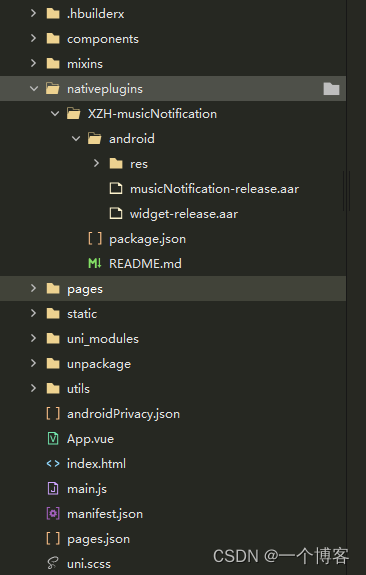
2、manifest.json中配置如下
"nativePlugins" : {

		    "XZH-musicNotification" : {

		        "page" : "page/story/storyDetails",
		        "favour" : "false",
		        "themeColor" : "#ffffff",
		        "titleColor" : "#ffffff",
		        "artistColor" : "#ffffff",
		        "__plugin_info__" : {

		            "name" : "XZH-musicNotification",
		            "description" : "Android音乐通知栏",
		            "platforms" : "Android",
		            "url" : "",
		            "android_package_name" : "",
		            "ios_bundle_id" : "",
		            "isCloud" : false,
		            "bought" : -1,
		            "pid" : "",
		            "parameters" : {

		                "page" : {

		                    "des" : "页面路径(如:pages/*/*)",
		                    "key" : "xzh_page",
		                    "value" : ""
		                },
		                "favour" : {

		                    "des" : "是否开启收藏按钮",
		                    "key" : "xzh_favour",
		                    "value" : ""
		                },
		                "themeColor" : {

		                    "des" : "widget背景色(请使用 ARGB 格式)",
		                    "key" : "xzh_theme_color",
		                    "value" : ""
		                },
		                "titleColor" : {

		                    "des" : "widget歌名字体色(请使用 ARGB 格式)",
		                    "key" : "xzh_title_color",
		                    "value" : ""
		                },
		                "artistColor" : {

		                    "des" : "widget歌手字体色(请使用 ARGB 格式)",
		                    "key" : "xzh_artist_color",
		                    "value" : ""
		                }
		            }
		        }
		    }
		}

3、封装 JS 调用的方法
播放器调用代码的封装: musicNotification.js 提取码:7zbd
背景音频的封装: audioUtils.js 提取码:xtyy
4、使用
(1)在app.vue 里面调用初始化的方法
			this.$mc.init({

				//点击通知栏跳转页面
				path: '/pages/story/storyDetails.vue',
				//设置状态栏小图标,只有 android 8.0 以上才有效
				icon: '/static/image/logo.png',
			})
(2)main.js 中全局定义 背景音频
//背景音频
import audioUtils from './utils/audioUtils.js'
Vue.prototype.$audioUtils = audioUtils;
(3)需要用到播放器的页面,进行创建生成
import music from '@/utils/musicNotification.js'

data() {

			return {

				isInitPlay:false,
				audio:null,
				isLockActivity:false,
			}
},
onLoad() {


	//有问题哈,这个背景音频的方法在其他页面使用了也会执行,所以需要加个判断是否是当前页面
	let currentRoutes = getCurrentPages(); // 获取当前打开过的页面路由数组
	let currentRoute = currentRoutes[currentRoutes.length - 1].route //获取当前页面路由
	if (currentRoute == "pages/story/storyDetails") {

		this.isaudio=true;
	}
	//判断用户是否前往设置通知权限 在返回后重新设置故事信息
	if(uni.getStorageSync("musicIsUpdata")==1){

		this.updataInfoX(this.storyList[this.current])
		uni.setStorageSync("musicIsUpdata",0)
	}
	this.audio=this.$audioUtils.initContext();//获取封装的背景音频
},
onUnload() {

	this.isaudio=false;
	let timer=setTimeout(function(){

		// 添加移除 播放器
		plus.globalEvent.removeEventListener('musicNotificationPause')
		uni.removeStorageSync("createMusic");
		music.playOrPause(JSON.parse(false))
		music.cancel();
		clearTimeout(timer)
	},300)
},
mounted(){

	let _this=this;
	//切换下一首
	plus.globalEvent.addEventListener('musicNotificationNext', function(e) {

		_this.onNext();
		music.playOrPause(JSON.parse(true));
	});
	//切换上一首
	plus.globalEvent.addEventListener('musicNotificationPrevious', function(e) {

		_this.onPre();
		music.playOrPause(JSON.parse(true));
	});
	//暂停与播放
	plus.globalEvent.addEventListener('musicNotificationPause', function(e) {

		_this.onSwitch()
	});
	//音频进入可以播放状态
	this.audio.onCanplay(function(e){

		if(this.isaudio){

				this.timeLength=Math.floor(_this.audio.duration)
				if(this.isHide){

					//更新音频播放
					this.Notification()
				}
		}
	})
},
onHide() {

	this.isHide=true;
	//显示音频播放器
	this.Notification();
},
methods:{

			// 提示用户给予通知权限
			updataInfo(storyInfo){

				let Info=storyInfo;
				  let res = music.update({

				  	songName: Info.title,
				  	favour: false, //这里我写死,
				  	picUrl: Info.img_url
				  });
				  switch (res.code) {

				  	case -1: //未知错误
				  		return;
				  	case -2: //没有权限
				  		uni.showModal({

				  			title: '开启通知说明',
				  			cancelText:"前往设置",
				  			confirmText:"本次忽略",
				  			content: '尊敬的用户您好,应用需要开启通知以保证程序在后台能够正常运行。如果您选择不开启,应用在后台一段时间将被系统回收,导致播放中断,强烈建议您开启!(忽略后下次启动可继续在此页面点击前往设置)',
				  			success: function (res) {

				  				if (res.confirm) {

				  				} else if (res.cancel) {

				  					music.openPermissionSetting(); //没有权限,跳转设置页面
				  					uni.setStorageSync("musicIsUpdata",1)
				  				}
				  			}
				  		});
				  		return;
				  }
			},
			// 更新通知信息
			updataInfoX(storyInfo){

				let res = music.update({

					songName: storyInfo.title,
					favour: false, //这里我写死,
					picUrl: storyInfo.img_url
				});
				console.log(res)
				switch (res.code) {

					case -1: //未知错误
						return;
					case -2: //没有权限
						return;
				}
			},
			Notification(){

				if(this.isHide){

					if(this.isInitPlay){

						this.updataInfoX(this.storyList[this.current])
					}else{

						let storyList=this.storyList[this.current]
						music.createNotification(res=>{

							this.updataInfo(storyList)
							music.playOrPause(JSON.parse(true))
							this.isInitPlay=true
						})
					}
				}
			},
			lockActivity(){

				// 设置锁屏页,同时返回授权状态
				if (!music.openLockActivity({

						lock: !this.isLockActivity
					})) {

					// 没有权限,弹出一个对话框
					uni.showModal({

						content: 'android 10 以上需要开启悬浮窗权限才能打开锁屏页',
						success: (res) => {

							if (res.confirm) {

								// 用户点击确定,注册授权监听
								plus.globalEvent.addEventListener('openLockActivity', ({

									type
								}) => {

									if (type) {

										// 获得悬浮窗权限,重新设置锁屏页
										this.lockActivity()
									}
									// 注销授权监听
									plus.globalEvent.removeEventListener('openLockActivity');
								});
								/**
								 * 没有悬浮窗权限,跳转设置页面
								 * android 10 以上没有这权限打不开锁屏页
								 */
								music.openOverlaySetting();
							}
						}
					});
				} else {

					// 有权限,就修改前端状态
					this.isLockActivity = !this.isLockActivity;
				}
			},
}
5、离线打包中的配置
1、在AndroidManifest.xml里面配置三个权限
    <!-- 允许程序快捷方式的创建应用-->
    <uses-permission android:name="android.permission.INSTALL_SHORTCUT"/>
    <!-- 允许程序在手机屏幕关闭后后台进程仍然运行-->
    <uses-permission android:name="android.permission.WAKE_LOCK"/>
    <!-- 前台服务的权限-->
    <uses-permission android:name="android.permission.FOREGROUND_SERVICE"/>
2、dcloud_uniplugins.json:集成的信息
{

  "nativePlugins": [
    {

      "integrateType": "aar",
      "compileOptions": {

        "sourceCompatibility": "1.8",
        "targetCompatibility": "1.8"
      },
      "plugins": [{

        "type": "module",
        "name": "XZH-musicNotification",
        "class": "com.xzh.musicnotification.MusicNotificationModule"
      }]
    }
  ]
}

3、导入音频播放器的 musicNotification-release.aar 压缩文件

4、在AndroidManifest.xml里面配置参数
  <meta-data
      android:name="xzh_favour"
      android:value="true"/>
  <meta-data
      android:name="xzh_theme_color"
      android:value="#55000000"/>

   <meta-data
      android:name="xzh_title_color"
      android:value="#ffffff"/>

   <meta-data
      android:name="xzh_artist_color"
      android:value="#ffffff"/>

边栏推荐
- R语言使用epiDisplay包的summ函数计算dataframe中指定变量在不同分组变量下的描述性统计汇总信息并可视化有序点图、自定义cex.main参数配置标题文本字体的大小
- XSS white list
- Detailed explanation of odoo JS DoAction
- An error is reported when using activiti to create a database table,
- Soft link, hard link
- Repair the problem of adding device groups and editing exceptions on easycvr platform
- WSDM 22 | 基于双曲几何的图推荐
- Common OJ questions of stack and queue
- 群体知识图谱:分布式知识迁移与联邦式图谱推理
- Simple use and difference of symmetric res, AES and asymmetric RSA (JWT)
猜你喜欢

JS execution mechanism

网络安全——中间人攻击渗透测试

Network security - Cookie injection

Network security - file upload competitive conditions bypass

Sringboot-plugin-framework 实现可插拔插件服务

网络安全——函数绕过注入

Explain the edge cloud in simple terms | 2. architecture

Simulate the implementation of the library function memcpy-- copy memory blocks. Understand memory overlap and accurate replication in detail

CSP2021 T3 回文

Why are there "two abstract methods" in the functional interface comparator?
随机推荐
网络安全——文件上传竞争条件绕过
基于图正则化的贝叶斯宽度学习系统
ICML2022 | 分支强化学习
简易订单管理系统小练习
网络安全——WAR后门部署
Network security - war backdoor deployment
Network security - function bypass injection
Sringboot plugin framework implements pluggable plug-in services
游戏思考04总结:针对帧、状态、物理同步的总结(之前写的太长,现在简略下)
群体知识图谱:分布式知识迁移与联邦式图谱推理
自动化运维之Ansible安装部署
Why are there "two abstract methods" in the functional interface comparator?
[acm/ two points] two points clear entry-level explanation
Swarm intelligence collaborative obstacle avoidance method inspired by brain attention mechanism
Bayesian width learning system based on graph regularization
网络安全——使用Evil Maid物理访问安全漏洞进行渗透
Network security - file upload content check bypass
Flink容错机制(五)
Network security -- Service Vulnerability scanning and utilization
Overview of multi view learning methods based on canonical correlation analysis