当前位置:网站首页>Uni app background audio will not be played after the screen is turned off or returned to the desktop
Uni app background audio will not be played after the screen is turned off or returned to the desktop
2022-07-24 13:48:00 【A blog】
terms of settlement : download Android native plug-ins , And configure the foreground service configuration in offline packaging
1、 Import the plug-in into HBuilder X in
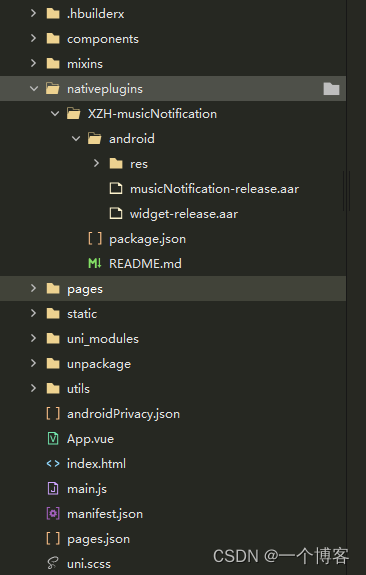
2、manifest.json The configuration in is as follows
"nativePlugins" : {

		    "XZH-musicNotification" : {

		        "page" : "page/story/storyDetails",
		        "favour" : "false",
		        "themeColor" : "#ffffff",
		        "titleColor" : "#ffffff",
		        "artistColor" : "#ffffff",
		        "__plugin_info__" : {

		            "name" : "XZH-musicNotification",
		            "description" : "Android Music notice bar ",
		            "platforms" : "Android",
		            "url" : "",
		            "android_package_name" : "",
		            "ios_bundle_id" : "",
		            "isCloud" : false,
		            "bought" : -1,
		            "pid" : "",
		            "parameters" : {

		                "page" : {

		                    "des" : " Page path ( Such as :pages/*/*)",
		                    "key" : "xzh_page",
		                    "value" : ""
		                },
		                "favour" : {

		                    "des" : " Whether to turn on the favorite button ",
		                    "key" : "xzh_favour",
		                    "value" : ""
		                },
		                "themeColor" : {

		                    "des" : "widget Background color ( Please use  ARGB  Format )",
		                    "key" : "xzh_theme_color",
		                    "value" : ""
		                },
		                "titleColor" : {

		                    "des" : "widget Song name and body color ( Please use  ARGB  Format )",
		                    "key" : "xzh_title_color",
		                    "value" : ""
		                },
		                "artistColor" : {

		                    "des" : "widget Singer font color ( Please use  ARGB  Format )",
		                    "key" : "xzh_artist_color",
		                    "value" : ""
		                }
		            }
		        }
		    }
		}

3、 encapsulation JS Method called
Encapsulation of player call code : musicNotification.js Extraction code :7zbd
Packaging of background audio : audioUtils.js Extraction code :xtyy
4、 Use
(1) stay app.vue Inside, call the initialization method
			this.$mc.init({

				// Click the notice bar to jump to the page
				path: '/pages/story/storyDetails.vue',
				// Set the status bar small icon , Only  android 8.0  The above is valid
				icon: '/static/image/logo.png',
			})
(2)main.js Global definitions in Background audio
// Background audio
import audioUtils from './utils/audioUtils.js'
Vue.prototype.$audioUtils = audioUtils;
(3) You need to use the page of the player , Create and generate
import music from '@/utils/musicNotification.js'

data() {

			return {

				isInitPlay:false,
				audio:null,
				isLockActivity:false,
			}
},
onLoad() {


	// There's a problem, huh , This method of background audio will also be implemented in other pages , So you need to add a judge whether it is the current page
	let currentRoutes = getCurrentPages(); //  Gets the currently opened page routing array
	let currentRoute = currentRoutes[currentRoutes.length - 1].route // Get the current page route
	if (currentRoute == "pages/story/storyDetails") {

		this.isaudio=true;
	}
	// Judge whether the user goes to set the notification permission   Reset the story information after returning
	if(uni.getStorageSync("musicIsUpdata")==1){

		this.updataInfoX(this.storyList[this.current])
		uni.setStorageSync("musicIsUpdata",0)
	}
	this.audio=this.$audioUtils.initContext();// Get encapsulated background audio
},
onUnload() {

	this.isaudio=false;
	let timer=setTimeout(function(){

		//  Add remove   player
		plus.globalEvent.removeEventListener('musicNotificationPause')
		uni.removeStorageSync("createMusic");
		music.playOrPause(JSON.parse(false))
		music.cancel();
		clearTimeout(timer)
	},300)
},
mounted(){

	let _this=this;
	// Switch to the next song
	plus.globalEvent.addEventListener('musicNotificationNext', function(e) {

		_this.onNext();
		music.playOrPause(JSON.parse(true));
	});
	// Switch to the previous one
	plus.globalEvent.addEventListener('musicNotificationPrevious', function(e) {

		_this.onPre();
		music.playOrPause(JSON.parse(true));
	});
	// Pause and play
	plus.globalEvent.addEventListener('musicNotificationPause', function(e) {

		_this.onSwitch()
	});
	// The audio can be played
	this.audio.onCanplay(function(e){

		if(this.isaudio){

				this.timeLength=Math.floor(_this.audio.duration)
				if(this.isHide){

					// Update audio playback
					this.Notification()
				}
		}
	})
},
onHide() {

	this.isHide=true;
	// Show audio player
	this.Notification();
},
methods:{

			//  Prompt the user to give notification permission
			updataInfo(storyInfo){

				let Info=storyInfo;
				  let res = music.update({

				  	songName: Info.title,
				  	favour: false, // Here I write dead ,
				  	picUrl: Info.img_url
				  });
				  switch (res.code) {

				  	case -1: // Unknown error
				  		return;
				  	case -2: // No authority
				  		uni.showModal({

				  			title: ' Instructions for opening the notification ',
				  			cancelText:" Go to settings ",
				  			confirmText:" Ignore this time ",
				  			content: ' Dear user , The application needs to start notification to ensure that the program can run normally in the background . If you choose not to open , The application will be recycled by the system in the background for a period of time , Cause playback interruption , It is strongly recommended that you turn on !( After ignoring, you can continue to click on this page to set up next time )',
				  			success: function (res) {

				  				if (res.confirm) {

				  				} else if (res.cancel) {

				  					music.openPermissionSetting(); // No authority , Jump to settings page
				  					uni.setStorageSync("musicIsUpdata",1)
				  				}
				  			}
				  		});
				  		return;
				  }
			},
			//  Update notification information
			updataInfoX(storyInfo){

				let res = music.update({

					songName: storyInfo.title,
					favour: false, // Here I write dead ,
					picUrl: storyInfo.img_url
				});
				console.log(res)
				switch (res.code) {

					case -1: // Unknown error
						return;
					case -2: // No authority
						return;
				}
			},
			Notification(){

				if(this.isHide){

					if(this.isInitPlay){

						this.updataInfoX(this.storyList[this.current])
					}else{

						let storyList=this.storyList[this.current]
						music.createNotification(res=>{

							this.updataInfo(storyList)
							music.playOrPause(JSON.parse(true))
							this.isInitPlay=true
						})
					}
				}
			},
			lockActivity(){

				//  Set the lock screen , At the same time, the authorization status is returned
				if (!music.openLockActivity({

						lock: !this.isLockActivity
					})) {

					//  No authority , Pop up a dialog box
					uni.showModal({

						content: 'android 10  The above requires the permission to open the floating window to open the lock screen ',
						success: (res) => {

							if (res.confirm) {

								//  The user clicks ok , Register authorization to listen
								plus.globalEvent.addEventListener('openLockActivity', ({

									type
								}) => {

									if (type) {

										//  Get permission of floating window , Reset the lock screen
										this.lockActivity()
									}
									//  Log off authorization listening
									plus.globalEvent.removeEventListener('openLockActivity');
								});
								/**
								 *  No hover window permission , Jump to settings page
								 * android 10  Without this permission, you can't unlock the screen
								 */
								music.openOverlaySetting();
							}
						}
					});
				} else {

					//  Have permission , Just modify the front-end state
					this.isLockActivity = !this.isLockActivity;
				}
			},
}
5、 Configuration in offline packaging
1、 stay AndroidManifest.xml There are three permissions configured
    <!--  Allow the creation of application shortcuts -->
    <uses-permission android:name="android.permission.INSTALL_SHORTCUT"/>
    <!--  Allow the background process to still run after the phone screen is closed -->
    <uses-permission android:name="android.permission.WAKE_LOCK"/>
    <!--  Permission of front desk service -->
    <uses-permission android:name="android.permission.FOREGROUND_SERVICE"/>
2、dcloud_uniplugins.json: Integrated information
{

  "nativePlugins": [
    {

      "integrateType": "aar",
      "compileOptions": {

        "sourceCompatibility": "1.8",
        "targetCompatibility": "1.8"
      },
      "plugins": [{

        "type": "module",
        "name": "XZH-musicNotification",
        "class": "com.xzh.musicnotification.MusicNotificationModule"
      }]
    }
  ]
}

3、 Import audio player musicNotification-release.aar Compressed files

4、 stay AndroidManifest.xml It has parameters
  <meta-data
      android:name="xzh_favour"
      android:value="true"/>
  <meta-data
      android:name="xzh_theme_color"
      android:value="#55000000"/>

   <meta-data
      android:name="xzh_title_color"
      android:value="#ffffff"/>

   <meta-data
      android:name="xzh_artist_color"
      android:value="#ffffff"/>

边栏推荐
- 支持鹏程系列开源大模型应用生态演化的可持续学习能力探索
- Click event to create a new node
- Flink高级特性和新特性(八)v2
- Happy number ~ ~ ~ (in fact, I'm not happy at all) & ugly number
- 开放环境下的群智决策:概念、挑战及引领性技术
- JS execution mechanism
- 2022.7.22 模拟赛
- 网络安全——文件上传黑名单绕过
- Error reported when using activiti to create a database table
- Network security - war backdoor deployment
猜你喜欢

为什么函数式接口 Comparator 中有 “两个抽象方法”?

网络安全——WAR后门部署

Sringboot plugin framework implements pluggable plug-in services
![[untitled]](/img/67/793d1fd7c295f0af9f683ffa389757.png)
[untitled]

Network security - penetration using evil maid physical access security vulnerabilities

2021-07-09

Nmap安全测试工具使用教程

网络安全——Cookie注入

How to generate expected data? Emory University and others' latest "deep learning controllable data generation" review, 52 page PDF, covering 346 documents, comprehensively expounds the controllable g

Network security - file upload penetration test
随机推荐
Network security - war backdoor deployment
Simulate the implementation of the library function memcpy-- copy memory blocks. Understand memory overlap and accurate replication in detail
Packet switching and label switching in MPLS
Click event to create a new node
数据修改插入
网络安全——文件上传竞争条件绕过
第六章 总线
Sringboot plugin framework implements pluggable plug-in services
申请了SSL数字证书如何进行域名验证?
FlinkTable&SQL(七)
2022.7.22 模拟赛
网络安全——文件上传渗透测试
Network security -- man in the middle attack penetration test
脑注意力机制启发的群体智能协同避障方法
Data modification and insertion
为什么函数式接口 Comparator 中有 “两个抽象方法”?
R语言使用epiDisplay包的dotplot函数通过点图的形式可视化不同区间数据点的频率、使用by参数指定分组参数可视化不同分组的点图分布、使用cex.Y.axis参数指定Y轴分组标签文本的大小
Chapter VI bus
uni-app 背景音频 熄屏或者退回桌面之后不在播放
【无标题】rhcsa第一次作业