当前位置:网站首页>Network security - file upload penetration test
Network security - file upload penetration test
2022-07-24 13:34:00 【Beluga】
File upload penetration test
First step , Open the network topology , Start the experimental virtual machine , View the virtual machines separately IP Address :
Kali Linux1

Kali Linux2

Windows 7
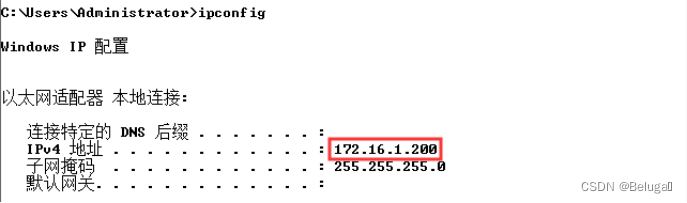
1. Through the infiltration machine Kali Linux2 Target machine Windows 7 Conduct website directory violence enumeration test , By analyzing the scanning results , Find the upload point and use Firefox to access the page containing the upload point , And take the first word in the first line of the page after successful access as Flag Value submission ;
Use the command to call dirb Tool scans the target site


Suspected upload points found url, Access to url

Flag:Upload
2. After the successful access, the upload name is backdoor.php Of php In a word, the Trojan horse goes to the server , Open the console and use the website security dog to detect whether there is a Trojan horse in the local area , If a Trojan horse is detected , The absolute path of the Trojan horse is taken as Flag Value submission , If no Trojan horse is detected, submit false;
Use the command to generate a sentence Trojan and write backdoor.php file

Upload backdoor.php To the server

Open the website safety dog on the target desktop , Select custom path scanning to scan the website


Flag:C:/AppServ/www/Uploadfile/uploads/uploads/backdoor.php
3. Through the infiltration machine Kali Linux2 Target machine Windows 7 Conduct file upload penetration test , Using tools Weevely stay / Directory to generate a Trojan horse , The name of the Trojan horse is backdoor.php, The password for pass, This operation uses the fixed string in the command as Flag Value submission ;
Use the command to generate Trojan file

Flag:weevely generate pass /backdoor.php
4. Upload and use Weevely Tool generated Trojan horse backdoor1.php To server , Open the console and use the website security dog to detect whether there is a Trojan horse in the local area , If a Trojan horse is detected , The absolute path of the Trojan horse is taken as Flag Value submission , If no Trojan horse is detected, submit false;
Use the command to backdoor.php Renamed as backdoor1.php,

And then backdoor1.php Upload to the target server , And scan again with the website safety dog in the target , The scan results are as follows .

Because the first time I uploaded a sentence, the Trojan horse did not clear , So we can still detect the existence of Trojans
Flag:C:/AppServ/www/Uploadfile/uploads/uploads/backdoor.php
5. Through the infiltration machine Kali Linux2 Target machine Windows 7 Conduct file upload penetration test ( Using tools Weevely, Connect the Trojan file on the target server ), After the connection is successful, take the string of the host name of the target server as Flag Value submission ;
Use the command to connect the one sentence Trojan horse

Be careful : You need to set the code to GB18030, Otherwise, Chinese characters cannot be displayed normally
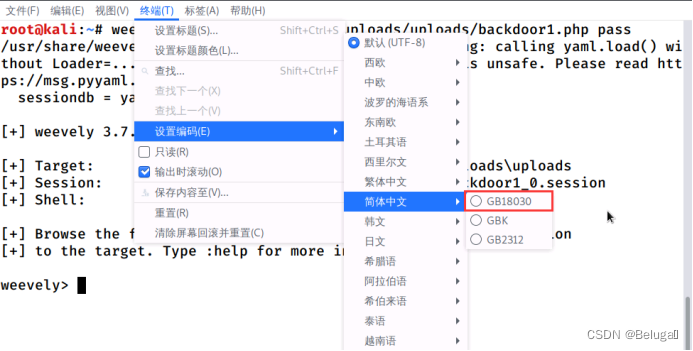
Then type the command systeminfo Check system information

Flag:PC6249546
6. Turn on all the protection of the website security dog , Again using Weevely The tool generates a new Trojan file and uploads it to the target server , Take the second line of the page prompt after uploading as Flag Value submission ;
Use again to generate Trojan files , And upload


The results are as follows :

Flag:Upload failed
7. Turn on all the protection of the website security dog , Again using Weevely The tool generates the Trojan file and uploads it to the target server , It is required to upload successfully , Take the parameters that must be used to generate the Trojan horse as Flag Value submission .
Use locate Command search system gif chart ,

Change the picture noun to test.gif

Test whether the pictures can be uploaded normally ,

There is no prompt after uploading , Try to visit :

Image parsing succeeded , explain gif The image format can be uploaded normally .
Next we switch to Kali Linux To generate Trojans and combine pictures . Because of the new edition Weevely The tool has been removed generate.img command , We need to use kali 1.0 Medium Weevely Tools help us generate Trojans

Need to upload test.gif and .htaccess Two documents

Be careful :“.hataccess” To hide files , You need to right-click to open the display hidden file to display .
After uploading successfully, use the command to connect the Trojan horse , It is found that you can successfully connect

Be careful : You need to set the character encoding to simplified Chinese , Otherwise, Chinese characters cannot be displayed normally
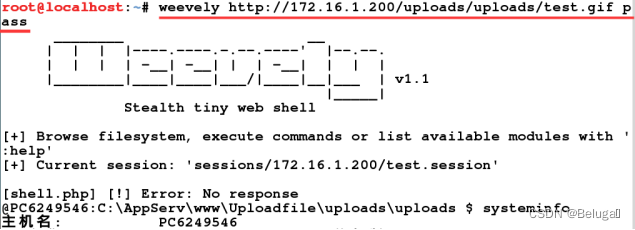
Flag:generate.img
End of experiment , Shut down the virtual machine .
边栏推荐
- vscode配置用户代码片段(包括删除方法)
- 基于ABP实现DDD--实体创建和更新
- binary search
- 基于boost库的搜索引擎
- EAS approval process related table
- Implementation of dynamic columns in EAS BOS doc list
- LeadTools 22 kit LeadTools super set
- Win10 log in with Microsoft account and open all programs by default with administrator privileges: 2020-12-14
- Repair the problem of adding device groups and editing exceptions on easycvr platform
- Experience on how to improve the anti-interference of TTL (UART) communication
猜你喜欢
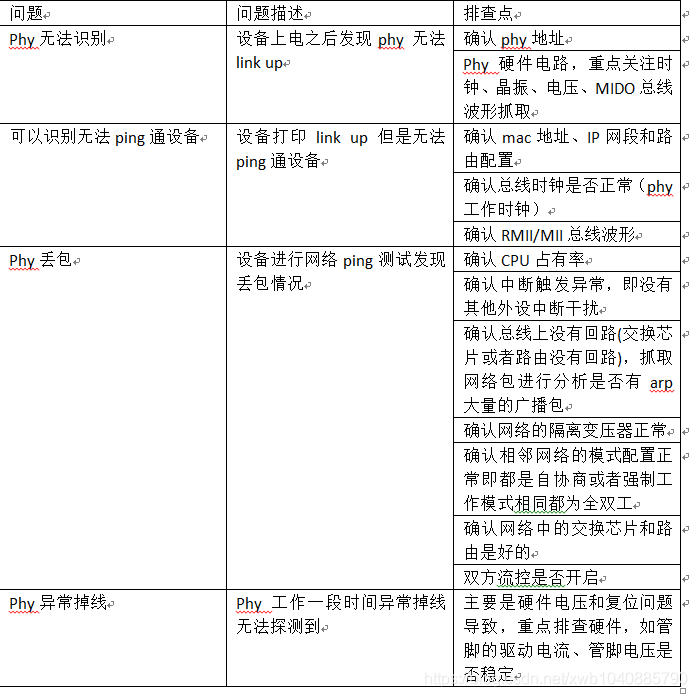
Summary of embedded network problems (packet loss of network card, unrecognized network card)

论文笔记:Swin-Unet: Unet-like Pure Transformer for MedicalImage Segmentation

支持鹏程系列开源大模型应用生态演化的可持续学习能力探索

Digital intelligence integration accelerates enterprise business innovation

群体知识图谱:分布式知识迁移与联邦式图谱推理

网络安全——函数绕过注入

Handler learning

Copy of array and array address value

Win10 log in with Microsoft account and open all programs by default with administrator privileges: 2020-12-14

Thread multithreading
随机推荐
The scroll bar in unity ugui is not displayed from the top when launching the interface in the game
Windivert: capture and modify packages
Mongodb uses mongotemplate operations to add, delete, modify, query, page, sort, aggregate (including embedded data), file upload and download
Kunyu(坤舆) 安装 详解
LeadTools 22 kit LeadTools super set
网络安全——文件上传渗透测试
Simple use and difference of symmetric res, AES and asymmetric RSA (JWT)
Relevant laws of animation movement (judge where to move according to parameters)
LEADTOOLS 22 套件 LEADTOOLS 超级套
Chat room project
Overview of multi view learning methods based on canonical correlation analysis
Chinese character style transfer --- unsupervised typesetting transmission
户外广告牌不能“想挂就挂”!广州城管部门加强户外广告安全管理
How to configure webrtc protocol for low latency playback on easycvr platform v2.5.0 and above?
Group knowledge map: distributed knowledge transfer and federated map reasoning
H5py Quick Start Guide
vscode配置用户代码片段(包括删除方法)
The core capability of accelerating enterprise data application innovation flexibility
[acm/ two points] two points clear entry-level explanation
An example of how to save various data types by using esp32 EEPROM library functions under Arduino framework