当前位置:网站首页>Eth-Trunk 配置实例学习记录
Eth-Trunk 配置实例学习记录
2022-07-23 05:47:00 【业余幻想家】
Eth-Trunk 配置实例
Eth-Trunk 通过将多条以太网物理链路捆绑在一起成为一条逻辑链路,从而实现增加链路带宽的目的。捆绑在一起的链路通过相互间的动态备份,可以有效地提高链路的可靠性。
文章目录
1、实验目标
交换机 SW1 和 SW2 通过聚合端口相连,它们分别由两个物理端口聚合而成,聚合后的端口模式为 Trunk ,承载 VLAN 10 和 VLAN 20 。通过端口聚合的配置实现相同 VLAN 中的 PC 互通,不同的 VLAN 中的 PC 相互隔离。
2、网络拓扑图
注:PC的IP地址、子网掩码及网关,点击PC进入自行配置
3、配置步骤
(1)创建 Eth-Trunk 端口
注:如果本端设备接口加入了 Eth-Trunk ,与该接口直连的对端接口也必须加入 Eth-Trunk ,两端才能正常通信。
SW1:
<Huawei>system-view  //进入系统视图
[Huawei]sysname SW1  //重命名设备
[SW1]interface eth-trunk 1  //创建 ID 为 1 的 Eth-Trunk 接口
[SW1-Eth-Trunk1]trunkport Ethernet 0/0/3 to 0/0/4  //在 Eth-Trunk1 接口中加入 Ethernet 0/0/3 到 0/0/4 两个成员接口
[SW1-Eth-Trunk1]quit
SW2:
<Huawei>system-view  //进入系统视图
[Huawei]sysname SW2  //重命名设备
[SW2]interface eth-trunk 1  //创建 ID 为 1 的 Eth-Trunk 接口
[SW2-Eth-Trunk1]trunkport Ethernet 0/0/3 to 0/0/4  //在 Eth-Trunk1 接口中加入 Ethernet 0/0/3 到 0/0/4 两个成员接口
[SW2-Eth-Trunk1]quit
(2)创建VLAN并将接口加入VLAN
配置 VLAN 请具体参考 vlan配置实例学习记录
SW1:
[SW1]vlan batch 10 20
[SW1]interface Ethernet0/0/1
[SW1-Ethernet0/0/1]port link-type access  //配置本端口为access端口
[SW1-Ethernet0/0/1]port default vlan 10  //把端口添加到vlan 10
[SW1-Ethernet0/0/1]quit
[SW1]interface Ethernet0/0/2
[SW1-Ethernet0/0/2]port link-type access  //配置本端口为access端口
[SW1-Ethernet0/0/2]port default vlan 20  //把端口添加到vlan 20
[SW1-Ethernet0/0/2]quit
SW2:
[SW2]vlan batch 10 20
[SW2]interface Ethernet0/0/1
[SW2-Ethernet0/0/1]port link-type access  //配置本端口为access端口
[SW2-Ethernet0/0/1]port default vlan 10  //把端口添加到vlan 10
[SW2-Ethernet0/0/1]quit
[SW2]interface Ethernet0/0/2
[SW2-Ethernet0/0/2]port link-type access  //配置本端口为access端口
[SW2-Ethernet0/0/2]port default vlan 20  //把端口添加到vlan 20
[SW2-Ethernet0/0/2]quit
(3)配置 Eth-Trunk1 接口允许 VLAN 10 和 VLAN 20 通过
SW1:
[SW1]interface eth-trunk 1
[SW1-Eth-Trunk1]port link-type trunk  //配置本端口为trunk端口
[SW1-Eth-Trunk1]port trunk allow-pass vlan 10 20  //本端口允许vlan 10、vlan 20通过
SW2:
[SW2]interface eth-trunk 1
[SW2-Eth-Trunk1]port link-type trunk  //配置本端口为trunk端口
[SW2-Eth-Trunk1]port trunk allow-pass vlan 10 20  //本端口允许vlan 10、vlan 20通过
(4)配置 Eth-Trunk1 的负载分担方式
SW1:
[SW1-Eth-Trunk1]load-balance src-dst-mac  //配置 Eth-Trunk1 基于源MAC地址与目的MAC地址进行负载分担
[SW1-Eth-Trunk1]quit
SW2:
[SW2-Eth-Trunk1]load-balance src-dst-mac  //配置 Eth-Trunk1 基于源MAC地址与目的MAC地址进行负载分担
[SW2-Eth-Trunk1]quit
4、测试
(1)查看聚合组
SW1:
[SW1]display eth-trunk 1
Eth-Trunk1's state information is:
WorkingMode: NORMAL         Hash arithmetic: According to SA-XOR-DA
Least Active-linknumber: 1  Max Bandwidth-affected-linknumber: 8
Operate status: up          Number Of Up Port In Trunk: 2
--------------------------------------------------------------------------------
PortName                      Status      Weight
Ethernet0/0/3                 Up          1
Ethernet0/0/4                 Up          1
SW2:
[SW2]display eth-trunk 1
Eth-Trunk1's state information is:
WorkingMode: NORMAL         Hash arithmetic: According to SA-XOR-DA
Least Active-linknumber: 1  Max Bandwidth-affected-linknumber: 8
Operate status: up          Number Of Up Port In Trunk: 2
--------------------------------------------------------------------------------
PortName                      Status      Weight
Ethernet0/0/3                 Up          1
Ethernet0/0/4                 Up          1
(2)测试联通性
用 PC1 去 ping PC3 的 IP 地址(同一 VLAN ),发现已经可以通了
用 PC2 去 ping PC4 的 IP 地址(同一 VLAN ),发现已经可以通了
用 PC1 去 ping PC2 或 PC4 的 IP 地址(不同 VLAN ),发现不可以通,因为它们之间相互隔离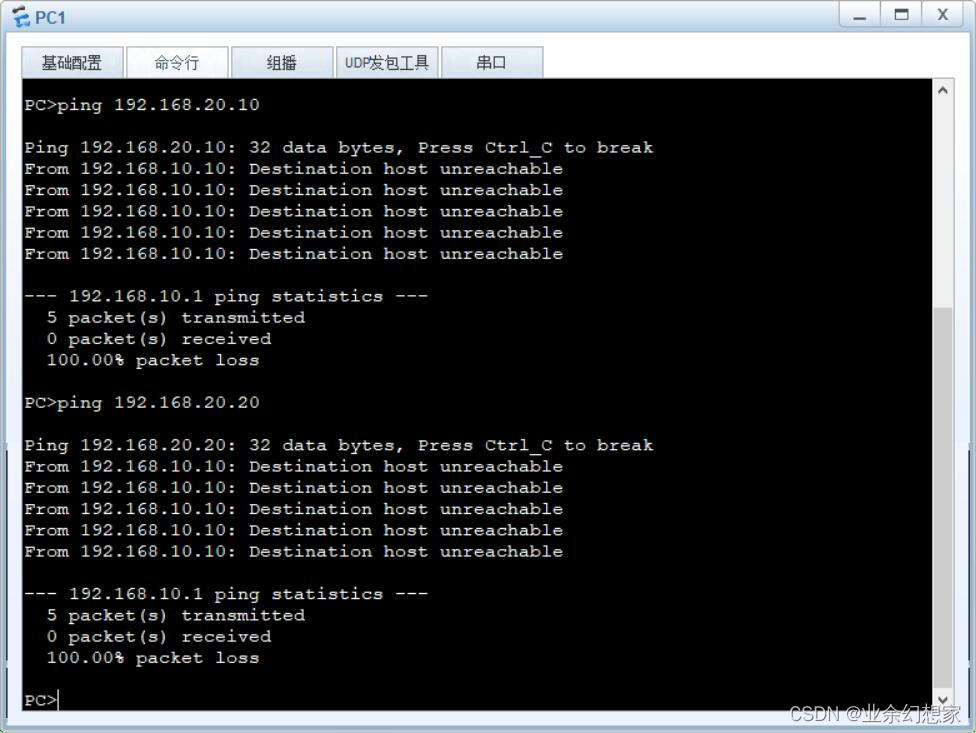
用 PC1 去 ping PC2 或 PC4 的 IP 地址(不同 VLAN ),发现不可以通,因为它们之间相互隔离
5、小结
Eth-Trunk主要有以下优势:
- 增加带宽:链路聚合接口的最大带宽可以达到各成员接口带宽之和。
- 提高可靠性:当某条活动链路出现故障时,流量可以切换到其他可用的成员链路上,从而提高链路聚合接口的可靠性。
- 负载分担:在一个链路聚合组内,可以实现在各成员活动链路上的负载分担。
- 应用简单:Eth-trunk的作用域仅在相邻设备之间,和整个网络结构无关,应用更简单。
边栏推荐
- 如何解决if语句太多
- 路由与接口技术——直连网络总结
- 详解TCP的交互数据流和成块数据流
- Openssl自行签证流程概述
- 0 dynamic planning leetcode1024. Video splicing
- Hcip-hcia knowledge review (II)
- Learning diary - (routing and switching technology) dynamic routing (RIP protocol) and static routing
- HCIP---BGP相关配置
- Overview of OpenSSL self visa process
- Hcip--- BGP related configuration
猜你喜欢

Analysis of inheritablethreadlocal and Alibaba's transmittablethreadlocal design ideas
Nas里搭建Frpc客户端【超级无脑】

OSPF的链路扩展配置

DHCP principle and configuration

Unity3d+moba+ skill indicator (II)

Learning diary - (routing and switching technology) dynamic routing (RIP protocol) and static routing

Hcip-hcia knowledge review (II)

DNS域名解析服务
OSPF和RIP的路由扩展配置
学习日记——(路由与交换技术)单臂路由
随机推荐
C custom set
C #: quick sort. If there is the same number, it will be ignored, and then continue the previous search direction to find the next number that meets the requirements for replacement
剖析Redis集群
C language can also write Plants vs. Zombies
How many seats do you need for 1000 people to eat in 2 hours?
Explanation of websocket protocol
Analysis of Internet Protocol (II)
学习日记——(路由与交换技术)DHCP(动态主机配置协议)
helm安装rancher
简洁描述raft与paxos在设计上的共同点和不同点
详解TCP的交互数据流和成块数据流
Hcip --- BGP --- border gateway protocol
Unity used trilib plug-in under URP pipeline to load model material incorrectly
Sql Server性能分析,查看慢查询
C # custom bidirectional linked list
超好用的抓包工具tcpdump
Integer times integer overflow
Unity3d+moba+ skill indicator (I)
Article on the basic technology needed to build hybrid app
Homework of the fifth week