当前位置:网站首页>学习日记——(路由与交换技术)单臂路由
学习日记——(路由与交换技术)单臂路由
2022-07-23 05:46:00 【賺钱娶甜甜】
一、相关知识
- 单臂路由的原理:将路由器的一个物理接口当成多个逻辑接口来使用时,需要启用该接口上的子接口,通过一个个逻辑子接口实现物理端口以一当多的功能。
- 优点:1、节省开支;2、配置简单;维护方便
- 缺点:1、路由器CPU与内存的资源消耗大;2、网络数据包的传输效率受影响,特别是大流量;3、对于连接线路要求比较高;4、VLAN间安全性降低。
- 常见问题:1、不要对物理接口进行任何配置,只需对其子接口进行划分和设置;2、不要忘记将物理接口开启,用no shutdown,这样所有子接口会同时开启;3、如果有防病毒ACL等列表的话不要忘记在最后添加到物理以太口上;4、由于数据实际上通过物理接口传输,所以对路由器设备要求较高;5、在设置TRUNK类型时要根据实际情况选择是ISL(思科的协议)还是802.1q协议。
二、简单例子
1、拓扑结构
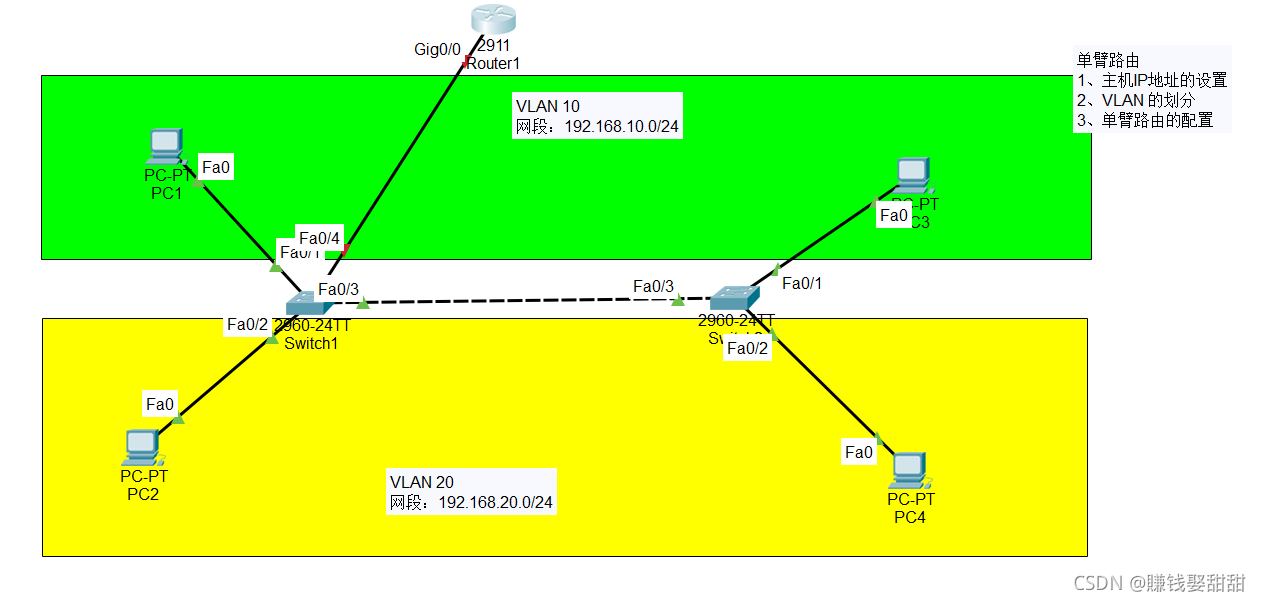 2、相关代码
S1:
Switch>en
Switch#conf t
Enter configuration commands, one per line. End with CNTL/Z.
Switch(config)#host S1
VLAN 的划分
S1(config)#vlan 10
S1(config-vlan)#e
S1(config-vlan)#exit
S1(config)#vlan 20
S1(config-vlan)#e
S1(config-vlan)#exit
将接口划分到相应的VLAN
S1(config)#int f
S1(config)#int fastEthernet 0/1
S1(config-if)#sw
S1(config-if)#switchport mo
S1(config-if)#switchport mode acc
S1(config-if)#switchport mode access
S1(config-if)#sw
S1(config-if)#switchport ac
S1(config-if)#switchport access vlan 10
S1(config-if)#e
S1(config-if)#exit
S1(config)#int fastEthernet 0/2
S1(config-if)#switchport mode access
S1(config-if)#switchport access vlan 10
S1(config-if)#e
S1(config-if)#exit
配置trunk模式
S1(config)#int fastEthernet 0/3
S1(config-if)#switchport mode t
S1(config-if)#switchport mode trunk
S1(config-if)#
%LINEPROTO-5-UPDOWN: Line protocol on Interface FastEthernet0/3, changed state to down
%LINEPROTO-5-UPDOWN: Line protocol on Interface FastEthernet0/3, changed state to up
S1(config-if)#
%LINK-5-CHANGED: Interface FastEthernet0/4, changed state to up
%LINEPROTO-5-UPDOWN: Line protocol on Interface FastEthernet0/4, changed state to up
S1(config-if)#exit
S1(config)#
%LINK-5-CHANGED: Interface FastEthernet0/4, changed state to up
%LINEPROTO-5-UPDOWN: Line protocol on Interface FastEthernet0/4, changed state to up
跟路由器相连的链路也要配置trunk 模式
S1(config)#interface fastEthernet 0/4
S1(config-if)#sw
S1(config-if)#switchport mod
S1(config-if)#switchport mode tru
S1(config-if)#switchport mode trunk
S1(config-if)#
%LINEPROTO-5-UPDOWN: Line protocol on Interface FastEthernet0/4, changed state to down
%LINEPROTO-5-UPDOWN: Line protocol on Interface FastEthernet0/4, changed state to up
S1(config-if)#e
S1(config-if)#exit
S2:
Switch>en
Switch#conf t
Enter configuration commands, one per line. End with CNTL/Z.
Switch(config)#host S2
VLAN 的划分
S2(config)#vlan 10
S2(config-vlan)#e
S2(config-vlan)#exit
S2(config)#vlan 20
S2(config-vlan)#e
S2(config-vlan)#exit
将接口划分到相应的VLAN
S2(config)#int f
S2(config)#int fastEthernet 0/1
S2(config-if)#sw
S2(config-if)#switchport mod
S2(config-if)#switchport mode ac
S2(config-if)#switchport mode access
S2(config-if)#sw
S2(config-if)#switchport ac
S2(config-if)#switchport access vlan 10
S2(config-if)#e
S2(config-if)#exit
S2(config)#int fastEthernet 0/2
S2(config-if)#switchport mode access
S2(config-if)#switchport access vlan 20
S2(config-if)#e
S2(config-if)#exit
交换机1 F0/3口配置了trunk模式,交换机2与它同一条链路上的接口也自动设置成trunk模式
S2(config)#%SPANTREE-2-RECV_PVID_ERR: Received 802.1Q BPDU on non trunk FastEthernet0/3 VLAN1.
%SPANTREE-2-BLOCK_PVID_LOCAL: Blocking FastEthernet0/3 on VLAN0001. Inconsistent port type.
S2(config)#
%LINEPROTO-5-UPDOWN: Line protocol on Interface FastEthernet0/3, changed state to down
%LINEPROTO-5-UPDOWN: Line protocol on Interface FastEthernet0/3, changed state to up
R1:
Router>en
Router#conf t
Enter configuration commands, one per line. End with CNTL/Z.
Router(config)#host R1
R1(config)#int
R1(config)#interface g
开启物理接口
R1(config)#interface gigabitEthernet 0/0
R1(config-if)#no sh
R1(config-if)#no shutdown
设置物理接口下的逻辑接口
R1(config-if)#
%LINK-5-CHANGED: Interface GigabitEthernet0/0, changed state to up
%LINEPROTO-5-UPDOWN: Line protocol on Interface GigabitEthernet0/0, changed state to up
R1(config-if)#e
R1(config-if)#exit
R1(config)#interface gigabitEthernet 0/0.10
R1(config-subif)#
(提示信息)%LINK-5-CHANGED: Interface GigabitEthernet0/0.10, changed state to up
%LINEPROTO-5-UPDOWN: Line protocol on Interface GigabitEthernet0/0.10, changed state to up
R1(config-subif)#en
R1(config-subif)#encapsulation ?
dot1Q IEEE 802.1Q Virtual LAN
R1(config-subif)#encapsulation d
R1(config-subif)#encapsulation dot1Q 10
R1(config-subif)#ip address 192.168.10.254 255.255.255.0
R1(config-subif)#ex
R1(config-subif)#exit
R1(config)#interface gigabitEthernet 0/0.20
R1(config-subif)#
%LINK-5-CHANGED: Interface GigabitEthernet0/0.20, changed state to up
%LINEPROTO-5-UPDOWN: Line protocol on Interface GigabitEthernet0/0.20, changed state to up
R1(config-subif)#en
R1(config-subif)#encapsulation d
R1(config-subif)#encapsulation dot1Q 20
R1(config-subif)#ip add
R1(config-subif)#ip address 192.168.20.254 255.255.255.0
R1(config-subif)#ex
R1(config-subif)#exit
R1(config)#do show ip route (配置后的路由表)
Codes: L - local, C - connected, S - static, R - RIP, M - mobile, B - BGP
D - EIGRP, EX - EIGRP external, O - OSPF, IA - OSPF inter area
N1 - OSPF NSSA external type 1, N2 - OSPF NSSA external type 2
E1 - OSPF external type 1, E2 - OSPF external type 2, E - EGP
i - IS-IS, L1 - IS-IS level-1, L2 - IS-IS level-2, ia - IS-IS inter area
* - candidate default, U - per-user static route, o - ODR
P - periodic downloaded static route
Gateway of last resort is not set
192.168.10.0/24 is variably subnetted, 2 subnets, 2 masks
C 192.168.10.0/24 is directly connected, GigabitEthernet0/0.10
L 192.168.10.254/32 is directly connected, GigabitEthernet0/0.10
192.168.20.0/24 is variably subnetted, 2 subnets, 2 masks
C 192.168.20.0/24 is directly connected, GigabitEthernet0/0.20
L 192.168.20.254/32 is directly connected, GigabitEthernet0/0.20
R1(config)#
结果:各个网段之间能互相ping 通
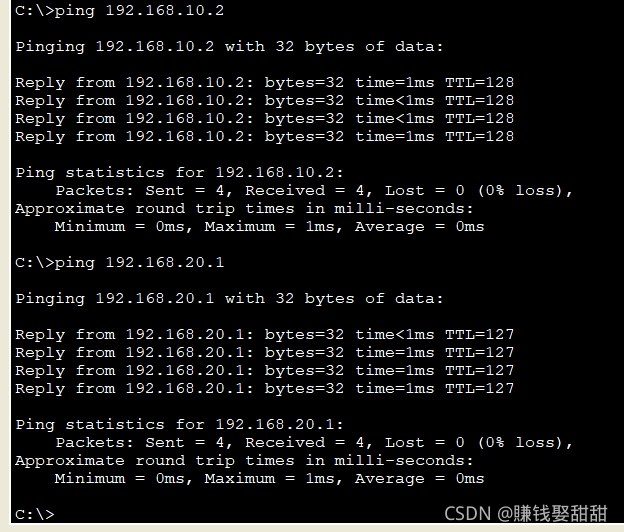
这篇文章就写到这里啦,有哪些不好的欢迎指出!
边栏推荐
- htpasswd作用
- Openssl自行签证流程概述
- The correspondence between the concept of go ability and the concept of software development ability
- 以go语言为例类比侦探推理来讲解【性能分析】
- 0双指针 LeetCode844. 比较含退格的字符串
- 并发编程1-2
- Implementation of binary tree -c
- GameFramework:资源热更代码分析,检查版本信息,下载版本文件,校验版本文件,得到更新文件数量,下载文件,TaskPool
- [memory understand the difference and function between ram flash and EEPROM memory]
- 0数组 LeetCode605. 种花问题
猜你喜欢

unity3d:向量计算,AOE图形相交

基于UDP的群聊聊天室
Unity3d:ugui, UI and special effect particle level, bakemesh above 2018.2, particles between two images and in Scrollview
Implementation of heap and heap sorting
![[fee of AUTOSAR (difference between nonvolatile memory flash and EEPROM)]](/img/cc/34bfcc450d82befab24173b0cb132d.png)
[fee of AUTOSAR (difference between nonvolatile memory flash and EEPROM)]
OSPF和RIP的路由扩展配置

GameFramework:打包资源,打随app发布包,打包生成文件夹说明,上传资源至服务器,下载资源,GameFreamworkList.dat 与GameFrameworkVersion.dat

C (CSharp) wechat official account development - basic configuration

@Requiredargsconstructor annotation use

unity3d:UGUI源码EventSystem输入系统常见问题
随机推荐
GameFramework:打包资源,打随app发布包,打包生成文件夹说明,上传资源至服务器,下载资源,GameFreamworkList.dat 与GameFrameworkVersion.dat
HCIP---OSPF细节讲解
Unity3D+moba+技能指示器(二)
Analysis of Internet Protocol (I)
C: stack stack source code, array stack, chain stack
linkerd服务网格调研笔记
剑指offer 05 两个栈实现队列
0动态规划 LeetCode1024. 视频拼接
Unity3d:UGUI源碼,Rebuild優化
HCIP---MGRE综合实验
浅析UDP协议和TCP协议
LVS负载均衡调度原理及配置方法
以go语言为例类比侦探推理来讲解【性能分析】
C#(CSharp) 微信公众号开发一 基本配置
WebSocket 协议讲解
详解TCP连接的建立
URL查询参数编码问题(golang)
第一类错误离我们有多远
HCIP-HCIA知识回顾(二)
《Kubernetes in Action》第二章笔记