当前位置:网站首页>cartographer_pose_graph_2d
cartographer_pose_graph_2d
2022-06-26 05:09:00 【古路】
cartographer_pose_graph_2d
0.引言
本文主要学习了pose_Graph中的部分逻辑,特别是后端优化中的两种约束计算。
不规范类图:

部分数据结构:


节点与约束的概念
- 节点: A.tracking_frame的位姿 ; B.子图原点的位姿
- 约束: tracking_frame与子图原点间的坐标变换

1.PoseGraph2D::AddNode

1.1.GetLocalToGlobalTransform
GetLocalToGlobalTransform(trajectory_id) * constant_data->local_pose
- T g l ∗ T l n = T g n T_{gl} * T_{ln} = T_{gn} Tgl∗Tln=Tgn :将节点在local坐标系下的位姿转成global坐标系下的位姿
- T g l T_{gl} Tgl :
GetLocalToGlobalTransform(trajectory_id) - T l n T_{ln} Tln:node在local map frame坐标系下的位姿

这一步主要就是将 节点 添加到 PoseGraph2D 的 PoseGraphData 中。
  // 向节点列表中添加一个新的节点
  const NodeId node_id = data_.trajectory_nodes.Append(
      trajectory_id, TrajectoryNode{
    constant_data, optimized_pose});
这里添加的节点位姿,实际上从前端结果可以看出,这里也有另一层含义,即包含了submap的位姿:

1.2.AppendNode
前端只维护两个submap,其他的都传到后端这边进行保存:

  // Test if the 'insertion_submap.back()' is one we never saw before.
  // 如果是刚开始的轨迹, 或者insertion_submaps.back()是第一次看到, 就添加新的子图
  if (data_.submap_data.SizeOfTrajectoryOrZero(trajectory_id) == 0 ||
      std::prev(data_.submap_data.EndOfTrajectory(trajectory_id))
              ->data.submap != insertion_submaps.back()) {

    // We grow 'data_.submap_data' as needed. This code assumes that the first
    // time we see a new submap is as 'insertion_submaps.back()'.

    // 如果insertion_submaps.back()是第一次看到, 也就是新生成的
    // 在data_.submap_data中加入一个空的InternalSubmapData
    const SubmapId submap_id =
        data_.submap_data.Append(trajectory_id, InternalSubmapData());

    // 保存后边的地图, 将后边的地图的指针赋值过去
    // 地图是刚生成的, 但是地图会在前端部分通过插入点云数据进行更新, 这里只保存指针
    // tag: 画图说明一下
    data_.submap_data.at(submap_id).submap = insertion_submaps.back();
    LOG(INFO) << "Inserted submap " << submap_id << ".";
    kActiveSubmapsMetric->Increment();
  }
地图这种数据量大的都是传的指针,只开辟一次内存,cartographer的内存管理做得十分的好。
submap只有前端会更改,后端不会,那这样的话,前端没优化的位姿的地图是不准确的,地图是在哪儿进行优化的?
1.3.AddWorkItem
在 添加子图修剪器 AddTrimmer AddImuData AddOdometryData AddFixedFramePoseData AddLandmarkData等外部接口函数(Global中进行调用)中都调用了这个函数。
AddWorkItem() 实参中这个 lambda表达式实际上没有立即执行,而是加入到任务调度里面。
- work_queue_ 任务调度
- thread_pool_ 线程池
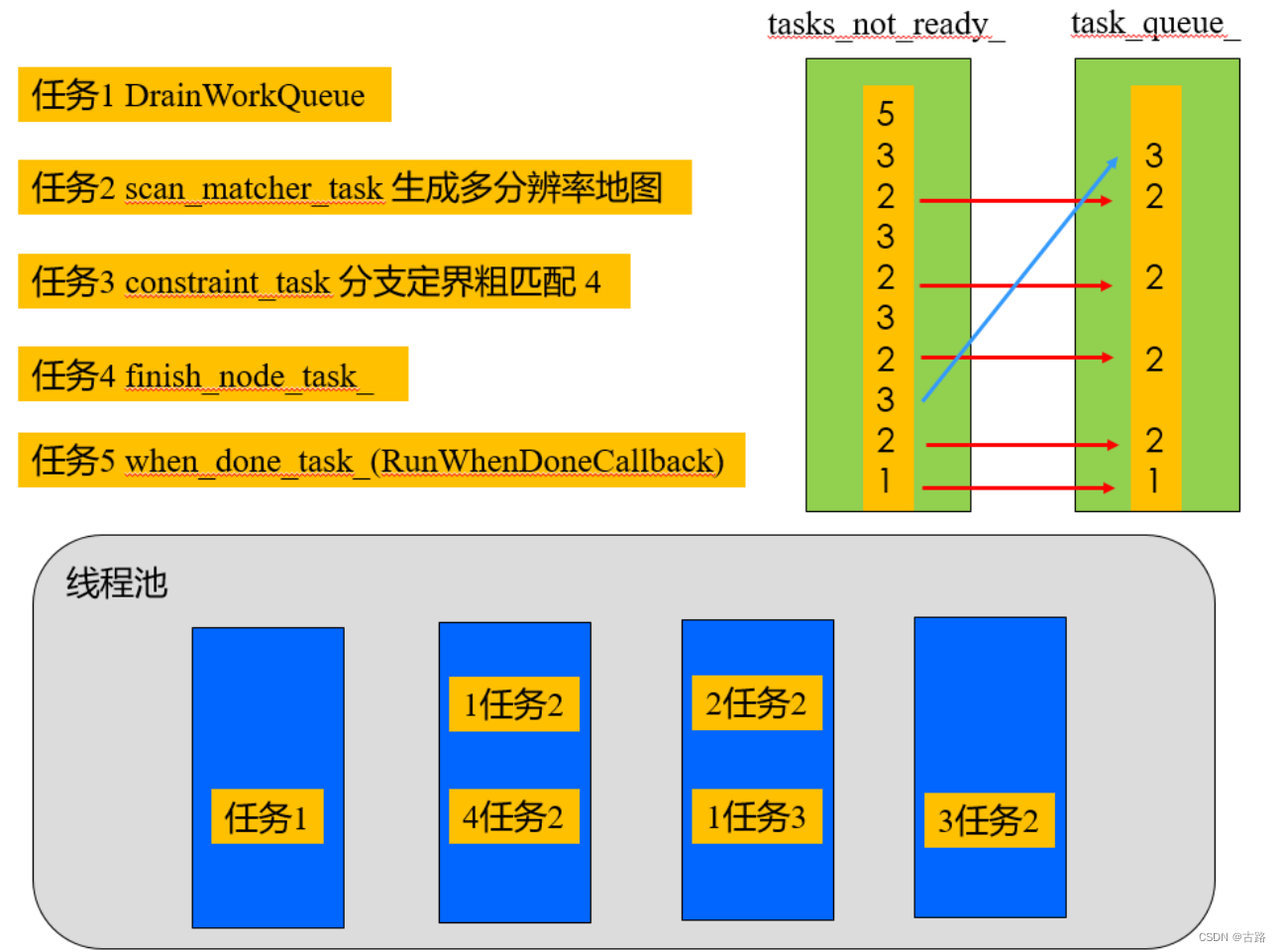
TODO: 待学习。
在 PoseGraph2D::AddNode 加入线程池过后,就在DrainWorkQueue in 线程池中循环执行。
2.ComputeConstraintsForNode子图内约束计算

- 1.获取 node 的 constant_data:

- 2.获取 trajectory_id 下的正处于活跃状态下的子图的SubmapId :
InitializeGlobalSubmapPoses
A).data_.global_submap_poses_2d: 全都是优化后的子图在global坐标系下的pose
B).optimization_problem_->submap_data(): 包含了优化后和还没有进行优化的 子图在global坐标系下的pose
C).ComputeLocalToGlobalTransform()这个函数的参数, 始终都是data_.global_submap_poses_2d, 计算的是优化后的global指向local的坐标变换.
约束:
  // 包含了子图的id, 节点的id, 节点j相对于子图i的坐标变换, 以及节点是在子图内还是子图外的标志
  struct Constraint {

    struct Pose {

      transform::Rigid3d zbar_ij;
      double translation_weight;
      double rotation_weight;
    };

    SubmapId submap_id;  // 'i' in the paper.
    NodeId node_id;      // 'j' in the paper.

    // Pose of the node 'j' relative to submap 'i'.
    Pose pose;

    // Differentiates between intra-submap (where node 'j' was inserted into
    // submap 'i') and inter-submap constraints (where node 'j' was not inserted
    // into submap 'i').
    enum Tag {
     INTRA_SUBMAP, INTER_SUBMAP } tag;
  };

cartographer后端约束类型:

3.ComputeConstraints子图间约束计算(回环检测)
两种子图间的约束调用的是同一个函数,都是 node <--> submap. 其中 for 循环中的一步:
节点与子图的一部分进行匹配 ConstraintBuilder2D::MaybeAddConstraint (建图时只会执行这块, 通过局部搜索进行回环检测)
节点与全子图进行匹配 ConstraintBuilder2D::MaybeAddGlobalConstraint ( 定位时才有可能执行这块)
主要逻辑流转到了(一个node与一个submap进行匹配):
/** * @brief 计算节点和子图之间的一个约束(回环检测) * 用基于分支定界算法的匹配器进行粗匹配,然后用ceres进行精匹配 * * @param[in] submap_id submap的id * @param[in] submap 地图数据 * @param[in] node_id 节点id * @param[in] match_full_submap 是局部匹配还是全子图匹配 * @param[in] constant_data 节点数据 * @param[in] initial_relative_pose 约束的初值 * @param[in] submap_scan_matcher 匹配器 * @param[out] constraint 计算出的约束 */
void ConstraintBuilder2D::ComputeConstraint(
    const SubmapId& submap_id, const Submap2D* const submap,
    const NodeId& node_id, bool match_full_submap,
    const TrajectoryNode::Data* const constant_data,
    const transform::Rigid2d& initial_relative_pose,
    const SubmapScanMatcher& submap_scan_matcher,
    std::unique_ptr<ConstraintBuilder2D::Constraint>* constraint) {
- Step:1 得到节点在local frame下的坐标
- Step:2 使用基于分支定界算法的匹配器进行粗匹配(论文创新点,单独起文学习),如果得分过低,不再执行精匹配,直接返回
- Step:3 使用ceres进行精匹配, 就是前端扫描匹配使用的函数
- Step:4 获取节点到submap坐标系原点间的坐标变换
- Step:5 返回计算后的约束
回环检测这里包含两种模式:
- // param: global_localization_min_score 对整体子图进行回环检测时的最低分数阈值 0.6 (纯定位)
- // param: min_score 对局部子图进行回环检测时的最低分数阈值 0.55
边栏推荐
- Some parameter settings and feature graph visualization of yolov5-6.0
- Anaconda creates tensorflow environment
- [quartz] read configuration from database to realize dynamic timing task
- Multipass Chinese document - remote use of multipass
- FastAdmin Apache下设置伪静态
- Classic theory: detailed explanation of three handshakes and four waves of TCP protocol
- ModuleNotFoundError: No module named ‘numpy‘
- What is UWB in ultra-high precision positioning system
- Implementation of IM message delivery guarantee mechanism (II): ensure reliable delivery of offline messages
- Briefly describe the pitfalls of mobile IM development: architecture design, communication protocol and client
猜你喜欢
Technical past: tcp/ip protocol that has changed the world (precious pictures, caution for mobile phones)

FastAdmin Apache下设置伪静态

Final review of brain and cognitive science
The beautiful scenery is natural, and the wonderful pen is obtained by chance -- how is the "wonderful pen" refined?
Créateur de génie: cavalier solitaire, magnat de la technologie et ai | dix ans d'apprentissage profond
zencart新建的URL怎么重写伪静态
【红队】要想加入红队,需要做好哪些准备?

5. < tag stack and general problems > supplement: lt.946 Verify the stack sequence (the same as the push in and pop-up sequence of offer 31. stack)

Mise en œuvre du routage dynamique par zuul

【Unity3D】人机交互Input

随机推荐
[leetcode] 713: subarray with product less than k
Modify the case of the string title(), upper(), lower()
tensorlow:cifar100_ train
apktool 工具使用文档
Wechat applet exits the applet (navigator and api--wx.exitminiprogram)
UWB ultra high precision positioning system architecture
Illustration of ONEFLOW's learning rate adjustment strategy
Zhongshanshan: engineers after being blasted will take off | ONEFLOW u
[ide (imagebed)]picgo+typora+aliyunoss deployment blog Gallery (2022.6)
C# 39. string类型和byte[]类型相互转换(实测)
Using Matplotlib to add an external image at the canvas level
Dbeaver installation and configuration of offline driver
广和通联合安提国际为基于英伟达 Jetson Xavier NX的AI边缘计算平台带来5G R16强大性能
Multipass Chinese document - remote use of multipass
FastAdmin Apache下设置伪静态
Create a binary response variable using the cut sub box operation
【Latex】错误类型总结(持更)
Anaconda creates tensorflow environment
zencart新建的URL怎么重写伪静态
【Unity3D】刚体组件Rigidbody