当前位置:网站首页>【Unity3D】人机交互Input
【Unity3D】人机交互Input
2022-06-26 04:58:00 【little_fat_sheep】
1 前言
Input 是 Unity3D 中用于人机交互的工具类,用户可以调用其 GetKey、GetMousePosition、GetMouseButton、GetAxis、GetButton 等方法获取键盘和鼠标的状态信息,再通过这些状态信息控制游戏对象,从而实现人机交互。
1)键盘输入
// 按住按键
public static bool GetKey(KeyCode key)
// 按下按键
public static bool GetKeyDown(KeyCode key)
// 抬起按键
public static bool GetKeyUp(KeyCode key)
KeyCode 的取值有:
A~Z
F1~F15
// 键盘顶部的数字
Alpha0~Alpha9
Left、RightArrow、UpArrow、DownArrow
LeftCtrl、LeftShift、LeftAlt、LeftWindows、RightCtrl、RightShift、RightAlt、RightWindows
Tab、Space、Backspace、Return
// 加号、减号、星号、斜杠、反斜杠、左括号、右括号、小于号、大于号、等于号、上尖号
Plus、Minus、Asterisk、Slash、Backslash、LeftBracket、RightBracket、Less、Greater、Equals、Caret
// 逗号、点号、问号、分号、冒号、单引号、反引号、双引号、感叹号
Comma、Period、Question、Semicolon、Colon、Quote、BackQuote、DoubleQuote、Exclaim
// @符号、$符号、&符号、下划线
At、Dollar、Ampersand、Underscore
Insert、Delete、Home、End、PageUp、PageDown、Print
CapsLock、Numlock、ScrollLock
Keypad0~Keypad9、KeypadPeriod
KeypadPlus、KeypadMinus、KeypadMultiply、KeypadDivide
KeypadEquals、KeypadEnter
// 鼠标左键、鼠标右键、鼠标中间
Mouse0、Mouse1、Mouse2
2)鼠标输入
// 按住鼠标
public static bool GetMouseButton(int button)
// 按下鼠标
public static bool GetMouseButtonDown(int button)
// 抬起鼠标
public static bool GetMouseButtonUp(int button)
// 鼠标坐标
Vector3 position = Input.mousePosition
说明:button 取值为 0、1、2,分别表示鼠标左键、右键、中键。
3)虚拟轴输入
在【Edit→Project Settings→Input】中可以打开 InputManager 配置界面,用户可以在此配置虚拟轴信息。


// 按左右箭头或A、D键,hor在-1~1之间变化
float hor = Input.GetAxis("Horizontal");
// 按上下箭头或W、S键,hor在-1~1之间变化
float ver = Input.GetAxis("Vertical");
// 获取鼠标在水平方向上的移动
float mouseX = Input.GetAxis("Mouse X");
// 获取鼠标在竖直方向上的移动
float mouseY = Input.GetAxis("Mouse Y");
4)虚拟按键输入
InputManager 配置界面配置虚拟按键,如下:

// 按住虚拟按键
public static bool GetButton(string buttonName)
// 按下虚拟按键
public static bool GetButtonDown(string buttonName)
// 抬起虚拟按键
public static bool GetButtonUp(string buttonName)
// 按以上配置,按住Q键或鼠标左键返回true,表示开火了
bool fire = Input.GetButton("Fire");
2 应用
本节将实现坦克对战游戏。
1)实现需求
- 绘制2个坦克,一个表示己方,一个表示敌方;
- 用户可以通过上下箭头按键控制己方坦克前后移动,通过左右箭头按键控制己方坦克左右移动或左右转向;
- 用户可以通过鼠标左键发射炮弹;
- 敌方坦克可以自动转向瞄准己方坦克,但是有延时,转向先快后慢,延时插值系数为 0.6;
- 敌方坦克瞄准己方坦克后(允许有5°误差),自动开炮,开炮间隔需要大于1秒。
2)创建游戏对象
游戏对象的 Transform 组件参数如下:
| name | type | position | Rotation | scale | Color/Texture |
| MyTank | Empty | (0, 0.25, -5) | (0, 0, 0) | (1, 1, 1) | —— |
| Button | Cube | (0, 0, 0) | (0, 0, 0) | (2, 0.5, 2) | #228439FF |
| Top | Cube | (0, 0.5, 0) | (0, 0, 0) | (1, 0.5, 1) | #228439FF |
| Gun | Cylinder | (0, 0, 1.5) | (90, 0, 0) | (0.2, 1, 0.4) | #228439FF |
| FirePoint | Empty | (0, 1.15, 0) | (0, 0, 0) | (1, 1, 1) | —— |
| MyBullet | Sphere | (0, 0, -2) | (0, 0, 0) | (0.2, 0.2, 0.2) | #82EA4FFF |
| Plane | Plane | (0, 0, 0) | (0, 0, 0) | (10, 10, 10) | GrassRockyAlbedo |
| EnemyTank | Empty | (0, 0.25, 5) | (0, 180, 0) | (1, 1, 1) | 15D3F9FF |
| EnemyBullet | Sphere | (0, 0, 2) | (0, 0, 0) | (0.2, 0.2, 0.2) | #4C55F8FF |
说明: EnemyTank 由 MyTank复制而来,只是修改了它自己及其子对象的颜色属性;EnemyBullet 由 MyBullet 复制而来,然后修改了颜色属性;将 MyBullet 和 EnemyBullet 拖拽至 Assets 窗口的 Resources/Prefabs 目录下,生成预设体(prefab),再删除 Hierarchy 窗口下 MyBullet 和 EnemyBullet 对象。
游戏对象的层级结构如下:
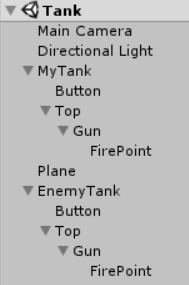
游戏界面如下:

3)脚本组件
MyTank.cs
using UnityEngine;

public class MyTank : MonoBehaviour {
	private Transform firePoint; // 开火点
	private GameObject bulletPrefab; // 炮弹预设体

	void Start() {
		firePoint = transform.Find("Top/Gun/FirePoint");
		bulletPrefab = (GameObject) Resources.Load("Prefabs/MyBullet");
		Debug.Log(bulletPrefab);
	}

	void Update () {
		float hor = Input.GetAxis("Horizontal");
        float ver = Input.GetAxis("Vertical");
		move(hor, ver);
		if (Input.GetMouseButtonDown(0)) { // 开炮
			GameObject bullet = Instantiate(bulletPrefab, firePoint.position, Quaternion.identity); // 通过预设体创建炮弹
			bullet.GetComponent<Bullet>().setMoveDir(transform.forward); // 设置炮弹飞出方向
		}
	}

	private void move(float hor, float ver) {
		// 移动方案一:上下箭头控制前后移动,左右箭头控制左右移动
		// transform.Translate(hor * Time.deltaTime * 3, 0, ver * Time.deltaTime * 3);

		// 移动方案二:上下箭头控制前后移动,左右箭头控制左右拐弯
		transform.Translate(0, 0, ver * Time.deltaTime * 3);
		transform.Rotate(Vector3.up * hor * Time.deltaTime * 120f);
	}
}
说明:MyTank.cs 脚本组件挂载在 MyTank 游戏对象上。
EnemyTank.cs
using UnityEngine;

public class EnemyTank : MonoBehaviour {
	private Transform target; // 目标
	private Transform top; // 炮头
	private Transform firePoint; // 开火点
	private GameObject bulletPrefab; // 炮弹预设体
	private float fireInternal = 0; // 开炮间隔

	void Start () {
		target = GameObject.Find("MyTank/Top").transform;
		top = transform.Find("Top");
		firePoint = transform.Find("Top/Gun/FirePoint");
		bulletPrefab = (GameObject) Resources.Load("Prefabs/EnemyBullet");
	}

	void Update () {
		Quaternion dir = Quaternion.LookRotation(target.position - top.position);
		top.rotation = Quaternion.Lerp(top.rotation, dir, Time.deltaTime * 0.6f); // 敌军转向己方
		float angle = Vector3.Angle(target.position - top.position, top.forward);
		if (angle < 5 && fireInternal > 1) {
			GameObject bullet = Instantiate(bulletPrefab, firePoint.position, Quaternion.identity); // 通过预设体创建炮弹
			bullet.GetComponent<Bullet>().setMoveDir(top.forward); // 设置炮弹飞出方向
			fireInternal = 0;
		}
		fireInternal += Time.deltaTime;
	}
}
说明:EnemyTank.cs 脚本组件挂载在 EnemyTank 游戏对象上。
Bullet.cs
using UnityEngine;

public class Bullet : MonoBehaviour {
	private Vector3 moveDir; // 炮弹飞出方向

	void Start () {
		Destroy(gameObject, 2); // 2秒后自动销毁
	}

	void Update () {
		if (moveDir != null) {
			transform.Translate(moveDir * Time.deltaTime * 6);
		}
	}

	public void setMoveDir(Vector3 dir) {
		moveDir = dir;
	}
}
说明:Bullet.cs 脚本组件挂载在 MyBullet 和 EnemyBullet 预设体上。
4)运行效果
左右箭头按键控制己方坦克左右移动
左右箭头按键控制己方坦克左右转向

边栏推荐
- 2022 talent strategic transformation under the development trend of digital economy
- ROS 笔记(07)— 客户端 Client 和服务端 Server 的实现
- Multipass Chinese document - remote use of multipass
- 2.< tag-动态规划和常规问题>lt.343. 整数拆分
- 1.20 learning summary
- 一个从坟墓里爬出的公司
- 排序查询
- 微信小程序保存图片的方法
- [quartz] read configuration from database to realize dynamic timing task
- ThreadPoolExecutor implements file uploading and batch inserting data
猜你喜欢

为什么许多shopify独立站卖家都在用聊天机器人?一分钟读懂行业秘密!

Statsmodels Library -- linear regression model

UWB超高精度定位系统架构图

Multipass Chinese document - setup driver

Record a circular reference problem

Zhongshanshan: engineers after being blasted will take off | ONEFLOW u

2. < tag dynamic programming and conventional problems > lt.343 integer partition

Install Damon database

1.18 learning summary

DBeaver 安装及配置离线驱动
随机推荐
pycharm 导包错误没有警告
A company crawling out of its grave
NVM installation and use and NPM package installation failure record
【quartz】从数据库中读取配置实现动态定时任务
2022.2.16
Using requests library and re library to crawl web pages
Condition query
Rdkit chemical formula molecular formula search
条件查询
Computer Vision Tools Chain
6.1 - 6.2 公钥密码学简介
Introduction to classification data cotegory and properties and methods of common APIs
Resample
Nabicat连接:本地Mysql&&云服务Mysql以及报错
[latex] error type summary (hold the change)
Why do many Shopify independent station sellers use chat robots? Read industry secrets in one minute!
文件上传与安全狗
ThreadPoolExecutor实现文件上传批量插入数据
Modify the case of the string title(), upper(), lower()
ModuleNotFoundError: No module named ‘numpy‘