当前位置:网站首页>ROS distributed operation -- launch file starts nodes on multiple machines
ROS distributed operation -- launch file starts nodes on multiple machines
2022-07-25 10:07:00 【Dark rose】
ROS Distributed operations –launch File starts nodes on multiple machines
Write it at the front : When we need to start multiple nodes , Will be used l a n c h lanch lanch File to batch start , At the same time, it can be in l a u n c h launch launch Set and load parameters in the file , Avoid the trouble of starting nodes one by one , But when multiple nodes are distributed on different hosts , You still need to start the nodes on the corresponding host one by one . Actually l a u n c h launch launch The file also provides the function of starting the host in batch , After all R O S ROS ROS It's a distributed system in itself , This function is not unexpected .
About l a u n c h launch launch How to use the document , I won't go into details here , Mainly record today's use l a u n c h launch launch File starts the operation of nodes in multiple hosts in the network .
machine label
l a u n c h launch launch There is one in the label of the file m a c h i n e machine machine label , The function is to identify the host under the same network , Corresponding ,node There is one in the label m a c h i n e machine machine attribute , Used to set the host of node operation . adopt m a c h i n e machine machine Property settings , It can be opened remotely and automatically on other hosts l a u n c h launch launch process , And let the node run on the specified host .ros In the official documents, the machine label Description of the property , The common ones are as follows :
- name: Host name ,node The label specifies the host with this name
- address: Set up the IP Address , have access to IP Address 、HosrName( namely /etc/hosts Set in the ip Address mapping ) Or domain name
- env-loader: Used to specify the configuration of environment variables on the remote host shell Script , The script must have the configuration of all environment variables required by the runtime , And with the last line exec "[email protected]" ending . This attribute is somewhat complicated , Configure it to bypass the road , I'll tell you more later .
- user: The user name to use on the remote host
- password: The login password of the corresponding user
In this way, we can node The label specifies machine Tag to start the remote host
eg:
<launch>
  <!-- here env.bash The file name of the file can be specified by yourself -->
  <machine name="foo" address="foo-address" user="someone" env-loader="/home/user_name/path/env.bash">
    <env name="LUCKY_NUMBER" value="13" />
  </machine>
  <!-- adopt machine Attribute assignment , It can make talker The node runs on the host foo On -->
  <node machine="foo" name="footalker" pkg="test_ros" type="talker.py" />

</launch>
matters needing attention
If nothing happens , In fact, it's over here , The above configuration can achieve our goal , But the reality is cruel , Problem stratification , In general, it took more than half a day to solve .
problem 1: function roslaunch An error occurred during startup ,ssh Can't connect
The first thing to say is this ,roslaunch Start this function remotely , In fact, with the help of ssh To achieve , But it uses ssh The client is different from what we usually use , add ros Some condition checks will be carried out , Any slight difference in the pool will lead to startup failure .
The most difficult problem to solve is that the most direct error message cannot be connected , The log indicates that the reason is that the target host failed to known_hosts Found... In the file
Commonly used ssh We should all know ,ssh When connecting a host for the first time, it will connect the other host xxxx Add to known_hosts In file , It's strange to have such an error warning . The reason is the above ,ros Used ssh The client is bored , It can only recognize rsa Algorithm generated hostkey, So before using ssh And what is saved is for ros It is invalid .

The solution is simple , Just regenerate . The specific way is :
- Delete the original known_hosts file ,rm ~/.ssh/known_hosts
- Reuse ssh Connect to the target host once , And designate HostKey Generation algorithm of ,ssh [email protected]_address -oHostKeyAlgorithms=“ssh-rsa”
- The prompt will add hostKey when , Input yes Just go back and
- At this time, you will be prompted to enter some parameters , It doesn't matter , Just return all the way , After connecting, the goal is achieved , At this time, you can launch ssh Connected to .
- Run it again roslaunch You can see ssh The connection can be successfully created

Secondly, there is a small problem , It has something to do with the above problems .
Specifically , When the previous problem is solved , Sometimes an error is reported xxx The host cannot ping Through this kind of error reporting . The reason is that machine It seems that hostname To specify the address attribute ,ros Check the smoothness of the network before remote startup , One of the operations is ping Initiator host and itself , And this one ping The address parameter used in the operation is address Value .
This is the time , If hosts It is not done well in the document ip and hostname The mapping of ,ros There is no way to pass the designated hostname To find your address , This will lead to failure ping Through your own mistakes .

So master and slave hosts Files need to be mapped accordingly , The two sides of the /etc/hosts Two statements should be appended to the file :
master_ip master_hostname
slave_ip slave_hostname
problem 2 :env-loader designated bash The script doesn't exist ( I just can't find )
After successful connection , Can't find env-loader designated bash Script , Report an error and say it doesn't exist

Originally, according to the description of documents and tutorials , We just need to write our own shell The full path of the script is given to env-loader Attribute is enough ,
But after practice, it is found that only /opt/ros/melodic/setup.bash, This error will appear for other values .

Checked the documents and communities for a long time , The reason for this problem has not been found , Even many other successful bloggers haven't mentioned this problem at all . It's troublesome to find the cause of the problem and solve it . In order not to delay time , I can only bypass this problem , Turn to other solutions to solve this problem .
It's also simple , since /opt/ros/melodic/setup.bash It can be used legally , Then we will configure it ourselves shell Just include the script . open /opt/ros/melodic/setup.bash, Add a line at the end :
# shell in source Statement equivalent C/C++ Medium include sentence
source your_script_path
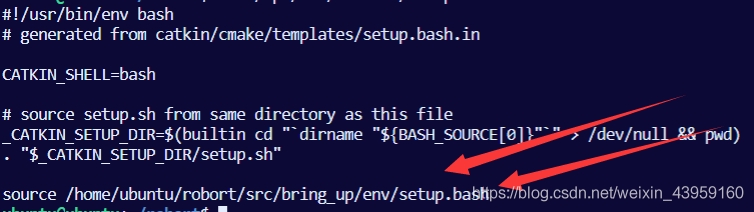
In this way , The user-defined script is indirectly executed and the environment variables are set , Thus bypassing env-loader The problem of not finding the file .
If a big man reads here and knows the direct solution to this problem , Please also comment , Thank you very much !
Reference resources :http://answers.ros.org/question/244060/roslaunch-ssh-known_host-errors-cannot-launch-remote-nodes/?answer=244064#post-id-244064
https://blog.csdn.net/heroacool/article/details/75228749
边栏推荐
- Excel导入导出源码分析
- FLASH read / write operation and flash upload file of esp8266
- Mlx90640 infrared thermal imager temperature measurement module development instructions
- Introduction to armv8 architecture
- 看一个双非二本(0实习)大三学生如何拿到阿里、腾讯的offer
- BSP3 电力监控仪(功率监控仪)端子定义和接线
- TM1638 LED数码显示模块ARDUINO驱动代码
- About student management system (registration, login, student side)
- ARM预备知识
- CCF 201509-2 date calculation
猜你喜欢

Visualization of sensor data based on raspberry pie 4B
Introduction to armv8 general timer

Solve the Chinese garbled code error of qtcreator compiling with vs

Mlx90640 infrared thermal imager temperature measurement module development notes (4)

Introduction to low power consumption and UPF

Temperature, humidity and light intensity acquisition based on smart cloud platform
![[Android studio] batch data import to Android local database](/img/fc/758df0ba1c4c5b4f0eb8ccbcb4952c.png)
[Android studio] batch data import to Android local database

Advanced introduction to digital IC Design SOC

多通道振弦、温度、模拟传感信号采集仪数据查看和参数修改

SD/SDIO/EMMC
随机推荐
LoRA转4G及网关中继器工作原理
入住阿里云MQTT物联网平台
小程序调起微信支付
The economic basis of a hardware siege lion
【RNN】剖析RNN 之 从RNN-(Simple|LSTM) 到 序列生成 再到 seq2seq框架(encoder-decoder,或称为seq2seq)
Mlx90640 infrared thermal imaging sensor temperature measurement module development notes (II)
Linked list -- basic operation
js数字千位分割的常用方法
无线中继采集仪的常见问题
微信小程序跳转其他小程序
CCF 201509-4 Expressway
Development history of convolutional neural network (part)
CCF 201509-2 date calculation
How Android uses ADB command to view application local database
[machine translation] scones -- machine translation with multi tag tasks
安装 oh my zsh
~3 CCF 2022-03-2 travel plan
File -- first acquaintance
OC -- packaging class and processing object
Yolov5 realizes target detection of small data sets -- kolektor defect data set