当前位置:网站首页>Integrated swagger learning
Integrated swagger learning
2022-07-24 22:07:00 【if you never leave me, i will be with you till death do us apart】
The notes of previous study are put locally. I hope I can study with you today ;
Project integration Swagger

Swagger brief introduction
Fore and aft end separation front end -> Front end control layer 、 View layer
Back end -> Back end control layer 、 Service layer 、 Data access layer
Through the front and rear end API Interact
The front and rear ends are relatively independent and loosely coupled
The problems that arise
Front and rear integration , Front end or back end can't do it “ Timely consultation , Settle as soon as possible ”, Finally, the problem is concentrated
Solution
First define schema [ The outline of the plan ], And keep track of the latest API, Reduce integration risk
Swagger
Known as the most popular in the world API frame
Restful Api Document online automatic generator => API file And API Definition synchronization update
Direct operation , Online testing API
Support for multiple languages ( Such as :Java,PHP etc. )
Official website :https://swagger.io/
SpringBoot Integrate Swagger
SpringBoot Integrate Swagger => springfox, Two jar package
Springfox-swagger2
swagger-springmvc
Use Swagger
requirement :jdk 1.8 + otherwise swagger2 Unable to run
step :
1、 Create a new one SpringBoot-web project
2、 add to Maven rely on
<!-- https://mvnrepository.com/artifact/io.springfox/springfox-swagger2 -->
 <dependency>
   <groupId>io.springfox</groupId>
   <artifactId>springfox-swagger2</artifactId>
   <version>2.9.2</version>
</dependency>
<!-- https://mvnrepository.com/artifact/io.springfox/springfox-swagger-ui -->
<dependency>
   <groupId>io.springfox</groupId>
   <artifactId>springfox-swagger-ui</artifactId>
   <version>2.9.2</version>
</dependency>
3、 To write HelloController, The test ensures that it runs successfully !
4、 To use Swagger, We need to write a configuration class -SwaggerConfig Come on To configure Swagger
@Configuration // Configuration class
@EnableSwagger2//  Turn on Swagger2 Automatic configuration of
public class SwaggerConfig {

}
5、 Access test :http://localhost:8080/swagger-ui.html , You can see swagger The interface of ;

if there be maven jar Can't download it, but send me a private message ; I will send it privately
To configure Swagger
1、Swagger example Bean yes Docket, So by configuring Docket Instance to configure Swaggger.
http://localhost:8080/swagger-ui.html
2、 Can pass apiInfo() Property configuration document information
// Configuration documentation information
private ApiInfo apiInfo() {

   Contact contact = new Contact(" Contact name ", "http://xxx.xxx.com/ Contact access link ", " Contact email ");
   return new ApiInfo(
           "Swagger Study ", //  title
           " Learn to demonstrate how to configure Swagger", //  describe
           "v1.0", //  edition
           "http://terms.service.url/ Organizing Links ", //  Organizing Links
           contact, //  Contact information
           "Apach 2.0  The license ", //  The license
           " License link ", //  Permission to connect
           new ArrayList<>()//  Expand
  );
}
3、Docket Instance Association apiInfo()
@Bean
public Docket docket() {

   return new Docket(DocumentationType.SWAGGER_2).apiInfo(apiInfo());
}
4、 Restart project , Access test http://localhost:8080/swagger-ui.html Look at the effect ;
Configure scan interface
1、 structure Docket Through select() Method to configure how to scan the interface .
@Bean
public Docket docket() {

   return new Docket(DocumentationType.SWAGGER_2)
      .apiInfo(apiInfo())
      .select()//  adopt .select() Method , To configure the scan interface ,RequestHandlerSelectors Configure how to scan the interface
      .apis(RequestHandlerSelectors.basePackage("com.kuang.swagger.controller"))
      .build();
}
2、 Restart project testing , Because we configure the scan interface based on the path of the package , So we can only see one class
3、 In addition to configuring the scan interface through the packet path , You can also configure other ways to scan the interface , Here's a comment on all the configuration methods :
any() //  Scan all , All interfaces in the project will be scanned
none() //  Don't scan the interface
//  Scan through annotations on methods , Such as withMethodAnnotation(GetMapping.class) Just scan get request
withMethodAnnotation(final Class<? extends Annotation> annotation)
//  Scan through annotations on classes , Such as .withClassAnnotation(Controller.class) Only scanning has controller Interfaces in annotated classes
withClassAnnotation(final Class<? extends Annotation> annotation)
basePackage(final String basePackage) //  Scan the interface according to the packet path
4、 besides , We can also configure interface scan filtering :
@Bean
public Docket docket() {

   return new Docket(DocumentationType.SWAGGER_2)
      .apiInfo(apiInfo())
      .select()//  adopt .select() Method , To configure the scan interface ,RequestHandlerSelectors Configure how to scan the interface
      .apis(RequestHandlerSelectors.basePackage("com.kuang.swagger.controller"))
       //  How to configure through path Filter , That is to say, only the request is scanned to /kuang The interface at the beginning
      .paths(PathSelectors.ant("/kuang/**"))
      .build();
}
5、 The optional values here are 

any() //  Any request is scanned
none() //  No requests are scanned
regex(final String pathRegex) //  Control... Through regular expressions
ant(final String antPattern) //  adopt ant() control
To configure Swagger switch
1、 adopt enable() Whether method configuration is enabled swagger, If it is false,swagger Will no longer be accessible in the browser
@Bean
public Docket docket() {

   return new Docket(DocumentationType.SWAGGER_2)
      .apiInfo(apiInfo())
      .enable(false) // Configure whether to enable Swagger, If it is false, The browser will not be able to access
      .select()//  adopt .select() Method , To configure the scan interface ,RequestHandlerSelectors Configure how to scan the interface
      .apis(RequestHandlerSelectors.basePackage("com.kuang.swagger.controller"))
       //  How to configure through path Filter , That is to say, only the request is scanned to /kuang The interface at the beginning
      .paths(PathSelectors.ant("/kuang/**"))
      .build();
}
2、 How to configure dynamically when the project is in test、dev The environment shows swagger, be in prod Time does not show ?
@Bean
public Docket docket(Environment environment) {

   //  Set to display swagger Environment
   Profiles of = Profiles.of("dev", "test");
   //  Judge whether you are currently in the environment
   //  adopt  enable()  Receive this parameter to determine whether to display
   boolean b = environment.acceptsProfiles(of);

   return new Docket(DocumentationType.SWAGGER_2)
      .apiInfo(apiInfo())
      .enable(b) // Configure whether to enable Swagger, If it is false, The browser will not be able to access
      .select()//  adopt .select() Method , To configure the scan interface ,RequestHandlerSelectors Configure how to scan the interface
      .apis(RequestHandlerSelectors.basePackage("com.kuang.swagger.controller"))
       //  How to configure through path Filter , That is to say, only the request is scanned to /kuang The interface at the beginning
      .paths(PathSelectors.ant("/kuang/**"))
      .build();
}
3、 You can add one to the project dev View the effect of the configuration file !
To configure API grouping

1、 If grouping is not configured , The default is default. adopt groupName() Method to configure the grouping :
@Bean
public Docket docket(Environment environment) {

   return new Docket(DocumentationType.SWAGGER_2).apiInfo(apiInfo())
      .groupName("hello") //  Configure grouping
       //  Omit configuration ....
}
2、 Restart the project view group
3、 How to configure multiple groups ? To configure multiple groups, you only need to configure multiple docket that will do :
@Bean
public Docket docket1(){

   return new Docket(DocumentationType.SWAGGER_2).groupName("group1");
}
@Bean
public Docket docket2(){

   return new Docket(DocumentationType.SWAGGER_2).groupName("group2");
}
@Bean
public Docket docket3(){

   return new Docket(DocumentationType.SWAGGER_2).groupName("group3");
}
4、 Restart the project to view
package com.yan.config;


import org.springframework.context.annotation.Bean;
import org.springframework.context.annotation.Configuration;
import org.springframework.core.env.Environment;
import org.springframework.core.env.Profiles;
import org.springframework.web.bind.annotation.RequestMapping;
import org.springframework.web.context.support.HttpRequestHandlerServlet;
import springfox.documentation.builders.PathSelectors;
import springfox.documentation.builders.RequestHandlerSelectors;
import springfox.documentation.service.ApiInfo;
import springfox.documentation.service.Contact;
import springfox.documentation.spi.DocumentationType;
import springfox.documentation.spring.web.plugins.Docket;
import springfox.documentation.swagger2.annotations.EnableSwagger2;

import java.util.ArrayList;


@Configuration
@EnableSwagger2
public class SwaggerConfig {


    @Bean
    public Docket docket1(){

        return new Docket(DocumentationType.SWAGGER_2).groupName("A");
    }

    @Bean
    public Docket docket2(){

        return new Docket(DocumentationType.SWAGGER_2).groupName("B");
    }

    @Bean
    public Docket docket3(){

        return new Docket(DocumentationType.SWAGGER_2).groupName("C");
    }


    @Bean
    public Docket docket(Environment environment) {


        // Get the project environment environment
          // Set up swagger2 Environment
        Profiles profiles=Profiles.of("dev","pro");
        // Listen for variables through the environment
        boolean b = environment.acceptsProfiles(profiles);

        return new Docket(DocumentationType.SWAGGER_2)
                .apiInfo(apiInfo())
                .groupName(" Yan Wenchao ")  // The name of the default search box
                .enable(true)  //swagger  close   Start true
                .select()
                //RequestHandlerSelectors  Configure scan interface
                //basePackage  Specify the package to scan
                //any()  Scan all packages
                //none()  No scanning
                //withClassAnnotation()  Scan the annotation above the class  EG:withClassAnnotation(RequestMapping.class)
                .apis(RequestHandlerSelectors.basePackage("com.yan.controller"))
                // Filter path  any  All  ant Specify the path
               // .paths(PathSelectors.ant("/yan"))
                .build();
    }

    private ApiInfo apiInfo() {

        Contact contact = new Contact(" Contact name ", "http://xxx.xxx.com/ Contact access link ", " Contact email ");
        return new ApiInfo(
                "Swagger Study ", //  title
                " Learn to demonstrate how to configure Swagger", //  describe
                "v1.0", //  edition
                "http://terms.service.url/ Organizing Links ", //  Organizing Links
                contact, //  Contact information
                "Apach 2.0  The license ", //  The license
                " License link ", //  Permission to connect
                new ArrayList<>()//  Expand
        );
    }
}
Entity configuration
1、 Create a new entity class
@ApiModel(" User entity ")
public class User {

   @ApiModelProperty(" user name ")
   public String username;
   @ApiModelProperty(" password ")
   public String password;
}
2、 As long as the entity is on the return value of the request interface ( Even generics ), Can be mapped to entity items :
@RequestMapping("/getUser")
public User getUser(){

   return new User();
}
3、 Restart the view test 
notes : It's not because @ApiModel This annotation makes the entity appear here , Instead, any entity that appears on the return value of an interface method will be displayed here , and @ApiModel and @ApiModelProperty These two annotations are just annotations for entities .
@ApiModel Add comments to the class
@ApiModelProperty Add comments to class properties
Commonly used annotations
Swagger All annotations defined in io.swagger.annotations It's a bag
Here are some of the most frequently used , For those not listed, please refer to the instructions separately
| Swagger | The notes simply explain |
| @Api(tags = “xxx The module specification ”) | Works on module classes |
| @ApiOperation(“xxx Interface specification ”) | It works on interface methods |
| @ApiModel(“xxxPOJO explain ”) | Acting on model classes : Such as VO、BO |
| @ApiModelProperty(value = “xxx Attribute specification ”,hidden = true) | Works on class methods and properties ,hidden Set to true You can hide this property |
| @ApiParam(“xxx Parameter description ”) | It acts on the parameter 、 Methods and fields , similar @ApiModelProperty |
We can also configure some comments for the requested interface
@ApiOperation(" The interface of madness ")
@PostMapping("/kuang")
@ResponseBody
public String kuang(@ApiParam(" The name will be returned ")String username){

   return username;
}
In this case , You can give some properties or interfaces that are difficult to understand , Add some configuration information , Make it easier for people to read !
Compared with traditional Postman or Curl Mode test interface , Use swagger It's a fool's operation , No additional documentation is required ( Well written is a document in itself ) And it's less prone to mistakes , Just enter the data and click Execute, If combined with automation framework , It can be said that there is basically no need for human operation .
Swagger It's a great tool , Now many small and medium-sized Internet companies are using it in China , Compared to the traditional "first come first served" strategy Word How to retest interface documents , Obviously, this is more in line with the current rapid iterative development market . Yes, of course , I'd like to remind you to close it in a formal environment Swagger, First, for security reasons, and second, to save runtime memory .
expand : Other skin
We can import different packages to implement different skin definitions :
1、 default visit http://localhost:8080/swagger-ui.html
<dependency>
   <groupId>io.springfox</groupId>
   <artifactId>springfox-swagger-ui</artifactId>
   <version>2.9.2</version>
</dependency>

2、bootstrap-ui visit http://localhost:8080/doc.html
<!--  introduce swagger-bootstrap-ui package  /doc.html-->
<dependency>
   <groupId>com.github.xiaoymin</groupId>
   <artifactId>swagger-bootstrap-ui</artifactId>
   <version>1.9.1</version>
</dependency>

3、Layui-ui visit http://localhost:8080/docs.html
<!--  introduce swagger-ui-layer package  /docs.html-->
<dependency>
   <groupId>com.github.caspar-chen</groupId>
   <artifactId>swagger-ui-layer</artifactId>
   <version>1.1.3</version>
</dependency>

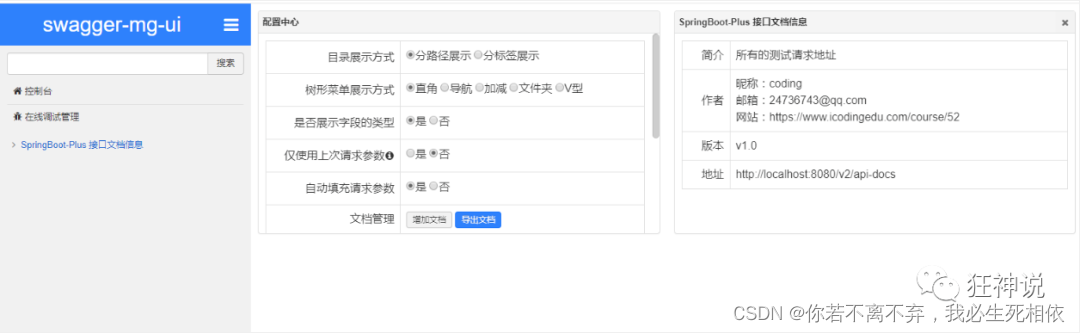
4、mg-ui visit http://localhost:8080/document.html
<!--  introduce swagger-ui-layer package  /document.html-->
<dependency>
   <groupId>com.zyplayer</groupId>
   <artifactId>swagger-mg-ui</artifactId>
   <version>1.0.6</version>
</dependency>
边栏推荐
- Esp32485 air temperature and humidity test
- Drawing library Matplotlib installation configuration
- 集成Swagger 学习
- How to output position synchronization of motion control
- Mathematical derivation in [pumpkin Book ml] (task4) neural network
- 在机器人行业的专业人士眼里,机器人行业目前的情况如何?
- What is a database password?
- C# 使用SQLite
- [e-commerce operation] teach you these tips to bid farewell to invalid preset replies
- Function default parameter pit avoidance Guide
猜你喜欢

SVM - for linear separability (Part 2)

Thread pool learning

Documentary of the second senior brother

【二分好题】

Calling Laser Galvanometer control in the application and development tutorial of motion control card
![Leetcode: the shortest dice sequence impossible to get [thinking questions + grouping ideas]](/img/89/0789cd381302237a28f3f18b3bfa74.png)
Leetcode: the shortest dice sequence impossible to get [thinking questions + grouping ideas]
Day10: declarative transaction control

Discussion on solving the application ecological problems of domestic systems based on small programs

Gather relevant knowledge points and expand supplements

陈春花与莫言,都有苦难言
随机推荐
[postgraduate entrance examination English vocabulary training camp] day 11 - offer, form, maintain, critical
ACL 2022 | comparative learning based on optimal transmission to achieve interpretable semantic text similarity
ICML2022 | 图神经网络的局域数据增强方法
Huawei cloud data governance production line dataarts, let "data 'wisdom' speak"
After reading this article, I also understand this
Get data in batches according to time
Both Chen Chunhua and Mo Yan have words of suffering
Sqlserver BCP parameter interpretation, character format selection and fault handling summary
How to output position synchronization of motion control
What is the database account in DTS?
CAD copy commands
Diou and ciou loss of loss function
在机器人行业的专业人士眼里,机器人行业目前的情况如何?
[e-commerce operation] teach you these tips to bid farewell to invalid preset replies
Web3安全 Go+Security
图像处理笔记(1)图像增强
What problems should be paid attention to when using a database without public ip: port?
【考研词汇训练营】Day 12 —— native,separate,figure,contribute,species,assumption,suppose
P2404 splitting of natural numbers
ESP32C3 LED PWM使用和ESP32差异说明