当前位置:网站首页>集成Swagger 学习
集成Swagger 学习
2022-07-24 21:46:00 【你若不离不弃,我必生死相依】
之前学习的笔记放在本地了今天整理下希望可以和大家一起学习;
项目集成Swagger

Swagger简介
前后端分离 前端 -> 前端控制层、视图层
后端 -> 后端控制层、服务层、数据访问层
前后端通过API进行交互
前后端相对独立且松耦合
产生的问题
前后端集成,前端或者后端无法做到“及时协商,尽早解决”,最终导致问题集中爆发
解决方案
首先定义schema [ 计划的提纲 ],并实时跟踪最新的API,降低集成风险
Swagger
号称世界上最流行的API框架
Restful Api 文档在线自动生成器 => API 文档 与API 定义同步更新
直接运行,在线测试API
支持多种语言 (如:Java,PHP等)
官网:https://swagger.io/
SpringBoot集成Swagger
SpringBoot集成Swagger => springfox,两个jar包
Springfox-swagger2
swagger-springmvc
使用Swagger
要求:jdk 1.8 + 否则swagger2无法运行
步骤:
1、新建一个SpringBoot-web项目
2、添加Maven依赖
<!-- https://mvnrepository.com/artifact/io.springfox/springfox-swagger2 -->
 <dependency>
   <groupId>io.springfox</groupId>
   <artifactId>springfox-swagger2</artifactId>
   <version>2.9.2</version>
</dependency>
<!-- https://mvnrepository.com/artifact/io.springfox/springfox-swagger-ui -->
<dependency>
   <groupId>io.springfox</groupId>
   <artifactId>springfox-swagger-ui</artifactId>
   <version>2.9.2</version>
</dependency>
3、编写HelloController,测试确保运行成功!
4、要使用Swagger,我们需要编写一个配置类-SwaggerConfig来配置 Swagger
@Configuration //配置类
@EnableSwagger2// 开启Swagger2的自动配置
public class SwaggerConfig {

}
5、访问测试 :http://localhost:8080/swagger-ui.html ,可以看到swagger的界面;

如有maven jar 无法下载可私信我;我会私发
配置Swagger
1、Swagger实例Bean是Docket,所以通过配置Docket实例来配置Swaggger。
http://localhost:8080/swagger-ui.html
2、可以通过apiInfo()属性配置文档信息
//配置文档信息
private ApiInfo apiInfo() {

   Contact contact = new Contact("联系人名字", "http://xxx.xxx.com/联系人访问链接", "联系人邮箱");
   return new ApiInfo(
           "Swagger学习", // 标题
           "学习演示如何配置Swagger", // 描述
           "v1.0", // 版本
           "http://terms.service.url/组织链接", // 组织链接
           contact, // 联系人信息
           "Apach 2.0 许可", // 许可
           "许可链接", // 许可连接
           new ArrayList<>()// 扩展
  );
}
3、Docket 实例关联上 apiInfo()
@Bean
public Docket docket() {

   return new Docket(DocumentationType.SWAGGER_2).apiInfo(apiInfo());
}
4、重启项目,访问测试 http://localhost:8080/swagger-ui.html 看下效果;
配置扫描接口
1、构建Docket时通过select()方法配置怎么扫描接口。
@Bean
public Docket docket() {

   return new Docket(DocumentationType.SWAGGER_2)
      .apiInfo(apiInfo())
      .select()// 通过.select()方法,去配置扫描接口,RequestHandlerSelectors配置如何扫描接口
      .apis(RequestHandlerSelectors.basePackage("com.kuang.swagger.controller"))
      .build();
}
2、重启项目测试,由于我们配置根据包的路径扫描接口,所以我们只能看到一个类
3、除了通过包路径配置扫描接口外,还可以通过配置其他方式扫描接口,这里注释一下所有的配置方式:
any() // 扫描所有,项目中的所有接口都会被扫描到
none() // 不扫描接口
// 通过方法上的注解扫描,如withMethodAnnotation(GetMapping.class)只扫描get请求
withMethodAnnotation(final Class<? extends Annotation> annotation)
// 通过类上的注解扫描,如.withClassAnnotation(Controller.class)只扫描有controller注解的类中的接口
withClassAnnotation(final Class<? extends Annotation> annotation)
basePackage(final String basePackage) // 根据包路径扫描接口
4、除此之外,我们还可以配置接口扫描过滤:
@Bean
public Docket docket() {

   return new Docket(DocumentationType.SWAGGER_2)
      .apiInfo(apiInfo())
      .select()// 通过.select()方法,去配置扫描接口,RequestHandlerSelectors配置如何扫描接口
      .apis(RequestHandlerSelectors.basePackage("com.kuang.swagger.controller"))
       // 配置如何通过path过滤,即这里只扫描请求以/kuang开头的接口
      .paths(PathSelectors.ant("/kuang/**"))
      .build();
}
5、这里的可选值还有

any() // 任何请求都扫描
none() // 任何请求都不扫描
regex(final String pathRegex) // 通过正则表达式控制
ant(final String antPattern) // 通过ant()控制
配置Swagger开关
1、通过enable()方法配置是否启用swagger,如果是false,swagger将不能在浏览器中访问了
@Bean
public Docket docket() {

   return new Docket(DocumentationType.SWAGGER_2)
      .apiInfo(apiInfo())
      .enable(false) //配置是否启用Swagger,如果是false,在浏览器将无法访问
      .select()// 通过.select()方法,去配置扫描接口,RequestHandlerSelectors配置如何扫描接口
      .apis(RequestHandlerSelectors.basePackage("com.kuang.swagger.controller"))
       // 配置如何通过path过滤,即这里只扫描请求以/kuang开头的接口
      .paths(PathSelectors.ant("/kuang/**"))
      .build();
}
2、如何动态配置当项目处于test、dev环境时显示swagger,处于prod时不显示?
@Bean
public Docket docket(Environment environment) {

   // 设置要显示swagger的环境
   Profiles of = Profiles.of("dev", "test");
   // 判断当前是否处于该环境
   // 通过 enable() 接收此参数判断是否要显示
   boolean b = environment.acceptsProfiles(of);

   return new Docket(DocumentationType.SWAGGER_2)
      .apiInfo(apiInfo())
      .enable(b) //配置是否启用Swagger,如果是false,在浏览器将无法访问
      .select()// 通过.select()方法,去配置扫描接口,RequestHandlerSelectors配置如何扫描接口
      .apis(RequestHandlerSelectors.basePackage("com.kuang.swagger.controller"))
       // 配置如何通过path过滤,即这里只扫描请求以/kuang开头的接口
      .paths(PathSelectors.ant("/kuang/**"))
      .build();
}
3、可以在项目中增加一个dev的配置文件查看效果!
配置API分组

1、如果没有配置分组,默认是default。通过groupName()方法即可配置分组:
@Bean
public Docket docket(Environment environment) {

   return new Docket(DocumentationType.SWAGGER_2).apiInfo(apiInfo())
      .groupName("hello") // 配置分组
       // 省略配置....
}
2、重启项目查看分组
3、如何配置多个分组?配置多个分组只需要配置多个docket即可:
@Bean
public Docket docket1(){

   return new Docket(DocumentationType.SWAGGER_2).groupName("group1");
}
@Bean
public Docket docket2(){

   return new Docket(DocumentationType.SWAGGER_2).groupName("group2");
}
@Bean
public Docket docket3(){

   return new Docket(DocumentationType.SWAGGER_2).groupName("group3");
}
4、重启项目查看即可
package com.yan.config;


import org.springframework.context.annotation.Bean;
import org.springframework.context.annotation.Configuration;
import org.springframework.core.env.Environment;
import org.springframework.core.env.Profiles;
import org.springframework.web.bind.annotation.RequestMapping;
import org.springframework.web.context.support.HttpRequestHandlerServlet;
import springfox.documentation.builders.PathSelectors;
import springfox.documentation.builders.RequestHandlerSelectors;
import springfox.documentation.service.ApiInfo;
import springfox.documentation.service.Contact;
import springfox.documentation.spi.DocumentationType;
import springfox.documentation.spring.web.plugins.Docket;
import springfox.documentation.swagger2.annotations.EnableSwagger2;

import java.util.ArrayList;


@Configuration
@EnableSwagger2
public class SwaggerConfig {


    @Bean
    public Docket docket1(){

        return new Docket(DocumentationType.SWAGGER_2).groupName("A");
    }

    @Bean
    public Docket docket2(){

        return new Docket(DocumentationType.SWAGGER_2).groupName("B");
    }

    @Bean
    public Docket docket3(){

        return new Docket(DocumentationType.SWAGGER_2).groupName("C");
    }


    @Bean
    public Docket docket(Environment environment) {


        //获取项目环境environment
          //设置swagger2的环境
        Profiles profiles=Profiles.of("dev","pro");
        //通过环境监听变量
        boolean b = environment.acceptsProfiles(profiles);

        return new Docket(DocumentationType.SWAGGER_2)
                .apiInfo(apiInfo())
                .groupName("闫文超")  //默認搜索框的名字
                .enable(true)  //swagger 关闭 开始true
                .select()
                //RequestHandlerSelectors 配置扫描接口
                //basePackage 指定扫描的包
                //any() 扫描全部的包
                //none() 都不扫描
                //withClassAnnotation() 扫描类上面的注解 EG:withClassAnnotation(RequestMapping.class)
                .apis(RequestHandlerSelectors.basePackage("com.yan.controller"))
                //过滤路径 any 全部 ant指定路径
               // .paths(PathSelectors.ant("/yan"))
                .build();
    }

    private ApiInfo apiInfo() {

        Contact contact = new Contact("联系人名字", "http://xxx.xxx.com/联系人访问链接", "联系人邮箱");
        return new ApiInfo(
                "Swagger学习", // 标题
                "学习演示如何配置Swagger", // 描述
                "v1.0", // 版本
                "http://terms.service.url/组织链接", // 组织链接
                contact, // 联系人信息
                "Apach 2.0 许可", // 许可
                "许可链接", // 许可连接
                new ArrayList<>()// 扩展
        );
    }
}
实体配置
1、新建一个实体类
@ApiModel("用户实体")
public class User {

   @ApiModelProperty("用户名")
   public String username;
   @ApiModelProperty("密码")
   public String password;
}
2、只要这个实体在请求接口的返回值上(即使是泛型),都能映射到实体项中:
@RequestMapping("/getUser")
public User getUser(){

   return new User();
}
3、重启查看测试
注:并不是因为@ApiModel这个注解让实体显示在这里了,而是只要出现在接口方法的返回值上的实体都会显示在这里,而@ApiModel和@ApiModelProperty这两个注解只是为实体添加注释的。
@ApiModel为类添加注释
@ApiModelProperty为类属性添加注释
常用注解
Swagger的所有注解定义在io.swagger.annotations包下
下面列一些经常用到的,未列举出来的可以另行查阅说明
| Swagger | 注解简单说明 |
| @Api(tags = “xxx模块说明”) | 作用在模块类上 |
| @ApiOperation(“xxx接口说明”) | 作用在接口方法上 |
| @ApiModel(“xxxPOJO说明”) | 作用在模型类上:如VO、BO |
| @ApiModelProperty(value = “xxx属性说明”,hidden = true) | 作用在类方法和属性上,hidden设置为true可以隐藏该属性 |
| @ApiParam(“xxx参数说明”) | 作用在参数、方法和字段上,类似@ApiModelProperty |
我们也可以给请求的接口配置一些注释
@ApiOperation("狂神的接口")
@PostMapping("/kuang")
@ResponseBody
public String kuang(@ApiParam("这个名字会被返回")String username){

   return username;
}
这样的话,可以给一些比较难理解的属性或者接口,增加一些配置信息,让人更容易阅读!
相较于传统的Postman或Curl方式测试接口,使用swagger简直就是傻瓜式操作,不需要额外说明文档(写得好本身就是文档)而且更不容易出错,只需要录入数据然后点击Execute,如果再配合自动化框架,可以说基本就不需要人为操作了。
Swagger是个优秀的工具,现在国内已经有很多的中小型互联网公司都在使用它,相较于传统的要先出Word接口文档再测试的方式,显然这样也更符合现在的快速迭代开发行情。当然了,提醒下大家在正式环境要记得关闭Swagger,一来出于安全考虑二来也可以节省运行时内存。
拓展:其他皮肤
我们可以导入不同的包实现不同的皮肤定义:
1、默认的 访问 http://localhost:8080/swagger-ui.html
<dependency>
   <groupId>io.springfox</groupId>
   <artifactId>springfox-swagger-ui</artifactId>
   <version>2.9.2</version>
</dependency>

2、bootstrap-ui 访问 http://localhost:8080/doc.html
<!-- 引入swagger-bootstrap-ui包 /doc.html-->
<dependency>
   <groupId>com.github.xiaoymin</groupId>
   <artifactId>swagger-bootstrap-ui</artifactId>
   <version>1.9.1</version>
</dependency>

3、Layui-ui 访问 http://localhost:8080/docs.html
<!-- 引入swagger-ui-layer包 /docs.html-->
<dependency>
   <groupId>com.github.caspar-chen</groupId>
   <artifactId>swagger-ui-layer</artifactId>
   <version>1.1.3</version>
</dependency>

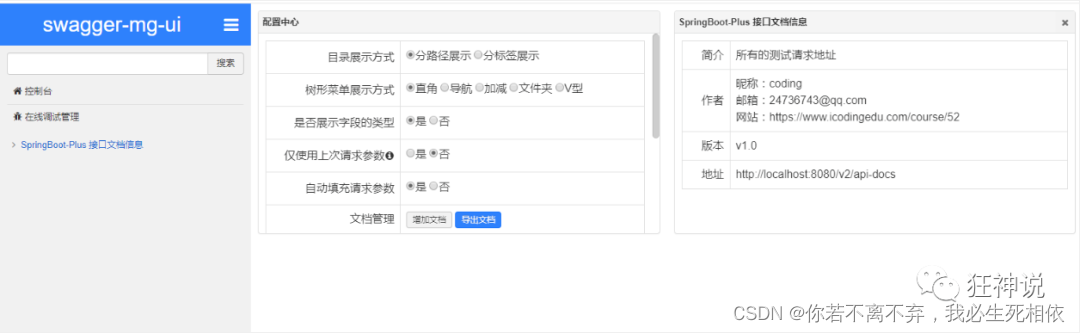
4、mg-ui 访问 http://localhost:8080/document.html
<!-- 引入swagger-ui-layer包 /document.html-->
<dependency>
   <groupId>com.zyplayer</groupId>
   <artifactId>swagger-mg-ui</artifactId>
   <version>1.0.6</version>
</dependency>
边栏推荐
- Little Red Book Keyword Search commodity list API interface (commodity detail page API interface)
- What is a database password?
- Composability and Recursion in snarkyJS
- [blind box app mall system] function introduction after online unpacking
- Build Tencent cloud website server at low cost (build your own website server)
- 一种自动化九点标定工具原理(包涵部分源码)
- RISC0:Towards a Unified Compilation Framework for Zero Knowledge
- The relationship between cloud computing and digital transformation has finally been clarified
- Drawing library Matplotlib drawing
- 2022 Tsinghua summer school notes L2_ 2 basic introduction of CNN and RNN
猜你喜欢

【二分好题】

Today, there's a power failure for one day.... stop working for another day. Don't forget to study
day10:声明式事务控制

rogabet note 1.1
![[e-commerce operation] teach you these tips to bid farewell to invalid preset replies](/img/5b/6682c613305deb3dc15401077d38a0.png)
[e-commerce operation] teach you these tips to bid farewell to invalid preset replies

【类的组合(在一个类中定义一个类)】

Little Red Book Keyword Search commodity list API interface (commodity detail page API interface)
Ch single database data migration to read / write separation mode

Discussion on solving the application ecological problems of domestic systems based on small programs

陈春花与莫言,都有苦难言
随机推荐
Using skills and design scheme of redis cache (classic collection version)
What should I do when selecting the RDS instance access method?
P2404 splitting of natural numbers
Want to open an account and fry American crude oil, but always worry about insecurity?
Classical review: understanding the "knowledge consistency" of neural networks (ICLR 2020)
【南瓜书ML】(task4)神经网络中的数学推导
Gradle 学习 ----Gradle 与Idea整合
Codeforces Round #809 (Div. 2)(A~D2)
Understand MySQL index and b+tree in an easy to understand way (supreme Collection Edition)
Scientific computing toolkit SciPy image processing
2018mysql technology Q & a collection, hoping to give some help to students who like MySQL
Drawing library Matplotlib drawing
Which type of database migration is suitable for choosing the self built database access method on ECs?
Circom 2.0: A Scalable Circuit Compiler
Documentary of the second senior brother
巧妙使用sort(List&lt;T&gt;,Comparator&lt;? super T&gt;)比较器
[e-commerce operation] teach you these tips to bid farewell to invalid preset replies
How does redis realize inventory deduction and prevent oversold? (glory Collection Edition)
损失函数之Diou和Ciou loss
Makefile basics -- extensions