当前位置:网站首页>FTP 配置实例学习记录
FTP 配置实例学习记录
2022-07-23 05:47:00 【业余幻想家】
FTP 配置实例
文件传输协议(File Transfer Protocol,FTP)是用于在网络上进行文件传输的一套标准协议。而 FTP 服务器主要是用来传输文件,在互联网行业比较常见,使用范围也比较广泛。
文章目录
1、实验目标
将设备 R1 作为 FTP 服务器,设备 R2 作为 客户端,将客户端中文件上传至 FTP 服务器,再将 FTP 服务器中文件下载到客户端,并分别在 FTP 服务器和客户端上查看文件是否传输成功
2、网络拓扑图
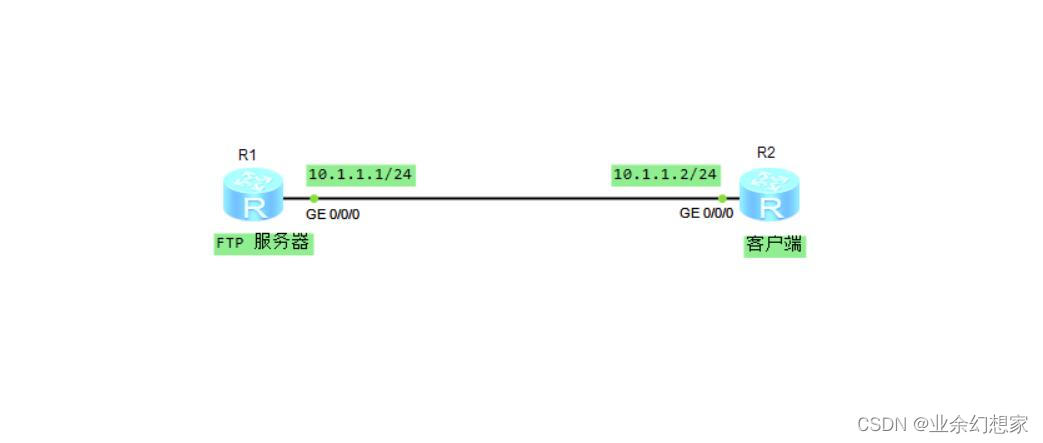
3、配置步骤
(1)按拓扑图配置端口 IP 地址
注:设备的端口 IP 就作为 FTP 服务器或客户端的 IP 地址
a、配置端口 IP 地址
R1:
<Huawei>system-view  //进入系统视图
[Huawei]sysname R1  //重命名设备
[R1]interface GigabitEthernet0/0/0
[R1-GigabitEthernet0/0/0]ip address 10.1.1.1 24  //配置端口 IP 地址
[R1-GigabitEthernet0/0/0]quit
R2:
<Huawei>system-view  //进入系统视图
[Huawei]sysname R2  //重命名设备
[R2]interface GigabitEthernet0/0/0
[R2-GigabitEthernet0/0/0]ip address 10.1.1.2 24  //配置端口 IP 地址
[R2-GigabitEthernet0/0/0]quit
b、测试设备之间的联通性
用 FTP 服务器(R1) 去 ping 客户端(R2) 的 IP地址(端口 IP 地址),发现可以互通
[R1]ping 10.1.1.2
  PING 10.1.1.2: 56  data bytes, press CTRL_C to break
    Reply from 10.1.1.2: bytes=56 Sequence=1 ttl=255 time=70 ms
    Reply from 10.1.1.2: bytes=56 Sequence=2 ttl=255 time=30 ms
    Reply from 10.1.1.2: bytes=56 Sequence=3 ttl=255 time=20 ms
    Reply from 10.1.1.2: bytes=56 Sequence=4 ttl=255 time=10 ms
    Reply from 10.1.1.2: bytes=56 Sequence=5 ttl=255 time=20 ms

  --- 10.1.1.2 ping statistics ---
    5 packet(s) transmitted
    5 packet(s) received
    0.00% packet loss
    round-trip min/avg/max = 10/30/70 ms
用客户端 (R2) 去 ping FTP 服务器(R1)的 IP地址(端口 IP 地址),同样可以互通
[R2]ping 10.1.1.1
  PING 10.1.1.1: 56  data bytes, press CTRL_C to break
    Reply from 10.1.1.1: bytes=56 Sequence=1 ttl=255 time=50 ms
    Reply from 10.1.1.1: bytes=56 Sequence=2 ttl=255 time=30 ms
    Reply from 10.1.1.1: bytes=56 Sequence=3 ttl=255 time=20 ms
    Reply from 10.1.1.1: bytes=56 Sequence=4 ttl=255 time=20 ms
    Reply from 10.1.1.1: bytes=56 Sequence=5 ttl=255 time=30 ms

  --- 10.1.1.1 ping statistics ---
    5 packet(s) transmitted
    5 packet(s) received
    0.00% packet loss
    round-trip min/avg/max = 20/30/50 ms
(2)在 FTP 服务器(R1)上配置 FTP 功能及 FTP 用户信息
AAA 服务器接收数据设备发送的 FTP 用户的认证信息;根据预设的FTP用户账号对所述认证信息进行认证和授权,可以集中管理 FTP 用户。
[R1]ftp server enable  //开启 FTP 功能
[R1]aaa
[R1-aaa]local-user ftptest password cipher ftptest123  //配置 FTP 用户信息,用户名:ftptest 密码:ftptest123
[R1-aaa]local-user ftptest privilege level 15  //配置用户的等级
[R1-aaa]local-user ftptest service-type ftp  //配置服务类型
[R1-aaa]local-user ftptest ftp-directory flash:  //配置 FTP 目录
[R1-aaa]quit
(3)查看设备中的文件
注:查看文件需要先退出系统视图,使用 dir 命令查看文件
R1:
[R1]quit  //退出系统视图
<R1>dir
Directory of flash:/

  Idx  Attr     Size(Byte)  Date        Time(LMT)  FileName
    0  drw-              -  Jul 19 2022 07:16:41   dhcp
    1  -rw-        121,802  May 26 2014 09:20:58   portalpage.zip
    2  -rw-          2,263  Jul 19 2022 07:16:36   statemach.efs
    3  -rw-        828,482  May 26 2014 09:20:58   sslvpn.zip

1,090,732 KB total (784,464 KB free)
R2:
[R2]quit  //退出系统视图
<R2>dir
Directory of flash:/

  Idx  Attr     Size(Byte)  Date        Time(LMT)  FileName
    0  drw-              -  Jul 19 2022 07:16:44   dhcp
    1  -rw-        121,802  May 26 2014 09:20:58   portalpage.zip
    2  -rw-          2,263  Jul 19 2022 07:16:39   statemach.efs
    3  -rw-        828,482  May 26 2014 09:20:58   sslvpn.zip

1,090,732 KB total (784,464 KB free)
(4)从客户端(R2)访问 FTP
注:输入密码时密码不会显示输入
<R2>ftp 10.1.1.1  //访问 FTP 服务器,输入之前创建的用户名和密码之后进入 FTP
Trying 10.1.1.1 ...

Press CTRL+K to abort
Connected to 10.1.1.1.
220 FTP service ready.
User(10.1.1.1:(none)):ftptest
331 Password required for ftptest.
Enter password:
230 User logged in.

[R2-ftp]
(5)从客户端(R2)上传文件至 FTP 服务器(R1)中
[R2-ftp]put sslvpn.zip put.zip  //将 sslvpn.zip 文件重命名为 put.zip 后上传至 FTP 服务器,put [源文件] [重命名文件]
200 Port command okay.
150 Opening ASCII mode data connection for put.zip.
 1% 3% 5% 7% 9%11%13%15%17%19%21%23%25%27%29%31%33%35%37%39%
41%43%45%47%49%51%53%55%57%59%61%63%65%67%69%71%73%75%77%79%
81%83%85%87%88%90%92%94%96%98%
 100%
226 Transfer complete.
FTP: 828482 byte(s) sent in 3.030 second(s) 273.42Kbyte(s)/sec.
(6)从FTP 服务器(R1)获取文件至 客户端(R2)中
[R2-ftp]get portalpage.zip get.zip  //将 portalpage.zip 文件重命名为 get.zip 后获取至客户端,get [源文件] [重命名文件]
200 Port command okay.
150 Opening ASCII mode data connection for portalpage.zip.
 2% 4 5 6% 7 9%101112%13%1516%171819%21%2324%25%28%30%34%36%39%41
%43%47%49%52%55%58%60%6364%66%69%71%7376%7778%798284%85%89%90%
93%95%97%99226 Transfer complete.
FTP: 121802 byte(s) received in 0.500 second(s) 243.60Kbyte(s)/sec.

[R2-ftp]quit
221 Server closing.
4、测试
(1)在FTP 服务器(R1)中查看从客户端(R2)上传文件至 FTP 服务器(R1)中是否成功
注:使用 dir 查看文件
<R1>dir
Directory of flash:/

  Idx  Attr     Size(Byte)  Date        Time(LMT)  FileName
    0  -rw-        828,482  Jul 19 2022 08:09:40   put.zip  //从客户端上传的文件
    1  drw-              -  Jul 19 2022 07:16:41   dhcp
    2  -rw-        121,802  May 26 2014 09:20:58   portalpage.zip
    3  -rw-          2,263  Jul 19 2022 07:16:36   statemach.efs
    4  -rw-        828,482  May 26 2014 09:20:58   sslvpn.zip

1,090,732 KB total (783,652 KB free)
(2)在客户端(R2)中查看从FTP 服务器(R1)获取文件至客户端(R2)中是否成功
<R2>dir
Directory of flash:/

  Idx  Attr     Size(Byte)  Date        Time(LMT)  FileName
    0  drw-              -  Jul 19 2022 07:16:44   dhcp
    1  -rw-        121,802  Jul 19 2022 08:13:46   portalpage.zip
    2  -rw-          2,263  Jul 19 2022 07:16:39   statemach.efs
    3  -rw-        828,482  May 26 2014 09:20:58   sslvpn.zip
    4  -rw-        121,802  Jul 19 2022 08:15:15   get.zip  //从 FTP 服务器获取到的文件

1,090,732 KB total (784,344 KB free)
5、小结
FTP 工作在 OSI 模型的第七层, TCP 模型的第四层, 即应用层, 使用 TCP 传输而不是 UDP, 客户在和服务器建立连接前要经过一个“三次握手”的过程, 保证客户与服务器之间的连接是可靠的, 而且是面向连接, 为数据传输提供可靠保证。
文章如有错误之处,欢迎各位大佬批评指正
边栏推荐
- Design experience of log file IO system
- Hcip--- BGP related configuration (Federal chapter)
- 浅析互联网协议(二)
- FTP实验及概述
- PostgreSQL k8s部署模板
- Unity3d+moba+ skill indicator (II)
- Hcip --- BGP --- border gateway protocol
- Hcip-hcia knowledge review (II)
- htpasswd作用
- C #: quick sort. If there is the same number, it will be ignored, and then continue the previous search direction to find the next number that meets the requirements for replacement
猜你喜欢
![[AUTOSAR storage stack NVM]](/img/7a/15e01f8ace647b55e11e764dba1b64.png)
[AUTOSAR storage stack NVM]

DNS域名解析服务

Unity3d HD rendering pipeline cannot play video on the model
Depth first find all simple paths from vertex u to vertex v in the graph
Routing and switching technology - static routing

Link expansion configuration of OSPF
学习日记——(路由与交换技术)单臂路由

Routing and interface technology -- Summary of direct network

Pod 拓扑约束

Learning diary - (routing and switching technology) layer 3 switch
随机推荐
Hcip--- BGP related configuration
读《凤凰架构》- RPC的历史与知识
剖析Redis中的Sentinel模式
Reading Phoenix Architecture - History and knowledge of RPC
学习日记——(路由与交换技术)ACL访问控制列表
The correspondence between the concept of go ability and the concept of software development ability
Analysis of UDP protocol and TCP protocol
以go语言为例类比侦探推理来讲解【性能分析】
Super easy to use packet capturing tool tcpdump
强一致性和弱一致性的分析思路以及分布式场景的并发技巧
浅析互联网协议(二)
Delete node in binary sort tree
Liveness、Readiness 和 Startup Probes
htpasswd作用
Analyze sentinel mode in redis
Routing and switching technology - static routing
Explanation of websocket protocol
Unity3d: vector calculation, AOE graph intersection
记一次日志文件IO系统的设计心得
Learning diary - (routing and switching technology) OSPF Protocol