当前位置:网站首页>Routing and switching technology - static routing
Routing and switching technology - static routing
2022-07-23 12:50:00 【Make money and marry sweet】
Static routing
One 、 Relevant concepts
1. Advantages of static routing (1). There is no need for dynamic routing protocols , Reduce the daily cost of routers ; (2). It's easy to configure on a small network ; (3). Routing can be controlled ; (4). High security , Allow network administrators to specify which of the limited network partitions can be exposed , What can be hidden .
Two 、 A simple example
1、 topology :

2、 Set up the host IP Address

This is a PC0 Set up , The same is true for other hosts
34、 Configure the routing
Router 1(R1):
Router>en
Router#conf t
Enter configuration commands, one per line. End with CNTL/Z.
Router(config)#host
Router(config)#hostname R1( Renamed as :R1)
R1(config)#int
R1(config)#interface g0/1
R1(config-if)#iip add
R1(config-if)#ip addr
R1(config-if)#ip address 192.168.1.254 255.255.255.0
R1(config-if)#no shut
R1(config-if)#no shutdown
R1(config-if)#
%LINK-5-CHANGED: Interface GigabitEthernet0/1, changed state to up
%LINEPROTO-5-UPDOWN: Line protocol on Interface GigabitEthernet0/1, changed state to up
R1(config-if)#exit
R1(config)#int g
R1(config)#int gigabitEthernet 0/0
R1(config-if)#ip add
R1(config-if)#ip address 192.168.12.1 255.255.255.0
R1(config-if)#no s
R1(config-if)#no sh
R1(config-if)#no shutdown
R1(config-if)#
%LINK-5-CHANGED: Interface GigabitEthernet0/0, changed state to up
R1(config-if)#exit
Router 2(R1):
Router>en
Router#conf t
Enter configuration commands, one per line. End with CNTL/Z.
Router(config)#host
Router(config)#hostname R2
R2(config)#int g
R2(config)#int gigabitEthernet 0/1
R2(config-if)#ip add
R2(config-if)#ip address 192.168.2.254 255.255.255.0
R2(config-if)#no shu
R2(config-if)#no shutdown
R2(config-if)#
%LINK-5-CHANGED: Interface GigabitEthernet0/1, changed state to up
%LINEPROTO-5-UPDOWN: Line protocol on Interface GigabitEthernet0/1, changed state to up
R2(config-if)#ex
R2(config-if)#exit
R2(config)#int g
R2(config)#int gigabitEthernet 0/0
R2(config-if)#ip add
R2(config-if)#ip address 192.168.12.2 255.255.255.0
R2(config-if)#no sh
R2(config-if)#no shutdown
R2(config-if)#
%LINK-5-CHANGED: Interface GigabitEthernet0/0, changed state to up
%LINEPROTO-5-UPDOWN: Line protocol on Interface GigabitEthernet0/0, changed state to up
R2(config-if)#ex
R2(config-if)#exit
4、 Configure static routing ( Simple topology )
R1(config)#ip route 192.168.2.0 255.255.255.0192.168.12.2
first ip The address is the destination network segment , The second is the mask The third is the next jump
R2(config)#ip route 192.168.1.0 255.255.255.0 192.168.12.1
This is a good match , You can use the command :show ip route View route information
R1#show ip route( It needs to be in privileged user mode )
Codes: L - local, C - connected, S - static, R - RIP, M - mobile, B - BGP
D - EIGRP, EX - EIGRP external, O - OSPF, IA - OSPF inter area
N1 - OSPF NSSA external type 1, N2 - OSPF NSSA external type 2
E1 - OSPF external type 1, E2 - OSPF external type 2, E - EGP
i - IS-IS, L1 - IS-IS level-1, L2 - IS-IS level-2, ia - IS-IS inter area
* - candidate default, U - per-user static route, o - ODR
P - periodic downloaded static route
Gateway of last resort is not set
192.168.1.0/24 is variably subnetted, 2 subnets, 2 masks6
C 192.168.1.0/24 is directly connected, GigabitEthernet0/1
L 192.168.1.254/32 is directly connected, GigabitEthernet0/1
S 192.168.2.0/24 [1/0] via 192.168.12.2 (via Indicates the next hop [1/0] 1 Indicates the management distance ,0 Indicates the number of hops )
192.168.12.0/24 is variably subnetted, 2 subnets, 2 masks
C 192.168.12.0/24 is directly connected, GigabitEthernet0/0
L 192.168.12.1/32 is directly connected, GigabitEthernet0/0
5、 The verification results
ping Hosts of different network segments
Pictured pc0(192.168.1.1) ping pc2 (192.168.2.1)
It's normal to lose two bags at first
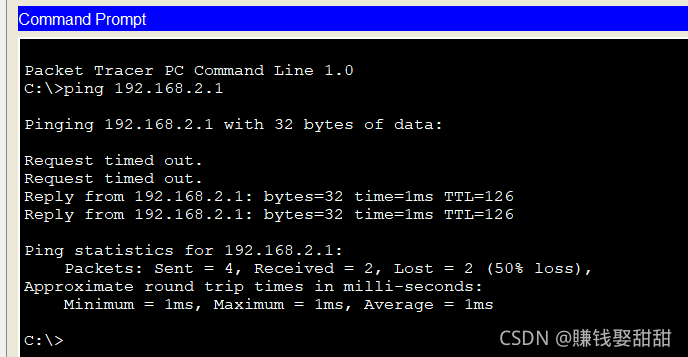
The result is : The configuration is correct ,ping Yes !!!
边栏推荐
- 学习日记——(路由与交换技术)DHCP(动态主机配置协议)
- LSM-tree(Log Structured-Merge Tree)的理解
- OSPF的链路扩展配置
- HCIP---BGP ---边界网关协议
- Knowledge points and skills of Wireshark network analysis is so simple
- Take go language as an example to explain [performance analysis] by analogizing detective reasoning
- SQL基础操作总结
- HCIP---MGRE综合实验
- HCIP---BGP相关配置(联邦篇)
- 在二叉排序树中删除节点
猜你喜欢

C custom queue set

@Requiredargsconstructor annotation use

HCIP---MGRE综合实验

Unity3D+moba+技能指示器(二)

学习日记——(路由与交换技术)动态路由(rip协议)和静态路由
DHCP 第二次实验
HCIP---OSPF细节讲解
C# 自定义Queue队列集合

Three versions and optimization of quick sorting by interval -- friends may not know it

Understanding of LSM tree (log structured merge tree)
随机推荐
HCIP---BGP相关配置
学习日记——(路由与交换技术)动态路由(rip协议)和静态路由
HCIP---OSPF细节讲解
Unity Shader丢失问题
[AUTOSAR storage stack NVM]
Analyze sentinel mode in redis
Analysis of inheritablethreadlocal and Alibaba's transmittablethreadlocal design ideas
路由与接口技术——直连网络总结
C # custom bidirectional linked list
unity3d:UGUI源码EventSystem输入系统常见问题
详解各种网络协议
OSPF和RIP的路由扩展配置
《wireshark网络分析就是这么简单》知识点与技巧
[fee of AUTOSAR (difference between nonvolatile memory flash and EEPROM)]
Openssl自行签证流程概述
C# 自定义双向链表
浅析互联网协议(一)
[bootloader architecture and brushing process based on UDS service]
C #: TOPK: take the largest 100 before 10000 numbers, and sort the heap
MySQL performance optimization, index optimization