当前位置:网站首页>centos7部署docker,安装mysql
centos7部署docker,安装mysql
2022-06-23 03:52:00 【韧小钊】
centos7部署docker
docker安装部署
创建部署用户,赋予sudo权限
[[email protected] ~]# useradd docker -d /home/docker
[[email protected] ~]# passwd docker
更改用户 docker 的密码 。
新的 密码:
无效的密码: 密码少于 8 个字符
重新输入新的 密码:
passwd:所有的身份验证令牌已经成功更新。
[[email protected] ~]# echo 'docker ALL=(ALL) NOPASSWD: ALL' >> /etc/sudoers
[[email protected] ~]# su - docker
[[email protected] ~]$
一键部署
[[email protected] ~]$ #使用官方安装脚本自动安装
[[email protected] ~]$ curl -fsSL https://get.docker.com | bash -s docker --mirror Aliyun
国内daocloud一键安装命令:
curl -sSL https://get.daocloud.io/docker | sh
启动
[[email protected] ~]$ sudo systemctl start docker
查看状态
[[email protected] ~]$ systemctl status docker
设置开机启动
[[email protected] ~]$ # 设置开机启动
[[email protected] ~]$ sudo systemctl enable docker
Created symlink from /etc/systemd/system/multi-user.target.wants/docker.service to /usr/lib/systemd/system/docker.service.
[[email protected] ~]$
镜像操作
查看镜像
[[email protected] ~]$  docker images
REPOSITORY   TAG       IMAGE ID   CREATED   SIZE
下载镜像(超时错)
[[email protected] ~]$ docker pull hello-world
Using default tag: latest
Error response from daemon: Get "https://registry-1.docker.io/v2/": net/http: TLS handshake timeout
指定镜像重新拉取
[[email protected] ~]$ sudo vi /etc/docker/daemon.json
[[email protected] ~]$ cat /etc/docker/daemon.json
{
    "registry-mirrors":["https://docker.mirrors.ustc.edu.cn"]
}
[[email protected] ~]$ docker pull hello-world
Using default tag: latest
latest: Pulling from library/hello-world
2db29710123e: Pull complete

Digest: sha256:10d7d58d5ebd2a652f4d93fdd86da8f265f5318c6a73cc5b6a9798ff6d2b2e67
Status: Downloaded newer image for hello-world:latest
docker.io/library/hello-world:latest
[[email protected] ~]$
[docker[email protected] ~]$  docker images
REPOSITORY    TAG       IMAGE ID       CREATED        SIZE
hello-world   latest    feb5d9fea6a5   7 months ago   13.3kB
删除镜像
[[email protected] ~]$ docker rmi hello-world
Untagged: hello-world:latest
Untagged: [email protected]:10d7d58d5ebd2a652f4d93fdd86da8f265f5318c6a73cc5b6a9798ff6d2b2e67
Deleted: sha256:feb5d9fea6a5e9606aa995e879d862b825965ba48de054caab5ef356dc6b3412
Deleted: sha256:e07ee1baac5fae6a26f30cabfe54a36d3402f96afda318fe0a96cec4ca393359
[[email protected] ~]$  docker images
REPOSITORY   TAG       IMAGE ID   CREATED   SIZE
[[email protected] ~]$
容器操作
#### 查看全部容器
[[email protected] ~]$ docker ps -a
CONTAINER ID   IMAGE     COMMAND   CREATED   STATUS    PORTS     NAMES
创建容器
[[email protected] ~]$ docker create -it --name=test hello-world
aaa8f6652052d88c159e53ac9f88cbfa77934c8f7b31a615ec9f18acedb88f1e
[[email protected] ~]$ docker ps -a
CONTAINER ID   IMAGE         COMMAND    CREATED         STATUS    PORTS     NAMES
aaa8f6652052   hello-world   "/hello"   8 seconds ago   Created             test
启动容器
[[email protected] ~]$ docker start aaa8f6652052
aaa8f6652052
[[email protected] ~]$ docker ps -a
CONTAINER ID   IMAGE         COMMAND    CREATED          STATUS                     PORTS     NAMES
aaa8f6652052   hello-world   "/hello"   29 seconds ago   Exited (0) 3 seconds ago             test
查看日志
[[email protected] ~]$ docker logs aaa8f6652052

Hello from Docker!
This message shows that your installation appears to be working correctly.

To generate this message, Docker took the following steps:
 1. The Docker client contacted the Docker daemon.
 2. The Docker daemon pulled the "hello-world" image from the Docker Hub.
    (amd64)
 3. The Docker daemon created a new container from that image which runs the
    executable that produces the output you are currently reading.
 4. The Docker daemon streamed that output to the Docker client, which sent it
    to your terminal.

To try something more ambitious, you can run an Ubuntu container with:
 $ docker run -it ubuntu bash

Share images, automate workflows, and more with a free Docker ID:
 https://hub.docker.com/

For more examples and ideas, visit:
 https://docs.docker.com/get-started/
查看容器详情
[[email protected] ~]$ docker inspect aaa8f6652052
[
    {
        "Id": "aaa8f6652052d88c159e53ac9f88cbfa77934c8f7b31a615ec9f18acedb88f1e",
        "Created": "2022-05-07T06:56:57.904666417Z",
        "Path": "/hello",
        "Args": [],
        "State": {
            "Status": "exited",
            "Running": false,
            "Paused": false,
            "Restarting": false,
            "OOMKilled": false,
            "Dead": false,
            "Pid": 0,
            "ExitCode": 0,
            "Error": "",
            "StartedAt": "2022-05-07T06:57:22.999901707Z",
            "FinishedAt": "2022-05-07T06:57:23.018206468Z"
        },
        "Image": "sha256:feb5d9fea6a5e9606aa995e879d862b825965ba48de054caab5ef356dc6b3412",
        "ResolvConfPath": "/var/lib/docker/containers/aaa8f6652052d88c159e53ac9f88cbfa77934c8f7b31a615ec9f18acedb88f1e/resolv.conf",
        "HostnamePath": "/var/lib/docker/containers/aaa8f6652052d88c159e53ac9f88cbfa77934c8f7b31a615ec9f18acedb88f1e/hostname",
        "HostsPath": "/var/lib/docker/containers/aaa8f6652052d88c159e53ac9f88cbfa77934c8f7b31a615ec9f18acedb88f1e/hosts",
        "LogPath": "/var/lib/docker/containers/aaa8f6652052d88c159e53ac9f88cbfa77934c8f7b31a615ec9f18acedb88f1e/aaa8f6652052d88c159e53ac9f88cbfa77934c8f7b31a615ec9f18acedb88f1e-json.log",
        "Name": "/test",
        "RestartCount": 0,
        "Driver": "overlay2",
        "Platform": "linux",
        "MountLabel": "",
        "ProcessLabel": "",
        "AppArmorProfile": "",
        "ExecIDs": null,
        "HostConfig": {
            "Binds": null,
            "ContainerIDFile": "",
            "LogConfig": {
                "Type": "json-file",
                "Config": {}
            },
            "NetworkMode": "default",
            "PortBindings": {},
            "RestartPolicy": {
                "Name": "no",
                "MaximumRetryCount": 0
            },
            "AutoRemove": false,
            "VolumeDriver": "",
            "VolumesFrom": null,
            "CapAdd": null,
            "CapDrop": null,
            "CgroupnsMode": "host",
            "Dns": [],
            "DnsOptions": [],
            "DnsSearch": [],
            "ExtraHosts": null,
            "GroupAdd": null,
            "IpcMode": "private",
            "Cgroup": "",
            "Links": null,
            "OomScoreAdj": 0,
            "PidMode": "",
            "Privileged": false,
            "PublishAllPorts": false,
            "ReadonlyRootfs": false,
            "SecurityOpt": null,
            "UTSMode": "",
            "UsernsMode": "",
            "ShmSize": 67108864,
            "Runtime": "runc",
            "ConsoleSize": [
                0,
                0
            ],
            "Isolation": "",
            "CpuShares": 0,
            "Memory": 0,
            "NanoCpus": 0,
            "CgroupParent": "",
            "BlkioWeight": 0,
            "BlkioWeightDevice": [],
            "BlkioDeviceReadBps": null,
            "BlkioDeviceWriteBps": null,
            "BlkioDeviceReadIOps": null,
            "BlkioDeviceWriteIOps": null,
            "CpuPeriod": 0,
            "CpuQuota": 0,
            "CpuRealtimePeriod": 0,
            "CpuRealtimeRuntime": 0,
            "CpusetCpus": "",
            "CpusetMems": "",
            "Devices": [],
            "DeviceCgroupRules": null,
            "DeviceRequests": null,
            "KernelMemory": 0,
            "KernelMemoryTCP": 0,
            "MemoryReservation": 0,
            "MemorySwap": 0,
            "MemorySwappiness": null,
            "OomKillDisable": false,
            "PidsLimit": null,
            "Ulimits": null,
            "CpuCount": 0,
            "CpuPercent": 0,
            "IOMaximumIOps": 0,
            "IOMaximumBandwidth": 0,
            "MaskedPaths": [
                "/proc/asound",
                "/proc/acpi",
                "/proc/kcore",
                "/proc/keys",
                "/proc/latency_stats",
                "/proc/timer_list",
                "/proc/timer_stats",
                "/proc/sched_debug",
                "/proc/scsi",
                "/sys/firmware"
            ],
            "ReadonlyPaths": [
                "/proc/bus",
                "/proc/fs",
                "/proc/irq",
                "/proc/sys",
                "/proc/sysrq-trigger"
            ]
        },
        "GraphDriver": {
            "Data": {
                "LowerDir": "/var/lib/docker/overlay2/66c71552979e600283024720c28fce1bbffdba0baeb948675a02c5d6ee31cc9e-init/diff:/var/lib/docker/overlay2/176b33a38f9b52db5535389d92450c23bbd3f1beb06036d93b9853ea9550a3f1/diff",
                "MergedDir": "/var/lib/docker/overlay2/66c71552979e600283024720c28fce1bbffdba0baeb948675a02c5d6ee31cc9e/merged",
                "UpperDir": "/var/lib/docker/overlay2/66c71552979e600283024720c28fce1bbffdba0baeb948675a02c5d6ee31cc9e/diff",
                "WorkDir": "/var/lib/docker/overlay2/66c71552979e600283024720c28fce1bbffdba0baeb948675a02c5d6ee31cc9e/work"
            },
            "Name": "overlay2"
        },
        "Mounts": [],
        "Config": {
            "Hostname": "aaa8f6652052",
            "Domainname": "",
            "User": "",
            "AttachStdin": true,
            "AttachStdout": true,
            "AttachStderr": true,
            "Tty": true,
            "OpenStdin": true,
            "StdinOnce": true,
            "Env": [
                "PATH=/usr/local/sbin:/usr/local/bin:/usr/sbin:/usr/bin:/sbin:/bin"
            ],
            "Cmd": [
                "/hello"
            ],
            "Image": "hello-world",
            "Volumes": null,
            "WorkingDir": "",
            "Entrypoint": null,
            "OnBuild": null,
            "Labels": {}
        },
        "NetworkSettings": {
            "Bridge": "",
            "SandboxID": "46ecfbf481103b2f5bc9d5cbae762c0eb427589483e905ed1d9216e530525d39",
            "HairpinMode": false,
            "LinkLocalIPv6Address": "",
            "LinkLocalIPv6PrefixLen": 0,
            "Ports": {},
            "SandboxKey": "/var/run/docker/netns/46ecfbf48110",
            "SecondaryIPAddresses": null,
            "SecondaryIPv6Addresses": null,
            "EndpointID": "",
            "Gateway": "",
            "GlobalIPv6Address": "",
            "GlobalIPv6PrefixLen": 0,
            "IPAddress": "",
            "IPPrefixLen": 0,
            "IPv6Gateway": "",
            "MacAddress": "",
            "Networks": {
                "bridge": {
                    "IPAMConfig": null,
                    "Links": null,
                    "Aliases": null,
                    "NetworkID": "c0c4813d6f77ca6c8b0b6c4faddd8a2041a3e1f93c56acd5fb22533b70e96444",
                    "EndpointID": "",
                    "Gateway": "",
                    "IPAddress": "",
                    "IPPrefixLen": 0,
                    "IPv6Gateway": "",
                    "GlobalIPv6Address": "",
                    "GlobalIPv6PrefixLen": 0,
                    "MacAddress": "",
                    "DriverOpts": null
                }
            }
        }
    }
]
[[email protected] ~]$
卸载docker
docker-ce社区版,docker-ee企业版
[[email protected] ~]$ sudo yum remove docker-ce -y
[[email protected] ~]$ sudo rm -rf /var/lib/docker
卸载完,还能看到版本号,哪里没卸载干净???
[[email protected] ~]$ docker -v
Docker version 20.10.15, build fd82621
[[email protected] ~]$
卸载旧版本命令
[[email protected] ~]$ sudo yum remove docker docker-client docker-client-latest docker-common docker-latest docker-latest-logrotate docker-logrotate docker-engine -y
已加载插件:fastestmirror
参数 docker 没有匹配
参数 docker-client 没有匹配
参数 docker-client-latest 没有匹配
参数 docker-common 没有匹配
参数 docker-latest 没有匹配
参数 docker-latest-logrotate 没有匹配
参数 docker-logrotate 没有匹配
参数 docker-engine 没有匹配
不删除任何软件包
[[email protected] ~]$
手动部署
设置仓库
安装依赖包
sudo yum install -y yum-utils device-mapper-persistent-data lvm2
设置仓库地址,选择阿里云源地址(官方源地址比较慢)
sudo yum-config-manager --add-repo http://mirrors.aliyun.com/docker-ce/linux/centos/docker-ce.repo
安装Docker社区版
sudo yum install -y docker-ce docker-ce-cli containerd.io
docker安装MySQL
拉取MySQL镜像文件
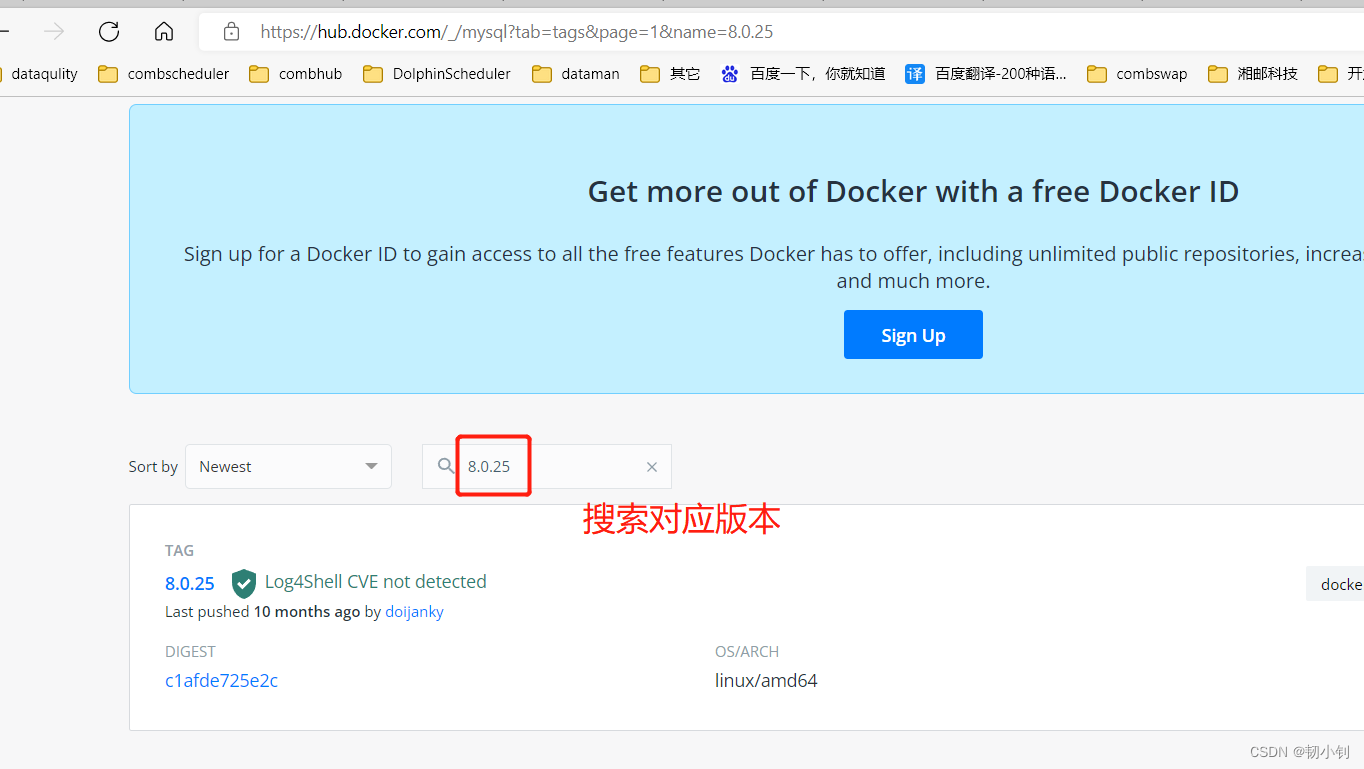
[[email protected] ~]$ sudo docker pull mysql:8.0.25
8.0.25: Pulling from library/mysql
b4d181a07f80: Pull complete
a462b60610f5: Pull complete
578fafb77ab8: Pull complete
524046006037: Pull complete
d0cbe54c8855: Pull complete
aa18e05cc46d: Pull complete
32ca814c833f: Pull complete
9ecc8abdb7f5: Pull complete
ad042b682e0f: Pull complete
71d327c6bb78: Pull complete
165d1d10a3fa: Pull complete
2f40c47d0626: Pull complete
Digest: sha256:52b8406e4c32b8cf0557f1b74517e14c5393aff5cf0384eff62d9e81f4985d4b
Status: Downloaded newer image for mysql:8.0.25
docker.io/library/mysql:8.0.25
[[email protected] ~]$
查看镜像
[[email protected] ~]$ sudo  docker images
REPOSITORYTAG   IMAGE ID   CREATED SIZE
hello-world   latestfeb5d9fea6a5   7 months ago13.3kB
mysql 8.0.255c62e459e087   10 months ago   556MB
[[email protected] ~]$
启动MySQL镜像
docker run -itd --name test-mysql1 -p 3307:3306 -e MYSQL_ROOT_PASSWORD=123456 mysql
参数说明:
- -p 3307:3306 :映射容器服务的 3306 端口到宿主机的 3307 端口,外部主机可以直接通过宿主机ip:3307访问到MySQL 的服务
- MYSQL_ROOT_PASSWORD=123456:设置 MySQL 服务 root 用户的密码。
机器之前装了mysql,因此端口改用3307,否则冲突!
验证

边栏推荐
- Usage of API interface test ------ post
- Project summary 1 (header file, switch, &, bit variables)
- 静态双位置继电器 XJLS-84/440/DC220V
- ICer技能02makefile脚本自跑vcs仿真
- 聊聊 C# 中的 Composite 模式
- const理解之一
- Cloud function realizes fuzzy search function
- Static two position relay gls-3004k/dc220v
- Examples of corpus data processing cases (part of speech encoding, part of speech restoration)
- Alkylation process test questions and simulation test in 2022
猜你喜欢

DSP7 环境

在Pycharm中使用append()方法对列表添加元素时提示“This list creation could be rewritten as a list literal“的解决方法
ICER skill 02makefile script self running VCs simulation

mysql json

Win10 view my Ini path

Common concepts and terms in offline warehouse modeling
《微信小程序-基础篇》带你了解小程序的路由系统(二)

2 万字 + 20张图|细说 Redis 九种数据类型和应用场景

静态双位置继电器GLS-3004K/DC220V

PCB----理论与现实的桥梁
随机推荐
Abnova PSMA磁珠解决方案
PCB任意角度和距离放置元器件
McKinsey: in 2021, the investment in quantum computing market grew strongly and the talent gap expanded
2 万字 + 20张图|细说 Redis 九种数据类型和应用场景
Mini Homer——几百块钱也能搞到一台远距离图数传链路?
Abnova blood total nucleic acid purification kit protocol
A mvc5+easyui enterprise rapid development framework source code BS framework source code
PCB -- bridge between theory and reality
如何更好地组织最小 WEB API 代码结构
CAN总线基础知识
AD9使用技巧拾遗
Summary of switched reluctance motor suspension drive ir2128
Mini Homer - can you get a remote map data transmission link for hundreds of yuan?
Abnova ACTN4纯化兔多克隆抗体说明书
五年连续亏损42亿,蘑菇如何渡劫?
How can mushrooms survive a five-year loss of 4.2 billion yuan?
Non return to zero code NRZ
ICer技能02makefile脚本自跑vcs仿真
Please use the NLTK Downloader to obtain the resource
Common concepts and terms in offline warehouse modeling