当前位置:网站首页>ICer技能02makefile脚本自跑vcs仿真
ICer技能02makefile脚本自跑vcs仿真
2022-06-23 03:52:00 【捌肆幺幺】
0.前言
在win上跑过modelesim仿真的都知道,我们需要准备好两个.v文件,然后一顿界面的操作点来点去,最后才生成波形,这对于开发者来说是相当低效的,所以今天记录一下linux下使用makefile脚本自跑vcs仿真。
1.常用选项
| 对象 | 指令 | 表示作用 |
|---|---|---|
| vcs | -full64 | 支持64位 |
| vcs | -l 空格 文件名 | 创建日志文件,一般为.log文件 |
| vcs | -f 空格 文件名 | 在某文件中索引要编译的文件路径,可以是file.list文件 |
| vcs | -debug_all | 支持调试 |
| vcs | -timescale=1ns/1ns | 时间精度 |
| vcs | +v2k | Verilog2001架构 |
| vcs | -sverilog | sv架构 |
| simv | -l | 仿真日志 |
| simv | -gui | 开启界面 |
| dve | -vpd 空格 文件名 | 打开波形文件,一般在最后加个&表示后台运行 |
2.准备工作
下面直接开始从零写一个简单的makefile脚本来自动化操作vcs仿真,当然要有一定的linux基础操作的知识,这个看个半小时基本命令的使用都能直接上手了,小case
①首先我们进入终端,用ls命令看看有什么文件
ls
②我们看到只有一个add_vcs的文件夹
③忽略这个文件夹,重新建立一个add_test的文件夹
mkdir add_test
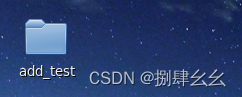
④可以看到桌面上多了一个文件夹(当然我是在桌面这个路径下敲的代码)
⑤进入add_test文件夹下的路径
cd ./add_test/

⑥创建两个文件:add.v add_tb.v
touch add.v
touch add_tb.v


⑦使用gvim编辑器编写两个.v文件,代码如下
add.v
 module add
 (
 	input		a,b,c_in,
 	output		sum,c_out
 );

 assign sum = a ^ b ^ c_in;

 assign c_out = (c_in & b)|(a & b)|(a & c_in);

 endmodule
add_tb.v 注意一定要保证仿真能结束,不然跑vcs会一直卡进程,还有就是$vcdpluson生成波形文件
 `timescale 1 ns/1 ns
 module add_tb();
 //输入用reg
 reg          a;
 reg          b;
 reg	     c_in;
 reg	     clk;

 //输出用wire
 wire	     sum;
 wire	     c_out;

 //时钟周期,单位为ns
 parameter CYCLE    = 20;

 //生成本地时钟
 initial begin
     clk = 0;
     forever
     #(CYCLE/2)
     clk=~clk;
 end

 //信号初始化
 initial begin
 	#1
 	a    = 0;
 	b    = 0;
 	c_in = 0;
 end

 //待测试的模块例化
 add u1
 (
 	.a	(a),
 	.b	(b),
 	.c_in   (c_in),
 	.c_out  (c_out),
 	.sum	(sum)
 );

 //其他输入信号赋值
 always @(posedge clk)begin
 	a    = {$random}%2;
 	b    = {$random}%2;
 	c_in = {$random}%2;
 end

 initial begin
   $vcdpluson;
 end

 initial begin
   # 200 $finish;
 end

 endmodule

⑧生成file.list文件,再用ls查看是否真正生成了相应文件
find -name "*.v"> file.list

⑨使用gvim查看flie.list文件(按下gf可以跳转,ctrl+o返回),发现是一个相对路径集合
gvim file.list

3.makefile编写
- vcs的仿真首先要进行编译(com),然后是仿真(sim),再接着就是看波形(用dve看)
- 首先定义all: com sim run_dve
- 接着编写com sim run_dve 的各个指令
- 最后加上一个clean来清除仿真生成的文件
先在add_test路径下创建一个makefile文件进而编写
代码如下:
all: com sim run_dve

com:
	vcs -sverilog -debug_all -timescale=1ns/1ns -f file.list -l com.log

sim:
	./simv -l sim.log

run_dve:
	dve -vpd vcdplus.vpd &

clean:
	rm -rf *.vpd csrc *.log *.key *.vdb simv* DVE*
根据开头的表格可以了解各个指令的功能
4.一键仿真及文件清理
①回到终端,在add_test路径下运行
make all
即可
②仿真如下图:
③自动运行dve ,我们添加查看波形即可


④最后关闭dve界面,在终端上运行
make clean
将生成的文件全部删除,ls查看一下只剩下原本的4个文件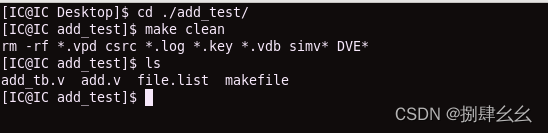
边栏推荐
猜你喜欢




随机推荐
Static two position relay xjls-84/440/dc220v
[acnoi2022] no way without guessing
PCB placing components at any angle and distance
Please use the NLTK Downloader to obtain the resource
DSP7 环境
openwrt目录结构
Abnova abcb10 (human) recombinant protein specification
zk 有一个节点报 It is probably not running且日志无明显报错
Cocos learning diary 2 - scripts and attributes
一款MVC5+EasyUI企业快速开发框架源码 BS框架源码
Const understanding II
左值与右值
Pta:6-33 student ranking table (destructor)
Welcome to the CSDN markdown editor
重装Cadence16.3,失败与成功
数据科学家是不是特有前途的职业?
聊聊 C# 中的 Composite 模式
Pta:6-73 function call
如何解决独立站多渠道客户沟通难题?这款跨境电商插件一定要知道!
欢迎使用CSDN-markdown编辑器