当前位置:网站首页>C # connection to database
C # connection to database
2022-06-23 17:12:00 【Hua doesn't care】
One 、 Components used in the connection
(1) A button "Button"
(2) One “DataGridView”( Used to store forms transferred from the database )
Two 、 Connection code
(1)form1.cs
using System;
using System.Collections.Generic;
using System.ComponentModel;
using System.Data;
using System.Drawing;
using System.Linq;
using System.Text;
using System.Threading.Tasks;
using System.Data.SqlClient;// The header file ( Be careful to write )
using System.Windows.Forms;

//Author dahua
//Data by 2022.6.23
namespace WindowsFormsApp1
{

    public partial class Form1 : Form
    {

        public Form1()
        {

            InitializeComponent();
        }

        private void Btnconn_Click(object sender, EventArgs e)
        {

            // Instantiate objects
            SqlConnection con = new SqlConnection();
            // Generate connection string
            //string connectString = "Data Source=.\\LAPTOP-F8H1G1BE; database=Q;User ID=root;password=963456";
            // Read configuration file
            string connectString = System.Configuration.ConfigurationSettings.AppSettings["SQLconnectString"];
            connectString=System.Configuration.ConfigurationManager.AppSettings["SQLconnectString"];
            con.ConnectionString = connectString;
            // Establishing a connection
            try
            {

                con.Open();

                // Prompt whether the connection is successful
                if (con.State == ConnectionState.Open)
                {

                    MessageBox.Show(" Database connection successful !");
                }
            }
            catch
            {

                MessageBox.Show(" Database connection failed !");
            }
            // Create objects
            SqlCommand sqlcommand = new SqlCommand();
            sqlcommand.Connection = con;
            sqlcommand.CommandText = "select * from [dbo].[student]";
            // perform Sql Command and return the result to the interface IDataReader type ider in
            IDataReader idr = sqlcommand.ExecuteReader();
            DataTable dt = new DataTable();
            // take idr Fill in the data in DataTable type dt in
            dt.Load(idr);
            dataGridView1.DataSource = dt.DefaultView;
            // Close the connection
            idr.Close();
            con.Close();
            if (connectString != null)
            {

                con.Close();
            }
        }
    }
}
(2) App.config
<?xml version="1.0" encoding="utf-8" ?>
<configuration>
    <startup>
        <supportedRuntime version="v4.0" sku=".NETFramework,Version=v4.7.2" />
    </startup>
  <appSettings>
    // Here's what I'm using sql Authentication login ( Select on demand )
    <add key="SQLconnectString1" value="Data Source=.\LAPTOP-F8H1G1BE; database=master;User ID=user1;password=;"/>
    <add key="OrleconnectString" value="Data Source=.\LAPTOP-F8H1G1BE; database=Q;User ID=root;password=xxxxx"/>
    // What's used here is window Authentication login
    <add key="SQLconnectString" value="server=.;database=master;integrated security=SSPI"/>

  </appSettings>
</configuration>
3、 ... and 、 Running results
(1) Database connection success result chart 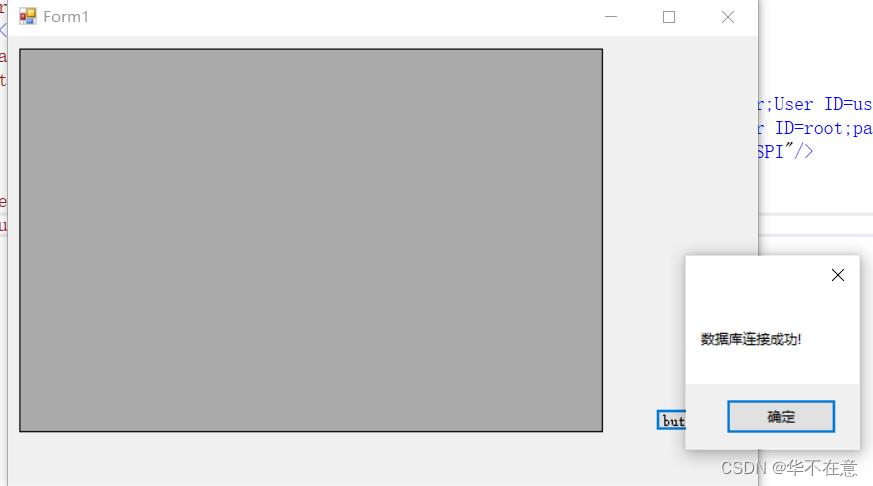
(2) Database connection to the result graph of the form 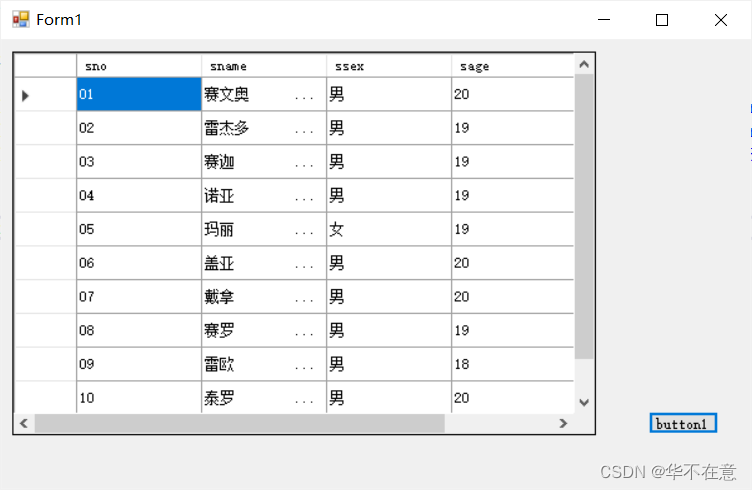
【 notes 】 Use App.config The reason why the configuration file places the database connection is
(1) Convenient will “.exe” After the file is packaged and sent to the user , Users on their own computers When the configuration , You can directly modify the user name and password of the database , You can use this file directly .
(2) Sometimes you need to connect to multiple databases , Put the database connection in the configuration file , It is convenient for unified management or modification in the later stage .
边栏推荐
- R language uses the image of magick package_ The scale function resizes the image. You can customize the scaling from the angle of width or height
- 电感参数有哪些?怎么选择电感?
- Rongyun: let the bank go to the "cloud" easily
- 科大讯飞神经影像疾病预测方案!
- 公司招了个五年经验的测试员,见识到了真正的测试天花板
- 相机电源受干扰案例分析,严重影响画质
- 官方零基础入门 Jetpack Compose 的中文课程来啦!
- Talk about the difference between redis cache penetration and cache breakdown, and the avalanche effect caused by them
- Right leg drive circuit principle? ECG acquisition is a must, with simulation files!
- What does websocket do?
猜你喜欢
![[untitled] Application of laser welding in medical treatment](/img/c5/9c9edf1c931dfdd995570fa20cf7fd.png)
[untitled] Application of laser welding in medical treatment

官方零基础入门 Jetpack Compose 的中文课程来啦
![Leetcode: interview question 08.13 Stacking bin [top-down DFS + memory or bottom-up sorting + DP]](/img/22/220e802da7543c2b14b7057e4458b7.png)
Leetcode: interview question 08.13 Stacking bin [top-down DFS + memory or bottom-up sorting + DP]

ASEMI超快恢复二极管ES1J参数,ES1J封装,ES1J规格

hands-on-data-analysis 第二单元 第四节数据可视化

EasyPlayer移动端播放webrtc协议时长按播放页面无法关闭“关于我们”页面
TensorRT Paser加载onnx 推理使用
Troubleshooting of datanode entering stale status

Rongyun: let the bank go to the "cloud" easily

面渣逆袭:MySQL六十六问!建议收藏
随机推荐
ERP管理系统的重要性
Tensorrt Paser loading onnx inference use
Here comes the official zero foundation introduction jetpack compose Chinese course!
R language ggplot2 visualizes horizontal boxplot with coord_flip, and adds jittered data points to display the distribution
A number of individual stocks in Hong Kong stocks performed actively, triggering investors' speculation and concern about the recovery of the Hong Kong stock market
接口的所有权之争
创新技术领航者!华为云GaussDB获颁2022年云原生数据库领域权威奖项
短视频平台开发,点击输入框时自动弹出软键盘
Counter attack by flour dregs: MySQL 66 question! Suggested collection
How to select securities companies? Is it safe to open a mobile account?
开户券商怎么选择?现在网上开户安全么?
混沌工程在云原生中间件稳定性治理中的实践分享
华为手机通过adb安装APK提示“签名不一致,该应用可能已被修改”
Practice sharing of chaos engineering in stability management of cloud native Middleware
R language plot visualization: plot visualization adds bar chart with error bars with plot in R
Redis cluster operation method
JS常见的报错及异常捕获
Shushulang passed the listing hearing: the gross profit margin of the tablet business fell, and the profit in 2021 fell by 11% year-on-year
元宇宙带来的社会结构和资本制度演变
亚朵更新招股书:继续推进纳斯达克上市,已提前“套现”2060万元