当前位置:网站首页>Redis cluster operation method
Redis cluster operation method
2022-06-23 16:57:00 【Yisu cloud】
Redis Methods of cluster operation
This article introduces “Redis Methods of cluster operation ” Knowledge about , During the operation of the actual case , Many people will encounter such difficulties , Next, let Xiaobian lead you to learn how to deal with these situations ! I hope you will read carefully , Be able to learn !

Based on a certain foundation , Here is a basic version of "three masters and three slaves" , The structure is as follows

1、 Start cluster
/usr/local/redis‐5.0.3/src/redis‐server /usr/local/redis‐cluster/8001/redis.conf /usr/local/redis‐5.0.3/src/redis‐server /usr/local/redis‐cluster/8002/redis.conf /usr/local/redis‐5.0.3/src/redis‐server /usr/local/redis‐cluster/8003/redis.conf /usr/local/redis‐5.0.3/src/redis‐server /usr/local/redis‐cluster/8004/redis.conf /usr/local/redis‐5.0.3/src/redis‐server /usr/local/redis‐cluster/8005/redis.conf /usr/local/redis‐5.0.3/src/redis‐server /usr/local/redis‐cluster/8006/redis.conf
View the cluster status :cluster nodes
 As can be seen from the above figure , The whole cluster is running normally , Three master Nodes and three slave node ,
8001 The instance node of the port stores 0-5460 these hash Slot ,
8002 The instance node of the port stores 5461-10922 these hash Slot ,
8003 The instance node of the port stores 10923-16383 these hash Slot ,
These three master All that the node stores hash Tank composition redis The storage slot of the cluster ,slave Point is the backup slave node of each master node , The storage slot is not displayed .
2、 Cluster operation
Let's add another host to the original cluster (8007) ever since (8008), See the figure below for the cluster after adding nodes , The new nodes are represented by dotted lines

2.1、 increase redis example
stay /usr/local/redis-cluster Create 8007 and 8008 Folder , And copy 8001 Under folder redis.conf File to 8007 and 8008 Under these two folders
mkdir 8007 8008 cd 8001cp redis.conf /usr/local/redis‐cluster/8007/ cp redis.conf /usr/local/redis‐cluster/8008/ # modify 8007 Under folder redis.conf The configuration file vim /usr/local/redis‐cluster/8007/redis.conf # Modify the following :port:8007 dir /usr/local/redis‐cluster/8007/cluster‐config‐file nodes‐8007.conf # modify 8008 Under folder redis.conf The configuration file vim /usr/local/redis‐cluster/8008/redis.conf# The modification is as follows :port:8008dir /usr/local/redis‐cluster/8008/cluster‐config‐file nodes‐8008.conf# start-up 8007 and 8008 Two services and check the service status /usr/local/redis‐5.0.3/src/redis‐server /usr/local/redis‐cluster/8007/redis.conf/usr/local/redis‐5.0.3/src/redis‐server /usr/local/redis‐cluster/8008/redis.confps ‐el | grep redis
2.2、 To configure 8007 Master node
use add-node Command to add a master node 8007(master), Ahead ip:port For new nodes , hinder ip:port For known nodes , At the end of the log is "[OK] New node added correctly" The prompt indicates that the new node has joined successfully
/usr/local/redis‐5.0.3/src/redis‐cli ‐a user ‐‐cluster add‐node 192.168.0.61:8007 192.168.0.61:8001
View the cluster status
/usr/local/redis‐5.0.3/src/redis‐cli ‐a user ‐c ‐h 192.168.0.61 ‐p 8001192.168.0.61:8001> cluster nodes
As shown below :

Be careful : When the node is added successfully , The new node will not have any data , Because it hasn't allocated any slot(hash Slot ), We need to manually assign... To new nodes hash Slot
Use redis-cli The order is 8007 Distribute hash Slot , Find any primary node in the cluster , Re slice it
/usr/local/redis‐5.0.3/src/redis‐cli ‐a user ‐‐cluster reshard 192.168.0.61:8001
2.3、 To configure 8008 by 8007 The slave node
Add slave node 8008 Go to the cluster and check the cluster status
/usr/local/redis‐5.0.3/src/redis‐cli ‐a user ‐‐cluster add‐node 192.168.0.61:8008 192.168.0.61:8001
as follows :

As shown in the figure , Or a master node , Not assigned anything hash Slot .
reason : We need to implement replicate Command to specify the current node ( From the node ) The primary node of id For which , First you need to connect the new 8008 The client of the node , Then use the cluster command to operate , Put the current 8008(slave) Nodes are assigned to a primary node ( Here we use the 8007 Master node )
Execution instruction
/usr/local/redis‐5.0.3/src/redis‐cli ‐a user ‐c ‐h 192.168.0.61 ‐p 8008 192.168.0.61:8008> cluster replicate 2728a594a0498e98e4b83a537e19f9a0a3790f38 # This string in the back id by 8007 The node of id
View the cluster status ,8008 Node was successfully added as 8007 The slave node of the node

2.4、 Delete 8080 From the node [ Do not delete four master and four slave ]
use del-node Delete from node 8008, Specify delete node ip And port , And nodes id( Red as 8008 node id)
/usr/local/redis‐5.0.3/src/redis‐cli ‐a user ‐‐cluster del‐node 192.168.0.61:8008 a1cfe35722d151cf70585cee212755653 93c0956
Check the cluster status again , As shown in the figure below ,8008 This slave The node has been removed , And the node's redis Services have also been stopped

2.5、 Delete 8007 Master node [ Do not delete four master and four slave ]
Because there are assignments in the master node hash Grooved , So we have to put 8007 Inside hash Slot into other available master nodes , Then remove the node , Otherwise, there will be data loss ( At present, only master Data is migrated to a node , We can't do the average distribution function for the time being ), Execute the order as follows :
/usr/local/redis‐5.0.3/src/redis‐cli ‐a user ‐‐cluster reshard 192.168.0.61:8007
Migration validation : Will find 8007 There is no more hash There's a slot , Prove that the migration was successful !

use del-node Command deletion 8007 The primary node is just
/usr/local/redis‐5.0.3/src/redis‐cli ‐a user ‐‐cluster del‐node 192.168.0.61:8007 2728a594a0498e98e4b83a537e19f9a0a 3790f38
View the final cluster status , Find that everything is restored , This completes the horizontal expansion

“Redis Methods of cluster operation ” That's all for , Thanks for reading . If you want to know more about the industry, you can pay attention to Yisu cloud website , Xiaobian will output more high-quality practical articles for you !
边栏推荐
- Coatnet: marrying revolution and attention for all data sizes
- golang冒泡排序代码实现
- ASEMI快恢复二极管RS1M、US1M和US1G能相互代换吗
- How long does it take to open a stock account by mobile phone? Is online account opening safe?
- leetcode:面試題 08.13. 堆箱子【自頂而下的dfs + memory or 自底而上的排序 + dp】
- TensorRT Paser加载onnx 推理使用
- 官方零基础入门 Jetpack Compose 的中文课程来啦
- Another breakthrough! Alibaba cloud enters the Gartner cloud AI developer service Challenger quadrant
- How to select an oscilloscope? These 10 points must be considered!
- ABAP essays - program optimization notes
猜你喜欢

科大讯飞神经影像疾病预测方案!

亚朵更新招股书:继续推进纳斯达克上市,已提前“套现”2060万元
Jetpack compose and material you FAQs

Robot Orientation and some misunderstandings in major selection in college entrance examination

Block, non block, multiplexing, synchronous, asynchronous, bio, NiO, AIO

出现Identify and stop the process that‘s listening on port 8080 or configure this application等解决方法

面渣逆袭:MySQL六十六问!建议收藏

混沌工程在云原生中间件稳定性治理中的实践分享

golang二分查找法代码实现
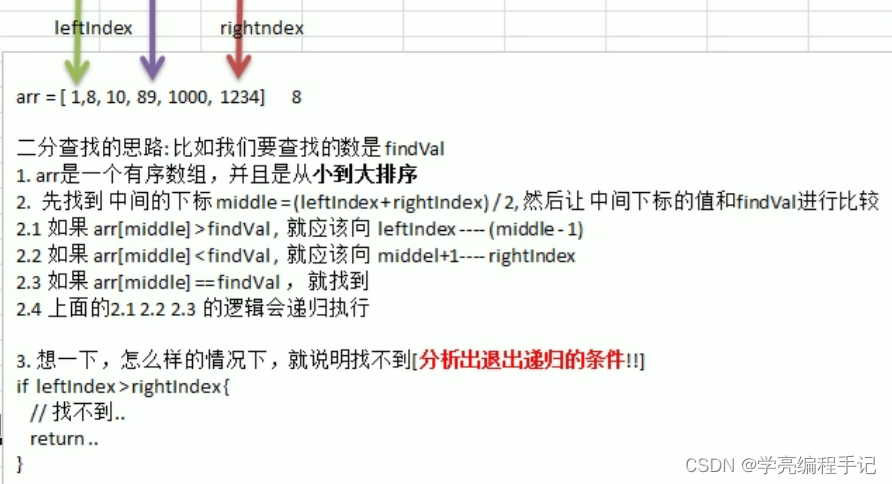
Thinking analysis of binary search method
随机推荐
Thinking analysis of binary search method
网络远程访问树莓派(VNC Viewer)
The connection between supply and demand will no longer depend on the platform and center of the Internet Era
golang日期时间time包代码示例: 根据生日获取年龄、生肖、星座
Apache基金会正式宣布Apache InLong成为顶级项目
stylegan2:analyzing and improving the image quality of stylegan
leetcode:面试题 08.13. 堆箱子【自顶而下的dfs + memory or 自底而上的排序 + dp】
以 27K 成功入职字节跳动,这份《 软件测试面试笔记》让我受益终身
OutputDebugString instructions and exception handling
golang数据类型图
Shushulang passed the listing hearing: the gross profit margin of the tablet business fell, and the profit in 2021 fell by 11% year-on-year
Medical image segmentation website
右腿驱动电路原理?心电采集必备,有仿真文件!
科大讯飞神经影像疾病预测方案!
ASEMI超快恢复二极管ES1J参数,ES1J封装,ES1J规格
How do you choose to buy stocks? Good security?
JS常见的报错及异常捕获
Implementation of network data transmission by golang Gob
读书郎通过上市聆讯:平板业务毛利率走低,2021年利润同比下滑11%
[today in history] June 23: Turing's birthday; The birth of the founder of the Internet; Reddit goes online