当前位置:网站首页>Spark broadcast variables and accumulators (cases attached)
Spark broadcast variables and accumulators (cases attached)
2022-06-23 02:14:00 【JKing_ one hundred and sixty-eight】
Broadcast variables :
If broadcast variable technology is used , be Driver The client will only send the shared data to each Executor One copy .Executor All in Task Reuse this object .
If you don't use broadcast variable technology , be Driver The client will distribute the shared data to each by default Task in , Causing great pressure on network distribution . Even cause you to carry on RDD When persistent to memory , Forced to save to disk due to insufficient memory , Added disk IO, Severely degrade performance .
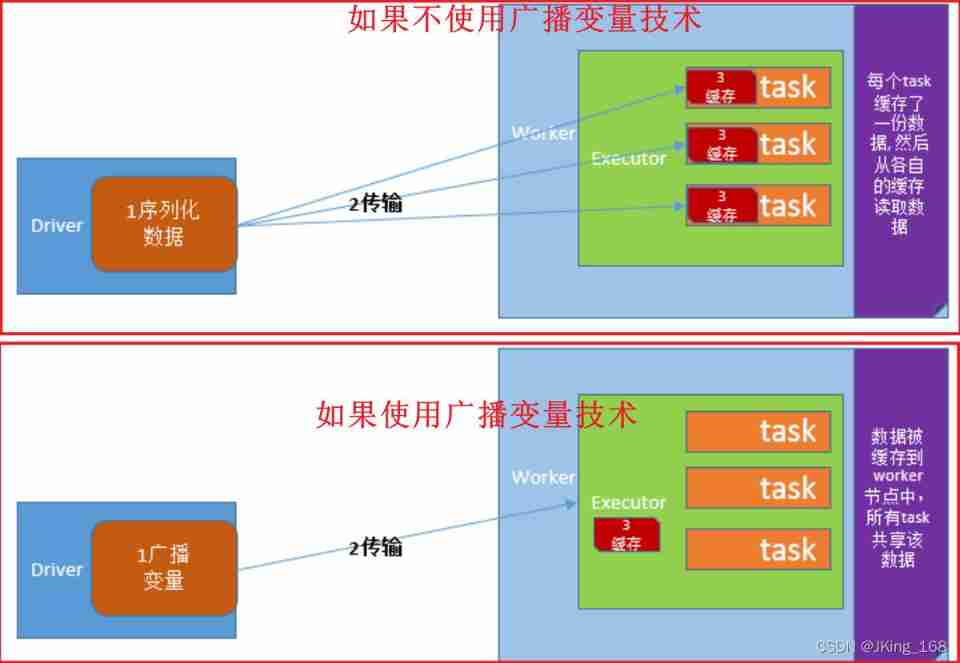
Broadcast variable usage (Python Realization ):
To ensure that the shared object is serializable . Because the data transmitted across nodes should be serializable .
stay Driver The client broadcasts the shared objects to each Executor:
#2- Define a list , Load special characters list_v=[",", ".", "!", "#", "$", "%"] #3- List from Driver End broadcast to each Executor in bc=sc.broadcast(list_v)- stay Executor In order to get :
list2=bc.value
accumulator :
Spark Provided Accumulator, It is mainly used for multiple nodes to share a variable .Accumulator Only the function of accumulation is provided , That is, multiple task The function of parallel operation on a variable . however task Only right Accumulator Carry out accumulation operation , Cannot read Accumulator Value , Only Driver The program can read Accumulator Value . Created Accumulator The value of the variable can be Spark Web UI See above , So you should try to name it when you create it .
Spark Built in three types of Accumulator, Namely LongAccumulator Cumulative integer type ,DoubleAccumulator Cumulative floating point ,CollectionAccumulator Accumulate set elements .
How to use the integer accumulator (Python Realization ) :
- stay Driver End define integer accumulator , Initial value of Fu .
acc=sc.accumulator(0) - stay Task Add up each time in 1
acc.add(1)
#  perhaps
acc+=1
PySpark Integrated case of accumulator and broadcast variables :
- Case study : Filter non word characters , And count the non word characters

- Python Code implementation :
from pyspark import SparkConf, SparkContext, StorageLevel
import os,jieba,time,re

# Specify environment variables
os.environ['SPARK_HOME'] = '/export/server/spark'
os.environ['PYSPARK_PYTHON'] = '/root/anaconda3/bin/python'
os.environ['PYSPARK_DRIVER_PYTHON'] = '/root/anaconda3/bin/python'

if __name__ == '__main__':
    conf = SparkConf().setAppName('text1').setMaster('local[*]')
    sc = SparkContext(conf=conf)
    # 2- Define a list , Load special characters
    list_v = [",", ".", "!", "#", "$", "%"]
    # 3- List from Driver End broadcast to each Executor in
    bc = sc.broadcast(list_v)
    # 4- Define accumulator , Follow up in distributed task in , Every time a special character is encountered , Just add up 1
    acc = sc.accumulator(0)
    # 5- Load text content , formation RDD
    input_rdd=sc.textFile('file:///export/pyworkspace/sz27_spark/pyspark_core/data/accumulator_broadcast_data.txt')
    # 6- Filter blank line
    filtered_rdd = input_rdd.filter(lambda line:len(line.strip())>0)
    # 7- Write each sentence , Split into short strings by white space characters
    str_rdd = filtered_rdd.flatMap(lambda line:re.split('\\s+',line))
    # 8- Right up there RDD, Filter , Every time a special character is encountered , accumulator acc Just add up 1, And eliminate special characters , Formed RDD Contains only words
    def filter_str(str):
        global acc
        # Get a list of special characters
        list2 = bc.value
        if str in list2:
            acc.add(1)
            return False
        else:
            return True
    word_rdd = str_rdd.filter(filter_str)
    # 9- Count the words ,
    wordcount_rdd = word_rdd.map(lambda word:(word,1)).reduceByKey(lambda x,y:x+y)
    # 10- Print word count results
    print(' Word count results :',wordcount_rdd.collect())
    # 11- Print the value of the accumulator , That is, the number of special characters
    print(' Special character accumulator results :',acc.value)
    sc.stop()
边栏推荐
- Detailed explanation of makefile usage
- Operator part
- "Initial C language" (Part 1)
- Interviewer: with the for loop, why do you need foreach??
- Understand GB, gbdt and xgboost step by step
- Triangle judgment (right angle, equilateral, general)
- This monitoring tool is enough for the operation and maintenance of small and medium-sized enterprises - wgcloud
- JS rotation chart (Netease cloud rotation chart)
- II Data preprocessing
- JS advanced part
猜你喜欢
My good brother gave me a difficult problem: retry mechanism

Nebula operator cloud practice

How are pub and sub connected in ros1?

Cmake simple usage

Function part

Common mistakes in C language (sizeof and strlen)

Microservice Optimization: internal communication of microservices using grpc

1.3-1.4 web page data capture

1. Mx6u bare metal program (1) - Lighting master

Garbled code of SecureCRT, double lines, double characters, unable to input (personal detection)
随机推荐
1. Mx6u startup mode and equipment
C language game minesweeping [simple implementation]
Evolution history of mobile communication
WM view of commodity master data in SAP retail preliminary level
【CodeWars】What is between?
Bc117 xiaolele walks up the steps
//1.8 char character variable assignment integer
JS advanced part
Triangle judgment (right angle, equilateral, general)
Rebirth -- C language and the story I have to tell (text)
Google benchmark user manual and examples
Analysis of web page status code
8 vertical centering methods
Ansible practice of Nepal graph
Third order magic cube formula
Lying in the trough, write it yourself if you can't grab it. Use code to realize a Bing Dwen Dwen. It's so beautiful
Deep learning environment configuration (I) installation of CUDA and cudnn
Reptile lesson 1
Performance testing -- Interpretation and practice of 16 enterprise level project framework
Anaconda creates a new environment encounter pit