当前位置:网站首页>Deep learning environment configuration (I) installation of CUDA and cudnn
Deep learning environment configuration (I) installation of CUDA and cudnn
2022-06-23 02:01:00 【A new doggerel imitating ancient times】
- choice CUDA and cuDNN edition
tensorflow Corresponding CUDA and cuDNN edition 、cuda The corresponding graphics card driver version is as follows :

Also available at NVIDIA Control panel - system information - View supported in component CUDA edition :
My configuration is GTX 1050(411.31 drive )+CUDA10.0+cuDNN7.4.2 for CUDA10.0+tensorflow2.0.0-gpu.
1. Install the appropriate version of the graphics card driver : Driving the genie app( The lower part can be stable / newest ) You can install older drivers . - download CUDA:https://developer.nvidia.com/cuda-toolkit-archive
download cuDNN:https://developer.nvidia.com/rdp/cudnn-archive - install CUDA
- install cuDNN
decompression cuDNN Compressed package , You can see bin、include、lib Catalog , Copy the files in the directory to C:\Program Files\NVIDIA GPU Computing Toolkit\CUDA In the corresponding directory of . - Add environment variables
In environment variable - Of the system variable Path Click under ’ edit - newly build ’ Add a path ( The following is the default installation path ):
C:\Program Files\NVIDIA GPU Computing Toolkit\CUDA\v10.0\bin
C:\Program Files\NVIDIA GPU Computing Toolkit\CUDA\v10.0\lib\x64

Will file C:\Program Files\NVIDIA GPU Computing Toolkit\CUDA\v10.0\extras\CUPTI\libx64\cupti64_100.dll Copy to folder C:\Program Files\NVIDIA GPU Computing Toolkit\CUDA\v10.0\bin in .
verification
cmd in cd Enter the installation directory , function bandwidthTest.exe and deviceQuery.exe, If all Result = PASS, Installation succeeded .
cd C:\Program Files\NVIDIA GPU Computing Toolkit\CUDA\v10.0\extras\demo_suite
bandwidthTest.exe
deviceQuery.exe
边栏推荐
- Data skew analysis of redis slice cluster
- 8. destruct, construct, deep copy, shallow copy, assignment operator overload
- 1. Mx6u bare metal program (1) - Lighting master
- Interviewer: what is the difference between SSH and SSM frameworks? How to choose??
- "Initial C language" (Part 2)
- Detailed explanation of makefile usage
- //1.8 char character variable assignment integer
- Campus network AC authentication failed
- Uniapp View Horizontal Center
- Analysis of current mainstream video coding technology | community essay solicitation
猜你喜欢

Rebirth -- millimeter wave radar and some things I have to say

9. class and object practice and initialization list
For Xiaobai who just learned to crawl, you can understand it after reading it

3. compilation and linking principle

Error reported when compiling basalt

Vs Code inadvertently disable error waveform curve

Pychart installation instructions
JS to paste pictures into web pages
Muduo simple usage

Application and challenge of ten billion level map data in Kwai security intelligence
随机推荐
Network module packaging
C language game minesweeping [simple implementation]
Centos7 installing postgresql12
2022-1-14
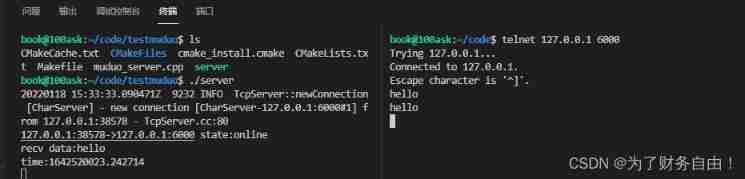
Muduo simple usage
278. digital combination
1. Mx6u bare metal program (2) - Lighting master (imitating 32 register version)
Freshman C language summary post (hold change) Part 2 formatted monthly calendar
Branch and loop statements (including goto statements) -part1
C language games: sanziqi (simple version) implementation explanation
There are animation characters interacting with each other when the mouse slides in the web page
Operator part
Common mistakes in C language (sizeof and strlen)
Using mock data in vite projects -vite plugin mock
"Initial C language" (Part 2)
Game (sanziqi & minesweeping)
Initial structure
Targeted and ready to go
Google benchmark user manual and examples
1. Mx6u bare metal program (6) - timer