当前位置:网站首页>Branch and loop statements (including goto statements) -part1
Branch and loop statements (including goto statements) -part1
2022-06-23 01:42:00 【'Dream_】
If you will It's better to start than to give up . Roman.
May we all have our own goals and are making unremitting efforts for them .
---------------------------------------------------- Split line
C Language is 【 structured 】 The programming language of , Its structure is reflected in : Sequential structure 、 Selection structure (if sentence 、switch sentence )、 Loop structure (for sentence 、while sentence 、do...while sentence )
-------------------------------------------------------
The classification of sentences :
sentence :C There is a semicolon in language ; What separates is a statement .
① Expression statement : expression + ;
② Function call statements : function + ()
③ Control statement : Control program execution process , In order to realize various structural ways of the program . It contains : Conditional statements , Also known as branch statements (if sentence 、switch sentence ); Loop statement (while sentence 、for sentence 、do...while sentence ); Turn to statement (goto sentence 、break sentence 、continue sentence 、return sentence )
④ Compound statement
⑤ Empty statement
-------------------------------------------------------
One 、 Conditional statements , Also known as branch statements ( Select structure )
One )if sentence

1、 Grammatical structure :
( If the expression is true, execute , If it is not true, execute the next )
// Single branch
if( expression )
sentence ;
// Double branch
if( expression )
sentence 1;
else
sentence 2;
// Multiple branches
if( expression 1)
sentence 1;
else if( expression 2)
sentence 2;
...
else
sentence n;
Attention review : The basis for judging whether the expression is true or false (0 For false , Not 0 It's true )
2、 Be careful :
if 、else if 、 else Statement executes a statement by default , If you want to execute multiple statements , You need to use { }
Writing habits : Generally used { }
notes : One { } It's just a code block
3、 In the air else sentence :
Example :

What is the output result ?
Put the code in VS2019 Run the following :
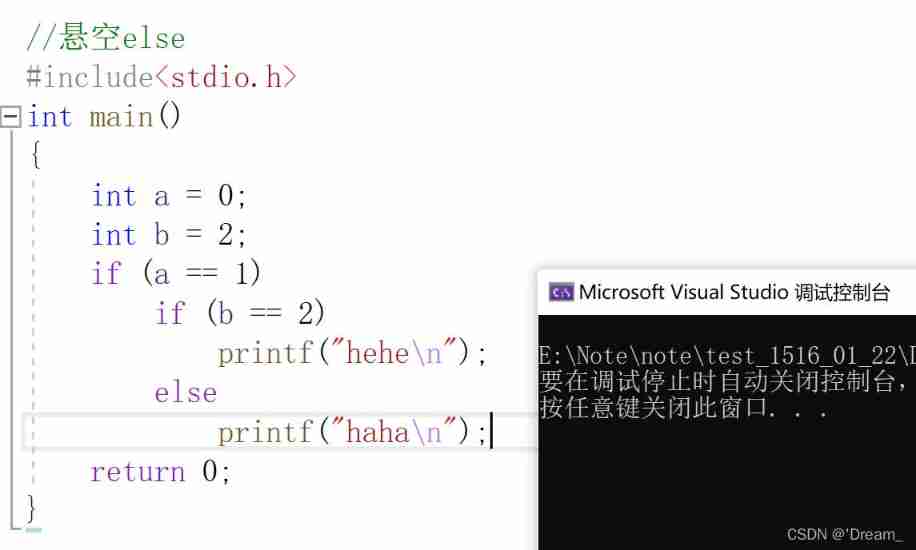
Pay attention to the code layout and output results , This code layout is not intentionally modified , But the system has its own typesetting effect ; You can see that there is no output .
* The explanation is as follows :
else It's always the closest if Match ;
if...else Together, it is called a statement , So when if Followed by if...else sentence , Even if you don't add { } Under the condition of , The effect is equivalent to adding { }
--------------------------- Code style is important , References 《 High-quality C/C++ Programming 》
4、if Contrast of writing forms :
// Code 1if (condition){return x;}return y;// Code 2if(condition){return x;}else{return y;}* The two writing effects are the same , But the second way is usually used , It's quite clearPay attention to the effect of the first writing , Pay attention to the use of return!!
// Code 3int num = 1;if(num == 5){printf("hehe\n");}// Code 4int num = 1;if(5 == num){printf("hehe\n");}* The two effects are the same , But the second way is usually used , Because writing is easy to miss =, Therefore, the second method is generally used , Avoid the error of assignment . Variables cannot be assigned to constants !


Two )switch sentence : Often used in multi branch situations
1、 Grammatical structure
switch( Integer expression )
{
Statement item ;
}
Statement item : It's some case sentence , form :
case Integer constant expression :
sentence ;
break;
2、 Be careful :
1) switch( expression ) The expression in just determines case Entrance , If there are no export restrictions (break Limit ), Will go on , Until the end ;
If you want to execute only one case sentence , need break; As an exit ( Jump out of the statement )
2) Has the same output , Multiple case : Just follow one statement
3) Even the last one case It is not recommended to omit break; sentence
3、default:
all case None of the statements can be matched , Then execute the statement , And it also needs to use break;
Its placement order position does not affect the output results , But habit is put last by default
default You don't have to choose , But it is recommended to use
4、switch Run nested use :
example :

// if case There is no break, see default Will it be carried out -- Meeting

Two 、 Loop statement ( Loop structure )
One )while sentence
1、 Grammatical structure :
while( expression )
Loop statement ;
( Expression for genuine talent enters )
2、break; Get out of the loop , Early termination of the entire cycle . namely :break stay while Statement to permanently terminate the loop !
3.continue; Jump out of current loop , Enter next cycle , namely : Jump straight to while The judgment part of a sentence
Once encountered continue, The following statements are not executed !
4、 Pay attention to add :
getchar( ); Read character , The return type is int, Reading error or reading to the end file returns EOF( Defined as -1); But notice : The final print result is the input character
putchar( ); Print character
Press ctrl + z Will stop , Its essence is ctrl + z Will make getchar or scanf return EOF , however VS In the compilation environment, you may not be able to stop by pressing , This is a VS Of itself bug
5、 example :
1、 Confirm cryptanalysis
// Confirm cryptanalysis
#include<stdio.h>
int main()
{
	char password[20] = { 0 };
	printf(" Please input a password :\n");
	scanf("%s", password);
	int tmp = 0;
	while ((tmp = getchar()) != '\n')
	{
		;// Role is : Clear all... In the buffer '\n'
	}
	printf(" Please confirm the password (Y/N):\n");
	int ch = getchar();
	//if (strcmp(ch, 'Y') == 0)// error , here ch  yes int type , Not characters , So just make a direct comparison
	if(ch == 'Y')
	{
		printf(" Confirm success !\n");
	}
	else
	{
		printf(" Confirmation failed !\n");
	}

	return 0;
}
2、 Analyze the following code :
#include<stdio.h>
int main()
{
	char ch = '\0';
	while ((ch = getchar()) != EOF)
	{
		if (ch < '0' || ch>'9')
			continue;
		// significance : if ch Of ASCII Code value in 0-9 Between , Then skip continue Output ch
		// from ASCII Code representation :<'0' or >'9' It's other characters , and '0'--'9' Between them are numeric characters
		putchar(ch);
	}
	return 0;
}
Enclosed ASCII clock

-------------------------------------------------
buffer !
scanf("%s") Only read the string before the space !!
while{ ;} It's an empty statement
getchar( ); Work once , One character is missing from the buffer !!
Note that the type is int
Two )for sentence
1、 Grammatical structure :
for( expression 1; expression 2; expression 3)
Loop statement ;
( expression 1: initialization ; expression 2: conditional ; expression 3: Adjustment part )
2、 Compare while Circulation and for Difference between cycles :
int i = 0;
// To achieve the same function , Use while
i=1;// Initialization part
while(i<=10)// Judgment part
{
 printf("hehe\n");
 i = i+1;// Adjustment part
}

// To achieve the same function , Use for
for(i=1; i<=10; i++) {
 printf("hehe\n");
}
3、 Be careful :
- stay for There are also... In the loop break and continue
- initialization 、 Judge 、 Adjustment can be omitted , At this point, it falls into an endless loop :for The judgment part of the loop omits , Just think that judgment is always true
4、 Suggest :
- Don't be in for Modify the loop variable in the loop body , prevent for The cycle is out of control
- Suggest for The loop control variable value of the statement adopts “ Before closed after opening ” How to write it ( namely : Judge with less than < form )-- This way of writing makes the number of cycles more definite , But don't be rigid , Can be changed flexibly .eg:100-200 Just use the closed interval
5、 example :
// How many times does the cycle take ?#include <stdio.h>int main(){int i = 0;int k = 0;for(i =0,k=0; k=0; i++,k++)k++;return 0;}
3、 ... and )do...while loop
1、 Grammatical structure :
do
The loop body ;
while( expression );
2、 Be careful :
- The circulatory body is executed at least once
- In the circulatory body break The same is to jump out of the whole cycle
- In the circulatory body continue End the current cycle , The following statements are skipped
3、 ... and 、goto sentence
1、goto Statements can be abused at will , But theoretically there is no need to use
2、 Have any jump function , however You cannot jump across functions
3、 Most common usage : Terminate the processing of the program in some deep nested structures ( Such as : Jump two floors at a time or Multilayer circulation )
4、 Be careful :goto Statement jump , Is all the statements after the jump , no need { } Results the same
5、 Applicable scenario ( give an example ):
for(...)for(...){for(...){if(disaster)goto error;}}…error:if(disaster)// Handling error situations
边栏推荐
- Debian10 create users, user groups, switch users
- JMeter associated login 302 type interface
- Module 8 job
- Lexical Sign Sequence
- The road of architects starts from "storage selection"
- Uint8 serializing and deserializing pits using stringstream
- three. JS simulated driving tour art exhibition hall - creating super camera controller
- LeetCode 206. 反转链表(迭代+递归)
- Pat class A - 1014 waiting in line (bank queuing problem | queue+ simulation)
- SFOD:无源域适配升级优化,让检测模型更容易适应新数据
猜你喜欢

Charles garbled code problem solving

Autumn move script B
![[hdu] P6964 I love counting](/img/ff/f8e79d28758c9bd3019816c8f46723.png)
[hdu] P6964 I love counting

3D printing microstructure

7.new, delete, OOP, this pointer
Using WordPress to create a MySQL based education website (learning notes 2) (technical notes 1) xampp error1045 solution

An interesting example of relaxed memory models

LeetCode 206. Reverse linked list (iteration + recursion)
SFOD:无源域适配升级优化,让检测模型更容易适应新数据

Epoll introduction and principle explanation
随机推荐
Use elk to save syslog, NetFlow logs and audit network interface traffic
MySQL -- how to access the database of a computer in the same LAN (prenatal education level teaching)
Modulenotfounderror: no module named 'rospy', PIP could not find the installation package
A blog allows you to understand the use of material design
Installing MySQL for Linux
Sfod: passive domain adaptation and upgrade optimization, making the detection model easier to adapt to new data
Day260: the number III that appears only once
SQL programming task03 job - more complex query
Uint8 serializing and deserializing pits using stringstream
fatal: refusing to merge unrelated histories
Debian10 LVM logical volumes
There is no corresponding change on the page after the code runs at the Chrome browser break point
Prevent others from using the browser to debug
关于打算做一个web的问题看板,需要使用哪些方面语言及数据库知识!
SQL programming task05 job -sql advanced processing
JMeter associated login 302 type interface
Is it safe for Hongyuan futures to open an account? Can Hongyuan futures company reduce the handling fee?
JS to read the picture of the clipboard
Day367: valid complete square
Char[], char *, conversion between strings