当前位置:网站首页>C WPF realizes dynamic loading of controls through binding
C WPF realizes dynamic loading of controls through binding
2022-06-23 07:28:00 【CodeOfCC】
List of articles
Preface
Use wpf Development sometimes requires dynamic loading of controls , Write directly in the background cs Code , The styles will be hard to write and less readable , At this time, we need to find a way to completely xaml Defines the styles of dynamically loaded controls in , Although we can define templates in the resource dictionary , Then get the template in the background and add it to the interface , But this process is still very troublesome and has nothing to do with mvvm Are not compatible . A better approach would be to use ItemsControl,ItemsControl As ListBox The usage of the ancestor class of is basically the same , We can customize its internal layout , And element templates , The dynamic loading of controls can be realized by binding data sources ,cs The client does not need to process any interface code .
One 、 How to achieve ?
1、 Use ItemsControl
as everyone knows ListBox As a list control, you can dynamically load elements , and ItemsControl Is its ancestor , We can use it to dynamically load elements . Or directly ListBox Yes, but there may be more attributes to set , For example, remove the element focus box , Element default margins , Remove borders, etc .
<ItemsControl/>
2、 Setting up layout
We set the layout we need according to the usage scenario , Set up ItemsControl Of ItemsPanel that will do .
<ItemsControl.ItemsPanel>
    <ItemsPanelTemplate>
        <Grid></Grid>
    </ItemsPanelTemplate>
</ItemsControl.ItemsPanel>
3、 Define control templates
adopt ItemsControl Of ItemTemplate To set the target that we need to dynamically load the control . And you can select different templates through triggers , For example, this method can be used to realize the dynamic loading of whiteboard controls .
<ItemsControl.ItemTemplate>
    <DataTemplate>
        <Button Content="ok" />
    </DataTemplate>
</ItemsControl.ItemTemplate>
4、 Bind data source
and ListBox similar , Use ItemsSource Just bind the entity .
<ItemsControl ItemsSource="{Binding lst}" />
Two 、 Examples of use
1. Dynamically load shapes
xaml
<Window x:Class="WpfApp2.MainWindow" xmlns="http://schemas.microsoft.com/winfx/2006/xaml/presentation" xmlns:x="http://schemas.microsoft.com/winfx/2006/xaml" xmlns:d="http://schemas.microsoft.com/expression/blend/2008" xmlns:mc="http://schemas.openxmlformats.org/markup-compatibility/2006" xmlns:local="clr-namespace:WpfApp2" mc:Ignorable="d" Title="MainWindow" Height="450" Width="800">
    <Grid>
        <ItemsControl ItemsSource="{Binding Shapes}" Height="450" Width="800">
            <ItemsControl.ItemsPanel>
                <!-- Layout -->
                <ItemsPanelTemplate>
                    <Grid ></Grid>
                </ItemsPanelTemplate>
            </ItemsControl.ItemsPanel>
            <!-- Control templates -->
            <ItemsControl.ItemTemplate>
                <DataTemplate>
                    <Control x:Name="ctrl" HorizontalAlignment="Left" VerticalAlignment="Top" Margin="{Binding Margin}" Width="{Binding Width}" Height="{Binding Height}" ></Control>
                    <DataTemplate.Triggers>
                        <!-- Select different templates according to different types -->
                        <DataTrigger Binding="{Binding Type}" Value="0">
                            <!-- rectangular -->
                            <Setter Property="Template" TargetName="ctrl">
                                <Setter.Value>
                                    <ControlTemplate >
                                        <Rectangle Fill="RoyalBlue" RadiusX="10" RadiusY="10" Width="{Binding Width}" Height="{Binding Height}"></Rectangle>
                                    </ControlTemplate>
                                </Setter.Value>
                            </Setter>
                        </DataTrigger>
                        <DataTrigger Binding="{Binding Type}" Value="1">
                            <!-- The ellipse -->
                            <Setter Property="Template" TargetName="ctrl">
                                <Setter.Value>
                                    <ControlTemplate >
                                        <Ellipse Fill="GreenYellow" Width="{Binding Width}" Height="{Binding Height}"></Ellipse>
                                    </ControlTemplate>
                                </Setter.Value>
                            </Setter>
                        </DataTrigger>
                    </DataTemplate.Triggers>
                </DataTemplate>
            </ItemsControl.ItemTemplate>
        </ItemsControl>
    </Grid>
</Window>
cs
using System.Collections.Generic;
using System.Windows;
namespace WpfApp2
{


    // Shape entity
    public class Shape
    {

        public int Type {
     set; get; }
        public Thickness Margin {
     set; get; }
        public double Width {
     set; get; }
        public double Height {
     set; get; }
    }

    public partial class MainWindow : Window
    {

        public List<Shape> Shapes {
     set; get; } = new List<Shape>();
        public MainWindow()
        {

            InitializeComponent();
            Shapes.Add(new Shape() {
     Type = 0, Margin=new Thickness(10,10,0,0), Width = 200, Height = 100 });
            Shapes.Add(new Shape() {
     Type = 0, Margin = new Thickness(300, 22   , 0, 0), Width = 280, Height = 120 });
            Shapes.Add(new Shape() {
     Type = 1, Margin = new Thickness(33, 255, 0, 0), Width = 200, Height = 100 });
            Shapes.Add(new Shape() {
     Type = 1, Margin = new Thickness(350, 150, 0, 0), Width = 200, Height = 200 });
            DataContext = this;
        }
    }
}
Results the preview 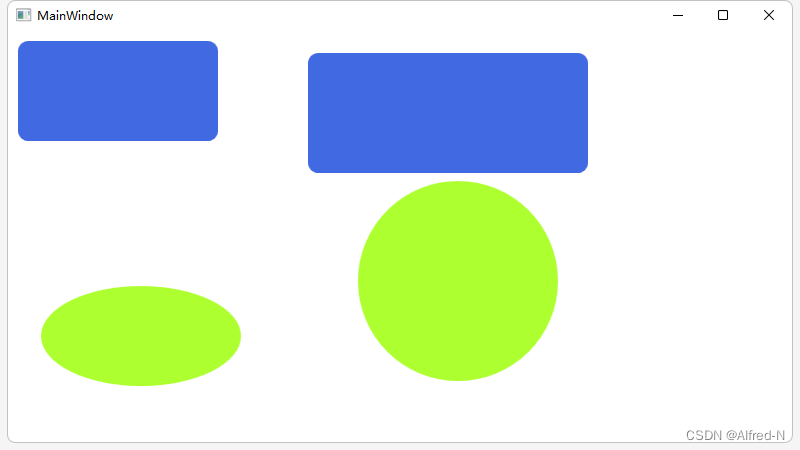
summary
for example : That's what we're going to talk about today , This article only introduces the methods , It solves the problem of interface separation , Especially in mvvm In mode , Dynamic loading of any control can be completed only by binding the entity collection . The use of ItemsControl And ListBox The usage is basically the same , Easy to understand and use .
边栏推荐
- Nacos adapts Oracle11g create table DDL statement
- How flannel works
- Technical article writing guide
- 900. RLE iterator
- MySQL(二) — MySQL数据类型
- 闫氏DP分析法
- UNET code implementation
- Mysql数据库的几个特点
- Feelm joined the Carbon Disclosure Project as an initiative of Smallville to deal with climate change emergencies
- deeplab v3 代码结构图
猜你喜欢

Mysql(十一) — MySQL面试题整理

深度学习系列47:超分模型Real-ESRGAN

Data types in tensorflow

Product axure9 (English version), prototype design background dynamic secondary menu display content

Akamai-1.75版本-_abck参数生成-js逆向分析
Both are hard disk partitions. What is the difference between C disk and D disk?

NTU-RGBD数据集下载及数据格式解析

Initialization layer implementation

How to quickly and gracefully download large files from Google cloud disk (II)

GINet
随机推荐
NPM download error NPM err code error
Data types in tensorflow
MySQL总结
微信多人聊天及轮盘小游戏(websocket实现)
【AI实战】XGBRegressor模型加速训练,使用GPU秒级训练XGBRegressor
‘latin-1‘ codec can‘t encode characters in position 103-115: Body (‘一串中文‘) is not valid Latin-1
Pagoda forgot password
[AI practice] xgb Xgbregression multioutputregressor parameter 2 (GPU training model)
deeplab v3 代码结构图
Feelm joined the Carbon Disclosure Project as an initiative of Smallville to deal with climate change emergencies
npm下载报错npm ERR code ERESOLVE
MySQL(四) — MySQL存储引擎
Redis设置密码
Redis setting password
都是硬盘分区 C盘和D盘到底有什么区别?
Unet代码实现
406 double pointer (27. remove elements, 977. square of ordered array, 15. sum of three numbers, 18. sum of four numbers)
Mysql(十一) — MySQL面试题整理
UNET code implementation
312. poke the balloon