当前位置:网站首页>[wechat applet development (III)] realize the stacking and sliding of cards
[wechat applet development (III)] realize the stacking and sliding of cards
2022-07-24 08:15:00 【Sock is a dog】
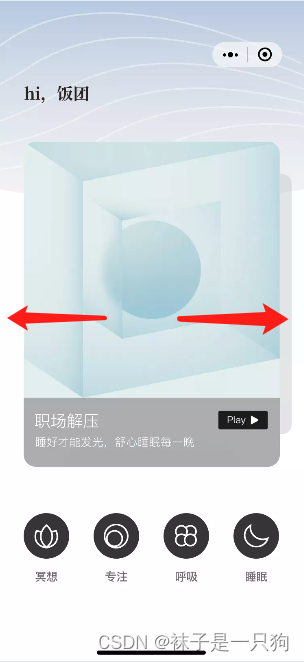
The renderings look like this , It can slide left and right
List of articles
Preface
Animation : transparency + The zoom
Namely swiper The switching effect of , Then why not swiper Well ?
Built in wechat applet swiper Components , Still quite unfriendly . image h5 Same swiper Plug ins are not available in applets .
One 、 Realize the event capture of sliding left and right
//  Slide gesture start event
  startEvent: function(event) {

    if (event.changedTouches[0].pageX) {

      this.data.startPageX = event.changedTouches[0].pageX
    } else {

      this.data.startPageX = event.changedTouches[0].x
    }
  },
  //  Slide gesture end event
  endEvent: function(event) {

    let endPageX = 0
    if (event.changedTouches[0].pageX) {

      endPageX = event.changedTouches[0].pageX
    } else {

      endPageX = event.changedTouches[0].x
    }
    const moveX = endPageX - this.data.startPageX
    if (Math.abs(moveX) < 20) return
    if (moveX > 0) {

      //  Right slip
      this.prev()  // Write your right slide method here
    } else {

      //  Left slide
      this.next()  // Write your left slide method here
    }
  },
Bind the sliding method in the card sliding area
<!--  The middle card  -->
		<div class="slider-container" bindtouchstart="startEvent" bindtouchend="endEvent">

		</div>
At this time, the sliding event is captured , Next, start to write animation
Two 、 For sliding left and right wx.animation
1. First, the static layout should be complete , Then you can implement your own animation
<!--  The middle card  -->
<div class="slider-container" bindtouchstart="startEvent" bindtouchend="endEvent">
<div class="{
     {card.isActive ? 'slide-item-active': card_index==cardsData.length-1? 'slide-item-last' : 'slide-item'}}" wx:for="{
     {cardsData}}" bindtap="cardLinkByType" data-type="{
     {card.type}}" data-index="{
     {card.index || 0}}" wx:for-item="card" wx:for-index="card_index" wx:key="unique" animation="{
     {card.animation}}" style="z-index:{
        {
        card.zIndex?card.zIndex:199 - card_index}}" data-idx="{
     {card_index}}" data-tittle="{
     {card.title}}">
	<!-- <image src="/images/page_index/ Relieve irritability .jpg" mode='widthFix'></image> -->
	<image src="/images/page_index/card_{
     {card.image_name}}.jpg" mode='widthFix'></image>
	<div class="bottom-mask">
		<div class="title">{
   {card.title}}</div>
		<div class="desc">{
   {card.desc}}</div>
		<image src="/images/page_index/[email protected]" mode='widthFix'></image>
	</div>
</div>
</div>
.slider-container {

  margin-top: -65px;
  position: relative;
  display: flex;
  justify-content: center;
  align-items: center;
  z-index: 99;
  height: 800rpx;
  width: 100%;
}

.slide-item-active {

  width: 630rpx;
  height: 800rpx;
  border-radius: 20rpx;
  overflow: hidden;
  position: absolute;
  transform: translateX(0%);
}
.slide-item-last {
      /*  Be careful : //  Because you can slide left and right   So there is a hidden one on the left of initialization  ( Here is the last one , At least 3 A card )*/
  width: 630rpx;
  height: 800rpx;
  border-radius: 20rpx;
  overflow: hidden;
  position: absolute;
  transform: translateX(-500px);
}
.slide-item {

  border-radius: 20rpx;
  overflow: hidden;
  position: absolute;
  right: 30rpx;
  width: 550rpx;
  height: 640rpx;
}

.slide-item-active image ,.slide-item image,.slide-item-last image{

  width: 100%;
  height: auto;
  display: block;
}
2. Loop animation
principle : Put the... Of the card object animation Initialize to null , Use when animation is needed this.setData Animate him :
 prev: function() {

    this.animationCardRight()
  },
  next: function() {

    this.animationCardLeft()
  },
  animationCardLeft: function() {

    clearInterval(this.timer);
    let translateX = -500;
    let animation = wx.createAnimation({

      duration: 680,
      timingFunction: "ease",
    });
    animation.translateX(translateX).opacity(0.5).step();
    let animationNext = wx.createAnimation({

      duration: 680,
      timingFunction: "ease",
    });
    animationNext.width('630rpx').height('100%').right('60rpx').step();
    let _index = this.data.currentActiveCardIndex;
    let _nextIndex = this.data.currentActiveCardIndex + 1;
    let _preIndex = this.data.currentActiveCardIndex - 1;

    //  Now it's the last   Make handover
    if (this.data.currentActiveCardIndex == this.data.cardsData.length - 1) {

      _nextIndex = 0;
    }
    //  The next one is the last one   Move the first one there
    let _next_nextIndex = _nextIndex + 1;
    if (_nextIndex == this.data.cardsData.length - 1) {

      _next_nextIndex = 0;
    }

    //  Move the left one to the right and hide it
    let animationNextNext = wx.createAnimation({

      duration: 0,
      timingFunction: "ease",
    });
    animationNextNext.width('550rpx').height('640rpx').opacity(1).translateX(0).right('30rpx').step();
    this.setData({

      ['cardsData['+ _index +'].animation']: animation.export(),
      ['cardsData['+ _nextIndex +'].animation']: animationNext.export(),
      ['cardsData['+ _next_nextIndex +'].animation']: animationNextNext.export(),
      ['cardsData['+ _index +'].zIndex']: this.data.zIndexInit,
      ['cardsData['+ _nextIndex +'].zIndex']: this.data.zIndexInit-2,
      ['cardsData['+ _next_nextIndex +'].zIndex']: this.data.zIndexInit-3,
    })
    this.data.zIndexInit--
    this.data.currentActiveCardIndex = _nextIndex
    setTimeout(()=>{

      this.createBanerTimer();
    },680)
  },
  animationCardRight: function() {

    clearInterval(this.timer);
    let translateX = 0;
    let animation = wx.createAnimation({

      duration: 680,
      timingFunction: "ease",
    });
    animation.translateX(translateX).opacity(1).step();
    let animationNext = wx.createAnimation({

      duration: 680,
      timingFunction: "ease",
    });
    animationNext.width('550rpx').height('640rpx').right('30rpx').step();
    let _index = this.data.currentActiveCardIndex;
    let _nextIndex = this.data.currentActiveCardIndex + 1;
    let _preIndex = this.data.currentActiveCardIndex - 1;
    if (this.data.currentActiveCardIndex == 0) {

      _preIndex = this.data.cardsData.length - 1;

    }
    let _pre_preIndex = _preIndex - 1;
    if (_preIndex == 0) {

      _pre_preIndex = this.data.cardsData.length - 1;
    }
    //  Move the one in front to the left
    let animationPrePre = wx.createAnimation({

      duration: 0,
      timingFunction: "ease",
    });
    animationPrePre.width('630rpx').height('100%').opacity(0).translateX(-500).right('60rpx').step();
    this.setData({

      ['cardsData['+ _pre_preIndex +'].animation']: animationPrePre.export(),
      ['cardsData['+ _preIndex +'].animation']: animation.export(),
      ['cardsData['+ _index +'].animation']: animationNext.export(),
      ['cardsData['+ _pre_preIndex +'].zIndex']: this.data.zIndexInit+2,
      ['cardsData['+ _preIndex +'].zIndex']: this.data.zIndexInit+1,
      ['cardsData['+ _index +'].zIndex']: this.data.zIndexInit,
    })
    this.data.zIndexInit++
    this.data.currentActiveCardIndex = _preIndex
    setTimeout(()=>{

      this.createBanerTimer();
    },680)
  },
summary
You can search on wechat 【 Simple psychological meditation sleep 】 Applet , You can see the effect on the home page
边栏推荐
- The vision group of Hegong University Sky team trained day3 - machine learning, strengthened the use of Yolo models, and learned pumpkin books and watermelon books
- Wechat applet subscription message development process
- Database system - Basic Concepts
- Kotlin coroutine (I): foundation and deepening
- Kotlin higher order function & DSL layout persuasion Guide
- MySQL -- subquery scalar subquery
- Several development frameworks based on openresty
- Kubernetes: (I) basic concepts
- 栈/堆/队列刷题(下)
- (dkby) DFL learning notes
猜你喜欢

Digital twin demonstration project -- Talking about simple pendulum (4) IOT exploration

Qt|字符串生成二维码功能

Hegong sky team vision training Day2 - traditional vision, opencv basic operation

jmeter中JSON提取器使用

图新地球:Revit建模的rvt格式BIM模型如何带着纹理精准匹配地图

Database | simple hospital patient appointment system based on opengauss

Wechat applet subscription message development process

The code is tired. Stop and enjoy the top color matching~
QT | string generation QR code function

避坑,职场远离PUA,PUA常见的套路与话术你得了解一下!
随机推荐
Detailed notes on pytoch building neural network
SVG 从入门到后悔,怎么不早点学起来(图解版)
P1739表达式括号匹配题解
*Yolo5 learning * data experiment based on yolo5 face combined with attention model CBAM
nacos报错: ERROR Nacos failed to start, please see D:\nacos\logs\nacos.log for more details.
Digital twin demonstration project -- Talking about simple pendulum (3) solid model exploration
基于thinkphp将execle表格上传并插入数据库
Hegong sky team vision training day4 - traditional vision, contour recognition
Opencv project practice - credit card recognition
Database | simple hospital patient appointment system based on opengauss
Detailed explanation of wechat applet page configuration and sitemap configuration parameters
Continuous learning, lifelong learning, episodic memory, memory module paper summary -- gradient episodic memory promotes continuous learning
[matlab] (IV) application of MATLAB in linear algebra
Hegong sky team vision training Day2 - traditional vision, opencv basic operation
Kotlin higher order function & DSL layout persuasion Guide
Zhouzhihua machine learning watermelon book chapter 2 model evaluation and selection - accuracy and model generalization evaluation method, self-help method and integrated learning
Upload and insert the execle table into the database based on ThinkPHP
What is NFT? An article to understand the concept of NFT
Database system - Basic Concepts
What is the NFT concept.. Fully understand NFT market, technology and cases