当前位置:网站首页>Qt|字符串生成二维码功能
Qt|字符串生成二维码功能
2022-07-24 07:50:00 【InfoQ】
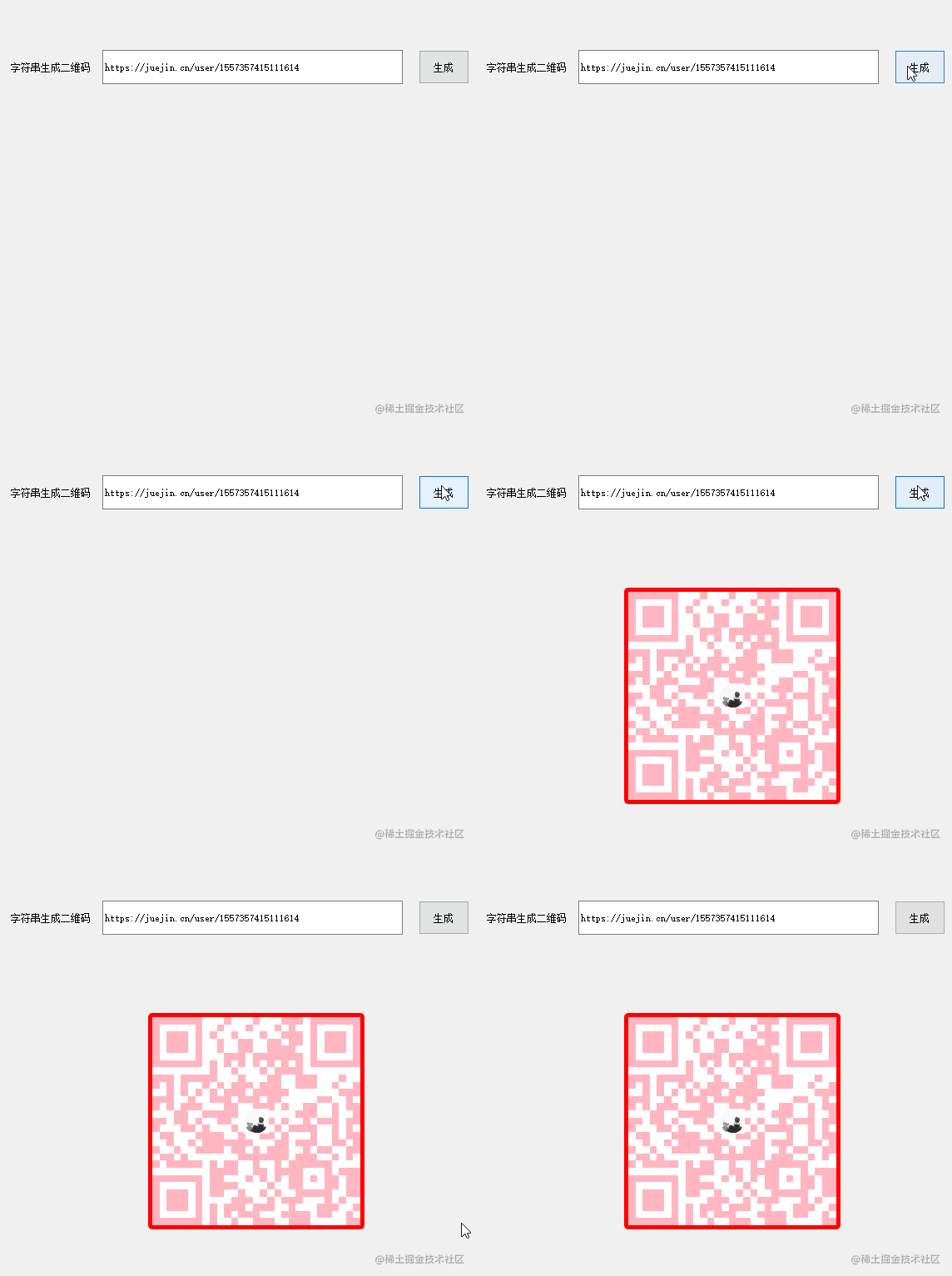
功能实现
开发环境:WIN10环境 + VS2017 + Qt 5.14.2 64位开发环境
资源包数据
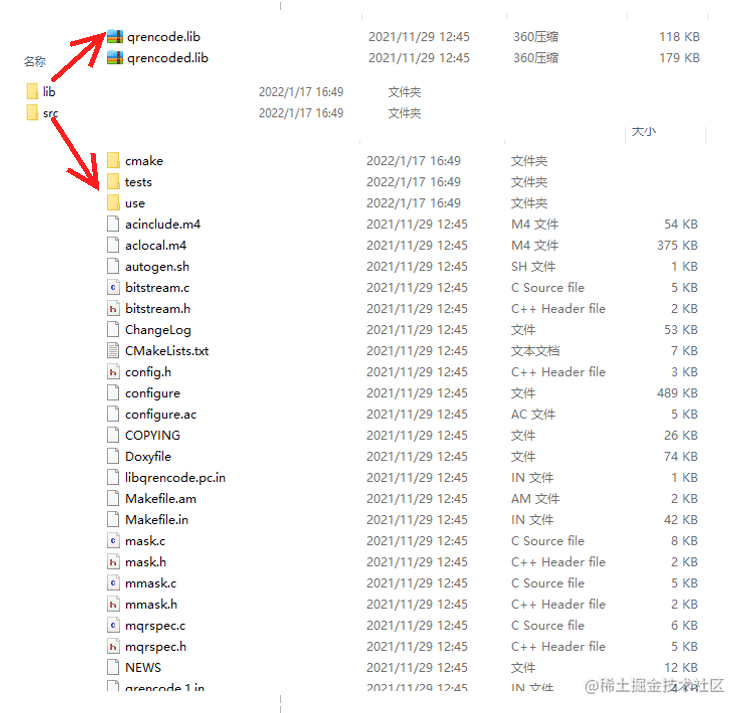
配置属性
1:头文件设置

2:静态库设置


QString qExePath = QCoreApplication::applicationDirPath();
QDir::setCurrent(qExePath);
二维码操作
1:创建QR操作类用于绘制QImage图形
#include <QPainter>
#include <xstring>
class CQRCodeOperation
{
public:
 CQRCodeOperation();
 ~CQRCodeOperation();
 QImage GeneratedGraphics(std::string sData, QSize nsize); //生成图形
private:
 QPixmap m_imgIcon;
};
2:生成二维码图形QImage
2.1:定义QImage对象存储生成内容
QImage image(nsize, QImage::Format_RGB32);
image.fill(QColor("#000000"));
2.2:构造绘图指针
QPainter painter(&image);
if (!painter.isActive())
{
 return image;
}
2.3:根据字符串获取QRcode类实例
QRcode *qrCode = QRcode_encodeString(sData.c_str(), 1, QR_ECLEVEL_L, QR_MODE_8, 1);
2.4:设置点画刷以及背景画刷
QColor colorForPoint("#FFB6C1");
QColor colorForBackground("#ffffff");

painter.setBrush(colorForBackground);
painter.setPen(Qt::NoPen);
painter.drawRect(0, 0, image.width(), image.height());

painter.setBrush(colorForPoint);
2.5:绘制图形
const double &&s = (qrCode->width > 0) ? (qrCode->width) : (1);
const double &&aspect = image.width() / image.height();
const double &&scale = ((aspect > 1.0) ? image.height() : image.width()) / s;

for (int y = 0; y < s; ++y)
{
 const int &&yy = static_cast<int>(y * s);
 for (int x = 0; x < s; ++x)
 {
 const int &&xx = yy + x;
 const unsigned char &b = qrCode->data[xx];

 if (b & 0x01)
 {
 const double rx1 = x * scale, ry1 = y * scale;
 QRectF r(rx1, ry1, scale, scale);
 painter.drawRects(&r, 1);
 }
 }
}
2.6:释放QRcode指针
QRcode_free(qrCode);
2.7:添加二维码图形
painter.setRenderHint(QPainter::Antialiasing, true); //抗锯齿
int nLeft = (nsize.width() - 30) / 2;
int nTop = (nsize.height() - 30) / 2;
QRect rectPng(nLeft, nTop,30,30);
painter.drawPixmap(rectPng, m_imgIcon);
2.8:结束绘制
painter.end();
3:二维码函数调用
CQRCodeOperation dlg;
QImage img = dlg.GeneratedGraphics(sText, QSize(250, 250));
ui.labPng->setPixmap(QPixmap::fromImage(img));
总结
边栏推荐
- Advanced part of C language IV. detailed explanation of user-defined types
- Oauth2==sso three protocols. Oauth2 four modes
- Influxdb unauthorized access & CouchDB permission bypass
- Solve the problem that Anaconda navigator cannot be opened
- Case practice - panoramic image mosaic: feature matching method
- Introduction to C language v First understanding pointer VI. first understanding structure
- Game three piece chess
- abstract class
- Requests crawler multi page crawling to KFC restaurant location
- When does MySQL use table locks and row locks?
猜你喜欢

C language advanced part VII. Program compilation and preprocessing

Devops essay

Introduction to C language
Kubernetes:(一)基本概念

The solution of unable to import custom library in pycharm

【sklearn】PCA

Requests crawler implements a simple web page collector

Appium use
Error when using PIP: pip is configured with locations that requires tls/ssl

Solve the problem that Anaconda navigator cannot be opened
随机推荐
The shortest distance of Y axis of 2D plane polyline
Arduino在不同主频下稳定支持的TTL串口速率
The difference between get and post
requests-爬取页面源码数据
Digital twin demonstration project -- Talking about simple pendulum (4) IOT exploration
Mutual implementation of stack and queue (c)
Hcip day 8 notes
加密熊市:有人大举扩张 有人裁员收缩
Talk about compilers based on vscode
Oauth2==sso three protocols. Oauth2 four modes
MS SQL Server 2019 学习
Multiple optimization methods print prime numbers between 100 and 200
Movie recommendation system
Error when using PIP: pip is configured with locations that requires tls/ssl
游戏三子棋
Problems encountered in inserting large quantities of data into the database in the project
Selenium basic knowledge debugging method
App performance test case
Deep analysis of data storage in memory
Use JMeter to analyze and test the lottery probability of the lottery interface