当前位置:网站首页>QT | string generation QR code function
QT | string generation QR code function
2022-07-24 07:51:00 【InfoQ】

Function realization
development environment :WIN10 Environmental Science + VS2017 + Qt 5.14.2 64 Bit development environment
Resource package data
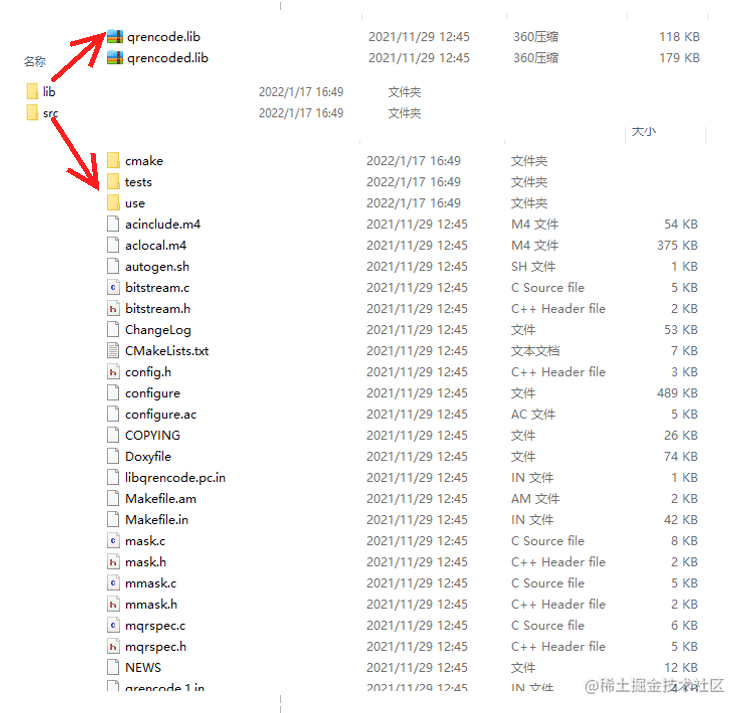
Configuration properties
1: Header file settings

2: Static library settings


QString qExePath = QCoreApplication::applicationDirPath();
QDir::setCurrent(qExePath);
QR code operation
1: establish QR Operation classes are used to draw QImage graphics
#include <QPainter>
#include <xstring>
class CQRCodeOperation
{
public:
 CQRCodeOperation();
 ~CQRCodeOperation();
 QImage GeneratedGraphics(std::string sData, QSize nsize); // Generate graphics
private:
 QPixmap m_imgIcon;
};
2: Generate QR code graphics QImage
2.1: Definition QImage Objects store generated content
QImage image(nsize, QImage::Format_RGB32);
image.fill(QColor("#000000"));
2.2: Construct drawing pointer
QPainter painter(&image);
if (!painter.isActive())
{
 return image;
}
2.3: Get... From string QRcode Class instance
QRcode *qrCode = QRcode_encodeString(sData.c_str(), 1, QR_ECLEVEL_L, QR_MODE_8, 1);
2.4: Set point brush and background brush
QColor colorForPoint("#FFB6C1");
QColor colorForBackground("#ffffff");

painter.setBrush(colorForBackground);
painter.setPen(Qt::NoPen);
painter.drawRect(0, 0, image.width(), image.height());

painter.setBrush(colorForPoint);
2.5: Drawing graphics
const double &&s = (qrCode->width > 0) ? (qrCode->width) : (1);
const double &&aspect = image.width() / image.height();
const double &&scale = ((aspect > 1.0) ? image.height() : image.width()) / s;

for (int y = 0; y < s; ++y)
{
 const int &&yy = static_cast<int>(y * s);
 for (int x = 0; x < s; ++x)
 {
 const int &&xx = yy + x;
 const unsigned char &b = qrCode->data[xx];

 if (b & 0x01)
 {
 const double rx1 = x * scale, ry1 = y * scale;
 QRectF r(rx1, ry1, scale, scale);
 painter.drawRects(&r, 1);
 }
 }
}
2.6: Release QRcode The pointer
QRcode_free(qrCode);
2.7: Add QR code graphics
painter.setRenderHint(QPainter::Antialiasing, true); // Anti-Aliasing
int nLeft = (nsize.width() - 30) / 2;
int nTop = (nsize.height() - 30) / 2;
QRect rectPng(nLeft, nTop,30,30);
painter.drawPixmap(rectPng, m_imgIcon);
2.8: Finish drawing
painter.end();
3: QR code function call
CQRCodeOperation dlg;
QImage img = dlg.GeneratedGraphics(sText, QSize(250, 250));
ui.labPng->setPixmap(QPixmap::fromImage(img));
summary
边栏推荐
- Digital twin demonstration project -- Talking about simple pendulum (4) IOT exploration
- Robot operation continuous learning thesis (1) original text reading and Translation -- primitive generation strategy learning without catastrophic forgetting in robot operation
- SVM linear separable linear support vector machine
- Do you want to have a robot that can make cartoon avatars in three steps?
- Digital twin demonstration project -- Talking about simple pendulum (2) vision exploration and application scenarios
- Advanced part of C language IV. detailed explanation of user-defined types
- Example of dictionary
- Thesis reading: geotransformer
- Kubernetes:(一)基本概念
- Collection of binary tree topics
猜你喜欢
App performance test case

The solution of unable to import custom library in pycharm

Selenium basic knowledge automatically login Baidu online disk
Movie recommendation system

OpenGL camera and periodic review
![[Beijiao] image processing: basic concepts, image enhancement, morphological processing, image segmentation](/img/b3/76d2bcdf4b9769fb6308b7dac9ceb5.jpg)
[Beijiao] image processing: basic concepts, image enhancement, morphological processing, image segmentation
About the solution of thinking that you download torch as a GPU version, but the result is really a CPU version

NFT是什么?一篇文章搞懂NFT的概念

【sklearn】PCA
hcip第十三天笔记
随机推荐
Intelligent robots and intelligent systems (Professor Zheng Zheng of Dalian University of Technology) -- 2. Mobile Robot Perception
Selenium basic knowledge paging processing
Anaconda cannot shut down the method of forced shutdown
[hiflow] Tencent cloud hiflow scene connector realizes intelligent campus information management
Use JMeter to analyze and test the lottery probability of the lottery interface
MS SQL Server 2019 learning
MySQL 啥时候用表锁,啥时候用行锁?
多种优化方法打印100~200之间的素数
Case practice - panoramic image mosaic: feature matching method
学习笔记总结篇(一)
【sklearn】tree.DecisionTreeClassifier
Mutual implementation of stack and queue (c)
Robot operation continuous learning thesis (1) original text reading and Translation -- primitive generation strategy learning without catastrophic forgetting in robot operation
MySQL --- 子查询 - 标量子查询
从零开始C语言精讲篇3:函数
Digital twin demonstration project -- Talking about simple pendulum (2) vision exploration and application scenarios
Movie recommendation system
2021-06-03 database query - sorting
Hcip day 10 notes
【Pytorch】Dataset_ DataLoader