当前位置:网站首页>Software configuration | Anaconda download, installation, environment configuration and uninstall
Software configuration | Anaconda download, installation, environment configuration and uninstall
2022-07-23 17:22:00 【MissMango0820】
This paper summarizes Anaconda Installation and download of 、 Installation and environment configuration and uninstallation .
Updated: 2022 / 7 / 18
software configuration | Anaconda download 、 Installation and environment configuration and uninstallation
download
It is recommended to go to the official website 1 Download the corresponding version on demand .
If the current network cannot connect to the external network , You can use the mirror website , On the server side wget Web address is enough 2.
Installation and environment configuration
After downloading the source file , Enter the directory where the downloaded file is located ,
Linux
such as , At this point, you will see Anaconda3-5.3.1-Linux-x86_64.sh, Open the terminal , Input
bash Anaconda3-5.3.1-Linux-x86_64.sh
Then there will be several operations , Just follow the prompts in the terminal , As shown in the figure below :
- Press
EnterKey to continue the installation ;
- Press down
enterAfter the key , The installation will stop temporarily , And amoreThe words... , You are required to read the agreement , Next, continue with multiple spaces orQTo jump over the text of the agreement ; - Input
yesTo accept the agreement ;
- Input
yesTo configure the system environment to initializeAnaconda;
- Whether to install
vscode? On demand inputyesperhapsno
After installation , You need to exit the terminal , Enter again to entercondacommand .
Or if you don't want to quit , Input in the terminalsource .bash_profileRefresh the environment variables , Input againcondacommand .
Potential problems and solutions
conda: command not found
Problem description
Input in the terminal conda, But it shows that conda: command not found3.
resolvent
Input in the terminal
bash Anaconda3-5.3.1-Linux-x86_64.sh -u
To reinstall the process .
During installation , We need to pay attention to , In the 4 Step requires input yes, As shown in the figure below :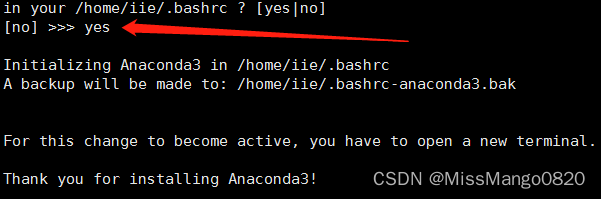
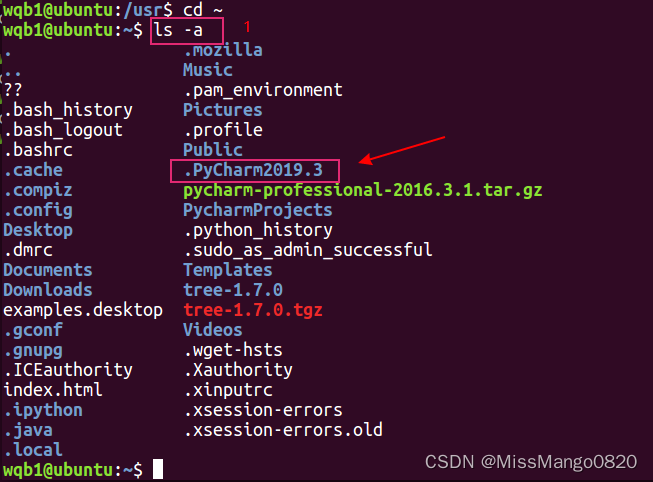
choice yes And after installation , confirm ~/.bashrc The corresponding environment variables have been added in , As shown in the figure below :
Input in the terminal source ~/.bashrc, Run again conda that will do .
uninstall
Please refer to here for the unloading steps 4:
- Delete the whole anaconda Catalog
becauseAnacondaThe installation files of are contained in a directory , So delete the directory directly . To include the wholeanacondaUnder the folder of the directory , Delete the entire directory :
rm -rf Anaconda3 The installation path
- clear
.bashrcMediumAnacondaroute
Open the terminal and input :
sudo gedit ~/.bashrc
stay .bashrc end of file , Delete or comment Anaconda3 Something written
# added by Anaconda3 5.3.1 installer
# >>> conda init >>>
# !! Contents within this block are managed by 'conda init' !!
__conda_setup="$(CONDA_REPORT_ERRORS=false '/home/vision/Softwares/Anaconda3/bin/conda' shell.bash hook 2> /dev/null)"
if [ $? -eq 0 ]; then
    \eval "$__conda_setup"
else
    if [ -f "/home/vision/Softwares/Anaconda3/etc/profile.d/conda.sh" ]; then
        . "/home/vision/Softwares/Anaconda3/etc/profile.d/conda.sh"
        CONDA_CHANGEPS1=false conda activate base
    else
        \export PATH="/home/vision/Softwares/Anaconda3/bin:$PATH"
    fi
fi
unset __conda_setup
# <<< conda init <<<
Save and close file
- Make it effective immediately , Execute at the terminal :
source ~/.bashrc
- Turn off the terminal , Then restart a new terminal , This is an important step , Otherwise, it is bound to the original terminal
Anaconda3.
Reference link
边栏推荐
- Pymoo学习 (4): 多标准决策
- How to set up the router correctly
- wsus可以打mysql中间件补丁_加入WSUS补丁服务器并下载补丁
- Preliminary understanding of string
- Shell | ssh失败原因及解决方法不完全总结
- 12张图+6K字图解ZGC垃圾回收器及调优技巧
- 使用 Preparedstatement 选择和显示记录的 JDBC 程序
- Detailed explanation of SQL bool blind note and time blind note
- 七月集训(第23天) —— 字典树
- PPPoE协议讲解以及拨号过程Wireshark抓包解析
猜你喜欢


![[31. Maze walking (BFS)]](/img/9b/1c1e991ca3e99923dab888a214efb3.png)



随机推荐
食品安全|吃皮蛋会铅中毒?了解这几点后放心吃
Thoughts on software quality system
When does MySQL use table locks and row locks?
AXI interconnect IP核的说明及用法
软件配置 | Pycharm下载、安装及环境配置和卸载
股票历史数据下载接口汇总(动态更新)
【30. n-皇后问题】
oracle 数据库 11C 之后版本使用 memory_target 自动内存管理
使用 Preparedstatement 选择和显示记录的 JDBC 程序
Pymoo学习 (4): 多标准决策
Preliminary understanding of string
职场3道坎:年薪30万、50万、100万
keil错误和解决办法(1):FCARM - Output Name not specified, please check ‘Options for Target - Utilities‘
Pinia (pineapple)
Could not load dynamic library ‘cudnn64_ 8.dll‘; dlerror: cudnn64_ 8.dll not found
keras——accuracy_score公式
wsus可以打mysql中间件补丁_加入WSUS补丁服务器并下载补丁
怎么正确设置路由器
树
Compose canvas pie chart effect drawing