当前位置:网站首页>[laravel series 7.8] broadcasting system
[laravel series 7.8] broadcasting system
2022-06-23 05:13:00 【Ma Nong Lao Zhang ZY】
broadcasting system
What does broadcasting system mean ? The broadcasting system we are talking about here is actually cooperation WebSocket Implementation of the instant update interface . What does that mean ? For example, in your shopping App On , If the order status changes , For example, the seller delivered the goods , Then you will receive a notification message immediately . Of course ,App Is not used on WebSocket , It is the push mechanism of different platforms , But it is also a broadcast notification mechanism . If you are right about Redis If you know better , You can understand that : It and Redis Medium Pub/Sub It's very much like , front end SUBSCRIBE Monitor channel , Back end to channel PUBLISH data , That's the process .
stay Web The field of page development , Now? WebSocket It can be said that it has reached the standard of fact . Before, if we wanted to do a broadcast notification function in the background , Is to use Ajax Polling request , But not many people are doing this now , After all WebSocket Is a more reliable and efficient choice . As for why WebSocket Better , This is beyond the scope of our discussion , You can consult relevant information by yourself .
Today's content is simply to set up the environment of the broadcasting system , Not much about the source code , Because the broadcast system is actually implemented by using the queues and events we have learned before . And it also involves some front-end related content , This one has not been studied in depth for me , So let's just have a look .( Tell the truth : Strength is not allowed ~~~~)
Server configuration
By default ,Laravel The broadcasting function in the framework is turned off . Now we need to open the broadcast service provider first , It's in config/app.php in .
App\Providers\BroadcastServiceProvider::classtake providers The service provider's comments in open , We can use broadcast related components . Then we need to do some configuration . The broadcast related configuration is in config/broadcasting.php in .
return [

    'default' => env('BROADCAST_DRIVER', 'null'),

    'connections' => [

        'pusher' => [
            'driver' => 'pusher',
            'key' => env('PUSHER_APP_KEY'),
            'secret' => env('PUSHER_APP_SECRET'),
            'app_id' => env('PUSHER_APP_ID'),
            'options' => [
                'cluster' => env('PUSHER_APP_CLUSTER'),
                'useTLS' => true,
            ],
        ],

        'ably' => [
            'driver' => 'ably',
            'key' => env('ABLY_KEY'),
        ],

        'redis' => [
            'driver' => 'redis',
            'connection' => 'default',
        ],

        'log' => [
            'driver' => 'log',
        ],

        'null' => [
            'driver' => 'null',
        ],

    ],

];
In this configuration file , We can see that there are many different broadcast connection drivers .pusher It is recommended in official documents , however , Note that there are buts here . This thing needs to be registered on its official website to get it key You can only use . And in their daily use , In fact, more people will use redis+socket.io This collocation . But here comes the problem , stay Laravel8 In related documents , About redis and socket.io The content of is basically gone . So we need to refer to Laravel6 And earlier versions of the documentation . You should pay attention to what you are looking up .
Then we will use Redis To configure the , therefore , We need to be in .env Lieutenant general BROADCAST_DRIVER Set to Redis .
Through the above configuration , The broadcast related configuration is completed . Next we need to define an event , And use the queue to consume it , There is nothing wrong with that ? Broadcasting is handled through events and queues on the server side .
namespace App\Events;

use Illuminate\Broadcasting\Channel;
use Illuminate\Broadcasting\InteractsWithSockets;
use Illuminate\Contracts\Broadcasting\ShouldBroadcast;
use Illuminate\Foundation\Events\Dispatchable;
use Illuminate\Queue\SerializesModels;

class Messages implements ShouldBroadcast
{
    use Dispatchable, InteractsWithSockets, SerializesModels;

    public $message;

    public function __construct($newMessage)
    {
        //
        $this->message = $newMessage;
    }

    public function broadcastOn()
    {
        return new Channel('messages');
    }
}
Our newly defined event , Need to achieve ShouldBroadcast Interface , And then implement a broadcastOn() Method . In this method , Return to one Channel example , It is the channel we want to designate for broadcasting . Here we directly give a channel name as messages . in addition , In this event class , We define a public property to receive the parameters passed by the constructor , In a broadcast event , Public attributes can be broadcast to the front end .
Next , We define a route to trigger broadcast events .
Route::get('broadcasting/test', function(){
    broadcast(new \App\Events\Messages("[" . date("Y-m-d H:i:s") . "]  Here's the news "));
});
In this route , Use it directly broadcast() Tool function , The passed parameters are instantiated Messages Event object , Passed a piece of data to its constructor .
Next , We access this route , And then to redis You can see a piece of data in the queue .

npm install -g laravel-echo-serverInitialize after installation .
learn-laravel git:(main) * laravel-echo-server init
? Do you want to run this server in development mode? Yes
? Which port would you like to serve from? 6001
? Which database would you like to use to store presence channel members? redis
? Enter the host of your Laravel authentication server. http://laravel8
? Will you be serving on http or https? http
? Do you want to generate a client ID/Key for HTTP API? No
? Do you want to setup cross domain access to the API? No
? What do you want this config to be saved as? laravel-echo-server.json
Configuration file saved. Run laravel-echo-server start to run server.
During initialization, the contents of the options are in simple English , I believe you have no problem with your English . Then we find the generated in the current directory laravel-echo-server.json file , modify devMode by ture . Finally, the service runs .
learn-laravel git:(main) * laravel-echo-server start

L A R A V E L  E C H O  S E R V E R

version 1.6.2

 Starting server in DEV mode...

  Running at localhost on port 6001
  Channels are ready.
  Listening for http events...
  Listening for redis events...

Server ready!
At this time , We run queue monitoring , Then request the broadcast route , Will see laravel-echo-server The event has been broadcast under the command line of the service .
Channel: messages
Event: App\Events\Messages
thus , The work of the server is completed .
Client configuration
The next step is the configuration of the client , That is, our front-end configuration , Before configuration , You need to install the corresponding npm library .
npm install --save socket.io-client
npm install --save laravel-echo
Obviously , The front end corresponds to the need for a socket.io The client component of and a laravel-echo Components . After installation , It needs to be modified resources/assets/js/bootstrap.js . In this file , Has included a set of comments Echo To configure , We need to open the comment and change it to the following .
import Echo from 'laravel-echo';

window.io = require('socket.io-client');

window.Echo = new Echo({
    broadcaster: 'socket.io',
    host: window.location.hostname + ':6001'
    // key: process.env.MIX_PUSHER_APP_KEY,
    // cluster: process.env.MIX_PUSHER_APP_CLUSTER,
    // forceTLS: true
});
Be careful , Be careful , Be careful , Important things are to be repeated for 3 times , Now there are pits here , We will deal with it later . You can modify it like this .
After the modification is completed , We need to use Laravel default mix Tools to compile the front-end code , The last file to load is actually public/js/app.js , Directly use the following command line to compile .
npm run devAfter the compilation , We can write a front-end page to test . In this page , Direct reference app.js File can .
// lresources/views/broadcasting/messages.blade.php
<!DOCTYPE html>
<html lang="en">
<head>
    <meta charset="UTF-8">
    <title>messages</title>
    <meta name="csrf-token" content="{
    {csrf_token()}}">

    <link href="{
    {mix('css/app.css')}}" rel="stylesheet">
    <script src="{
    {mix('js/app.js')}}"></script>

</head>
<body>

<script>
    Echo.channel("messages")
        .listen("Messages", (e)=>{
            console.log(e);
        });
</script>
</body>
</html>
Echo The object is what we are on bootstrap.js The one defined in window.Echo object . In a specific page , We call it directly channel() Method , Give a specified channel name , Then listen for specific events in this channel , That's where we are Laravel Event class name defined in . In the listening callback function , We print the returned results .
Last , Define a path to display this page .
Route::view('broadcasting/test2', "broadcasting.messages");Okay , The front-end configuration has been completed . Now open this page .
socket.io problem
I believe you have opened the page we just defined , At the same time, the queue consumption and laravel-echo-server Also running , At this time, the page will continuously poll for a request like the following .
http://laravel8:6001/socket.io/?EIO=4&transport=polling&t=NrkU5-3The parameters in your request may be different from mine , But if you see this request being sent all the time , also console If there is no error in the report , It shows that there is no problem with your front-end configuration . however , At this time, you can try to refresh the page that sends the broadcast , There should still be no messages pushed here . Why is that ?
ok , In fact, it took me a long time to find out the reason for this pit , That's when we go up there npm Installed socket.io-client The version is too high . I'll check here package.json Well, that's right 4.4 Version of , and laravel-echo-server This side only supports to 2.x edition . So we need to reduce the version , The easiest way is to comment out bootstrap.js Introduction in socket.io That line .
import Echo from 'laravel-echo';

// window.io = require('socket.io-client');

window.Echo = new Echo({
    broadcaster: 'socket.io',
    host: window.location.hostname + ':6001'
    // key: process.env.MIX_PUSHER_APP_KEY,
    // cluster: process.env.MIX_PUSHER_APP_CLUSTER,
    // forceTLS: true
});
And then directly reference a lower version of... On the front page socket.io .
<script src="https://cdn.bootcdn.net/ajax/libs/socket.io/2.3.0/socket.io.js"></script>Next, recompile mix .
npm run devNow you can open our front-end test page , You can see a WebSocket The connection has been established , The previous one http The connection will not be polled all the time . This situation , Is the normal situation .
ws://laravel8:6001/socket.io/?EIO=3&transport=websocket&sid=NTZrvzpCSmX_kuuVAAABOkay , Go to refresh the broadcast page and send the broadcast , Then go to the test page to see Console Is there any output in .

summary
Happy or not , I'm not happy , It took me a long time to get the broadcasting system through . I believe your efforts will bring harvest . The whole broadcasting system is very complicated , There are events only on the back end 、 Application of queues , And also opened a node.js service . At the front end, you should pay attention to socket.io Version issue for . I will not analyze the specific source code , After all, only for Laravel Frame speaking , It is nothing more than the combined application of events and queues . And the strength of the front end is really not up to the level of analyzing the source code of the library , So there is no show of shame here .
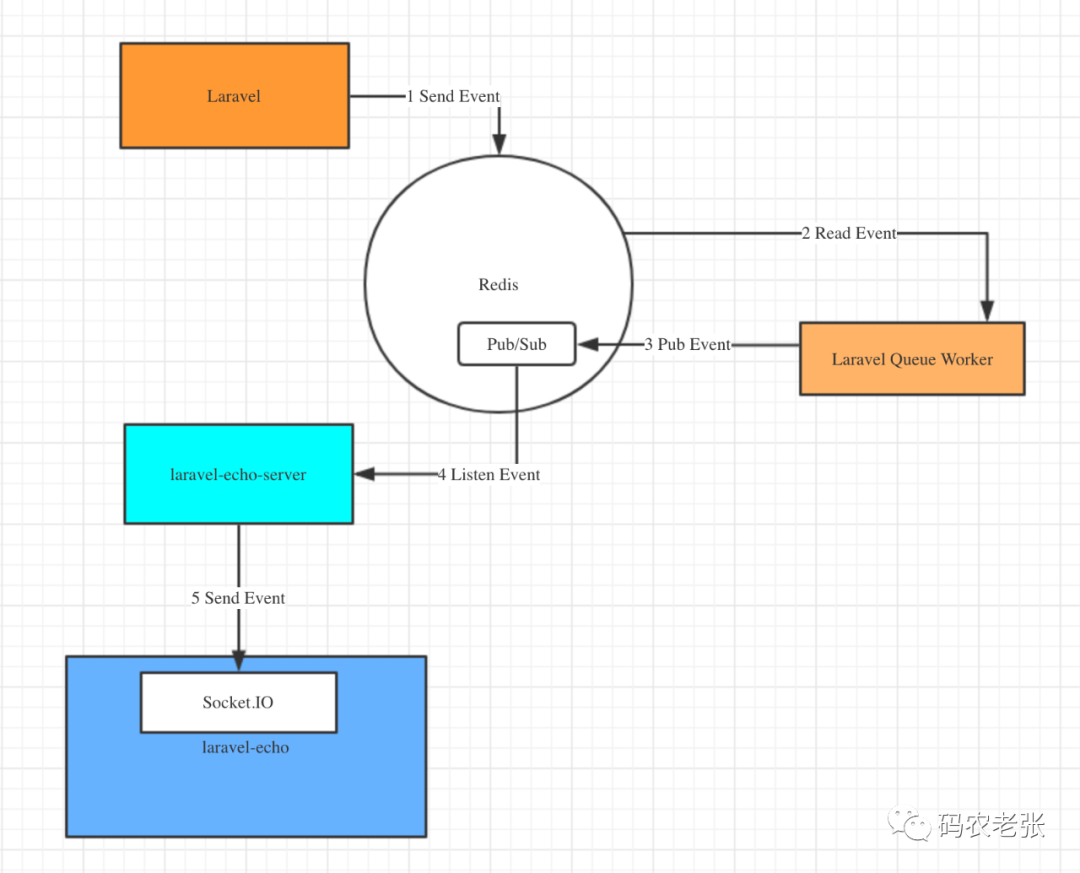
If you have a similar notification requirement in your system , It is entirely possible to consider using this broadcast system to realize , More or less powerful than polling , You can experience the benefits if you try more . Finally, I will quote a diagram of the broadcasting system drawn by a big man .
Reference documents :
https://learnku.com/docs/laravel/8.5/broadcasting/10382
https://learnku.com/docs/laravel/6.x/broadcasting/5159
https://blog.csdn.net/nsrainbow/article/details/80428769
https://learnku.com/laravel/t/52388
边栏推荐
猜你喜欢

使用teqcplot对teqc 质量分析结果进行可视化展示

2022-06-22:golang选择题,以下golang代码输出什么?A:3;B:1;C:4;D:编译失败。 package main import ( “fmt“ ) func mai

微信小程序:爱情保证书制作生成

Wechat applet example development: run
【微服务|Nacos】Nacos版本相关问题一览
微信小程序:凑单满减计算神器

直接插入排序——【常见排序法(1/8)】

Parameter passing of 18 generator function

Chrome debugging tips

Brief ideas and simple cases of JVM tuning - why do you need JVM tuning?
随机推荐
【C语言】关键字
prometheus、influxdb2.2安装及flume_export下载编译使用
微信小程序:凑单满减计算神器
SwiftUI 2.0 课程笔记 Chapter 5
servlet自学笔记
Small problems in the spoole framework for TCP communication in PHP
I have been engaged in software testing for 5 years and have changed jobs for 3 times. I have understood the field of software testing
MVC三层架构
Arduino temperature and humidity sensor DHT11 (including code)
微信小程序:未来老婆查询生成器
MySQL stored procedure
UI自动化定位利器-xpath实战
UI automation positioning edge -xpath actual combat
OSPF分流实验
掌握 Shell,一篇就够了!
What is the average annual salary of an outsourced tester who has worked for 5-8 years?
1183. electricity
Dolphin scheduler 2.0.5 task test (spark task) reported an error: container exited with a non zero exit code 1
BGP summary of hcip operation
【Mac】安全性与隐私中没有任何来源选项