当前位置:网站首页>dolphinscheduler 1.2.1 数据迁移到 dolphinscheduler 2.0.5方法及迁移后数据测试记录
dolphinscheduler 1.2.1 数据迁移到 dolphinscheduler 2.0.5方法及迁移后数据测试记录
2022-06-23 03:52:00 【韧小钊】
dolphinscheduler 1.2.1 升级及数据迁移
背景
在dolphinscheduler1.2.1的版本上进行了二次开发,近期进行了2.0升级,以2.0.5为基准,将之前在1.2.1版本上的内容迁移了过来。因此没有用dolphinscheduler的一键升级操作,代码迁移过来之后,直接手动部署测试,准备给生产环境升级的时候,遇到一件麻烦事情,2.0的新增了一些表,包括原先的工作流定义,现在对应多张表,因此数据迁移比较麻烦。好在dolphinscheduler确实够强大,支持数据一键同步。虽然还是需要人工干预,但还是大大减轻了工作量。
数据迁移步骤
数据库备份
● 将1.2.1使用的数据库导出。
● 对2.0.5使用的数据库进行备份,备份完成后,将库表全部删除。
● 导入1.2.1导出的表结构及数据。
执行create-dolphinscheduler.sh脚本

执行日志:

查看数据库,2.0新增的表都有了,数据也有了,这么爽
数据验证
目前常用的就datax和存储过程,因此先验证这两个任务。
DataX任务验证
查看页面数据是否完整
通过页面查看datax任务,发现默认的是脚本模式,数据全为空,但是对应数据库是有值的。
统一下线处理
update t_ds_process_definition set release_state=0;
update t_ds_process_definition_log set release_state=0;
update t_ds_schedules set release_state=0;
手工处理
关闭脚本按钮,恢复到1.2.1那种可以选择数据库的页面。然后手动输入相关参数保存,查看数据库,发现保存后的数据比之前迁移来的数据多了五个元素。因此手动更新数据库,全部加上这五个元素,再次查看页面,数据可以正常显示。
更新数据库语句
UPDATE t_ds_task_definition_log def
SET task_params =(
	SELECT
		concat(
			"{",
			'"customConfig": 0,"xms": 1,"xmx": 1,"waitStartTimeout": {},"switchResult": {},',
		SUBSTRING( task_params, 2 ))
	FROM
		t_ds_task_definition_log_copy1 def2
	WHERE
		def2.id = def.id
	)
WHERE
	def.task_type = 'DATAX'
注意:
t_ds_task_definition和t_ds_task_definition_log两张表都要更新
不能对同一张表同时进行查询和更新操作,因此先拷贝一份作为执行更新语句使用,更新完成后再删除掉
执行DataX任务报错
[INFO] 2022-04-14 15:50:27.199 TaskLogLogger-class org.apache.dolphinscheduler.plugin.task.datax.DataxTask:[117] - command : #!/bin/sh
BASEDIR=$(cd `dirname $0`; pwd)
cd $BASEDIR
source /home/combscupdate/app/combscheduler/conf/env/dolphinscheduler_env.sh
/tmp/dolphinscheduler/exec/process/3/16_5/55852/416253/55852_416253_node.sh
[INFO] 2022-04-14 15:50:27.206 TaskLogLogger-class org.apache.dolphinscheduler.plugin.task.datax.DataxTask:[287] - task run command: sudo -u combexec sh /tmp/dolphinscheduler/exec/process/3/16_5/55852/416253/55852_416253.command
[INFO] 2022-04-14 15:50:27.215 TaskLogLogger-class org.apache.dolphinscheduler.plugin.task.datax.DataxTask:[178] - process start, process id is: 209144
[INFO] 2022-04-14 15:50:27.234 TaskLogLogger-class org.apache.dolphinscheduler.plugin.task.datax.DataxTask:[202] - process has exited, execute path:/tmp/dolphinscheduler/exec/process/3/16_5/55852/416253, processId:209144 ,exitStatusCode:2 ,processWaitForStatus:true ,processExitValue:2
[INFO] 2022-04-14 15:50:28.213 TaskLogLogger-class org.apache.dolphinscheduler.plugin.task.datax.DataxTask:[66] -  -> welcome to use bigdata scheduling system...
	python2.7: can't open file '/home/combscupdate/app/datax
	/bin/datax.py': [Errno 2] No such file or directory
切换到对应的租户执行都没问题,变量都是存在的,打断点,json文件也是存在的。但是新增一个datax任务执行,结果成功了,查看日志发现唯一的不同就是加载环境变量这一块,看来还是环境变量没起作用。
json存在(新版任务执行完command和json文件都会自动清除掉)

新增datax任务执行成功
日志区别在于export环境变量
[INFO] 2022-04-14 15:16:19.955 TaskLogLogger-class org.apache.dolphinscheduler.plugin.task.datax.DataxTask:[91] - create command file:/tmp/dolphinscheduler/exec/process/3/5182740511616_1/55849/416249/55849_416249.command
[INFO] 2022-04-14 15:16:19.955 TaskLogLogger-class org.apache.dolphinscheduler.plugin.task.datax.DataxTask:[117] - command : #!/bin/sh
BASEDIR=$(cd `dirname $0`; pwd)
cd $BASEDIR
export JAVA_HOME=/usr/java/jdk1.8.0_151
export PATH=$JAVA_HOME/bin:$JAVA_HOME/jre/bin:$PATH
export CLASSPATH=.$CLASSPATH:$JAVA_HOME/lib:$JAVA_HOME/jre/lib:$JAVA_HOME/lib/tools.jar
export DATAX_HOME=/home/combscupdate/app/datax
/tmp/dolphinscheduler/exec/process/3/5182740511616_1/55849/416249/55849_416249_node.sh
[INFO] 2022-04-14 15:16:19.959 TaskLogLogger-class org.apache.dolphinscheduler.plugin.task.datax.DataxTask:[287] - task run command: sudo -u combexec sh /tmp/dolphinscheduler/exec/process/3/5182740511616_1/55849/416249/55849_416249.command
[INFO] 2022-04-14 15:16:19.960 TaskLogLogger-class org.apache.dolphinscheduler.plugin.task.datax.DataxTask:[178] - process start, process id is: 187330
[INFO] 2022-04-14 15:16:20.305 TaskLogLogger-class org.apache.dolphinscheduler.plugin.task.datax.DataxTask:[66] -  -> welcome to use bigdata scheduling system...
	DataX (DATAX-OPENSOURCE-3.0), From Alibaba !
	Copyright (C) 2010-2017, Alibaba Group. All Rights Reserved.
加载环境变量代码处理
首先判断工作流定义是否选择了环境,选择了则走该环境变量,否则走配置文件dolphinscheduler_env.sh

手动执行选择环境时还是失败,并不会生效,走的依然是配置文件!!!!!

成功的任务是在定义工作流时候选择了环境
迁移过来的数据,默认都是空,走的都是配置文件,配置文件又偏偏不生效,在环境上手动source执行又没问题…
再次手工处理
将环境编码字段全部设置默认值,安全中心,配置完环境便会产生一条记录,把编码拿来即可。配置环境时候worker进程要启动,否则下拉框选不到数据。
update t_ds_task_definition set environment_code=xxxxxx;
update t_ds_task_definition_log set environment_code=xxxxxx;


存储过程验证
页面同样改版,老版直接就是方法名,新版要求完整的sql调用语句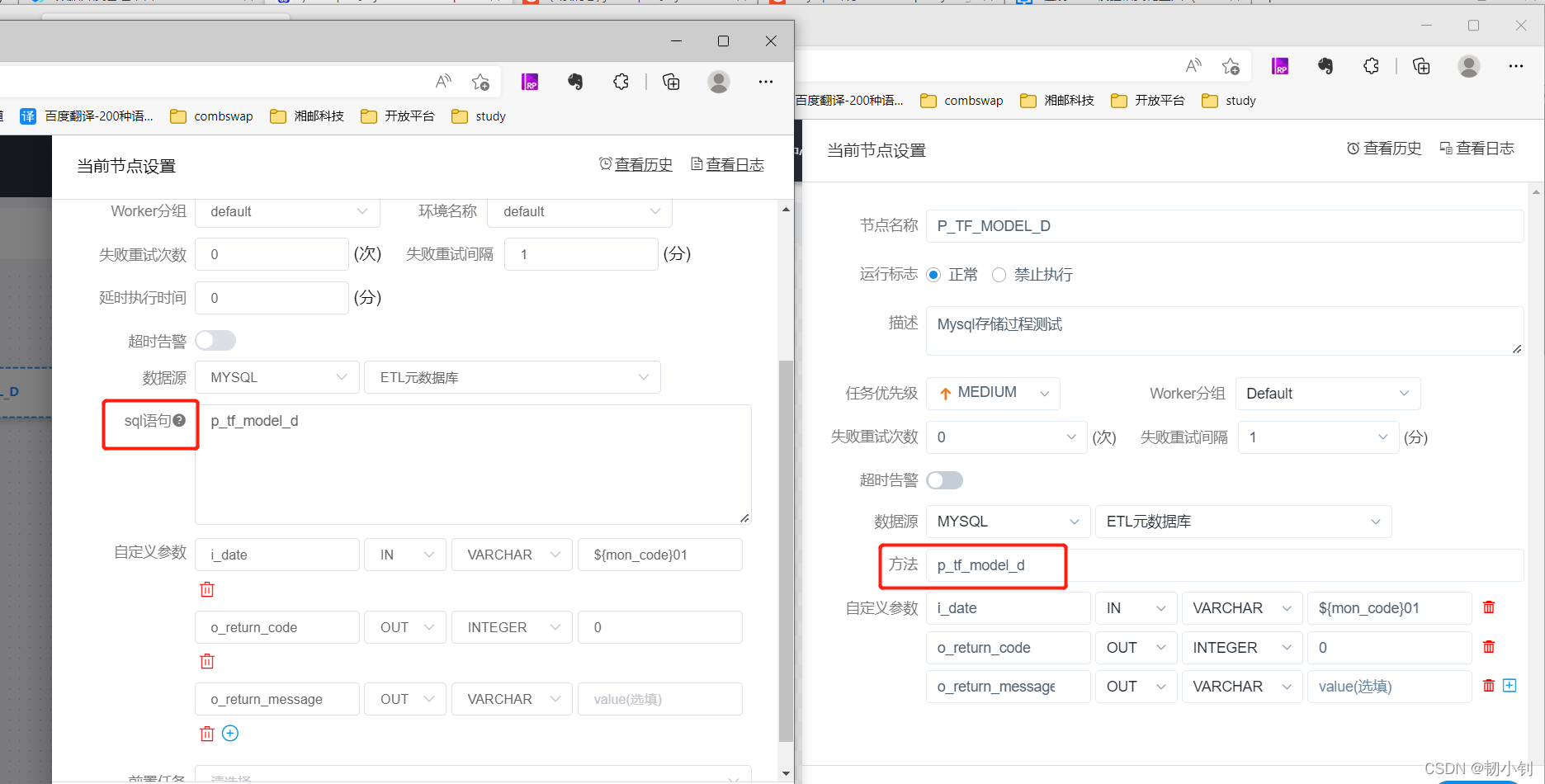
存储过程写法
{call 存储过程名称(具体参数1,具体参数2...)}

记得老版日志会把日期打印出来,新版显示的还是变量,难道没转换成功?
验证日期变量
想多了,是转换了的,不然也不会执行成功呀!
对应转换工具类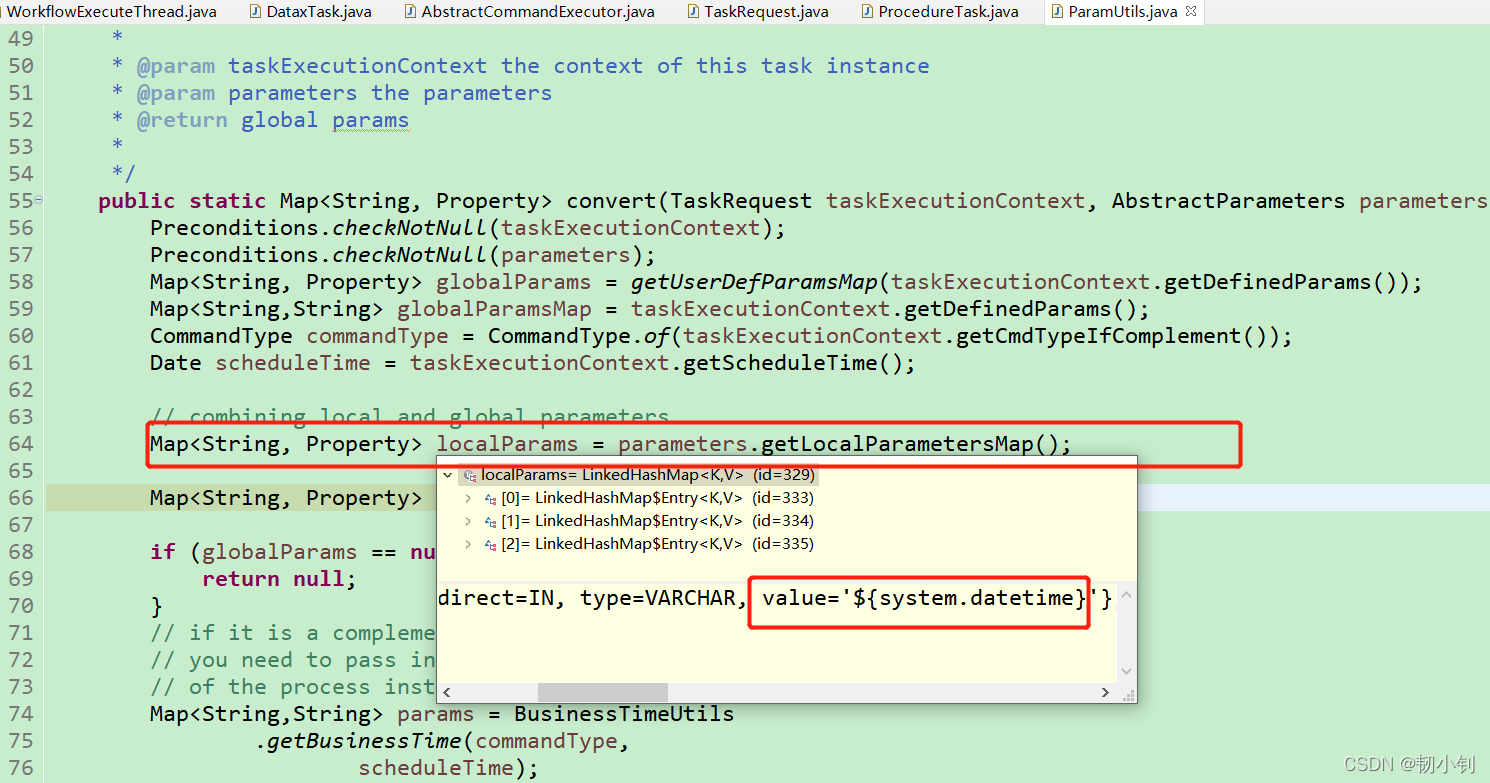

统一处理
和datax一样,统一更新成{call..的样式。
后来发现比较麻烦,应该有更简单的方式
测试记录
真难!!!
总结
虽然一键同步,省了很多工作量,但是每一个任务至少还要测一遍,这步是省不了滴!
边栏推荐
- PCB任意角度和距离放置元器件
- centos7部署docker,安装mysql
- TabControl style of WPF basic control
- 项目总结1(头文件,switch,&&,位变量)
- cadence中的焊盘和flash symbol
- 如何更好地组织最小 WEB API 代码结构
- Thinkphp6 solving jump problems
- 1183. electricity
- Reinstallation of cadence16.3, failure and success
- Precautions for running high-frequency and high-speed signal lines near PCB board - basic principles for high-frequency and high-speed signal design
猜你喜欢

Mini Homer - can you get a remote map data transmission link for hundreds of yuan?

ICER skills 03design compile
开发一年不到,来面试居然敢开口要20K,面完连8K都不想给~

Install and run mongodb under win10

cadence中的焊盘和flash symbol

Receive incoming files and download (simple usage) a tag
【图论】—— 二分图

Usage of apipost interface test ------ get

Cloud native database is in full swing, and the future can be expected

Abnova PSMA磁珠解决方案
随机推荐
Altium designer 09 screen printing displays a green warning near the pad. How to prevent it from alarming?
左值与右值
Chrome debugging tips
Thinkphp6 solving jump problems
Win10 view my Ini path
What are the types of independent station chat robots? How to quickly create your own free chat robot? It only takes 3 seconds!
静态双位置继电器 XJLS-84/440/DC220V
静态双位置继电器GLS-3004K/DC220V
Cloud native database is in full swing, and the future can be expected
Flask基础:环境搭建+配置+URL与试图之间的映射+重定向+数据库连接
How can mushrooms survive a five-year loss of 4.2 billion yuan?
Abnova fluorescent dye 510-m streptavidin scheme
Three operation directions of integral mall
电流继电器HDL-A/1-110VDC-1
Examples of corpus data processing cases (part of speech encoding, part of speech restoration)
FreeModBus解析1
Abnova fluorescent dye 555-c3 maleimide scheme
接收传来得文件并下载(简单用法)a标签
Openjudge noi 1.13 51: ancient password
Pads and flash symbols in cadence