当前位置:网站首页>怎么使用Shell脚本实现监测文件变化
怎么使用Shell脚本实现监测文件变化
2022-06-23 03:42:00 【亿速云】
怎么使用Shell脚本实现监测文件变化
这篇文章主要讲解了“怎么使用Shell脚本实现监测文件变化”,文中的讲解内容简单清晰,易于学习与理解,下面请大家跟着小编的思路慢慢深入,一起来研究和学习“怎么使用Shell脚本实现监测文件变化”吧!
代码
完整的shell脚本如下,可以直接使用。本示例中,脚本文件名为fileTracer.sh。
#!/bin/bash# ------------------------------------------# Filename : fileTracer.sh# Version : 1.1# Date : 2022-5-22 00:52:23# Author : 农民工老王@CSDN# Email : [email protected]# Website : https://blog.csdn.net/monarch91# Description : 用于追踪文件变化的脚本# ------------------------------------------time=$1sleepNum=$2filePath=$3fileName=`basename ${filePath}`whileNum=$(echo "scale=0;${time}*60/${sleepNum}"|bc)flag=0historyDir=./fileHistorytimeStr=""detection_log() { timeStr=$(date "+%H:%M:%S.%N") timeStr=${timeStr:0:12} echo -e "\033[35m${timeStr}\033[0m \033[36m[DEBUG]\033[0m :$1"}existNotice=0deleteNotice=0md5StrLast=""mkdir -p $historyDirwhile [ $flag -lt $whileNum ]; do if [ -f "${filePath}" ]; then if [ $existNotice -eq 1 ] || [ $flag -eq 0 ] ; then if [ $flag -eq 0 ]; then detection_log "文件已存在。" else detection_log "文件被创建。" fi md5StrLast=`md5sum ${filePath} | awk '{ print $1 }'` cp -fr ${filePath} ${historyDir}/${timeStr}_${fileName} else md5StrNow=`md5sum ${filePath} | awk '{ print $1 }'` >/dev/null 2>&1 if [ "lw${md5StrNow}" != "lw" ] && [ "lw${md5StrNow}" != "lw${md5StrLast}" ]; then detection_log "文件被修改。" cp -fr ${filePath} ${historyDir}/${timeStr}_${fileName} md5StrLast=${md5StrNow} fi fi existNotice=0 deleteNotice=1 else if [ $flag -eq 0 ]; then detection_log "文件未创建。" elif [ $deleteNotice -eq 1 ]; then detection_log "文件被删除。" fi deleteNotice=0 existNotice=1 fi flag=$((flag+1)) sleep ${sleepNum}done
使用方法
在脚本所在文件夹运行:./fileTracer.sh ${监测时长} ${监测间隔} ${被监测文件的绝对路径}
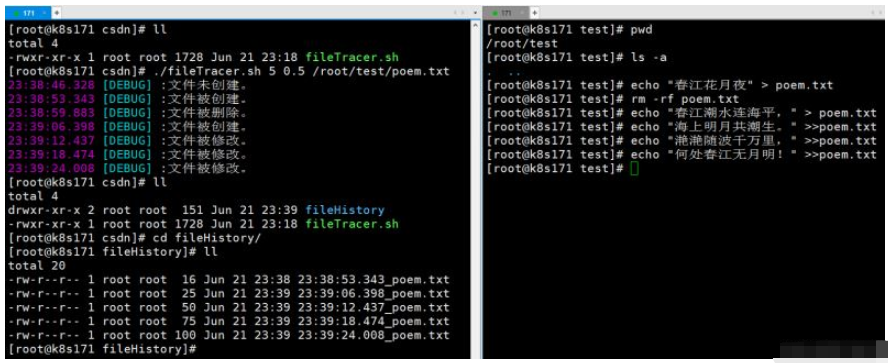
其中 监测时长 的单位为 分钟,检测间隔的单位为 秒,以上两个参数均可以为小数。如:./fileTracer.sh 5 0.5 /root/test/poem.txt ,此指令表示在未来的5分钟内,每隔0.5秒监测一次 /root/test/poem.txt的文件变化。
感谢各位的阅读,以上就是“怎么使用Shell脚本实现监测文件变化”的内容了,经过本文的学习后,相信大家对怎么使用Shell脚本实现监测文件变化这一问题有了更深刻的体会,具体使用情况还需要大家实践验证。这里是亿速云,小编将为大家推送更多相关知识点的文章,欢迎关注!
边栏推荐
- Web page dynamic and static separation based on haproxy
- Summary of some precautions and problems in the use of tars framework (mengxinxiang)
- How to batch generate jan13 barcode
- Gx3001q UI instructions for upgrading 8-bit color to 16 bit color
- An implementation of warning bombing
- D overloading nested functions
- 【LeetCode】翻转链表II
- LRU cache
- What is the difference between the poll () method and the remove () method?
- Simply use the pagoda to build WordPress
猜你喜欢

The first batch of job hunting after 00: don't misread their "different"
第一批00后下场求职:不要误读他们的“不一样”
软件项目管理 8.4.软件项目质量计划
Software project management 8.4 Software project quality plan

Gakataka student end to bundle Version (made by likewendy)

嵌入式软件测试工具TPT18更新全解析

线上MySQL的自增id用尽怎么办?

Jmeter- (V) simulated user concurrent login for interface test
Full analysis of embedded software testing tool tpt18 update

The new version of Kali switches the highest account
随机推荐
How to solve the problem that the web page fails to log in after the easycvr service is started?
node+express如何操作cookie
redis 精讲系列介绍八 - 淘汰策略
[leetcode] flip linked list II
怎样能在小程序中实现视频通话及互动直播功能?
Three ways to export excel from pages
Adobe international certification 𞓜 how IIT Madras brings efficiency and accessibility to scholars through Adobe e Acrobat
Salesforce heroku (V) application in salesforce (canvasapp)
Heavyweight review: strategies for reliable fMRI measurements
MySQL common instructions
The power of code refactoring: how to measure the success of refactoring
How to batch generate jan13 barcode
What is the difference between ArrayList and array?
选择排序法
[two points] leetcode1011 Capacity To Ship Packages Within D Days
数据交易怎样实现
AI 视频云 VS 窄带高清,谁是视频时代的宠儿
MySQL data recovery (.Ibdata1, bin log)
How can I realize video call and interactive live broadcast in a small program?
【LeetCode】两数之和II