当前位置:网站首页>MySQL common instructions
MySQL common instructions
2022-06-23 03:37:00 【ZNineSun】
This article will gradually put all commonly used sql The sentences are listed one by one , It is suitable for most interviews and written examinations , You can also do it yourself in the project , At the same time, this article will Continuous updating , Stay tuned .
1. Capitalize all letters
upper(str)
eg:upper('green')->GREEN
2. Make all letters lowercase
lower(str)
eg:lower('grEEn')->green
3. Connection string ( String splicing )
concat(str1,str2)
eg:concat('aaB','cd')->aaBcd
4. Crop string
#  From a Bit start , extract b Characters ,b If it is not written, it will be intercepted to the last bit by default
SUBSTRING(str,a,b)
#  Start on the left , extract b Characters
left(str,b)
#  From the right , extract b Characters
right(str,b)
5. Get string length
- length(): Unit is byte ,utf8 Code , A Chinese character has three bytes , A number or letter, a byte .gbk Code , Two bytes of a Chinese character , A number or letter, a byte .
- char_length(): Unit as character , No matter Chinese character or number or letter, it is a character .
length('ninesun China ')=7+6=13
CHAR_LENGTH('ninesun China ')=7+2=9
6.group_concat() function
There is group by In the query statement of ,select The specified field is either contained in the group by After statement , As a basis for grouping , Or in aggregate functions .
The data in the table is as follows :
We look for people with the same name id, You can query like this :
select name,id from `user` order by name;

You can see that the name has many repetitions , It doesn't look intuitive , So lead to group_concat:
- function : take group by The resulting values in the same group are connected , Returns a string result
- grammar :group_concat( [distinct] Fields to connect [order by Sort field asc/desc ] [separator ‘ Separator ’] )
- explain : By using distinct You can exclude duplicate values ; If you want to sort the values in the results , have access to order by Clause ;separator Is a string value , The default is a comma .
So we look up the same name Id, This function can be written like this :
select name,GROUP_CONCAT(id) from `user` GROUP BY name;

Of course, we can also put the above id The numbers are sorted from large to small , And use ’_' As a separator :
select name,GROUP_CONCAT(id ORDER BY id desc SEPARATOR '_') from `user` GROUP BY name;

Title Example :https://leetcode.cn/problems/group-sold-products-by-the-date/submissions/
7.rlike
Contains a character
# ^DIAB1 Include with DIAB1 start
# .* For any character  \\ Said the blank space
# .*\\sDIAB1  Any character space DIAB1 start
conditions rlike '^DIAB1|.*\\sDIAB1';
Be careful rlike You can use regular expressions to match
8.having
mysql in , When we use aggregate functions , Such as sum,count after , When screening conditions are needed again ,having That comes in handy , because WHERE Filter records before aggregation ,having and group by It is used in combination , Of course, it can be different group by Connected use , however having The following fields must be return fields .
Be careful having The final judgment field must be the result returned by the aggregate function
Example :
As shown in the table above , We grouped by age
SELECT id,name,age from user group BY age

Then we need to calculate that the age is greater than or equal to 23 Of
SELECT id,name,age from user group BY age HAVING age>=23

9.union
MySQL UNION Operators are used to connect more than two SELECT The results of a statement are combined into a set of results . Multiple SELECT Statement will remove duplicate data .
For example, the first query has 100 Two columns , The second query result is also 160 Two columns , Therefore, using union all after , You can combine these two results into one , become 260 Row two columns .
Grammar format :
SELECT expression1, expression2, ... expression_n
FROM tables
[WHERE conditions]
UNION [ALL | DISTINCT]
SELECT expression1, expression2, ... expression_n
FROM tables
[WHERE conditions];
Parameters
- expression1, expression2, … expression_n: Columns to retrieve .
- tables: Data table to retrieve .
- WHERE conditions: Optional , Retrieve conditions .
- DISTINCT: Optional , Delete duplicate data in result set . By default UNION The operator has removed the duplicate data , therefore DISTINCT Modifiers have little effect on the results .
- ALL: Optional , Return all result sets , Contains duplicate data .
unin There are many other uses of , Like many interviews, you have to ask : The problem of row to column type is nothing more than the following two steps :
- One by one : hold “ Name ” As a new column value, Original value Also as a new column , This is a query , Other columns do not
- use union all Splice the results of each column
Take the following simple question (leeteCode:1795. The price of each product in different stores ) Let's get you started :
Title Description :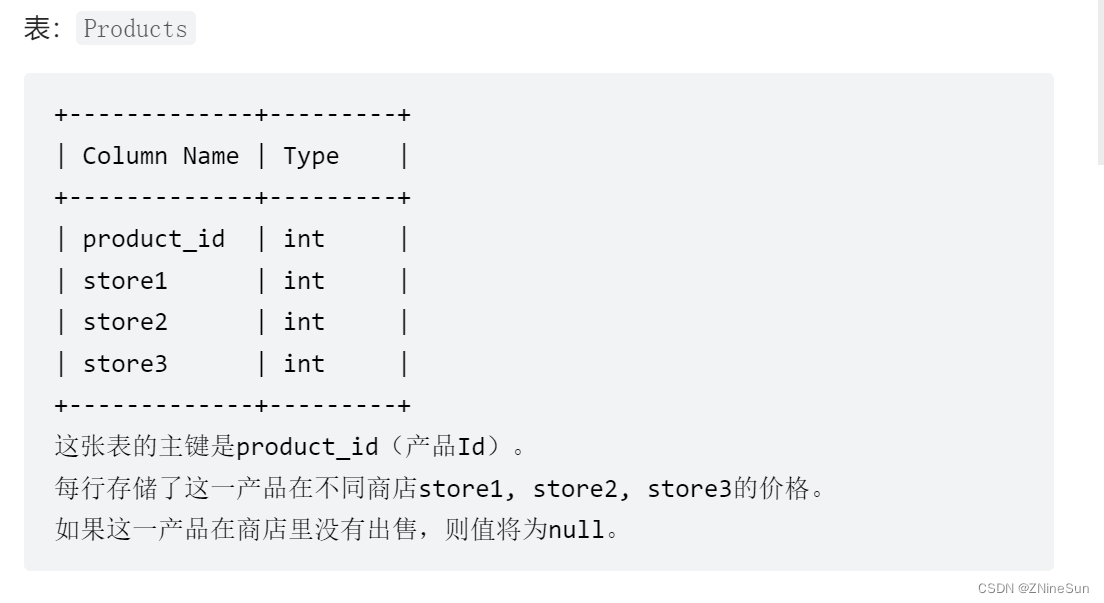
Please refactor Products surface , Check the price of each product in different stores , Make the output format change to (product_id, store, price) . If this product is not sold in the store , This line is not output .
In the output result table The order is not required .
Please refer to the following example for query output format .
This problem is a typical row to column problem , Let's follow the steps just mentioned to solve the problem :
- One by one : hold “ Name ” As a new column value( Topic store), Original value Also as a new column ( Topic price), This is a query , Other columns do not
- use union all Splice the results of each column
If this product is not sold in the store , This line is not output , So the original column is not null The screening criteria for
So the final code is as follows :
select product_id,'store1' as store,store1 as price
from Products where store1 is not null
union all
select product_id,'store2' as store,store2 as price
from Products where store2 is not null
union all
select product_id,'store3' as store,store3 as price
from Products where store3 is not null
Let me explain it in general ’store1’ This is to add a new column , This store1 It will show up in stroe In this column .
If you put store1 Change to another name , Such as store111, The result is :
Seeing this place, you should know the specific usage of row column conversion .
边栏推荐
- Analysis on the development of China's satellite navigation industry chain in 2021: satellite navigation is fully integrated into production and life, and the satellite navigation industry is also boo
- This point (II)
- JSON. Function of the stringify() optional parameter
- C. Differential Sorting
- Analysis on demand and market scale of China's steamed stuffed bun industry in 2020 [figure]
- Is LinkedList a one-way linked list or a two-way linked list?
- SwiftUI 组件大全之使用 ScrollView 和 GeometryReader 创建动画 3D卡片 滚动效果
- Tcapulusdb Jun · industry news collection (V)
- Analysis on development history, industrial chain, output and enterprise layout of medical polypropylene in China in 2020 [figure]
- Installing serverstatus probe using pagoda
猜你喜欢

mysql 数据恢复 (.ibdata1, bin log)

R tree of search tree

1058 multiple choice questions (20 points)

【owt】owt-client-native-p2p-e2e-test vs2017构建2 :测试单元构建及运行

【曾书格激光SLAM笔记】Gmapping基于滤波器的SLAM
1-1VMware介绍

Detailed discussion on modular architecture design of MCU firmware

Static code block, code block, constructor execution order
mysql常用指令

Banknext microservice: a case study
随机推荐
R tree of search tree
Form submit onclick and onsubmit
Simply use the pagoda to build WordPress
If there is a smart bus visualization platform, can "beginning" restart indefinitely?
How to print array contents
Decentralized networks are not decentralized
Analysis on development history, industrial chain, output and enterprise layout of medical polypropylene in China in 2020 [figure]
Tcapulusdb Jun · industry news collection (IV)
Analysis of the number of urban residents covered by basic medical insurance, their treatment and medical treatment in other places in China in 2021 [figure]
JS Part 4
Parsing the implementation of easygbs compatible token as parameter passing
【owt】owt-client-native-p2p-e2e-test vs2017构建2 :测试单元构建及运行
The cloud disk has been offline from the internal machine, but the console uninstall failed
Google Earth Engine(GEE)——长时间序列逐月VCI数据提取分析和面积计算(墨西哥为例)
[JS reverse hundreds of cases] the login of a HN service network is reverse, and the verification code is null and void
Banknext microservice: a case study
Analysis on the development prospect of China's brain computer interface industry in 2021: wide application prospect, sustained and rapid growth of market scale [figure]
How to share small programs released by wechat
Tcapulusdb Jun · industry news collection (V)
【owt】owt-client-native-p2p-e2e-test vs2017构建 3 : 无 测试单元对比, 手动生成vs项目