当前位置:网站首页>Jmeter- (V) simulated user concurrent login for interface test
Jmeter- (V) simulated user concurrent login for interface test
2022-06-23 03:23:00 【Hello, test】
Preface :
This time mainly introduces the use of Jmeter Simulate user concurrent login , Test interface performance :
( One ) read CVS The configuration file
( Two ) Read database
( One ) read configuration file
advantage : Easy to learn , Easy to use
shortcoming : It is not applicable to concurrency with a large number of users , For example, testing 1 Million users concurrently , You need to manually write tens of thousands of pieces of data to the configuration file , Hands hurt ~
1. Add thread group
Right click test plan -> Threads -> Thread group

Parameter interpretation :
Number of threads : Number of concurrent users
Ramp-Up Time ( second ): How long it takes to start all threads
① 0 Concurrent on behalf of ;
② If the number of threads is 3, The required duration is 3S, be 3/3=1 every other 1S Start a thread ;
③ General Settings Ramp-Up= Number of threads , Then adjust it up and down to the desired .
cycles : Check Forever And keep doing it
2. Add synchronous timer , Set assembly point
explain : Its function is to block threads , Until the specified number of threads arrives , And release it together , It can create a lot of pressure in a moment
Thread group right-click -> Timer -> Synchro timer

Parameter description :
The number of simulated user groups : Number of threads released at the same time
The timeout is in milliseconds : That is, how many milliseconds after the timeout, release the specified number of threads at the same time .
- If set to 0,Timer Will wait for the number of threads to reach “Number of Simulated Users to Group by” The value in is released ;
- If it is greater than 0, If the number of threads set above has not been reached after this time ,Timer All threads will be released .
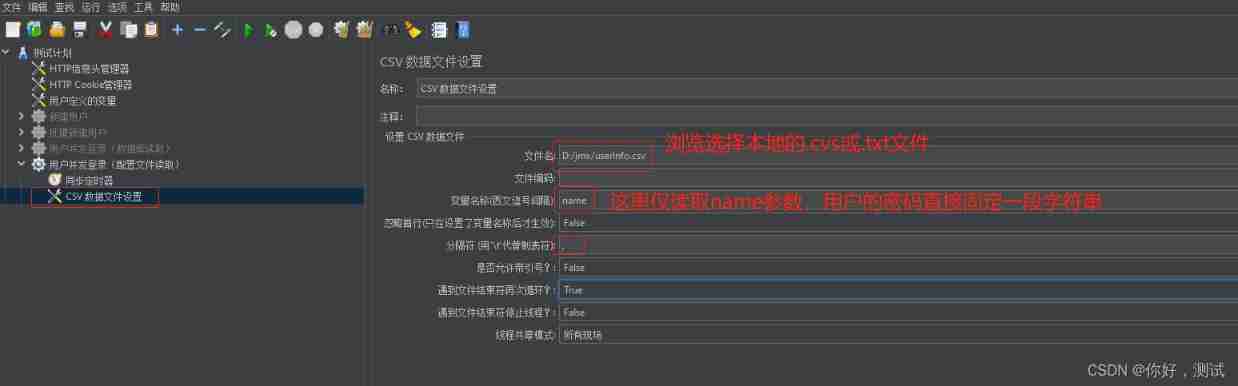
3. A parameterized
Thread group right-click -> The configuration element ->CVS Data file settings

4. add to http request , Call parameters

5. Check operation
View the concurrency by viewing the result tree and the aggregation report .

( Two ) Read database
advantage : It is suitable for large-scale user concurrent testing , And the maintenance cost is small .
1. Add thread group
2. Add timers
3. Add database configuration
Thread group right-click -> The configuration element ->JDBC Connection Configuration

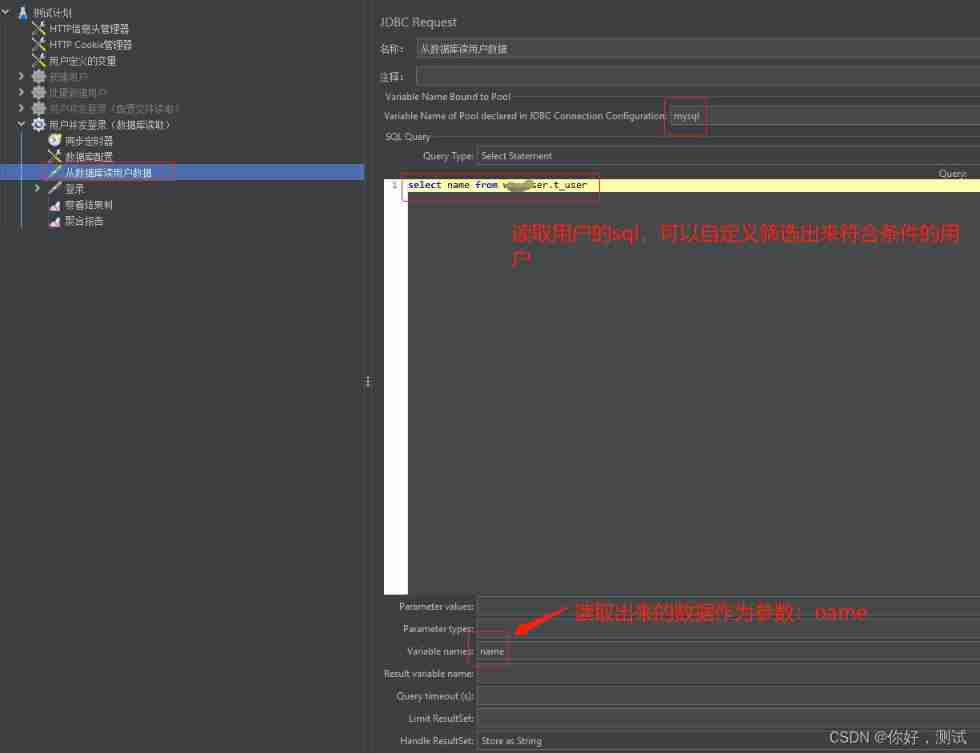
4. Get the login account and password from the database
Thread group right-click -> Sampler ->JDBC request request
5. add to http request
${__V(name_${__Random(1,10,)})}: The function is used here , Random login 10 This user

You can use tools -> The function Assistant dialog box generates

5. Check operation
View the concurrency by viewing the result tree and the aggregation report .

Hello Test, So far we Jmeter Simulation concurrency has been introduced , We choose the best solution according to the number of users . Later, we will give a special article on how to view the aggregation report ? Pay more attention to , finger heart ~
边栏推荐
- Mybatties plus batch warehousing
- Email authentication bypass
- Analysis on the development of China's graphene industry chain in 2021: with the support of energy conservation and environmental protection policies, the scale of graphene industry will continue to e
- Learning record -- memo on constructors and attributes in C
- Ultra detailed Apache and PHP installation tutorial windows (2022.1)
- How to gracefully solve the problem of platform font adaptation
- DAAS architecture and Implementation (I)
- Reading redis source code (II) underlying data structure
- 2022-01-25: serialize and deserialize n-ary tree. Serialization means that a
- Chaoscraft: join your girlfriend in Hackathon show -- Interview with the skate team
猜你喜欢
![Analysis on the development status of China's watch industry in 2021: a large number of electric watches are imported [figure]](/img/ca/672bfe49c8123da8679b2abeb43a2e.jpg)
Analysis on the development status of China's watch industry in 2021: a large number of electric watches are imported [figure]
![Analysis on development history, industrial chain, output and enterprise layout of medical polypropylene in China in 2020 [figure]](/img/28/ebfc25ec288627706e15a07e6bdb77.jpg)
Analysis on development history, industrial chain, output and enterprise layout of medical polypropylene in China in 2020 [figure]
![Analysis of China's integrated circuit industry chain in 2021: huge downstream market demand [figure]](/img/de/d73805aaf4345ca3d2a7baf85aab8d.jpg)
Analysis of China's integrated circuit industry chain in 2021: huge downstream market demand [figure]
Analysis on the development of China's satellite navigation industry chain in 2021: satellite navigation is fully integrated into production and life, and the satellite navigation industry is also boo
![Analysis of the number of urban residents covered by basic medical insurance, their treatment and medical treatment in other places in China in 2021 [figure]](/img/81/4d3cb059f700dd9243645e64023be7.jpg)
Analysis of the number of urban residents covered by basic medical insurance, their treatment and medical treatment in other places in China in 2021 [figure]
![Analysis on the development prospect of China's brain computer interface industry in 2021: wide application prospect, sustained and rapid growth of market scale [figure]](/img/84/192d152ceb760264b6b555b321f129.jpg)
Analysis on the development prospect of China's brain computer interface industry in 2021: wide application prospect, sustained and rapid growth of market scale [figure]

Encryption related to returnee of national market supervision public service platform

Analysis on the development of duty-free industry in Hainan Province in 2021: the implementation of the new policy makes the duty-free market in Hainan more "prosperous" [figure]
![[quick view] Analysis on the development status and future development trend of the global and Chinese diamond cultivation industry in 2021 [figure]](/img/f1/972a760459a6d599b5681aa634df09.jpg)
[quick view] Analysis on the development status and future development trend of the global and Chinese diamond cultivation industry in 2021 [figure]

Analysis on the development of China's graphene industry chain in 2021: with the support of energy conservation and environmental protection policies, the scale of graphene industry will continue to e
随机推荐
How to generate IATA barcode in batch through TXT file
How to install redis version 5.0.8 on the pagoda panel
2022-01-27: heater. Winter has come. Your task is to design a
Redis source code reading (I) general overview
QUIC or TCP
Interrupt array Foreach method [js implementation]
Brief introduction to arm architecture
WPF developer essential control library newbeecoder UI —NbMessageBox
An implementation of universal interface caching Middleware
"Tencent conference": how to operate and maintain efficiently in the face of exponential growth of business?
How to configure the domain name with low code of micro build
What are the advantages of the completely free and open source flutter? How to learn about flutter?
Xiamen's hidden gaopuge smart park has finally been uncovered
CVE-2021-21973 Vmware Vcenter SSRF POC
Learning records - things inherited by subclass parent of C #
WordPress modifying fixed links and pseudo statics
2022-01-28: for example, {5, 3, 1, 4} all number pairs are: (5,3), (5,1)
Compile your own openwrt firmware using Tencent cloud lightweight application server
Chapter IV open source projects and deployment
DAAS architecture and Implementation (I)