当前位置:网站首页>How to batch generate jan13 barcode
How to batch generate jan13 barcode
2022-06-23 03:24:00 【Magic Pixel Technology】
A friend asked how to make JAN13 bar code , Actually JAN13 Bar code and international EAN13 Code coding rules are completely consistent , Just input 12 Bit bar code data , The barcode software will automatically calculate the check digit . The only difference is JAN13 The first two digits of the barcode must be 45 perhaps 49 start ,45 perhaps 49 It is the international code of Japan , Just as our country is 69 Same as the beginning . Let's take a look at how to batch generate JAN13 bar code
Open barcode printing software , Create a new blank label , And set the size of the label , Note that the size of the label should be consistent with the size of the label paper in the printer . Click Set data source on the top of the software after label setting , Add a save with JAN13 Barcode data Excel file , Import it into the software .
Click the bar code button on the left side of the software , Add a barcode to the label , In the pop-up interface, select barcode type as “JAN-13”, Click insert data source field , Select barcode data .
After barcode generation , You can set whether to display barcode text and dead zone symbol on the right side of the software , You can also set the font and size of barcode text .
Click Print Preview , Set label layout , Print range and print quantity . Click the next page to view the generation of the tag , When it is correct, you can start printing .
The above is batch generation JAN13 How to operate bar code , Barcode printing software also has flexible output function ,JAN13 After the bar code is made, it can not only be printed by a printer, but also output PDF Save or picture .
边栏推荐
- Centos7.6 installing mysqlclient error reporting solution
- How to generate IATA barcode in batch through TXT file
- Learning record -- superficial understanding of unity decoupling
- Batch generation of Codabar codes using Excel files
- JS remove first character of string
- CentOS install redis
- Analysis on the development status of China's watch industry in 2021: a large number of electric watches are imported [figure]
- Tachometer script
- MySQL gets the top 1 and top n records after grouping
- Using promise to process asynchronous operations
猜你喜欢
![Analysis on the development prospect of China's brain computer interface industry in 2021: wide application prospect, sustained and rapid growth of market scale [figure]](/img/84/192d152ceb760264b6b555b321f129.jpg)
Analysis on the development prospect of China's brain computer interface industry in 2021: wide application prospect, sustained and rapid growth of market scale [figure]
![Analysis on development history, industrial chain, output and enterprise layout of medical polypropylene in China in 2020 [figure]](/img/28/ebfc25ec288627706e15a07e6bdb77.jpg)
Analysis on development history, industrial chain, output and enterprise layout of medical polypropylene in China in 2020 [figure]
![Analysis of China's integrated circuit industry chain in 2021: huge downstream market demand [figure]](/img/de/d73805aaf4345ca3d2a7baf85aab8d.jpg)
Analysis of China's integrated circuit industry chain in 2021: huge downstream market demand [figure]
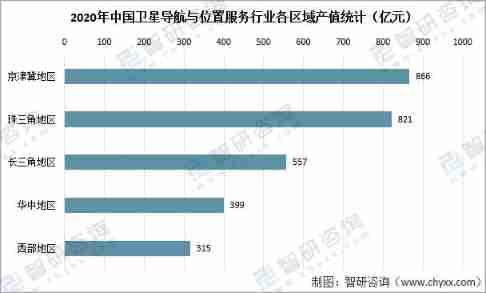
Analysis on the development of China's satellite navigation industry chain in 2021: satellite navigation is fully integrated into production and life, and the satellite navigation industry is also boo

Encryption related to returnee of national market supervision public service platform
![Analysis on the development status of China's watch industry in 2021: a large number of electric watches are imported [figure]](/img/ca/672bfe49c8123da8679b2abeb43a2e.jpg)
Analysis on the development status of China's watch industry in 2021: a large number of electric watches are imported [figure]
![Analysis on demand and market scale of China's steamed stuffed bun industry in 2020 [figure]](/img/4b/dd272f98b89a157180bf68570d2763.jpg)
Analysis on demand and market scale of China's steamed stuffed bun industry in 2020 [figure]
![[quick view] Analysis on the development status and future development trend of the global and Chinese diamond cultivation industry in 2021 [figure]](/img/f1/972a760459a6d599b5681aa634df09.jpg)
[quick view] Analysis on the development status and future development trend of the global and Chinese diamond cultivation industry in 2021 [figure]

Analysis on the development of China's graphene industry chain in 2021: with the support of energy conservation and environmental protection policies, the scale of graphene industry will continue to e

Analysis on the development of duty-free industry in Hainan Province in 2021: the implementation of the new policy makes the duty-free market in Hainan more "prosperous" [figure]
随机推荐
JSON. Function of the stringify() optional parameter
The performance of the new Tokio scheduler is improved by 10 times
WPF developer essential control library newbeecoder UI —NbMessageBox
QUIC or TCP
Exploration on the framework of stream batch integration technology and its practice in kangaroo cloud number stack
Operating wechat cache by using wechat low code
JS counts the number of times a string appears in another string
How to make special labels for books
JS asynchronous mechanism
Salesforce heroku (V) application in salesforce (canvasapp)
Email authentication bypass
Configuring multi cluster management using kubectl
Account MFA usage scheme
Easysearcher cannot find the IP address of easynvr hardware. How to solve it?
Analysis on the development prospect of China's brain computer interface industry in 2021: wide application prospect, sustained and rapid growth of market scale [figure]
Dynamic filling of drop-down box with micro overlap
Construction and exploration of vivo database and storage platform
An implementation of universal interface caching Middleware
Using promise to process asynchronous operations
Quickly grab the red envelope cover of Tencent blue whale New Year! Slow hands!