当前位置:网站首页>Wechat applet to realize stacked rotation
Wechat applet to realize stacked rotation
2022-06-24 18:13:00 【Susu is little Susu】
1. Realization effect
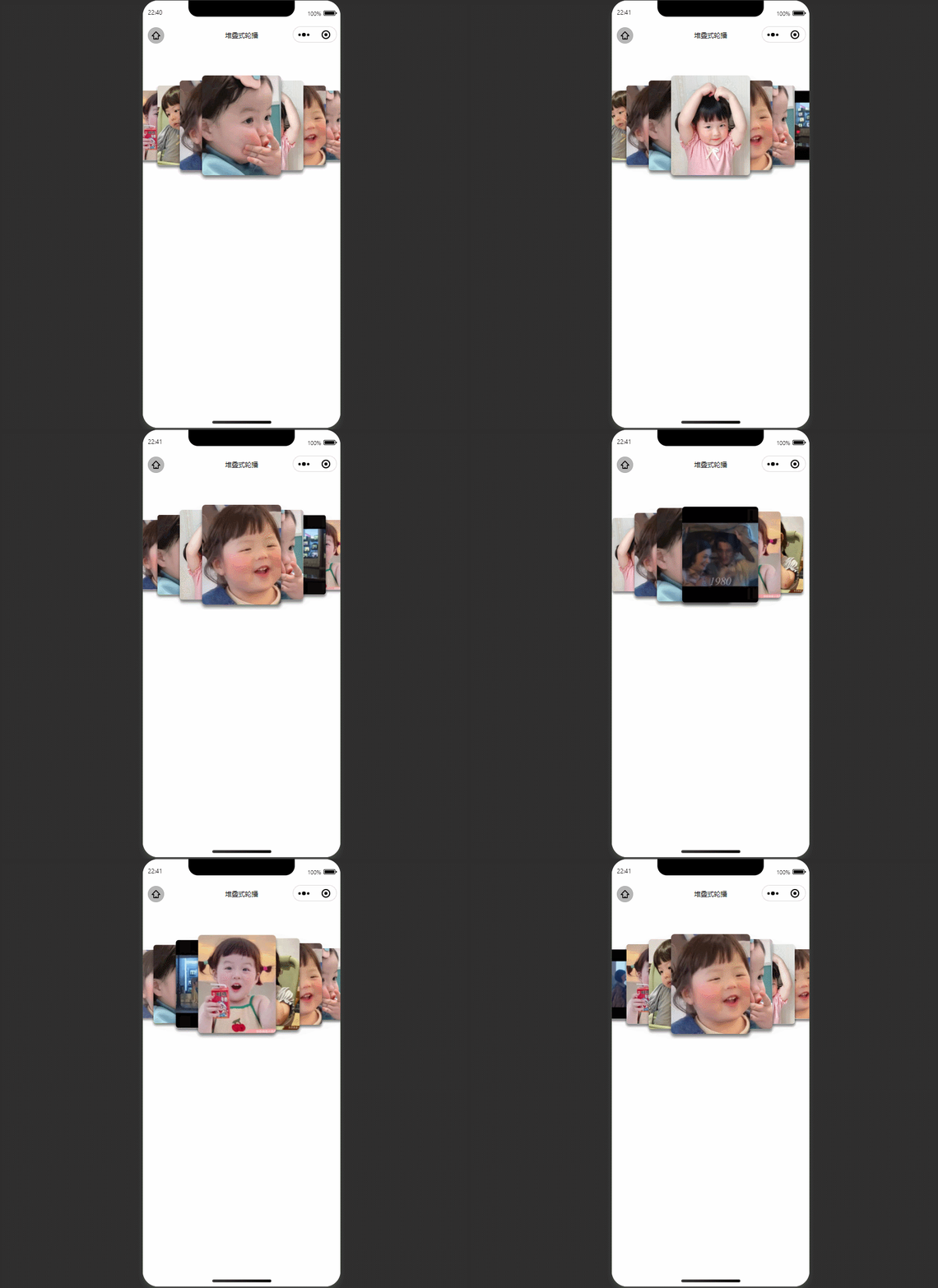
2. Realization principle
1.css Of var() function
var() Function to insert the value of a custom attribute , Instead of any part of the value of another property .
grammar :
var(custom-property-name, value)

eg:
:root {

  --main-bg-color: coral;
  --main-txt-color: blue;
  --main-padding: 15px;
}

#div1 {

  background-color: var(--main-bg-color);
  color: var(--main-txt-color);
  padding: var(--main-padding);
}

#div2 {

  background-color: var(--main-bg-color);
  color: var(--main-txt-color);
  padding: var(--main-padding);
}
2. Use inline styles , Distinguish between different styles
Get the value of each item
style="--index:{
    {item.zIndex}};--left:{
    {item.mLeft}}"
Set different zoom sizes , Level , A relatively central position
 transform: scale(calc(0.5 + var(--index) / 10));
 margin-left: calc(var(--left) * 100rpx - 150rpx);
 z-index: var(--index);
3. Initialization data , Set the corresponding... For the data z-index and mleft
4. Combined with Events :bindtouchmove,bindtouchstart,bindtouchend
Applet events :
- Events are a way of communicating from the view layer to the logical layer .
- Events can feed back the user's behavior to the logic layer for processing .
- Events can be bound to components , When the trigger event is reached , It will execute the corresponding event handler function in the logic layer .
- Event objects can carry extra information , Such as id, dataset,touches. How events are used
Events are divided into bubble events and non bubble events :
Bubbling event : When an event on a component is triggered , This event passes... To the parent node .
Non bubbling Events : When an event on a component is triggered , The event does not pass... To the parent node .
Bubble event list :
notes : Other component custom events except the above table are non bubbling events without special declaration , Such as form Of submit event ,input Of input event ,scroll-view Of scroll event
How to bind and prevent event bubbling ?
except bind Outside , It can also be used. catch To bind events . And bind Different , catch Will prevent the event from bubbling up .
3. Implementation code
<view class="swiper-box" bindtouchmove="tauchMove" bindtouchstart="tauchStart" bindtouchend="tauchEnd">
  <view class="item-box {
    {item.zIndex==1?'none':''}}" wx:for="{
    {swiperList}}" wx:key="index" style="--index:{
    {item.zIndex}};--left:{
    {item.mLeft}}">
    <view class="swiper-item">
      <image src="{
    {item.url}}" mode="aspectFill" wx:if="{
    {item.type=='image'}}"></image>
      <video src="{
    {item.url}}" autoplay loop muted show-play-btn="{
    {false}}" controls="{
    {false}}" objectFit="cover" wx:if="{
    {item.type=='video'}}"></video>
    </view>
  </view>
</view>
/* pages/another/cust-swiper/index.wxss */
page {

  background-color: #fff;
}

.swiper-item image,
.swiper-item video {

  width: 100%;
  display: block;
  height: 100%;
  margin: 0;
  pointer-events: none;
}

image {

  max-width: 100%;
  display: inline-block;
  position: relative;
  z-index: 0;
}

.swiper-box {

  height: 420rpx;
  position: relative;
  max-width: 750rpx;
  overflow: hidden;
  box-sizing: border-box;
  margin-top: 90rpx;
}

.swiper-box .item-box {

  position: absolute;
  width: 300rpx;
  height: 380rpx;
  top: 0;
  bottom: 0;
  left: 50%;
  margin: auto;
  transition: all 0.2s ease-in 0s;
  opacity: 1;
  box-shadow: 0px 13rpx 12rpx rgba(0, 0, 0, .5);
  border-radius: 15rpx;
  overflow: hidden;
}

.swiper-box .item-box.none {

  opacity: 0;
}

.swiper-box .item-box .swiper-item {

  width: 100%;
  height: 100%;
  border-radius: 6rpx;
  overflow: hidden;
}


.swiper-box .item-box {

  transform: scale(calc(0.5 + var(--index) / 10));
  margin-left: calc(var(--left) * 100rpx - 150rpx);
  z-index: var(--index);
}
// pages/another/cust-swiper/index.js
Page({


  data: {

    swiperList: [
      {

        type: 'video',
        url: 'https://static.51dh.com.cn/dbp/12/98/4494bd8a6e0fcd4a992f25a42bea28f8d1fb.mp4'
      }, {

        type: 'image',
        url: 'https://i.postimg.cc/mgsKJGLw/susu1.jpg'
      }, {


        type: 'image',
        url: 'https://i.postimg.cc/qRRLS16Q/susu0.jpg',
      }, {


        type: 'image',
        url: 'https://i.postimg.cc/pXDp6RXq/susu3.jpg'
      }, {


        type: 'image',
        url: 'https://i.postimg.cc/XJmpTvCD/susu2.jpg'
      }, {


        type: 'image',
        url: 'https://i.postimg.cc/76br1jzJ/susu1.jpg'
      }, {


        type: 'image',
        url: 'https://i.postimg.cc/pXDp6RXq/susu3.jpg'
      },
      {


        type: 'image',
        url: 'https://i.postimg.cc/XJmpTvCD/susu2.jpg'
      },
    ],
  },


  onLoad: function (options) {

    this.tauchSwiper('swiperList');
  },


  onShow: function () {


  },
  //  initialization tauchSwiper
  tauchSwiper(name) {

    let list = this.data[name];
    for (let i = 0; i < list.length; i++) {

      // Math.abs(x)  Function returns the specified number  “x“  The absolute value of
      list[i].zIndex = parseInt(list.length / 2) + 1 - Math.abs(i - parseInt(list.length / 2))
      list[i].mLeft = i - parseInt(list.length / 2)
    }
    this.setData({

      swiperList: list
    })
  },
  // tauchSwiper Touch start
  tauchStart(e) {

    this.setData({

      tauchStart: e.touches[0].pageX
    })
  },
  // tauchSwiper Calculation direction
  tauchMove(e) {

    this.setData({

      direction: e.touches[0].pageX - this.data.tauchStart > 0 ? 'right' : 'left'
    })
  },
  // tauchSwiper Calculate scrolling
  tauchEnd(e) {

    let direction = this.data.direction;
    let list = this.data.swiperList;
    if (direction == 'right') {

      let mLeft = list[0].mLeft;
      let zIndex = list[0].zIndex;
      for (let i = 1; i < list.length; i++) {

        list[i - 1].mLeft = list[i].mLeft
        list[i - 1].zIndex = list[i].zIndex
      }
      list[list.length - 1].mLeft = mLeft;
      list[list.length - 1].zIndex = zIndex;
      this.setData({

        swiperList: list
      })
    } else {

      let mLeft = list[list.length - 1].mLeft;
      let zIndex = list[list.length - 1].zIndex;
      for (let i = list.length - 1; i > 0; i--) {

        list[i].mLeft = list[i - 1].mLeft
        list[i].zIndex = list[i - 1].zIndex
      }
      list[0].mLeft = mLeft;
      list[0].zIndex = zIndex;
      this.setData({

        swiperList: list
      })
    }
  }
})
4. More applets demo, Focus on Su Su's code cloud !, For more information , Follow the wechat official account of Susu bug
边栏推荐
- Cloud MySQL importing cloud data warehouse PostgreSQL best practices
- How can programmers reduce bugs in development?
- Uncover the secrets of Tencent R & D! 30% of the demand will be responded within 1 day!
- 投资理财产品的钱能随时取出来吗?
- Complete Guide to web application penetration testing
- Install MySQL using Yum for Linux
- Two micro service interviews where small companies suffer losses
- Operation and maintenance guide | cos back source setting practice
- Bigdecimalavoiddoubleconstructorrule: do not directly use the double variable as a parameter to construct BigDecimal
- Selection (031) -cool_ How long can secret be accessed?
猜你喜欢

Nine practical guidelines for improving responsive design testing

Crmeb multi merchant PC packaging tutorial

LC 300. Longest increasing subsequence

Overall planning and construction method of digital transformation

Four security issues of low code and no code development
What if the database table structure changes? Smartbi products support one click synchronization

Eight recommended microservice testing tools

Six configuration management tools that administrators must know

How can programmers reduce bugs in development?

Etching process flow for PCB fabrication

随机推荐
Uncover the secrets of Tencent R & D! 30% of the demand will be responded within 1 day!
Leveldb source code analysis -- writing data
[golang] leetcode intermediate - jumping game & different paths
你知道CMDB吗?
Leveldb source code analysis -- open the database
腾讯云荣获“可信云技术最佳实践-虚拟化”
Quickly build MySQL million level test data
Explanation of pod DNS configuration & cases of DNS resolution failure
How to use SEO to increase the inquiry volume?
Users of the Tiktok open platform are authorized to obtain the user's fan statistics and short video data
Issue 39: MySQL time class partition write SQL considerations
A set of IM architecture technology dry goods for 100 million users (Part 2): reliability, orderliness, weak network optimization, etc
Business based precipitation component = & gt; manage-table
Three indicators to help you measure the effectiveness of digital transformation
Easygbs video platform TCP active mode streaming exception repair
Error reported after NPM I
[untitled]
Why are more and more people studying for doctors? Isn't it more and more difficult to graduate a doctor?
How can programmers reduce bugs in development?
Mengyou Technology: tiktok current limiting? Teach you to create popular copywriting + popular background music selection