当前位置:网站首页>Mysql入门学习(一)之语法
Mysql入门学习(一)之语法
2022-06-23 03:56:00 【默主归沙】
1.MySQL介绍
数据的存储问题:
变量,数组,对象,集合
弊端:临时存储,存储数据的量级太小
IO流
弊端:存储的数据没有类型区分,没有安全措施,没有备份与恢复
引出数据库概念:
存储和管理数据仓库
数据库分类:
1.关系型数据库:
Oracle、DB2、MySQL(重点)、SQL Server,特点:表与表建立关联关系
2. 非关系型数据库:
ElastecSearch、MongoDB、Redis,一般使用哈希表,通过键值对存数据
数据库的安装----文本界面安装方式
SQL语言概述
结构化的查询语言,简单的说增删改查都是SQL范畴–CRUD
1.通过命令提示符方式操作数据库
- 通过图形化方式操作数据库
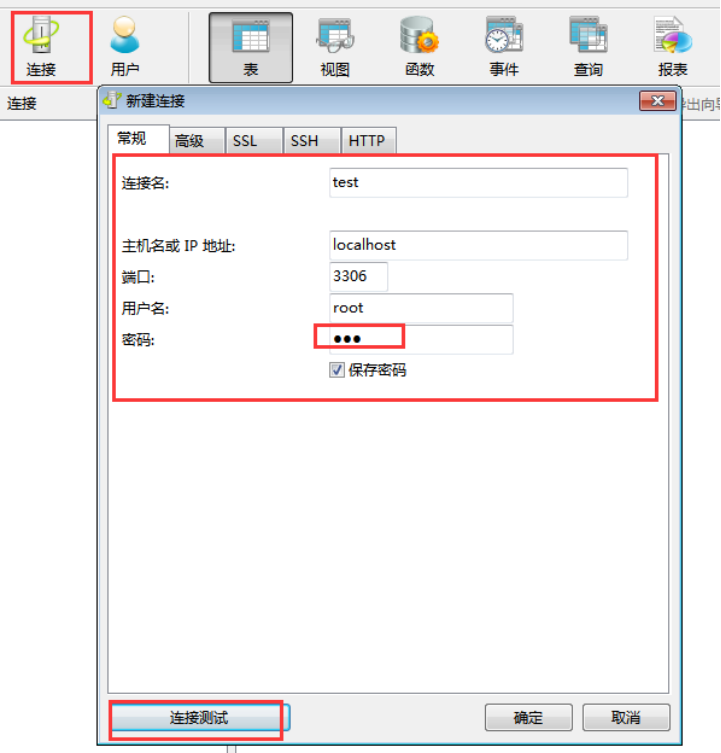


- 数据查询(重点)
基本查询
ctrl+:放大
查询语法:SELECT 列名 FROM 表名 查询单个字段
select first_name from t_employees;
查询多个字段
select first_name,salary from t_employees;
查询所有字段
select * from t_employees;
查询的字段可以进行运算
SELECT employee_id,first_name,salary*12 from t_employees;
查询的字段设置别名: as
SELECT employee_id as '员工编号',first_name as '姓',salary*12 as '年薪' from t_employees;
字段内容去重:distinct
select DISTINCT manager_id from t_employees;
排序查询: SELECT 列名 FROM 表名 ORDER BY 排序列 [排序规则]
查询员工的编号,名字,薪资。按照工资高低进行降序排序。
select employee_id,first_name,salary from t_employees ORDER BY salary desc;
多列排序:
查询员工的编号,名字,薪资。按照工资高低进行升序排序(薪资相同时,按照编号进行升序排序)。
select employee_id,first_name,salary from t_employees ORDER BY salary asc,employee_id asc;
条件查询
条件查询:
语法:SELECT 列名 FROM 表名 WHERE 条件
等值判断(=)
查询薪资是11000的员工信息(编号、名字、薪资)
select employee_id,first_name,salary from t_employees where salary=11000;
逻辑条件(and,or,not)
查询薪资是11000并且提成是0.30的员工信息(编号、名字、薪资)
select employee_id,first_name,salary from t_employees where salary=11000 and commission_pct=0.3;
不等值判断(> 、< 、>= 、<= 、!= 、<>)
查询员工的薪资在6000~10000之间的员工信息(编号,名字,薪资)
select employee_id,first_name,salary from t_employees where salary>=6000 and salary<=10000;
区间判断(between and)
查询员工的薪资在6000~10000之间的员工信息(编号,名字,薪资)
select employee_id,first_name,salary from t_employees where salary BETWEEN 6000 and 10000;
null值判断
查询没有提成的员工信息(编号,名字,薪资 , 提成)
select employee_id,first_name,salary,commission_pct from t_employees where commission_pct is NULL;
where in 枚举查询
查询部门编号为70、80、90的员工信息(编号,名字,薪资 , 部门编号)
select employee_id,first_name,salary,department_id from t_employees where department_id in (70,80,90);
模糊查询: like % _
查询名字以"L"开头的员工信息(编号,名字,薪资 , 部门编号)
select employee_id,first_name,salary,department_id from t_employees where first_name like 'L%'
查询名字以"L"开头并且长度为4的员工信息(编号,名字,薪资 , 部门编号)
select employee_id,first_name,salary,department_id from t_employees where first_name like 'L___';
分支结构查询
查询员工信息编号,名字,薪资 , 薪资级别 对应条件表达式生成
select employee_id,first_name,salary,
 (case
    WHEN salary>=10000 THEN 'A'
    WHEN salary>=8000 and salary<10000 THEN 'B'
    when salary>=6000 and salary<8000  then 'C'
    WHEN salary>=4000 and salary<6000 THEN  'D'
    else 'E'
 END) as '薪资级别'
from t_employees;
系统函数查询
时间查询: 语法:SELECT 时间函数
select SYSDATE();    查询当前系统日期与时间
SELECT NOW();        查询现在的日期与时间
SELECT CURDATE();    查询日期
select CURTIME();    查询时间

select YEAR(NOW());    查询年份
SELECT DATEDIFF('2021-08-09','2021-08-01');   两个时间天数之差

SELECT ADDDATE('2021-08-09',10);   在指定时间上,加天数
字符串查询:
select CONCAT(CURDATE(),' ',CURTIME());   字符串拼接
SELECT INSERT('helloworld',2,3,"xx");  hxxoworld  将原字符串指定位置添加子串
                                       数据库的下标往往从1开始
聚合&分组&过滤&限制查询
聚合函数
语法:SELECT 聚合函数(列名) FROM 表名;
统计所有员工每月的工资总和
select sum(salary) from t_employees;
求总条数–COUNT(字段):不包括null值的条数
SELECT count(commission_pct) from t_employees;
求总条数,包含null值的记录(常用)
select count(*) from t_employees;
分组查询:
语法:SELECT 列名 FROM 表名 WHERE 条件 GROUP BY 分组依据(列)
案例: 查询各部门的总人数
思路:
1.按照部门编号进行分组(分组依据是 department_id)
2.再针对各部门的人数进行统计(count)
select department_id,count(*) from t_employees GROUP BY department_id;
案例:查询各个部门、各个岗位的人数
思路:
1.按照部门编号进行分组(分组依据 department_id)。
2.按照岗位名称进行分组(分组依据 job_id)。
3.针对每个部门中的各个岗位进行人数统计(count)。
select department_id,job_id,count(*) from t_employees GROUP BY department_id,job_id;
查询各个部门id、总人数、first_name ----错误的查询
注意:分组查询匹配的字段必须是,聚合函数或分组依据列
select department_id,count(*),first_name from t_employees GROUP BY department_id;
分组过滤查询
语法:SELECT 列名 FROM 表名 WHERE 条件 GROUP BY 分组列 HAVING 过滤规则
案例:统计60、70、90号部门的最高工资
思路:
1). 确定分组依据(department_id)
2). 对分组后的数据,过滤出部门编号是60、70、90信息
3). max()函数处理
select department_id,max(salary) from t_employees GROUP BY department_id HAVING department_id in (60,70,90);
限定查询-限制查询出多少条
SELECT 列名 FROM 表名 [LIMIT 起始行,查询行数]
案例:查询表中前五名员工的所有信息
select * from t_employees limit 0,5;   前5条  下标从0开始
select * from t_employees limit 5,5;   第二个5条
边栏推荐
- PRCS-1016 : Failed to resolve Single Client Access Name
- App hangs~
- C language stack implementation
- Missing essential plugin
- Getting started with the shutter AppBar
- Rtklib new version 2.4.3 B34 test comparison
- Beyond chips and AI, why is hard technology capital becoming more and more "hard core"?
- What is the average annual salary of an outsourced tester who has worked for 5-8 years?
- vmware网络连接出错Unit network.service not found
- 同步国内AOSP代码相关错误
猜你喜欢

超越芯片和AI,硬科技资本为什么越来越“硬核”?

开源生态|超实用开源License基础知识扫盲帖(下)

PRCS-1016 : Failed to resolve Single Client Access Name

大環境不好難找工作?三面阿裏,幸好做足了准備,已拿offer

Event日志关键字:EventLogTags.logtags

百度飞桨“万有引力”2022首站落地苏州,全面启动中小企业赋能计划

JSP入门级笔记

HCIP第五次作业
Three tier architecture experiment

8 years' experience: monthly salary of 3000 to 30000, the change of Test Engineer
随机推荐
MVVM has become history, and Google has fully turned to MVI
C language stack implementation
【opencv450】 图像相减、二值化、阈值分割
搭建一套 gocd 的环境
Hcip switch experiment
大環境不好難找工作?三面阿裏,幸好做足了准備,已拿offer
Swiftui 2.0 course notes Chapter 4
APP自动化测试-Appium进阶
Event log keyword: eventlogtags logtags
Jetpack Compose 从开门到入门之 MenuBar桌面菜单(Desktop Menu)
Visual display of TEQC quality analysis results using teqcplot
Hard core, become a high-quality tester: learn to communicate with products
组合式API-composition-api
直接插入排序——【常见排序法(1/8)】
How to conduct exploratory data analysis
物联网开源开发平台 Shifu 开放内测!第一版技术文档发布
Missing essential plugin
OSPF shunt test
(IntelliJ)插件一 Background Image Plus
开源生态|超实用开源License基础知识扫盲帖(下)