当前位置:网站首页>Hcip switch experiment
Hcip switch experiment
2022-06-23 05:12:00 【Empty and white】

One 、 Configure according to the drawing VLAN
[sw1]vlan batch 2 to 5
[sw1-GigabitEthernet0/0/2]port link-type trunk
[sw1-GigabitEthernet0/0/2]port trunk a
[sw1-GigabitEthernet0/0/2]port trunk allow-pass vlan 2 3
[sw1-GigabitEthernet0/0/2]int g0/0/1
[sw1-GigabitEthernet0/0/1]port link-type trunk
[sw1-GigabitEthernet0/0/1]port trunk allow-pass vlan 114
[sw1]vlan 114
[sw1]int vlan 114
[sw1-Vlanif114]
[sw1-Vlanif114]ip add 10.1.114.1 24
[sw1]int vlan 3
[sw1-Vlanif3]ip add 10.1.3.254 24
[sw1]int vlan 2
[sw1-Vlanif2]ip add 10.1.2.254 24
[sw1]ip pool vlan2
Info:It’s successful to create an IP address pool.
[sw1-ip-pool-vlan2]network 10.1.2.0 mask 24
[sw1-ip-pool-vlan2]gateway-list 10.1.2.254
[sw1-Vlanif2]dhcp select global
[sw1]int g0/0/4
[sw1-GigabitEthernet0/0/4]port link-type trunk
[sw1-GigabitEthernet0/0/4]port trunk allow-pass vlan 100
[sw1-GigabitEthernet0/0/4]int g0/0/4
[sw1]int vlan 100
[sw1-Vlanif100]ip add 10.1.100.254 24
[sw1-Vlanif11]ip add 10.1.11.2 24
[sw1-GigabitEthernet0/0/5]dis th
interface GigabitEthernet0/0/5
port link-type access
port default vlan 11
[sw2]int g0/0/2
[sw2-GigabitEthernet0/0/2]port link-type access
[sw2-GigabitEthernet0/0/2]port default vlan 2
[sw2-GigabitEthernet0/0/2]int g0/0/3
[sw2-GigabitEthernet0/0/3]port link-type access
[sw2-GigabitEthernet0/0/3]port default vlan 3
[sw2-GigabitEthernet0/0/3]int g0/0/1
[sw2-GigabitEthernet0/0/1]port link-type trunk
[sw2-GigabitEthernet0/0/1]port trunk allow-pass vlan 2 3
[sw3]int g0/0/3
[sw3-GigabitEthernet0/0/3]port link-type access
[sw3-GigabitEthernet0/0/3]port default vlan 2
[sw3]int g0/0/1
[sw3-GigabitEthernet0/0/1]port link-type trunk
[sw3-GigabitEthernet0/0/1]port trunk allow-pass vlan 2
[sw4-GigabitEthernet0/0/2]port link-type trunk
[sw4-GigabitEthernet0/0/2]port trunk allow-pass vlan 4
[sw4-GigabitEthernet0/0/3]port link-type trunk
[sw4-GigabitEthernet0/0/3]port trunk allow-pass vlan 4 5
[sw4-GigabitEthernet0/0/3]int vlan 4
[sw4-Vlanif4]ip add 10.1.4.254 24
[sw4-Vlanif4]int vlan 5
[sw4-Vlanif5]ip address 10.1.5.254 24
[sw4]vlan 200
[sw4]int vlan 200
[sw4-Vlanif200]ip add 10.1.200.254 24
[sw4]dhcp enable
[sw4]int vlan 4
[sw4-Vlanif4]dhcp select interface
[sw4-Vlanif4]int vlan 5
[sw4-Vlanif5]dhcp select interface
[sw4-GigabitEthernet0/0/4]port link-type access
[sw4-GigabitEthernet0/0/4]port default vlan 14
[sw4-Vlanif14]ip add 10.1.14.2 24
[r5]int g0/0/2
[r5-GigabitEthernet0/0/2]port link-type access
[r5-GigabitEthernet0/0/2]port default vlan 4
[r5]int g0/0/1
[r5-GigabitEthernet0/0/1]port link-type trunk
[r5-GigabitEthernet0/0/1]port trunk allow-pass vlan 4
[sw6]int g0/0/2
[sw6-GigabitEthernet0/0/2]port link-type access
[sw6-GigabitEthernet0/0/2]port default vlan 5
[sw6-GigabitEthernet0/0/2]int g0/0/3
[sw6-GigabitEthernet0/0/3]port link-type access
[sw6-GigabitEthernet0/0/3]port default vlan 4
[sw6-GigabitEthernet0/0/3]int g0/0/1
[sw6-GigabitEthernet0/0/1]port link-type trunk
[sw6-GigabitEthernet0/0/1]port trunk allow-pass vlan 4 5
[sw7]int g0/0/3
[sw7-GigabitEthernet0/0/3]port link-type access
[sw7-GigabitEthernet0/0/3]port default vlan 100
[sw7]int g0/0/4
[sw7-GigabitEthernet0/0/4]port link-type access
[sw7-GigabitEthernet0/0/4]port default vlan 200
[sw7-GigabitEthernet0/0/2]dis this
interface GigabitEthernet0/0/2
port link-type trunk
port trunk allow-pass vlan 200
[sw7-GigabitEthernet0/0/1]dis this
interface GigabitEthernet0/0/1
port link-type trunk
port trunk allow-pass vlan 100
[r1]ip route-static 0.0.0.0 0 100.1.1.2
[r1]acl 2000
[r1-acl-basic-2000]rule permit source 10.1.0.0 0.0.0.255
[r1-acl-basic-2000]int g0/0/2
[r1-GigabitEthernet0/0/2]nat outbound 2000
Two 、 To configure OSPF
[r1]ospf 1 router-id 1.1.1.1
[r1-ospf-1]a 0
[r1-ospf-1-area-0.0.0.0]net 10.1.11.0 0.0.0.255
[r1-ospf-1-area-0.0.0.0]net 10.1.14.0 0.0.0.255
[r1-ospf-1]default-route-advertise
[sw1-ospf-1-area-0.0.0.0]dis th
area 0.0.0.0
network 10.1.11.0 0.0.0.255
network 10.1.114.0 0.0.0.255
return
[sw4-ospf-1-area-0.0.0.0]dis this
area 0.0.0.0
network 10.1.114.0 0.0.0.255
network 10.1.14.0 0.0.0.255
[sw1]ospf 1 r
[sw1]ospf 1 router-id 11.11.11.11
[sw1-ospf-1]a 1
[sw1-ospf-1-area-0.0.0.1]network 10.1.2.0 0.0.0.255
[sw1-ospf-1-area-0.0.0.1]network 10.1.3.0 0.0.0.255
[sw1-ospf-1-area-0.0.0.1]stub no-summary
[sw1-ospf-1-area-0.0.0.1]qu
[sw1-ospf-1]a 3
[sw1-ospf-1-area-0.0.0.3]net 10.1.100.0 0.0.0.255
[sw1-ospf-1-area-0.0.0.3]stub no-summary
[sw1-ospf-1-area-0.0.0.3]
[sw1]ospf 1 r
[sw1]ospf 1 router-id 11.11.11.11
[sw1-ospf-1]a 1
[sw1-ospf-1-area-0.0.0.1]net
[sw1-ospf-1-area-0.0.0.1]network
Jul 15 2021 19:49:22-08:00 sw1 DS/4/DATASYNC_CFGCHANGE:OID 1.3.6.1.4.1.2011.5.25
.191.3.1 configurations have been changed. The current change number is 39, the
change loop count is 0, and the maximum number of records is 4095.10.
[sw1-ospf-1-area-0.0.0.1]network 10.1.2.0 0.0.0.255
[sw1-ospf-1-area-0.0.0.1]
Jul 15 2021 19:49:42-08:00 sw1 DS/4/DATASYNC_CFGCHANGE:OID 1.3.6.1.4.1.2011.5.25
.191.3.1 configurations have been changed. The current change number is 40, the
change loop count is 0, and the maximum number of records is 4095.net
[sw1-ospf-1-area-0.0.0.1]network 10.1.3.0 0.0.0.255
[sw1-ospf-1-area-0.0.0.1]
[sw1-ospf-1-area-0.0.0.1]
[sw1-ospf-1-area-0.0.0.1]
Jul 15 2021 19:50:02-08:00 sw1 DS/4/DATASYNC_CFGCHANGE:OID 1.3.6.1.4.1.2011.5.25
.191.3.1 configurations have been changed. The current change number is 41, the
change loop count is 0, and the maximum number of records is 4095.
[sw1-ospf-1-area-0.0.0.1]stub no
[sw1-ospf-1-area-0.0.0.1]stub no-summary
[sw1-ospf-1-area-0.0.0.1]qu
[sw1-ospf-1]a 3
[sw1-ospf-1-area-0.0.0.3]net 10.1.100.0 0.0.0.255
[sw1-ospf-1-area-0.0.0.3]stub no-summary
3、 ... and 、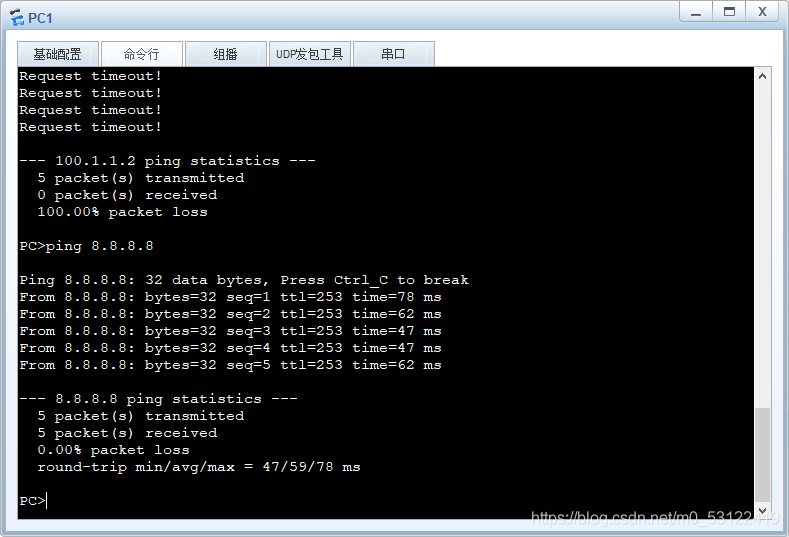

vlan100 After deleting Sure ping through
边栏推荐
- MVC三层架构
- 传统意义上的互联网式的平台或将不复存在,一个融合的产业特质和互联网特质的全新产业
- This markdown artifact will be charged!
- 掌握 Shell,一篇就够了!
- 1183. electricity
- 微信小程序:拼图工具箱
- Mini Homer - can you get a remote map data transmission link for hundreds of yuan?
- dolphinscheduler 2.0.5 任务测试(spark task)报错:Container exited with a non-zero exit code 1
- [MAC] there is no source option in security and privacy
- 经济发展由新技术推动着来
猜你喜欢

dolphinscheduler 1.2.1 数据迁移到 dolphinscheduler 2.0.5方法及迁移后数据测试记录

Emergency response HW review

2022-06-22:golang选择题,以下golang代码输出什么?A:3;B:1;C:4;D:编译失败。 package main import ( “fmt“ ) func mai

Parameter passing of 18 generator function

飞桨框架v2.3发布高可复用算子库PHI!重构开发范式,降本增效

Arduino温湿度传感器DHT11(含代码)

Rtklib new version 2.4.3 B34 test comparison

AlertManager告警的单独使用及prometheus配置告警规则使用

Unity中,如何在【编辑器】和【运行时】状态下读写一个ScriptableObject对象
"Wechat applet - Basics" takes you to understand the routing system of the applet (2)
随机推荐
3 天完成小学期项目,手把手教你完成天气播报系统!
Shadertoy basic teaching 01. Circle drawing (explanation of smoothstep() function)
Servlet self study notes
Automatically add watermark to screenshot
Decompile
使用PX4的ECL进行多传感器数据融合的后处理
dolphinscheduler 2.0.5 spark 任务测试总结(源码优化)
teqc进行GNSS数据质量分析时生成的s文件介绍
微信小程序;AI智能配音助手
微信小程序:全新趣味测试
Separate use of alertmanager alarms and use of Prometheus configuration alarm rules
② Cocoapods principle and podspec file uploading operation
Function declaration and call of 17 generator
ICER skill 01 regular matching
Is data scientist a promising profession?
树莓派网络远程访问
七年码农路
[OFDM communication] simulation of OFDM multi-user resource allocation based on MATLAB [including Matlab source code 1902]
PRCS-1016 : Failed to resolve Single Client Access Name
8 years' experience: monthly salary of 3000 to 30000, the change of Test Engineer