当前位置:网站首页>基于云原生的私有化 PaaS 平台交付实践
基于云原生的私有化 PaaS 平台交付实践
2022-07-25 04:38:00 【nginx】
本文将解读如何利用云原生解决私有化交付中的问题,进而打造一个 PaaS 平台,提升业务平台的复用性。在进入正题之前,有必要先明确两个关键词:
作者:牛玉富,某知名互联网公司专家工程师。喜欢开源 / 热衷分享,对 K8s 及 golang 网关有较深入研究。
- PaaS 平台:多个核心业务服务作为一个整体平台去封装,以平台形式提供服务。
- 私有化交付:平台需要部署私有云环境中,要面对无网情况下依然可以运转。

如上图:私有云会有明确的安全性要求
- 私有云服务无法连接外网,数据只能通过单向网闸形式进行摆渡到内网私有云。
- 源代码只能存储在公司机房中,私有云只部署编译文件。
- 服务会不定期迭代,另外为了保证服务稳定性需要自建独立业务监控。
- 架构可迁移性差:服务之间配置复杂,多种异构语言需要修改配置文件,无固定服务 DNS。
- 部署运维成本高:服务依赖环境需支持离线安装,服务更新需本地运维人员手动完成,复杂场景下,完整一次部署大概需要 数人 / 月 的时间。
- 监控运维成本高:监控需支持系统级 / 服务级 / 业务级监控,通知方式需支持短信、Webhook 等多种类型。
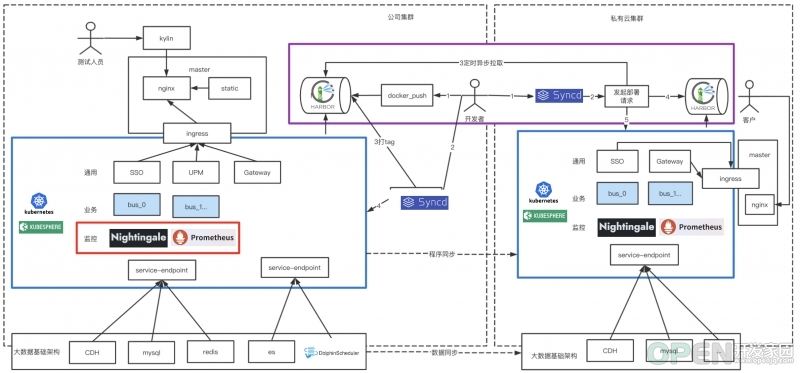
我们的原则是 拥抱云原生和复用已有能力,近可能使用业界已存在且成熟技术方案。 我们采用 KubeSphere+K8S 作为服务编排,处于安全性及简洁性考虑对 Syncd 进行二次开发完整 DevOps 能力,监控系统上采用 Nightingale+Prometheus 方案。
如上图架构图
- 蓝色框内是我们底层 PaaS 集群,我们对业务服务通用服务统一进行了服务编排升级,用以解决架构迁移性差问题。
- 红色框内,监控系统作为一种编排服务形式存在,所有监控项交付前配置好。用以解决监控系统运维成本高问题。
- 紫色框内,服务容器可以实现跨网段自动拉取并自动化部署。用以解决服务服务部署成本高问题。
服务编排:KubeSphere
KubeSphere 的愿景是打造一个以 K8s 为内核的云原生分布式操作系统,它的架构可以非常方便地使第三方应用与云原生生态组件进行即插即用(plug-and-play)的集成,支持云原生应用在多云与多集群的统一分发和运维管理,同时它还拥有活跃的社区。
KubeSphere 选型理由有以下几点:
基于制品的方式定制自己的私有化交付方案
私有化镜像文件打包
创建制品清单 :
然后我们就可以通过命令进行导出了。
apiVersion: kubekey.kubesphere.io/v1alpha2kind: Manifestmetadata:name: samplespec:arches:- amd64...- type: kubernetesversion: v1.21.5components:helm:version: v3.6.3cni:version: v0.9.1etcd:version: v3.4.13containerRuntimes:- type: dockerversion: 20.10.8crictl:version: v1.22.0harbor:version: v2.4.1docker-compose:version: v2.2.2images:- dockerhub.kubekey.local/kubesphere/kube-apiserver:v1.22.1...
私有化部署
$ ./kk artifact export -m manifest-sample.yaml -o kubesphere.tar.gz
创建部署清单:
执行安装部署:
apiVersion: kubekey.kubesphere.io/v1alpha2kind: Clustermetadata:name: samplespec:hosts:- {name: kubesphere01.ys, address: 10.89.3.12, internalAddress: 10.89.3.12, user: kubesphere, password: "Kubesphere123"}- {name: kubesphere02.ys, address: 10.74.3.25, internalAddress: 10.74.3.25, user: kubesphere, password: "Kubesphere123"}- {name: kubesphere03.ys, address: 10.86.3.66, internalAddress: 10.86.3.66, user: kubesphere, password: "Kubesphere123"}- {name: kubesphere04.ys, address: 10.86.3.67, internalAddress: 10.86.3.67, user: kubesphere, password: "Kubesphere123"}- {name: kubesphere05.ys, address: 10.86.3.11, internalAddress: 10.86.3.11, user: kubesphere, password: "Kubesphere123"}roleGroups:etcd:- kubesphere01.py- kubesphere02.py- kubesphere03.pycontrol-plane:- kubesphere01.py- kubesphere02.py- kubesphere03.pyworker:- kubesphere05.pyregistry:- kubesphere04.pycontrolPlaneEndpoint:internalLoadbalancer: haproxydomain: lb.kubesphere.localaddress: ""port: 6443kubernetes:version: v1.21.5clusterName: cluster.localnetwork:plugin: calicokubePodsCIDR: 10.233.64.0/18kubeServiceCIDR: 10.233.0.0/18multusCNI:enabled: falseregistry:type: harborauths:"dockerhub.kubekey.local":username: adminpassword: Kubesphere123...
原来大量复杂的 K8s 部署、高可用方案、Harbor 私有化镜像仓库等,均可以完成自动化安装,极大的简化了私有化交付场景下 K8s 组件部署难度。
$ ./kk create cluster -f config-sample.yaml -a kubesphere.tar.gz --with-packages --with-kubesphere --skip-push-images
可视化界面极大简化操作流程
- 创建部署:流水线式创建一个容器服务的部署、存储、服务访问。
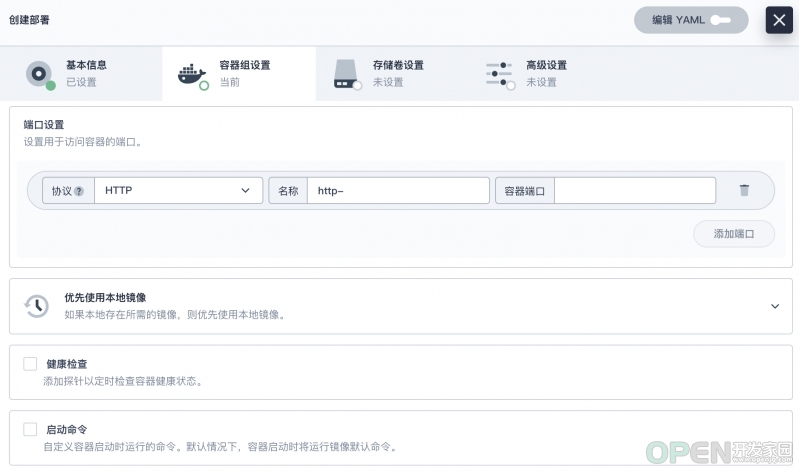
- 资源限制:限制容器的资源利用率 & 限制租户资源利用率。

- 远程登陆:容器远程登陆功能。

基于 KubeSphere 的业务部署经验分享
私有化场景构建高可用服务实例部署,保障单实例挂掉不影响整体使用,我们要保证以下几点。
1、由于服务都需要有固定的网络标识和存储,所以我们需要创建 “有状态副本集部署”。
2、有状态副本集使用 host 反亲和性保证服务分散到不同 host 中。
apiVersion: apps/v1kind: StatefulSetmetadata:namespace: projectname: ${env_project_name}labels:app: ${env_project_name}spec:serviceName: ${env_project_name}replicas: 1selector:matchLabels:app: ${env_project_name}template:metadata:labels:app: ${env_project_name}spec:containers:- name: ${env_project_name}image: ${env_image_path}imagePullPolicy: IfNotPresent
3、服务与服务之间互相调用均使用 K8s 底层的 DNS 进行配置。
....affinity:podAntiAffinity:preferredDuringSchedulingIgnoredDuringExecution:- weight: 100podAffinityTerm:labelSelector:matchExpressions:- key: appoperator: Invalues:- ${env_project_name}topologyKey: kubernetes.io/hostname....

4、集群内部依赖外部资源时需要设置为 Service,然后在内部提供服务。
5、借助 nip.io 域名实现服务动态域名解析调试。 nip.io 可以自动根据请求的域名中设置 IP 信息,完成响应的 IP 信息映射。
kind: EndpointsapiVersion: v1metadata:name: redis-clusternamespace: projectsubsets:- addresses:- ip: 10.86.67.11ports:- port: 6379---kind: ServiceapiVersion: v1metadata:name: redis-clusternamespace: projectspec:ports:- protocol: TCPport: 6379targetPort: 6379
因此我们可以在构建 Ingress 时直接使用该域名:
$ nslookup abc-service.project.10.86.67.11.nip.ioServer: 169.254.25.10Address: 169.254.25.10:53Non-authoritative answer:Name: abc-service.project.10.86.67.11.nip.ioAddress: 10.86.67.11
6、挂载目录到宿主机,有时候需要容器直接关联宿主机目录具体操作如下。
---kind: IngressapiVersion: networking.k8s.io/v1metadata:name: gatekeepernamespace: projectspec:rules:- host: gatekeeper.project.10.86.67.11.nip.iohttp:paths:- path: /pathType: ImplementationSpecificbackend:service:name: gatekeeperport:number: 8000
7、有状态部署工作负载,主要涉及 StatefulSet、Service、volumeClaimTemplates、Ingress,示例如下:
...spec:spec:...volumeMounts:- name: vol-datamountPath: /home/user/data1volumes:- name: vol-datahostPath:path: /data0
DevOps:基于 Syncd 构建服务自动化交付
apiVersion: apps/v1kind: StatefulSetmetadata:namespace: projectname: gatekeeperlabels:app: gatekeeperspec:serviceName: gatekeeperreplicas: 1selector:matchLabels:app: gatekeepertemplate:metadata:labels:app: gatekeeperspec:containers:- name: gatekeeperimage: dockerhub.kubekey.local/project/gatekeeper:v362imagePullPolicy: IfNotPresentports:- name: http-8000containerPort: 8000protocol: TCP- name: http-8080containerPort: 8080protocol: TCPresources:limits:cpu: '2'memory: 4GivolumeMounts:- name: vol-datamountPath: /home/user/data1affinity:podAntiAffinity:preferredDuringSchedulingIgnoredDuringExecution:- weight: 100podAffinityTerm:labelSelector:matchExpressions:- key: appoperator: Invalues:- gatekeepertopologyKey: kubernetes.io/hostnamevolumeClaimTemplates:- metadata:name: vol-dataspec:accessModes: [ "ReadWriteOnce" ]resources:requests:storage: 10Gi---apiVersion: v1kind: Servicemetadata:name: gatekeepernamespace: projectlabels:app: gatekeeperspec:ports:- name: "http-8000"protocol: TCPport: 8000targetPort: 8000- name: "http-8080"protocol: TCPport: 8080targetPort: 8080selector:app: gatekeepertype: NodePort---kind: IngressapiVersion: networking.k8s.io/v1metadata:name: gatekeepernamespace: projectspec:rules:- host: gatekeeper.project.10.86.67.11.nip.iohttp:paths:- path: /pathType: ImplementationSpecificbackend:service:name: gatekeeperport:number: 8000- host: gatekeeper.project.10.86.68.66.nip.iohttp:paths:- path: /pathType: ImplementationSpecificbackend:service:name: gatekeeperport:number: 8080
DevOps 选型有很多,这里我们没有采用 Jenkins、GitRunner 等等,而是使用了我们团队内部比较熟悉的 Syncd 进行二次开发。原因有两点:
- 处于安全考虑:我们的源码无法在本地存放,所以基于 gitlab 构建打包的方案,对我们用处不是很大,使用是一种资源浪费。
- 功能简洁性:虽然 Syncd 已经停更 2 年多但是,但其核心的 CICD 功能比较完善且前后端拓展性强,我们可以很轻松拓展相应的功能。
- 从使用本地工具链构建打包镜像,这里可以把 docker push 当作 git push 理解。
- 通过 Syncd 拉取镜像包完成部署流程打包上线操作,通过打包时设置版本号便于服务回滚。
1、基于项目创建目录
2、导入 Dockerfile,大家可基于业务自行创建。 3、创建 tool.sh 文件
#创建目录cd /Users/niuyufu/goproject/abc-servicemkdir -p devopscd devops
4、执行项目打包,请确保产出物在 ./output 中
cat >> tool.sh << EOF#!/bin/sh###########配置区域###############模块名称,可变更module=abc-service#项目名称project=project1#容器名称container_name=${project}"_"${module}#镜像名称image_name=${project}"/"${module}#服务端口映射:宿主机端口:容器端口,多个逗号间隔port_mapping=8032:8032#镜像hub地址image_hub=dockerhub.kubekey.local#镜像tagimage_tag=latest###########配置区域###############构建工具action=$1case $action in"docker_push")image_path=${image_hub}/${image_name}:${image_tag}docker tag ${image_name}:${image_tag} ${image_path}docker push ${image_path}echo "镜像推送完毕,image_path: "${image_path};;"docker_login")container_id=$(docker ps -a | grep ${container_name} | awk '{print $1}')docker exec -it ${container_id} /bin/sh;;"docker_stop")docker ps -a | grep ${container_name} | awk '{print $1}' | xargs docker stopcontainer_id=`docker ps -a | grep ${container_name} | awk '{print $1}' | xargs docker rm`if [ "$container_id" != "" ];thenecho "容器已关闭,container_id: "${container_id}fiif [ "$images_id" != "" ];thendocker rmi ${images_id}fi;;"docker_run")docker ps -a | grep ${container_name} | awk '{print $1}' | xargs docker stopdocker ps -a | grep ${container_name} | awk '{print $1}' | xargs docker rmport_mapping_array=(${port_mapping//,/ })# shellcheck disable=SC2068for var in ${port_mapping_array[@]}; doport_mapping_str=${mapping_str}" -p "${var}donecontainer_id=$(docker run -d ${port_mapping_str} --name=${container_name} ${image_name})echo "容器已启动,container_id: "${container_id};;"docker_build")if [ ! -d "../output" ]; thenecho "../output 文件夹不存在,请先执行 ../build.sh"exit 1ficp -rf ../output ./docker build -f Dockerfile -t ${image_name} .rm -rf ./outputecho "镜像编译成功,images_name: "${image_name};;*)echo "可运行命令:docker_build 镜像编译,依赖../output 文件夹docker_run 容器启动,依赖 docker_builddocker_login 容器登陆,依赖 docker_rundocker_push 镜像推送,依赖 docker_build"exit 1;;esacEOF
5、利用 tool.sh 工具进行服务调试
$cd ~/goproject/abc-service/$sh build.shabc-service build okmake output okbuild done
tools.sh 执行顺序一般是这样的:./output 产出物→docker_build→docker_run→docker_login→docker_push
基于 Syncd 进行服务打包构建
$cd devops$chmod +x tool.sh#查看可运行命令$sh tool.sh可运行命令:docker_build 镜像编译,依赖../output 文件夹docker_run 容器启动,依赖 docker_builddocker_login 容器登陆,依赖 docker_rundocker_push 镜像推送,依赖 docker_build#docker_build举例:$sh tool.sh docker_build[+] Building 1.9s (10/10) FINISHED=> [internal] load build definition from Dockerfile 0.1s=> => transferring dockerfile: 37B 0.0s=> [internal] load .dockerignore 0.0s=> => transferring context: 2B... 0.0s=> exporting to image 0.0s=> => exporting layers 0.0s=> => writing image sha256:0a1fba79684a1a74fa200b71efb1669116c8dc388053143775aa7514391cdabf 0.0s=> => naming to docker.io/project/abc-service 0.0sUse 'docker scan' to run Snyk tests against images to find vulnerabilities and learn how to fix them镜像编译成功,images_name: project/abc-service#docker_run举例:$ sh tool.sh docker_run6720454ce9b66720454ce9b6容器已启动,container_id: e5d7c87fa4de9c091e184d98e98f0a21fd9265c73953af06025282fcef6968a5#可以使用 docker_login 登陆容器进行代码调试:$ sh tool.sh docker_loginsh-4.2# sudo -i[email protected]:~$#docker_push举例:$sh tool.sh docker_push 130 ↵The push refers to repository [dockerhub.kubekey.local/citybrain/gatekeeper]4f3c543c4f39: Pushed54c83eb651e3: Pushede4df065798ff: Pushed26f8c87cc369: Pushed1fcdf9b8f632: Pushedc02b40d00d6f: Pushed8d07545b8ecc: Pushedccccb24a63f4: Pushed30fe9c138e8b: Pushed6ceb20e477f1: Pushed76fbea184065: Pushed471cc0093e14: Pushed616b2700922d: Pushedc4af1604d3f2: Pushedlatest: digest: sha256:775e7fbabffd5c8a4f6a7c256ab984519ba2f90b1e7ba924a12b704fc07ea7eb size: 3251镜像推送完毕,image_path: dockerhub.kubekey.local/citybrain/gatekeeper:latest#最后登陆Harbor测试镜像是否上传https://dockerhub.kubekey.local/harbor/projects/52/repositories/gatekeeper
1、项目配置
新增项目

设置 tool.sh 中生成的镜像地址。

设置构建脚本。
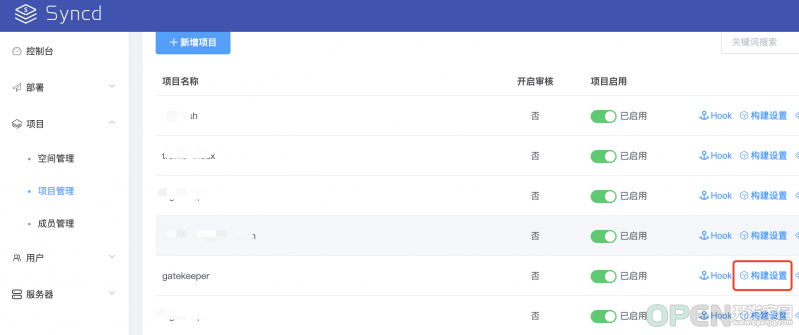
参照有状态工作负载填写构建脚本。

2、创建上线单

3、构建部署包执行部署

4、切换到 KubeSphere 查看部署效果。

至此已完成 DevOps 与 KubeSphere 的功能打通。
服务监控:基于 Nightingale 构建企业级监控
选型理由
- 可视化引擎:内置模板,开箱即用。

- 告警分析引擎:灵活管理、告警自愈、开箱即用。

- 支持 Helm Chart 一键完成应用及服务部署,私有化场景中我们只需要关心容器融合本地化即可。
实际规则配置演示
$ git clone https://github.com/flashcatcloud/n9e-helm.git$ helm install nightingale ./n9e-helm -n n9e --create-namespace
- 配置告警规则,无缝支持 PromQL 灵活编写各种规则。

- 配置告警接收组

- 实际接收告警消息及恢复消息


总结
私有化交付下因业务场景不同,对云原生的应用选型也不相同。本文仅对我们自身业务场景做了介绍,如有问题欢迎指正,另外其他场景下的云原生应用也随时欢迎大家来和我交流探讨。
本文由博客一文多发平台 OpenWrite 发布!
边栏推荐
- Idea2021 installation
- 数据链路层协议 ——— 以太网协议
- 市场的调节
- HMS Core Discovery第16期直播预告|与虎墩一起,玩转AI新“声”态
- Xiaohongshu joins hands with HMS core to enjoy HD vision and grow grass for a better life
- @Summary of ResponseBody annotation
- 2022-7-18 summary
- The interviewer asked MySQL transactions, locks and mvcc at one go. I
- Androd releases jitpack open source project (gradle7.2)
- 运筹学基础【一】 之 导论
猜你喜欢

GDT,LDT,GDTR,LDTR

5年经验的大厂测试/开发程序员,怎样突破技术瓶颈?大厂通病......

Document collaboration tool recommendation

Data link layer protocol -- Ethernet protocol
【微信小程序】拍卖商品详情页设计与交互实现(包含倒计时、实时更新出价)

It we media shows off its wealth in a high profile, and is targeted by hacker organizations. It is bound to be imprisoned
![[CTF learning] steganography set in CTF -- picture steganography](/img/32/2da78bd5866cfab9ee64dfcb1c1204.png)
[CTF learning] steganography set in CTF -- picture steganography

2022-7-13 summary

Unity LOD

I will write some Q & A blogs recently, mainly focusing on the points that are easy to have doubts.
随机推荐
市场的调节
教你如何定位不合理的SQL?并优化之
Understand Huawei's 2018 financial report with one picture
[ CTF 学习 ] CTF 中的隐写集合 —— 图片隐写术
Etcd learning
How to get the database creation time?
很清晰的条理
运筹学基础【一】 之 导论
Teach you how to locate unreasonable SQL? And optimize it
Permanent magnet synchronous motor 36 question (1) -- what is the difference between salient pole motor and salient pole motor?
Pyg builds GCN to realize link prediction
很多时候都是概率
Analysis of lottery winning numbers in history
Tiny-emitter.js: a small event subscription and Publishing Library
市场是对的
[wechat applet] picker scroll selector (85/100)
Druid connection pool - strong self-study from 0. Those who don't understand Druid can click in. If you know not to click in, you will think I'm wordy
Summary and Prospect of aut, the transport layer protocol of sound network -- dev for dev column
【微信小程序】拍卖商品详情页设计与交互实现(包含倒计时、实时更新出价)
Burpsuite爆破之token值替换