当前位置:网站首页>史上最全面的UE4 文件操作,打开,读、写,增、删、改、查
史上最全面的UE4 文件操作,打开,读、写,增、删、改、查
2022-07-25 09:26:00 【飞起的猪】
一、前期操作
创建一个C++项目,并且创建一个C++蓝图库函数,并且加入头文件
#include "HAL/PlatformFilemanager.h"
#include "Misc/FileHelper.h"
#include "Misc/Paths.h"
#include "Developer/DesktopPlatform/Public/DesktopPlatformModule.h"
#include "Developer/DesktopPlatform/Public/IDesktopPlatform.h"
#include "Runtime/Core/Public/HAL/FileManagerGeneric.h"

二、打开文件
UFUNCTION(BlueprintCallable, DisplayName = "OpenFile", Category = "File")
	   static TArray<FString> OpenFile();
TArray<FString> UGenericArrayLibrary::OpenFile()
{
TArray<FString> FilePath; //选择文件路径
FString fileType = TEXT("*.*"); //过滤文件类型
FString defaultPath = FPaths::ConvertRelativePathToFull(FPaths::ProjectDir()); //文件选择窗口默认开启路径
IDesktopPlatform* DesktopPlatform = FDesktopPlatformModule::Get();
bool bSuccess = DesktopPlatform->OpenFileDialog(nullptr, TEXT("打开文件"), defaultPath, TEXT(""), *fileType, EFileDialogFlags::None, FilePath);
for (auto& name : FilePath)
{
UE_LOG(LogTemp, Warning,
TEXT("%s"), *name);
}
if (bSuccess)
{
//文件选择成功,文件路径 path
UE_LOG(LogTemp,Warning,TEXT("Success"));
}
return FilePath;
}
三、读取和写入文件(字符串)
//读取文件(字符串)
	UFUNCTION(BlueprintCallable, DisplayName = "ReadFile", Category = "File")
		static FString ReadFile(FString path);
//写入文件(字符串)
	UFUNCTION(BlueprintCallable, DisplayName = "WriteFile", Category = "File")
		static bool WriteFile(FString saveFile,FString path);
FString UGenericArrayLibrary::ReadFile(FString path)
{
FString resultString;
FFileHelper::LoadFileToString(resultString,*path);
return resultString;
}
///
bool UGenericArrayLibrary::WriteFile(FString saveFile,FString path)
{
bool success;
success = FFileHelper::SaveStringToFile(saveFile,*path);
return success;
}
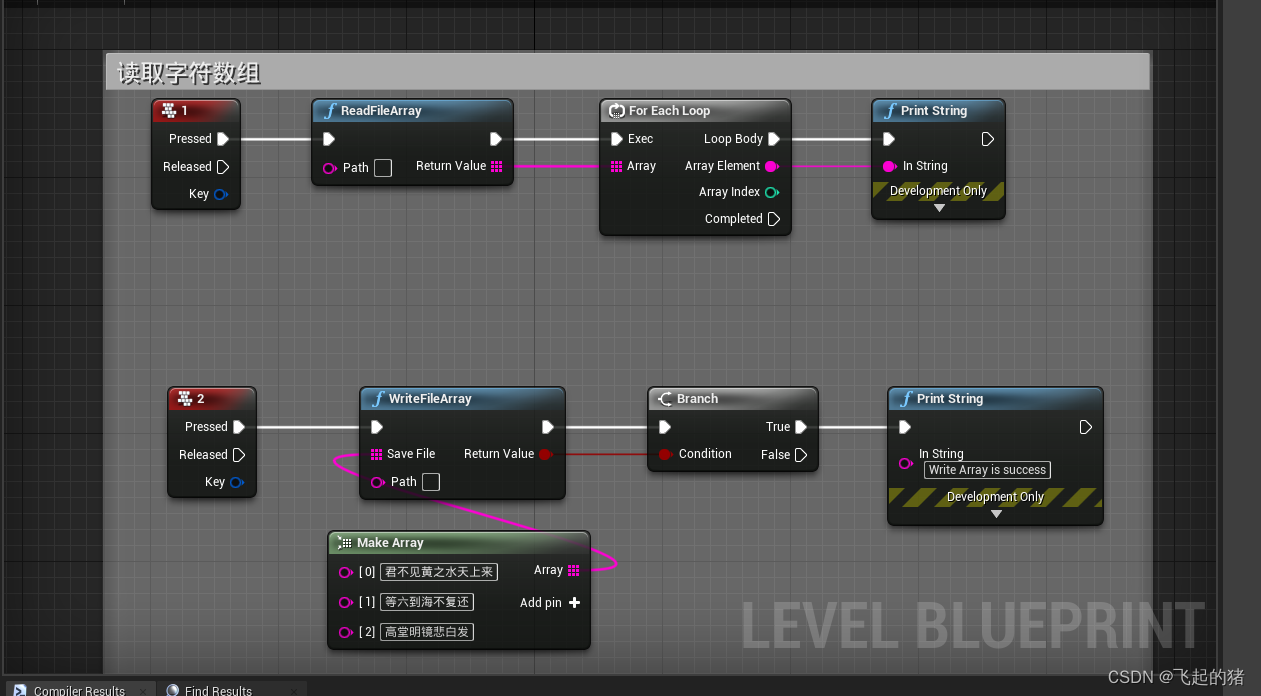
四、读取和写入字符数组
/读取文件(字符数组)
	UFUNCTION(BlueprintCallable, DisplayName = "ReadFileArray", Category = "File")
		static TArray<FString> ReadFileArray(FString path);
	//写入文件(字符数组)
	UFUNCTION(BlueprintCallable, DisplayName = "WriteFileArray", Category = "File")
		static bool WriteFileArray(TArray<FString> saveFile,FString path);
TArray<FString> UGenericArrayLibrary::ReadFileArray(FString path)
{
TArray<FString> results;
FFileHelper::LoadFileToStringArray(results, *path);
return results;
}
bool UGenericArrayLibrary::WriteFileArray(TArray<FString> saveFile, FString path)
{
return FFileHelper::SaveStringArrayToFile(saveFile,*path);
}
五、 获取文件路径,获取文件名,获取文件后缀
	//获取文件所在路径
	UFUNCTION(BlueprintCallable, DisplayName = "Get FilePath", Category = "File")
		static FString GetFilePath(FString path);
	//获取文件名,不带后缀
	UFUNCTION(BlueprintCallable, DisplayName = "GetFileName", Category = "File")
		static FString GetFileName(FString InPath, bool bRemovePath);
	//获取文件后缀
	UFUNCTION(BlueprintCallable, DisplayName = "GetFileExtension", Category = "File")
		static FString GetFileExtension(FString InPath, bool bIncludeDot);
FString UGenericArrayLibrary::GetFilePath(FString path)
{
FString Result;
Result = FPaths::GetPath(*path);
return Result;
}
FString UGenericArrayLibrary::GetFileName(FString InPath, bool bRemovePath)
{
return FPaths::GetBaseFilename(*InPath,bRemovePath);
}
FString UGenericArrayLibrary::GetFileExtension(FString InPath, bool bIncludeDot)
{
return FPaths::GetExtension(*InPath,bIncludeDot);
}
六、增加一个文件夹 和删除一个文件夹
//创建一个文件夹
	UFUNCTION(BlueprintCallable, DisplayName = "CreateFolder", Category = "File")
		static void CreatFolder(FString FolderName);
//删除一个文件夹
	UFUNCTION(BlueprintCallable, DisplayName = "DeleteFolder", Category = "File")
		static void DeleteFolder(FString FolderName);
void UGenericArrayLibrary::CreatFolder(FString FolderName)
{
FString Path = FPaths::ProjectDir()/ *FolderName;
Path = FPaths::ConvertRelativePathToFull(*Path);
FPlatformFileManager::Get().GetPlatformFile().CreateDirectoryTree(*Path);
}
void UGenericArrayLibrary::DeleteFolder(FString FolderName)
{
FString Path = FPaths::ProjectDir() / *FolderName;
Path = FPaths::ConvertRelativePathToFull(*Path);
FPlatformFileManager::Get().Get().GetPlatformFile().DeleteDirectoryRecursively(*Path);
}
七、移动文件夹
//移动文件
	UFUNCTION(BlueprintCallable, Category = "MoveFileTo")
		static bool MoveFileTo(FString To, FString From);
bool UGenericArrayLibrary::MoveFileTo(FString To, FString From)
{
return IFileManager::Get().Move(*To, *From);
}
八、查找文件夹
//查找文件目录下的所有文件
	UFUNCTION(BlueprintCallable, DisplayName = "FindFolder", Category = "File")
		static TArray<FString> FindFolder(FString Path, FString Filter, bool Files, bool Directory);
	//查找文件目录下所有文件无法删选查找
	UFUNCTION(BlueprintCallable, DisplayName = "GetFolderFiles", Category = "File")
		static TArray<FString> GetFolderFiles(FString Path);
TArray<FString> UGenericArrayLibrary::FindFolder(FString Path, FString Filter, bool Files, bool Directory)
{
TArray<FString> FilePathList;
FilePathList.Empty();
FFileManagerGeneric::Get().FindFilesRecursive(FilePathList, *Path, *Filter, Files, Directory);
return FilePathList;
}
//
TArray<FString> UGenericArrayLibrary::GetFolderFiles(FString Path)
{
TArray<FString> Files;
FPaths::NormalizeDirectoryName(Path);
IFileManager& FileManager = IFileManager::Get();
FString FinalPath = Path / TEXT("*");
FileManager.FindFiles(Files, *FinalPath, true, true);
return Files;
}
边栏推荐
猜你喜欢

ROS distributed operation -- launch file starts nodes on multiple machines
JDBC总结

看一个双非二本(0实习)大三学生如何拿到阿里、腾讯的offer
![[machine translation] scones -- machine translation with multi tag tasks](/img/72/d3e46a820796a48b458cd2d0a18f8f.png)
[machine translation] scones -- machine translation with multi tag tasks

@5-1 CCF 2019-12-1 reporting

js利用requestAnimationFrame实时检测当前动画的FPS帧率

Introduction to low power consumption and UPF

nodejs版本升级或切换的常用方式
拷贝过来老的项目变成web项目
Mlx90640 infrared thermal imaging sensor temperature measurement module development notes (III)
随机推荐
oracle 解析同名xml 问题
JSP details
T5 paper summary
ROS distributed operation -- launch file starts nodes on multiple machines
cookie and session
CCF 201512-3 drawing
CCF 201509-2 date calculation
入住阿里云MQTT物联网平台
Es6详解
Configuring ROS development environment with vscode: Causes and solutions to the problem of ineffective code modification
Introduction to armv8 architecture
VCs common commands
概率机器人学习笔记第二章
Probabilistic robot learning notes Chapter 2
无线中继采集仪的常见问题
[tensorflow2 installation] tensorflow2.3-cpu installation pit avoidance guide!!!
一.初始MySQL,MySQL安装、配置环境、初始化
[Android studio] batch data import to Android local database
Probability theory and mathematical statistics 3 discrete random variables and probability distributions (Part 2)
Internal structure of SOC chip