当前位置:网站首页>K8s-- deploy stand-alone MySQL and persist it
K8s-- deploy stand-alone MySQL and persist it
2022-06-23 14:42:00 【It artist rookie】
Write it at the front
This deployment uses pv,pvc,deployment,service Four resource objects .
pv It uses local Type of ,localStorage It should be the default .
PV
apiVersion: v1
kind: PersistentVolume
metadata:
  name: mypv1
  namespace: test-for-test
spec:
  capacity:
    storage: 5Gi
  accessModes:
    - ReadWriteMany
  persistentVolumeReclaimPolicy: Retain   #  Delete manually
  storageClassName: local-storage # Indicates that the pv Of storageClass
  local:
    path: /k8sVolume/mysqlVolume/mypv1 # The full path of the volume on the node .( Must be an existing path , Otherwise, the container cannot be created ,deployment Will report a mistake ) It can be a directory or a block device ( disk 、 Partition …).
  nodeAffinity: # Node affinity configuration , Restrict which nodes can access this volume from
    required:
      nodeSelectorTerms: # An array type
      - matchExpressions: # An array type
        - key: kubernetes.io/hostname   # String type . Applied by the tag selector label key
          operator: In   # String type . Represents the relationship between a key and a set of values . The effective operators are In, NotIn, Exists, DoesNotExist.Gt, Lt.
          values: # An array of strings , If the operator is In or NotIn, be values Array must be non empty . If the operator is Exists or DoesNotExist, values Array must be empty . If the operator is Gt or Lt, be values Array must have only one element , This element will be interpreted as an integer .
          - roy-ubuntu # The host name of the node
pvc
apiVersion: v1
kind: PersistentVolumeClaim
metadata:
  name: mypvclocal
  namespace: test-for-test
spec:
  accessModes: # Access pattern   Claim when requesting storage with a specific access mode , Use the same access mode Convention as the volume .
    - ReadWriteMany
  volumeMode: Filesystem # Volume mode
  resources:
    requests:
      storage: 4Gi
  storageClassName: local-storage #  An empty string or a specified value must be explicitly set here , Otherwise, it will be set as the default  StorageClass
deployment
apiVersion: apps/v1
kind: Deployment
metadata:
  name: mysql-deployment # Appoint deployment Name
  namespace: test-for-test
  labels:
    app: mysql-labels-app
spec: # Statute
  replicas: 3 #pod Number of copies of , Is how many you want to create pod Copy of . Optional fields . Its default value is 1.
  selector:  #selector  Field definition  Deployment  How to find the  Pods. Must match  .spec.template.metadata.labels, Otherwise the request will be  API  Refuse .
    matchLabels:
      app: mysql-pod
  template: #Deployment Pod  Templates ; It and  Pod  The rules of grammar are exactly the same .  It's just that it's nested here , So you don't need  apiVersion  or  kind.
    metadata:
      labels:
        app: mysql-pod
    spec: #pod Template conventions
      containers: # Containers
      - name: mysql # Name of the container
        image: mysql:5.7 # The image used by the container
        ports:
        - containerPort: 3306
        volumeMounts:
        - name: mypv1 #pv Of name
          mountPath: /var/lib/mysqlMount# The corresponding path in the container , The path here is wrong , Should be /var/lib/mysql.MySQL All the data are in this , What needs to be persisted is the content under this path
        env:
        - name: MYSQL_ROOT_PASSWORD
          value: "123456"
      volumes:
      - name: mypv1#pv Of name
        persistentVolumeClaim:
          claimName: mypvclocal
      restartPolicy: Always #Deployment  Medium  Pod  The template must specify the appropriate label and the appropriate restart policy . Only  .spec.template.spec.restartPolicy  be equal to  Always  That's what's allowed , This is also the default setting when it is not specified
service
apiVersion: v1
kind: Service
metadata:
  name: mysql-service
  namespace: test-for-test
spec:
  ports:
  - port: 3306
    nodePort: 30060
  selector:
    app: mysql-pod #  The  Service  All with tags will be  app: mysql-labels-app Exposed to an abstract  Service  On port (targetPort: The port on which the container receives traffic ;port: Abstract that can take any value  Service  port , other  Pod  Access... Through this port  Service
  type: NodePort
Connect... Using visualization tools MySQL
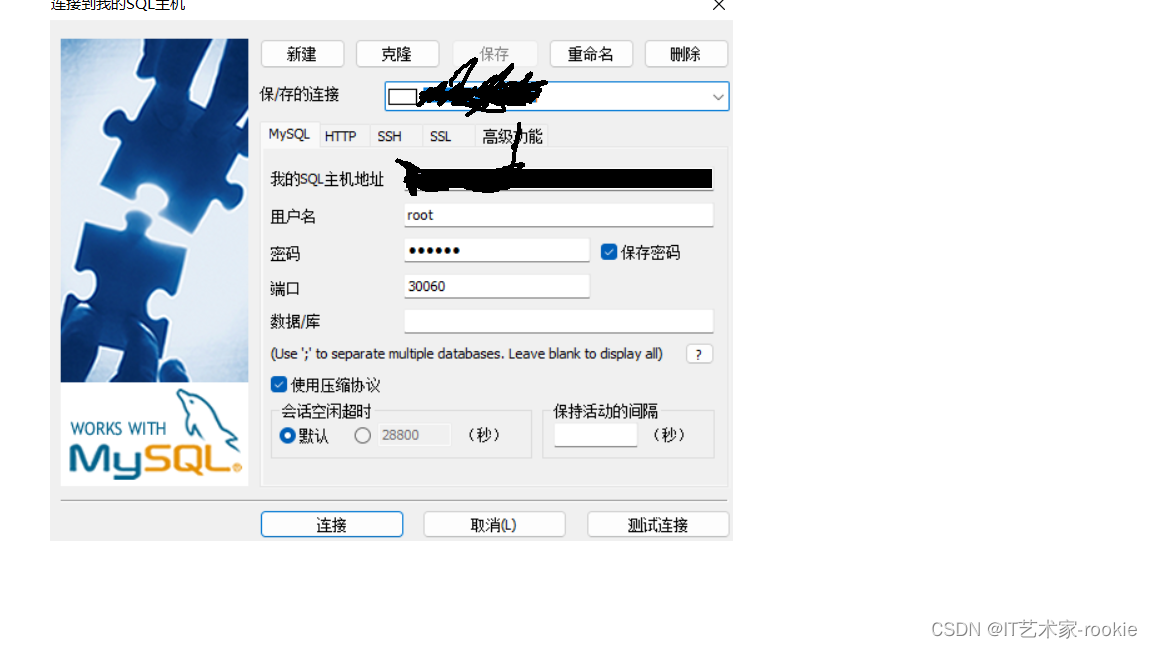
The host address is the address of the node
Into the container
kubectl exec -it pod Of name -c stay deployment File specifies the container for name -n test-for-test – bash
[email protected]:/k8sVolume/mysqlVolume/mypv1# kubectl exec -it mysql-deployment-59f68f87cd-d4bt8 -c mysql -n test-for-test -- bash
[email protected]:/# ls
bin  boot  dev	docker-entrypoint-initdb.d  entrypoint.sh  etc	home  lib  lib64  media  mnt  opt  proc  root  run  sbin  srv  sys  tmp  usr  var
边栏推荐
- How does activity implement lifecycleowner?
- When did the redo log under InnoDB in mysql start to perform check point disk dropping?
- Technology sharing | do you understand the requirements of the tested project?
- Shell process control - 39. Special process control statements
- Low grain prices hurt farmers, low wages hurt farmers!
- Vulnhub target os-hacknos-1
- kali使用
- Xmake v2.6.8 release, compilation cache improvement
- Is flush a stock? Is it safe to open an account online now?
- 等保備案是什麼意思?應該去哪裏辦理備案?
猜你喜欢

Acquisition of wechat applet JSON for PHP background database transformation

【二级等保】过二级等保用哪个堡垒机品牌好?
AXI_Round_Robin_Arbiter 设计 - AW、W通道部分

【DataHub】LinkedIn DataHub学习笔记

首个大众可用PyTorch版AlphaFold2复现,哥大开源OpenFold,star量破千

ICML 2022 | 上下文集成的基于transformer的拍卖设计神经网络

去 OPPO 面试, 被问麻了。。。
![[deeply understand tcapulusdb technology] tmonitor module architecture](/img/92/c579ce1e1ce881dd28a2794ffc22f2.png)
[deeply understand tcapulusdb technology] tmonitor module architecture

用OBS做直播推流简易教程
Penetration test - right raising topic
随机推荐
Google Earth engine (GEE) -- Comparative Case Analysis of calculating slope with different methods
Working for 7 years to develop my brother's career transition test: only by running hard can you get what you want~
Quick view of wechat applet development process
大厂架构师:如何画一张大气的业务大图?
Cause analysis and intelligent solution of information system row lock waiting
[deeply understand tcapulusdb technology] tcapulusdb import data
Gold three silver four, busy job hopping? Don't be careless. Figure out these 12 details so that you won't be fooled~
What is the charm of Guizhou? Why do Alibaba, Huawei and Tencent build data centers in Guizhou?
Win the championship for 2 consecutive years! ZABBIX ranked first in a number of monitoring software in 2022
微信小程序之在wx:for中绑定事件
图解OneFlow的学习率调整策略
今年英语高考,CMU用重构预训练交出134高分,大幅超越GPT3
ai智能机器人让我们工作省时省力
物流贸易相关
Execute the sc.exe QC command to query some services. The data area passed to the system call is too small
PHP receiving and sending data
[digital signal processing] linear time invariant system LTI (judge whether a system is a "non time variant" system | case 2)
去 OPPO 面试, 被问麻了。。。
Test article
Is flush a stock? Is it safe to open an account online now?