当前位置:网站首页>【SWT】滚动容器实现商品列表样式
【SWT】滚动容器实现商品列表样式
2022-07-24 15:37:00 【小子宝丁】
目的

如图实现一个商品列表,纵向支持滚动,当横向宽度变化时,商品自动向右向上填充。
当鼠标悬浮在商品上时,商品边框显示。当点击商品时,控制台打印商品名称。
分析
滚动容器依然使用 ScrolledComposite ,容器中的内容要随着容器宽度变化自动填充,需要是使用 Rowlayout 布局方式。在Rowlayout 布局中,每一个商品信息及特效使用 GC 实现。具体见项目 https://gitee.com/xzbd/epx
关键实现
该功能依然集成在RCP中,大致步骤如下:
- plugin.xml中配置编辑器
      <!-- 编辑器-滚动容器-商品列表 -->
      <editor class="com.xzbd.editors.ScrollGoodListEditor" default="false" extensions="scgl" icon="icons/20220721/16/paobing.png" id="com.xzbd.editors.ScrollGoodListEditor" name="编辑器-滚动容器-商品列表">
      </editor>
- 定义编辑器
package com.xzbd.editors;

import org.eclipse.core.runtime.IProgressMonitor;
import org.eclipse.swt.widgets.Composite;
import org.eclipse.ui.IEditorInput;
import org.eclipse.ui.IEditorSite;
import org.eclipse.ui.PartInitException;
import org.eclipse.ui.part.EditorPart;

import com.xzbd.views.ScrollGoodListEditorViewer;

public class ScrollGoodListEditor extends EditorPart {


	public static String ID = "com.xzbd.editors.ScrollGoodListEditor";

	public boolean isDirty = false;
	private ScrollGoodListEditorViewer viewer;

	@Override
	public void doSave(IProgressMonitor monitor) {

		clearDirty();
	}

	@Override
	public void doSaveAs() {


	}

	@Override
	public void init(IEditorSite site, IEditorInput input) throws PartInitException {

		this.setSite(site);
		this.setInput(input);
	}

	@Override
	public boolean isDirty() {

		return isDirty;
	}

	@Override
	public boolean isSaveAsAllowed() {

		return false;
	}

	@Override
	public void createPartControl(Composite parent) {

		viewer = new ScrollGoodListEditorViewer(parent, this);

	}

	@Override
	public void setFocus() {


	}

	/** * 转换编辑器状态 * * @param isDirty */
	public void changeDirtyState(boolean isDirty) {

		this.isDirty = isDirty;
		firePropertyChange(PROP_DIRTY);
	}

	public void toDirty() {

		changeDirtyState(true);
	}

	public void clearDirty() {

		changeDirtyState(false);
	}
}
- 实现编辑器视图
package com.xzbd.views;

import org.apache.commons.lang.math.RandomUtils;
import org.eclipse.swt.SWT;
import org.eclipse.swt.graphics.Font;
import org.eclipse.swt.graphics.GC;
import org.eclipse.swt.graphics.Image;
import org.eclipse.swt.graphics.Point;
import org.eclipse.swt.graphics.Rectangle;
import org.eclipse.swt.layout.FillLayout;
import org.eclipse.swt.layout.RowData;
import org.eclipse.swt.widgets.Composite;
import org.eclipse.swt.widgets.Listener;
import org.eclipse.swt.widgets.Widget;

import com.xzbd.constants.ColorConstant;
import com.xzbd.editors.ScrollGoodListEditor;
import com.xzbd.utils.AppPrinter;
import com.xzbd.utils.CompositeUtil;
import com.xzbd.utils.SWTResourceManager;

/** * * 滚动容器--商品列表示例 * */
public class ScrollGoodListEditorViewer {


	private String[] iconNames = {
     "bingkuai.png", "ganlan.png", "guodong.png", "jiroujuan.png", "kafei.png",
			"kele.png", "mantou.png", "meishikafei.png", "mianhuatang.png", "nailao.png", "paobing.png", "qishui.png",
			"shutiao.png", "tiantong.png", "xuegao.png", "zhenzhunaicha.png" };

	private ScrollGoodListEditor editor;
	private Composite parent;

	public ScrollGoodListEditorViewer(Composite parent, ScrollGoodListEditor editor) {

		this.parent = parent;
		// 缓存 Editor
		setEditor(editor);

		// 绘制UI
		buildPageUI();
	}

	// 创建UI
	private void buildPageUI() {

		// 设置 parent 布局
		parent.setLayout(new FillLayout());

		// 生成滚动容器
		Composite scContent = CompositeUtil.getAutoFillScrollCmp(parent);

		for (int i = 0; i <= 50 + RandomUtils.nextInt(50); i++) {

			Composite itemCmp = new Composite(scContent, SWT.NONE);
			itemCmp.setLayoutData(new RowData(160, 120));

			// 选定图片
			String iconName = iconNames[RandomUtils.nextInt(iconNames.length)];
			String imgPath = "/icons/20220721/32/" + iconName;
			Image img = SWTResourceManager.getImage(ScrollGoodListEditorViewer.class, imgPath);

			// GC 绘制
			Boolean[] lineTags = {
     false };
			itemCmp.addPaintListener(e -> {

				GC gc = e.gc;

				Rectangle clientArea = itemCmp.getClientArea();
				Rectangle imgBounds = img.getBounds();
				int imgWidth = (clientArea.width - imgBounds.width) / 2;
// int imgHeight = (clientArea.height - imgBounds.height) / 2;
				gc.drawImage(img, imgWidth, 15);

				String text = iconName.substring(0, iconName.lastIndexOf("."));
				Font font = SWTResourceManager.getFont("Microsoft YaHei", 14, SWT.NORMAL);
				if (lineTags[0]) {

					gc.setLineWidth(5);
					gc.setForeground(ColorConstant.MAIN_BLUE);
					gc.drawRectangle(0, 0, clientArea.width, clientArea.height);
					font = SWTResourceManager.getBoldFont(font);
				}

				gc.setFont(font);
				Point textExtentPoint = gc.textExtent(text);
				gc.setForeground(ColorConstant.MAIN_BLUE);
				int textWidth = (clientArea.width - textExtentPoint.x) / 2;
				int textHeight = clientArea.height - textExtentPoint.y - 10;
				gc.drawText(text, textWidth, textHeight, true);
			});

			// 事件绑定
			Listener enterListener = e -> {

				lineTags[0] = true;
				itemCmp.redraw();
			};

			itemCmp.addListener(SWT.MouseEnter, enterListener);

			Listener exitListener = e -> {

				lineTags[0] = false;
				itemCmp.redraw();
			};
			itemCmp.addListener(SWT.MouseExit, exitListener);


			itemCmp.addListener(SWT.MouseUp, e->{

				AppPrinter.println("您挑选了商品: " + iconName);
			});

		}

	}

	public ScrollGoodListEditor getEditor() {

		return editor;
	}

	public void setEditor(ScrollGoodListEditor editor) {

		this.editor = editor;
	}

	private void addDirtyListener(Widget com) {

		com.addListener(SWT.Modify, e -> {

			editor.toDirty();
		});

	}

}
- 滚动容器关键代码
	/** * 生成滚动容器 * <div> * parent 布局方式需是 FillLayout,返回的容器布局方式是 RowLayout * </div> * @param parent * @return */
	public static Composite getAutoFillScrollCmp(Composite parent) {

		ScrolledComposite scrollComposite = new ScrolledComposite(parent, SWT.V_SCROLL | SWT.BORDER);

		Composite scContent = new Composite(scrollComposite, SWT.NONE);
		RowLayout rowLayout = new RowLayout();
		rowLayout.spacing = 16;
		rowLayout.marginWidth = 24;

		RowLayout layout = new RowLayout(SWT.HORIZONTAL);
		layout.wrap = true;
		scContent.setLayout(layout);

		scrollComposite.setContent(scContent);
		scrollComposite.setExpandVertical(true);
		scrollComposite.setExpandHorizontal(true);
		scrollComposite.addControlListener(ControlListener.controlResizedAdapter(e -> {

			Rectangle r = scrollComposite.getClientArea();
			scrollComposite.setMinSize(scContent.computeSize(r.width, SWT.DEFAULT));
		}));

		return scContent;
	}
效果
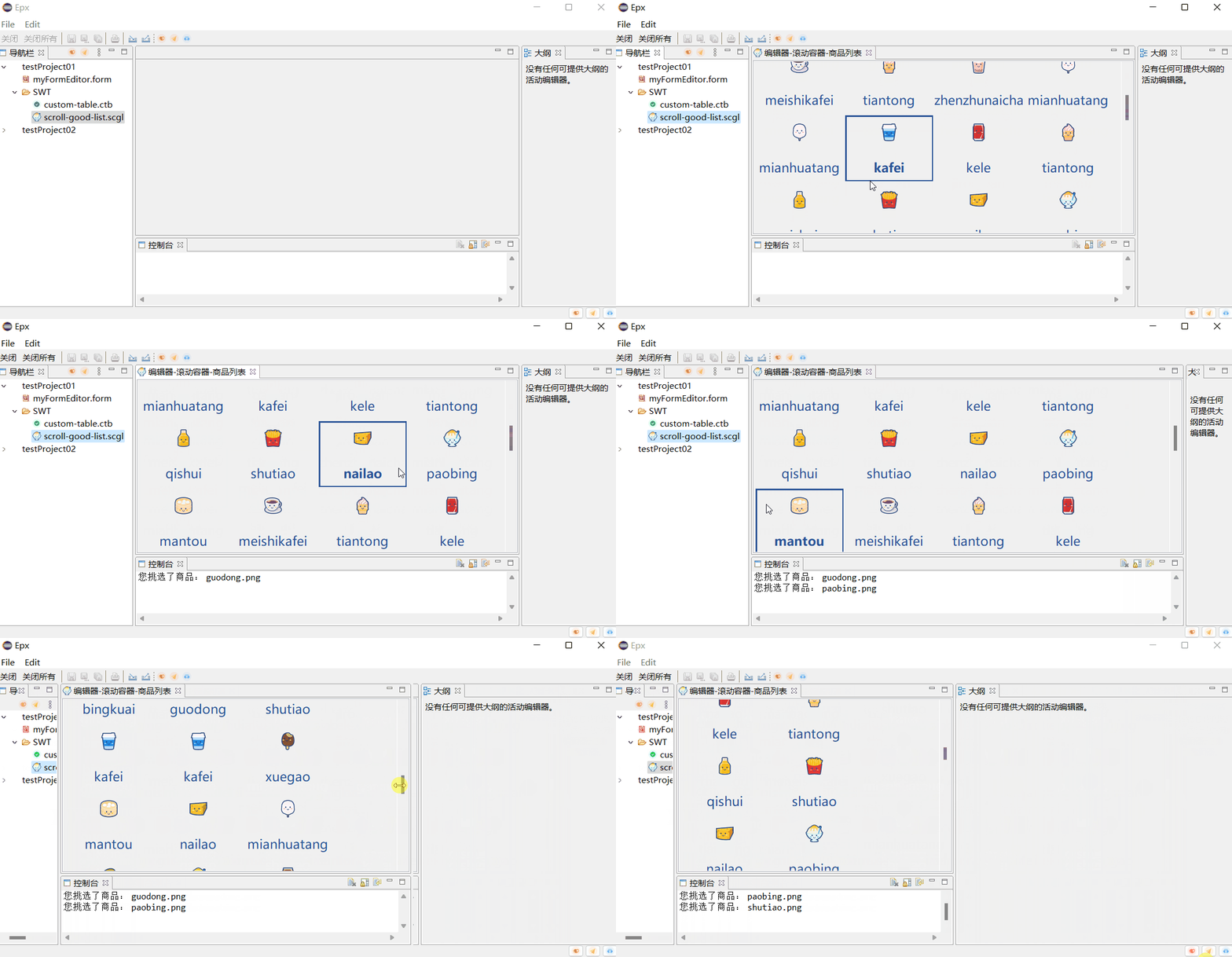
总结
依赖 ScrolledComposite ,Rowlayout , GC 实现了一个滚动容器,该容器支持纵向滚动,横向自动适配填充。适合用于类似与商品列表等展示的场景。
边栏推荐
猜你喜欢

Fastjson code execution cve-2022-25845

25. From disk to file

Kubectl_ Easy to use command line tool: Oh my Zsh_ Tips and tricks

Analysis of some difficulties in VAE (variational self encoder)

2022 robocom world robot developer competition - undergraduate group (provincial competition) rc-u4 strategy team (completed)

Android SQLite database practice

【着色器实现Pixelate马赛克效果_Shader效果第七篇】

(09) flask is OK if it has hands - cookies and sessions

MongoDB入门学习

2022 robocom world robot developer competition - undergraduate group (provincial competition) -- question 2: intelligent medication assistant (finished)
随机推荐
Istio1.12: installation and quick start
25. From disk to file
报错【项目报错】
You are only one SQL statement away from the tdengine Developer Conference!
Lsyncd搭建同步镜像-用Lsyncd实现本地和远程服务器之间实时同步
遭受DDoS时,高防IP和高防CDN的选择
Netease email (126/163): authorization code acquisition strategy
Outlook tutorial, how to set rules in outlook?
基于Lambert函数的时滞系统稳定性研究
Force button 31. Next arrangement -- double finger needling
Analysis of some difficulties in VAE (variational self encoder)
Storage and traversal of Graphs
Istio1.12:安装和快速入门
2022 RoboCom 世界机器人开发者大赛-本科组(省赛)-- 第五题 树与二分图 (已完结)
matlab图像去雾技术GUI界面-全局平衡直方图
27.目录与文件系统
2022 robocom world robot developer competition - undergraduate group (provincial competition) CAIP full version solution
简化理解:发布订阅
Research on stability of time-delay systems based on Lambert function
R语言ggplot2可视化:ggplot2可视化基本散点图(scatter plot)、通过在theme_bw中指定参数base_size来改变轴标签的大小、并控制网格线和轴标签的大小