当前位置:网站首页>[USB voltmeter and ammeter] Based on stm32f103c8t6 for Arduino
[USB voltmeter and ammeter] Based on stm32f103c8t6 for Arduino
2022-07-24 06:59:00 【Like warm know cold】
The main control chip is STM32F103C8T6
Arduino There are indeed many libraries
Project links :USB Voltmeter and ammeter - Jialichuang EDA Open source hardware platform
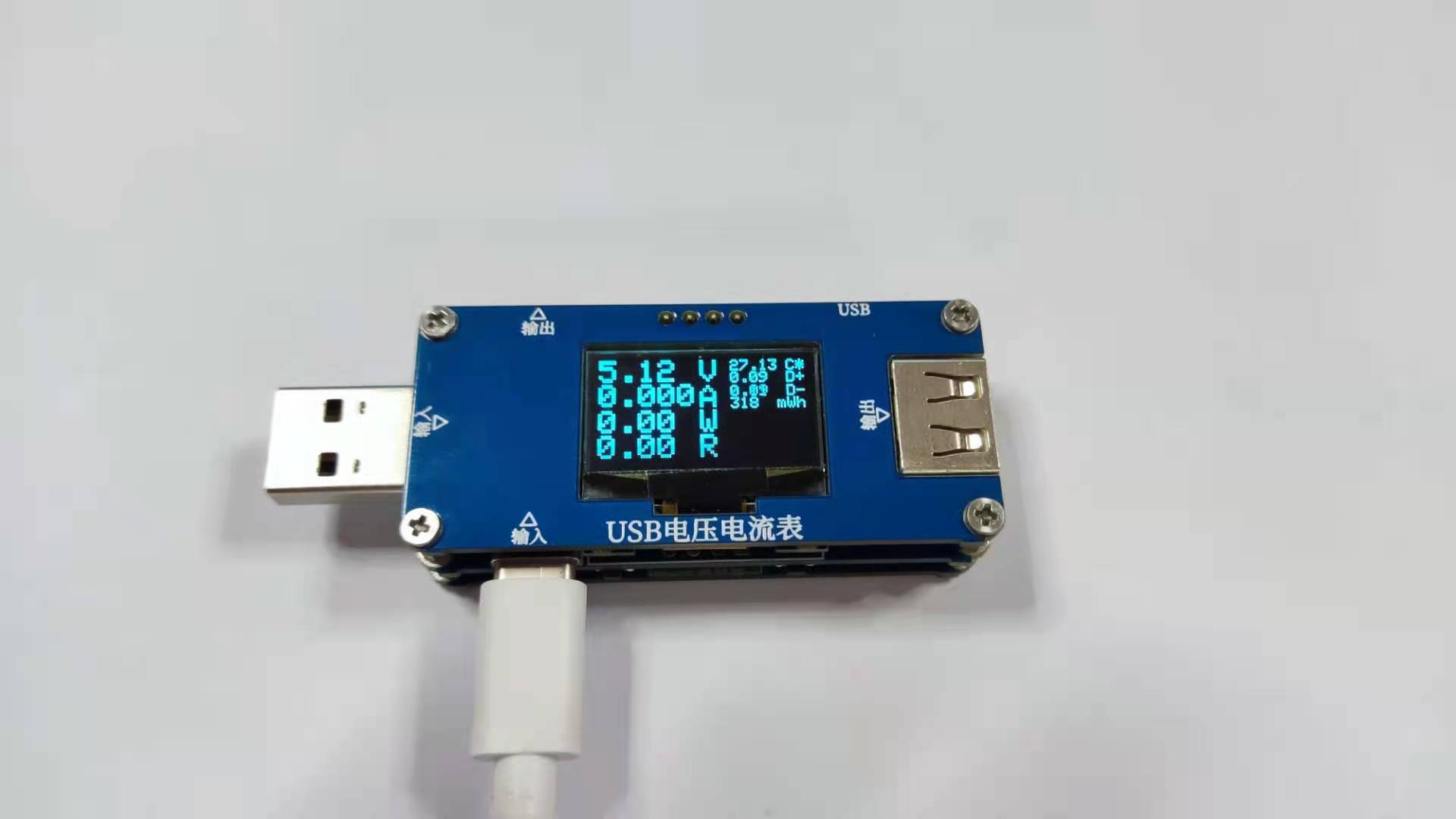
The code is also very simple , Not many lines .
This project mainly wants to learn hardware .
After verification, the author provides two versions of source code , The first version can be compiled successfully , The second edition has wrong definition of variable name , There are more . It can still be used after being changed .
Input and output

SMAJ30A: Transient suppression diode
Power supply part

At the top 5V0 Part of the power supply is reserved , Not used !
Partial inspection port

- PA0:D+ Voltage sampling
- PA3:D- Voltage sampling
- PA4: Thermistor sampling
- PA5: Output voltage sampling
- REST: Power on self reset
- PA15:KEY1
- PB4:KEY2
- PB10:KEY3
- PB1:KEY4
Current sampling


- PA1: High current sampling
- PA2: Small current sampling
- PB9: High current control
- PB8: Low current control
OPA2333: Operational amplifier chip
Ah ah ah !! Bother it , I can't understand this part !!!!
DGND Only with two NMOS Tube connection .
️ The current detection value is :
map(analogRead(a1),0,4095,0,3270)/101/5
/*  This is actually  */
map(analogRead(a1),0,4095,0,3270)/101/(1000*0.005)
️ such , I drew a sketch :

DGND Current I flow GND when ,PA1 The detected voltage is :

so , We can see the origin of the formula of current detection value .
Very good , Learned some knowledge !!!
STM32 Peripheral interface

Basically, they are reserved , Not used !
Function analysis
Variable definitions
//USB The test table
// range 10mA-6.5A
#include <Wire.h>
#include <Adafruit_GFX.h>
#include <Adafruit_SSD1306_STM32.h>

#define OLED_RESET 4
Adafruit_SSD1306 display(OLED_RESET);

byte a1 = PA1;        // High current sampling
byte a2 = PA2;        // Small current sampling
byte dn = PA3;        //D- Voltage sampling
byte dp = PA0;        //D+ Voltage sampling
byte wd = PA4;        //NTC sampling
byte dy = PA5;        // Voltage sampling

byte k1 = PA15;       // Key detection
byte k2 = PB4;        // Key detection
byte k3 = PB10;       // Key detection
byte k4 = PB1;        // Key detection

byte M1 = PB9;        // High current control
byte M2 = PB8;        // Low current control

float V ;             // Supply voltage
float VN ;            //D- voltage
float VP ;            //D+ voltage

float A ;             // electric current
int  uA ;             // electric current
float W ;             // power
float R ;             // load
float C ;             // temperature
int Wh ;              // Electric quantity
long int T;           // Time
long int WT ;         // Electric work
long int i;           // Time

byte K1,K2,K3,K4;     // Key

byte ms = 0;
electric current 、 voltage 、 power measurement
void VA(){
  float vn = map(analogRead(dn),0,4095,0,3300);    //D- Voltage sampling
  VN = vn*2/1000;

  float vp = map(analogRead(dp),0,4095,0,3300);    //D+ Voltage sampling
  VP = vp*2/1000;

  float LV = 0;
  float LA = 0;
  for(byte i = 0; i < 100; i++){
    float v = map(analogRead(dy),0,4095,0,3300);    // Output voltage sampling
    V = v * 11/1000;
    LV = LV + V;

    float a = map(analogRead(a1),0,4095,0,3270);    // High current sampling
    A = a/101/5;
    LA = LA + A;
  }
  V = LV/100;    // Average
  A = LA/100;

  W = V*A;    // power
  if( A > 0){
    R = V/A;    // resistance
    if(R >= 100){ R = 99.99; }
    UIT();
  }else{
    R = 0;
  }
  if( A > 6.5){ digitalWrite( M1 ,LOW); }    // Set the low level of high current control interface
}
- analogRead(pin): Read analog pin , return 0-1023 Between the value of the .
- map(value, fromLow, fromHigh, toLow, toHigh): Proportional scaling value .
Measuring electricity
void UIT(){
  if(millis() - T > 1000){
    T = millis();
    WT = WT+W;
    Wh = WT/3.6;
  }
}
Measuring temperature
void NTC(){
  pinMode( wd , INPUT_ANALOG);    // Analog input
  float r = map(analogRead(wd),0,4095,0,3270);    //NTC sampling
  float ntc = (10000 * r)/(3270 - r);    // Calculation NTC value
  //K =(3950 * 298.15)/(3950 +(298.15 * log( ntc/ 10000)));
  C = (3950 * 298.15)/(3950 +(298.15 * log( ntc/10000))) - 273.15 - 4;    // Calculate the temperature
}
0.96OLED Show
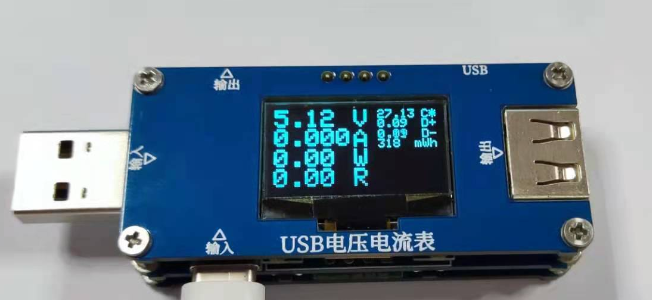
void SSD1306(){
  display.clearDisplay();                // clear 1306 The screen , Ready to display :
  display.setTextColor(WHITE);           // Set font color
  display.setTextSize(2,2);              // Set font size ,(X,Y) Than

  display.setCursor( 0 , 0 );
  display.print(V);
  display.setCursor(62, 0 );
  display.print("V");

  display.setCursor( 0 , 16 );
  display.print(A,3);
  display.setCursor( 62, 17 );
  display.print("A");

  display.setCursor( 0 , 33);
  display.print(W);
  display.setCursor( 62, 33);
  display.print("W");

  display.setCursor( 0 , 49);
  display.print(R);
  display.setCursor( 62, 49);
  display.print("R");

  display.setTextSize(1);

  display.setCursor( 81, 0 );
  display.print(C);
  display.setCursor(116, 0 );
  display.print("C*");

  display.setCursor( 81, 8 );
  display.print(VP);
  display.setCursor(116, 8 );
  display.print("D+");

  display.setCursor( 81, 17);
  display.print(VN);
  display.setCursor(116, 17);
  display.print("D-");

  display.setCursor( 81, 25);
  display.print(Wh);
  display.setCursor(110, 25);
  display.print("mWh");

  display.display();                     // Show the cache
}
initialization
void setup(){
  Serial.begin(9600);

  pinMode( a1 , INPUT_ANALOG);
  pinMode( a2 , INPUT_ANALOG);
  pinMode( dn , INPUT_ANALOG);
  pinMode( dp , INPUT_ANALOG);
  pinMode( wd , INPUT_ANALOG);
  pinMode( dy , INPUT_ANALOG);

  pinMode( k1 , INPUT_PULLUP);
  pinMode( k2 , INPUT_PULLUP);
  pinMode( k3 , INPUT_PULLUP);
  pinMode( k4 , INPUT_PULLUP);

  pinMode( M1, OUTPUT);
  pinMode( M2, OUTPUT);

  digitalWrite( M1 ,HIGH);
  digitalWrite( M2 ,LOW);

  display.begin(SSD1306_SWITCHCAPVCC, 0x3C); //OLED postal address
  display.clearDisplay();

}
Circular function
void loop(){
  VA();     // Measure all kinds of things
  NTC();    // Temperature detection function , High temperature power-off function should be added !
  KEY();    // Key detection , It doesn't work , The related function is not written
  if(millis() - i > 200){     // Refresh
    i = millis();
    SSD1306();
  }
}
summary
Reference resources :Adafruit_SSD1306 Library Learning _RenKaixuan0124 The blog of -CSDN Blog _ssd1306 library
Project resources , From the original author The light of negative entropy
link :https://pan.baidu.com/s/1QG5SR7RUGEHU3qOS54ZcHg
Extraction code :dj85
This project is easy to reproduce , Software is a library , Mainly hardware problems .
️ Learned the method of current detection ! great !!!!!!!!
Come on, study !!!
They are all notes from their own analysis of open source projects , If it helps you , Like it !

边栏推荐
- [essays: discretization]
- 记录PHPSerializer工具类反序列化遇到的坑
- 【微信小程序】一文搞懂条件渲染、列表渲染以及wxss模板样式
- Redis basic type - combined with set
- (笔记整理未完成)【图论:求单源最短路径】
- Detailed analysis of the process (life cycle) of class loading
- Practice of online problem feedback module (12): realize image deletion function
- Redis.conf详解
- Redis基本类型-有序集合Zset
- (静态,动态,文件)三个版本的通讯录
猜你喜欢

Redis分布式缓存学习笔记

济南人社已签1W+电子劳动合同,法大大助力HR数字化

STM32基于hal库的adc以DMA的多通道采样以及所遇问题解决
一个AI玩41个游戏,谷歌最新多游戏决策Transformer综合表现分是DQN的两倍

Metaltc5.0 realizes webrtc version IPC of Junzheng pure C
![[learning notes] possible reasons and optimization methods for white screen on Web pages](/img/80/152a2827b0e653ebf2365c16ce3b40.png)
[learning notes] possible reasons and optimization methods for white screen on Web pages
![[media controller] open source project learning notes (based on Arduino micro development board)](/img/08/39ed97437f235806c6d4415f53c47b.png)
[media controller] open source project learning notes (based on Arduino micro development board)

三级分类/菜单的查询——树形结构
![[lvgl (3)]](/img/d3/1e2bad232f29c6c75ff163a6c0f378.png)
[lvgl (3)]

GE口:SGMII模式和serdes模式
随机推荐
【微信小程序】一文搞懂条件渲染、列表渲染以及wxss模板样式
[lvgl (5)] label usage
Redis special data type bitmap
【学习笔记】网页出现白屏可能的原因与优化方法
[lvgl] API functions for setting, changing and deleting styles of components
你不可能让每个人都满意!
MySQL gets the self incrementing line mark (different from MySQL version)
(静态,动态,文件)三个版本的通讯录
项目问题积累
基于回归分析的广告投入销售额预测——K邻近,决策树,随机森林,线性回归,岭回归
Kubernetes' deployment, service concept, dynamic capacity expansion
Introduction, architecture and principle of kubernetes
【学习笔记】url输入到页面展现中发生了什么?
Redis基本类型-有序集合Zset
济南人社已签1W+电子劳动合同,法大大助力HR数字化
Sealos packages and deploys kubesphere container platform
GE口:SGMII模式和serdes模式
[learning notes] what happens when the URL is input into the page presentation?
Special effects - when the mouse moves, there will be a custom expression trail
Esp32 ultra detailed learning record: NTP synchronization time