当前位置:网站首页>Flutter and native communication (Part 1)
Flutter and native communication (Part 1)
2022-06-26 10:33:00 【Keke duck~】
One 、flutter Three ways of communication in
BasicMessageChannel: Used to pass strings and semi-structured information
MethodChannel: Used to pass method calls (method invocation) Usually used to call native One of the methods
EventChannel: For data flow (event streams) Communication for . With monitoring function , For example, after the electricity changes, directly push the data to flutter End .
Two 、MethodChannel Use
1. Construction process :
Flutter ------>Native
MethodChannel yes Flutter And the basis of native interaction , By passing in Flutter The name of the plug-in , call invokeMethod Method , You can call native methods , It's kind of like Java Reflection of .
Registration channels : Create one at both ends MethodChannel object , Register the same string value .
Android End
MethodChannel a2FChannel = new MethodChannel((FlutterView)flutterView,"A2FChannel");
Flutter End
 var channel = MethodChannel("A2FChannel");
 final String result = await channel.invokeMethod(nativeMethod, args);
setMethodCallHandler Method notes
channel.setMethodCallHandler {
     call, result ->
           //call.method  To get the method name
           //call.arguments  To get the input parameter
           //result.success To put back the successful processing results
           //result.error To put back the results after the failure
           //result.notImplemented To put back the method for implementation
     }
Native ------>Flutter
stay ( Flutter ——> Native) Code base
Native End
channel.invokeMethod(flutterMethod, args, new MethodChannel.Result () {

			 // Method rewriting
        @Override
        public void success(@Nullable Object o) {

        }
       @Override
       public void error(String s, @Nullable String s1, @Nullable Object o) {

			}
			@Override
       public void notImplemented() {

                }
            });
Flutter End
_channel.setMethodCallHandler((MethodCall call) {

      //call.method  To get the method name
      //call.arguments  To get the parameters
    });
2. Local method writing
stay Flutter 1.12 , plug-in unit API l It's time to 2.0 .
API 2.0 Before .
Developers usually have to work on MainActivity OfonCreate()MethodGeneratedPluginRegistrant.registerWith()To execute a static method in the plug-in class to initialize the plug-in .
API 2.0 after , There isFlutterPluginInterface .
Developers only need to let the plug-in class they create implement it , And put the initialization code into a rewritten method .
//API 2.0  Before .
public class MainActivity extends FlutterActivity {

	 @Override
	 protected void onCreate(Bundle savedInstanceState) {

	 super.onCreate(savedInstanceState);
	 GeneratedPluginRegistrant.registerWith(this);
 }
}
 //API2.0 after
     @Override
     public void configureFlutterEngine(@NonNull FlutterEngine flutterEngine) {

     super.configureFlutterEngine(flutterEngine);
  }
PS Knowledge point
- Start a Android application , It usually starts with a Activity , If this application is Flutter application , So this Activity yes FlutterActivity .
- stay FlutterActivity Of onCreate() In the method , Created a FlutterEngine , It's a separate one Flutter execution environment , Through it , You can make a Android Application and operation Dart Code .
FlutterEngineProvides ,FlutterRendererResponsible for rendering views .DartExecutorAsBinaryMessengerFor and Flutter End communication . We createdMethodChannelIt's about this .
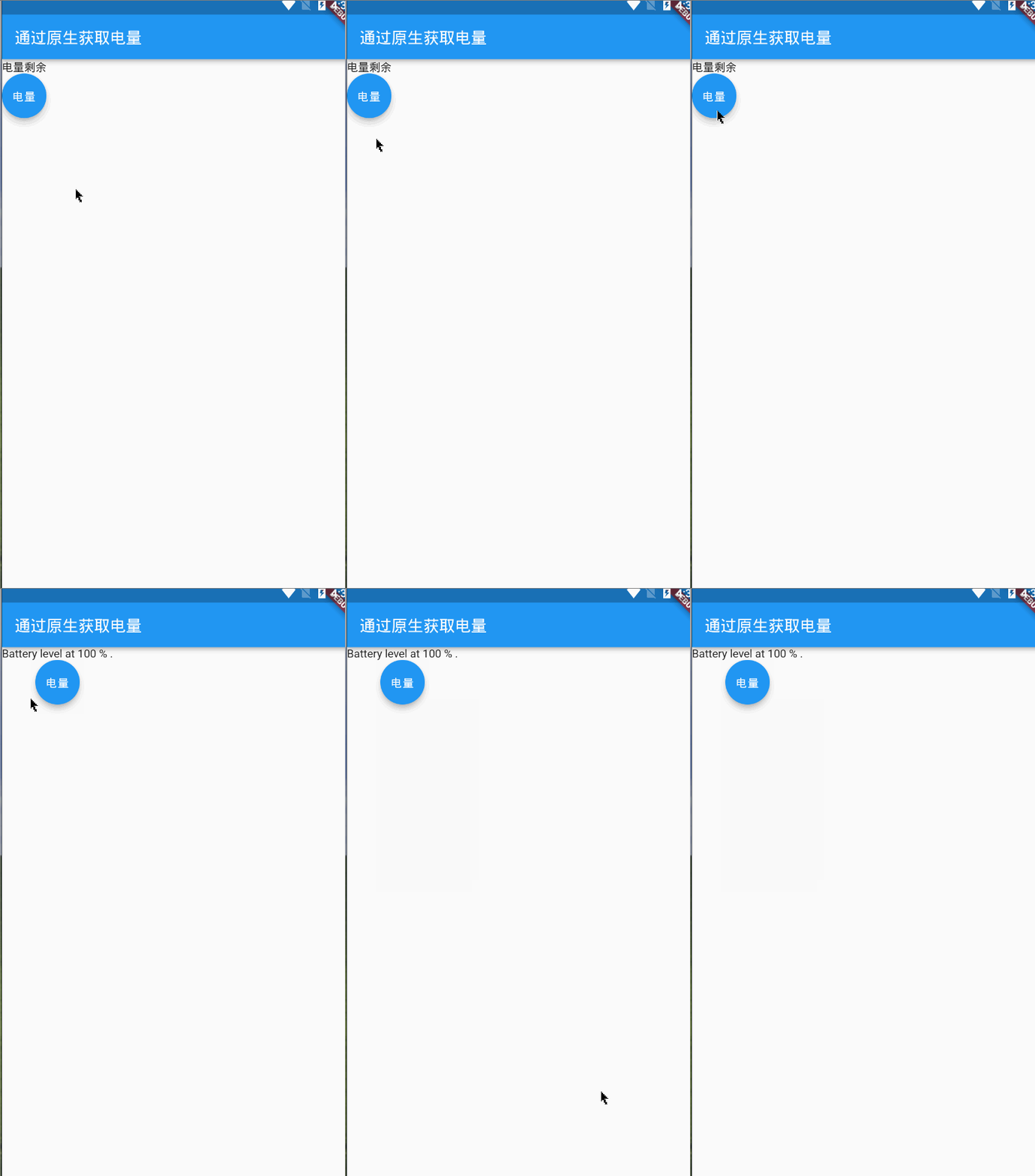
3.flutter The sample code for obtaining the phone power through native is as follows :

MainActivity
package com.example.item_1;

import androidx.annotation.NonNull;

import io.flutter.embedding.android.FlutterActivity;

import io.flutter.embedding.engine.FlutterEngine;

import io.flutter.plugins.GeneratedPluginRegistrant;

import io.flutter.plugin.common.MethodChannel;

import android.content.ContextWrapper;

import android.content.Intent;

import android.content.IntentFilter;

import android.os.BatteryManager;

import android.os.Build.VERSION;

import android.os.Build.VERSION_CODES;

import android.os.Bundle;
// Open separately android The directory can be viewed in the environment
public class MainActivity extends FlutterActivity {

    // Define a private static member variable
    private static final String CHANNEL = "com.jk/battery";
    // initialization
    @Override
    public void configureFlutterEngine(@NonNull FlutterEngine flutterEngine) {

        super.configureFlutterEngine(flutterEngine);
        // establish MethodChannel object , Add calling method
        // How to write it 1:
// new MethodChannel(getFlutterView(), CHANNEL).setMethodCallHandler(
// new MethodChannel.MethodCallHandler() {

// @Override
// public void onMethodCall(MethodCall methodCall, MethodChannel.Result result) {

// //  adopt methodCall You can get the parameter and method name   Execute the corresponding platform business logic
// if(methodCall.method.equals("getBatteryLevel")){

// int batteryLevel = getBatteryLevel();
// if(batteryLevel != -1){

// result.success(batteryLevel);
// }else{

// result.error("UNAVAILABLE", "Battery level not available.", null);
// }
// }else{

// result.notImplemented();
// }
// }
// }
// );
        // How to write it 2:
        // New version of the Flutter SDK The default is  import io.flutter.embedding.android.FlutterActivity;  package ,
        //  It's in MethodChannel The first parameter in the method is filled in  getFlutterEngine().getDartExecutor().getBinaryMessenger()
        // If you use it Flutter Of SDK It's the old version , So the default is  import io.flutter.app.FlutterActivity;  package
        //  be MethodChannel The first parameter in the method is filled in  getFlutterView()
        MethodChannel methodChannel = new MethodChannel(flutterEngine.getDartExecutor().getBinaryMessenger(), CHANNEL);
        methodChannel.setMethodCallHandler(
                (call, result) -> {

                    // If it is equal to flutter Method name passed from
                    if (call.method.equals("getBatteryInfo")) {

                        // Call another custom method to return the power information
                        int batteryLevel = getBatteryLevel();
                        if (batteryLevel != -1) {

                            result.success(batteryLevel);
                        } else {

                            result.error("UNAVAILABLE", "Battery level not available.", null);
                        }
                    } else {

                        // If there is no method name, the interface will be returned
                        result.notImplemented();
                    }
                }
        );
    }
    private int getBatteryLevel() {


        int batteryLevel = -1;

        if (VERSION.SDK_INT >= VERSION_CODES.LOLLIPOP) {


            BatteryManager batteryManager = (BatteryManager) getSystemService(BATTERY_SERVICE);

            batteryLevel = batteryManager.getIntProperty(BatteryManager.BATTERY_PROPERTY_CAPACITY);

        } else {


            Intent intent = new ContextWrapper(getApplicationContext()).

                    registerReceiver(null, new IntentFilter(Intent.ACTION_BATTERY_CHANGED));

            batteryLevel = (intent.getIntExtra(BatteryManager.EXTRA_LEVEL, -1) * 100) /

                    intent.getIntExtra(BatteryManager.EXTRA_SCALE, -1);

        }
        return batteryLevel;
    }
}
Flutter
import 'package:flutter/material.dart';
import 'package:flutter/services.dart';
class PageOne extends StatefulWidget {

  const PageOne({
    Key key}) : super(key: key);

  @override
  State<PageOne> createState() => _Page_oneState();
}
class _Page_oneState extends State<PageOne> {

  String value = " Electricity surplus ";
  // Establish connection points for native interaction
  static const channel = const MethodChannel("com.jk/battery");
  @override
  Widget build(BuildContext context) {

    return Scaffold(
      appBar: AppBar(
        title: Text(" Get power through native "),
      ),
      body: Container(
        child: Column(
          children: [
            Text("$value"),
            FloatingActionButton(onPressed: ()=>getData(),child: Text(" Electric quantity "),)
          ],
        ),
      ),
    );
  }
  Future getData()async{

    String batteryLevel;
    final int result = await channel.invokeMethod("getBatteryInfo");
    try{

      // Get the current... From the native species channel Method value in
      final int result = await channel.invokeMethod("getBatteryInfo");
      batteryLevel = 'Battery level at $result % .';
    }on PlatformException catch(e){

      batteryLevel = "Failed to get battery level: '${
      e.message}'.";
    }
    setState(() {

      value = batteryLevel;
    });
  }
}
边栏推荐
- MySQL 13th job - transaction management
- Basic string operations in C
- MySQL 9th job - connection Query & sub query
- See how I store integer data in the map < string, string > set
- 118. Yanghui triangle
- Développeur, quelle est l'architecture des microservices?
- Quantitative investment learning - Introduction to classic books
- The fourteenth MySQL operation - e-mall project
- Little red book - Notes inspiration - project summary
- 量化投资学习——经典书籍介绍
猜你喜欢


随机推荐
Dynamic library connection - symbol conflict - global symbol intervention
Redis中执行Lua脚本
Global and Chinese market of aluminum sunshade systems 2022-2028: Research Report on technology, participants, trends, market size and share
Using foreach to loop two-dimensional array
CentOS安装Redis多主多从集群
Oracle sqlplus 查询结果显示优化
MySQL第五章总结
[depth first search] 312 Poke balloon
Luogu 1146 coin flip
Enter a positive integer with no more than 5 digits, and output the last digit in reverse order
The IE mode tab of Microsoft edge browser is stuck, which has been fixed by rolling back the update
Index summary of blog articles -- Industrial Internet
118. Yanghui triangle
基础-MySQL
MySQL seventh job - update data
Reshape a two-dimensional array with 3 rows and 3 columns to find the sum of the diagonals
Small example of SSM project, detailed tutorial of SSM integration
Appium automation test foundation - mobile end test environment construction (II)
MySQL 10th job - View
開發者,微服務架構到底是什麼?