当前位置:网站首页>QML类型:Loader
QML类型:Loader
2022-06-23 16:52:00 【友善啊,朋友】
一、描述
Loader 用于动态加载 QML 组件。
Loader 可以加载 QML 文件(使用 source 属性)或 Component 对象(使用 sourceComponent 属性)。 它可用于延迟组件的创建。
下面例子在单击 MouseArea 时将“Page1.qml”作为组件加载:
import QtQuick 2.0

Item {
    width: 200; height: 200

    Loader { id: pageLoader }

    MouseArea {
        anchors.fill: parent
        onClicked: pageLoader.source = "Page1.qml"
    }
}
可以使用 item 属性访问加载的对象。
如果 source 或 sourceComponent 发生更改,则任何先前实例化的项目都将被销毁。
将 source 设置为空字符串或将 sourceComponent 设置为 undefined 会销毁当前加载的对象,释放资源并将 Loader 置空。
1.1、加载器大小调整行为
如果源组件不是 Item 类型,Loader 不会应用任何特殊的大小调整规则。当用于加载具有视觉效果的类型时,Loader 应用以下大小规则:
- 如果没有为 Loader 指定显式大小,则加载组件后,Loader 会自动调整为加载项的大小。
- 如果通过设置宽度、高度或锚定来明确指定 Loader 的大小,则加载的项目将调整为 Loader 的大小。
在下面这两种情况下,项目和加载器的大小是相同的。这确保了锚定到加载器等同于锚定到加载的项目。


1.2、接收来自加载对象的信号
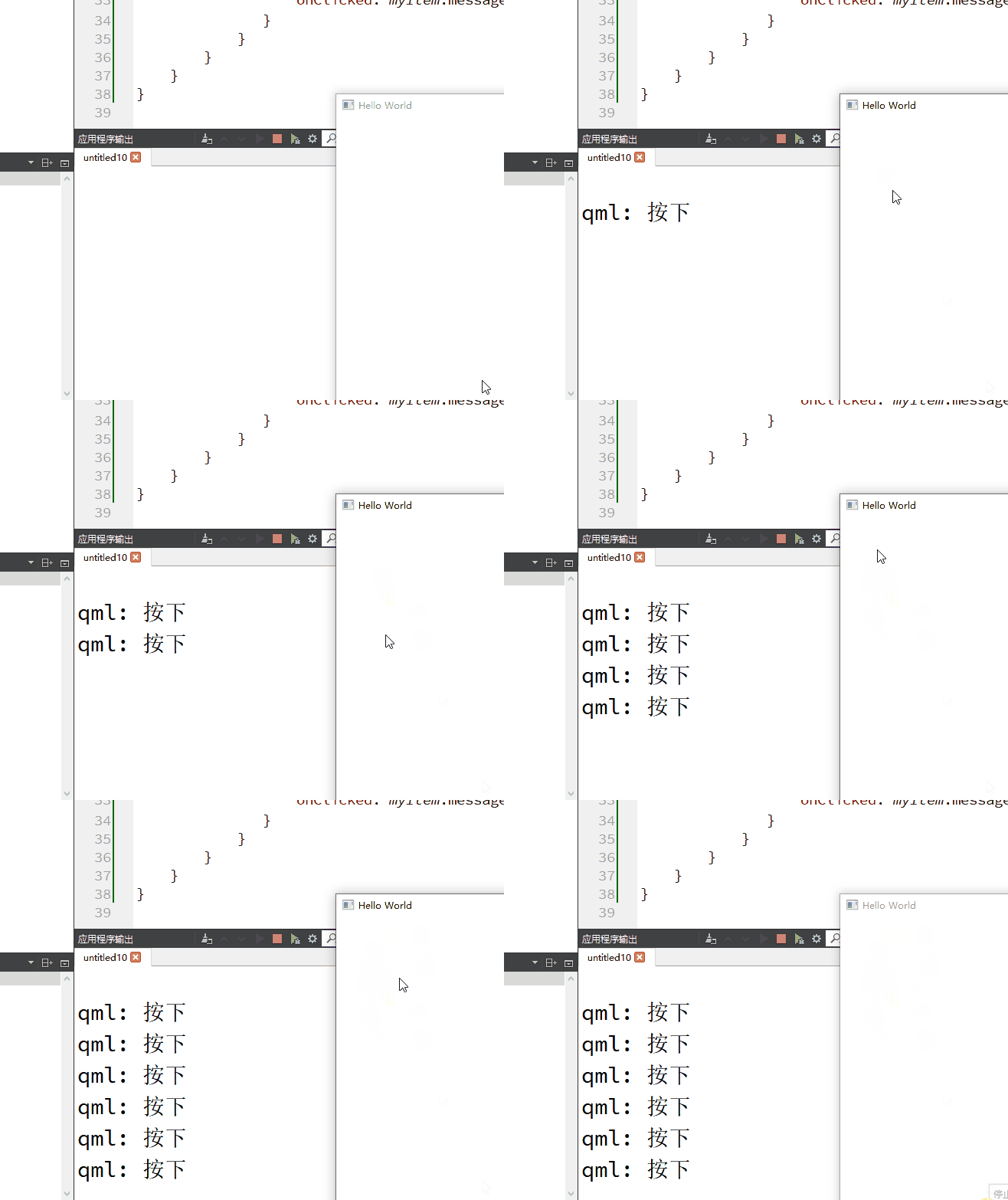
可以使用 Connections 类型接收从加载的对象发出的任何信号:
import QtQuick

Window {
    width: 640
    height: 480
    visible: true
    title: qsTr("Hello World")

    Item {
        width: 200; height: 200

        Loader {
           id: myLoader
           sourceComponent: rect
        }

        Connections
        {
            target: myLoader.item
            function onMessage(msg) { console.log(msg) }
        }

        Component {
            id: rect
            Rectangle {
               id: myItem
               signal message(string msg)

               width: 100; height: 100

               MouseArea {
                   anchors.fill: parent
                   onClicked: myItem.message("按下")
               }
            }
        }
    }
}
加载的对象也可以直接调用 Loader 或其父项中定义的任何函数:
import QtQuick

Window {
    id:root
    width: 640
    height: 480
    visible: true
    title: qsTr("Hello World")

    function fun03() { console.log("fun03") }

    Item {
        id:loader_parent
        width: 200; height: 200
        function fun02() { console.log("fun02") }

        Loader {
           id: myLoader
           sourceComponent: rect

           function fun01() { console.log("fun01") }
        }

        Component {
            id: rect
            Rectangle {
               id: myItem
               signal message(string msg)

               width: 100; height: 100

               MouseArea {
                   anchors.fill: parent
                   onClicked:
                   {
                       myLoader.fun01()
                       loader_parent.fun02()
                       root.fun03()
                   }
               }
            }
        }
    }
}
1.3、焦点和按键事件
Loader 是一个焦点作用域。它的 focus 属性必须设置为 true。
import QtQuick

Window {
    width: 640
    height: 480
    visible: true
    title: qsTr("Hello World")

    Item {
        id:loader_parent
        width: 200; height: 200

        Loader {
            id: myLoader
            sourceComponent: rect
            focus: true
        }

        Keys.onPressed: (event)=>
        {
            console.log("被载入的组件-放弃-捕获键盘按下事件");//01
        }

        Component {
            id: rect
            Item
            {
                Item
                {
                    focus: true
                    Keys.onPressed: (event)=>
                    {
                        console.log("被载入的组件接收键盘按下事件");//02
                        event.accepted = true;
                    }
                }
            }
        }
    }
}
上面的代码:
- 被载入的组件和 Loader 要同时设置 focus 为 true,被载入的组件才能接收到键盘按下事件。打印02。
- 被载入组件设置 focus 为 false,Loader 设置 focus 为 true 则打印01
1.4、在视图委托中使用 Loader
在视图委托中使用 Loader 可以提高委托加载性能。但要注意正确的用法。
一个普通的委托:
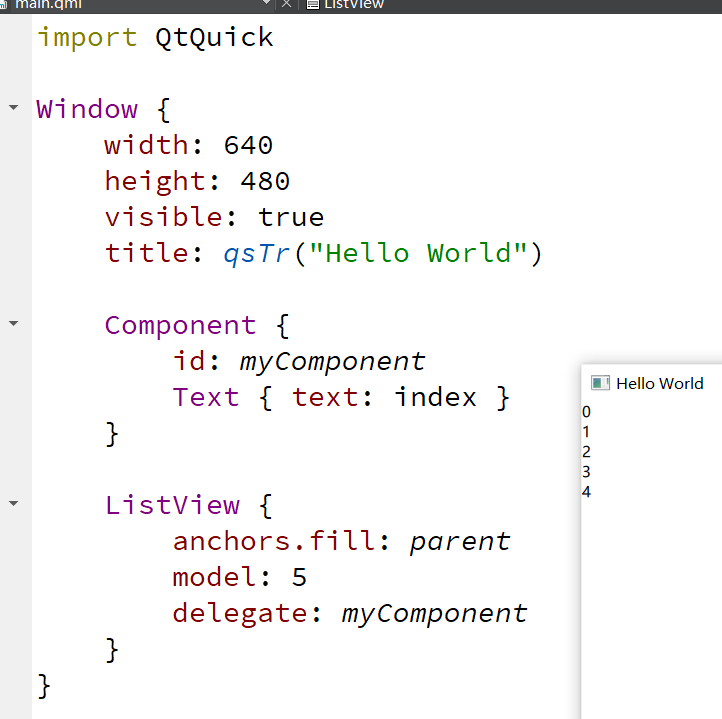
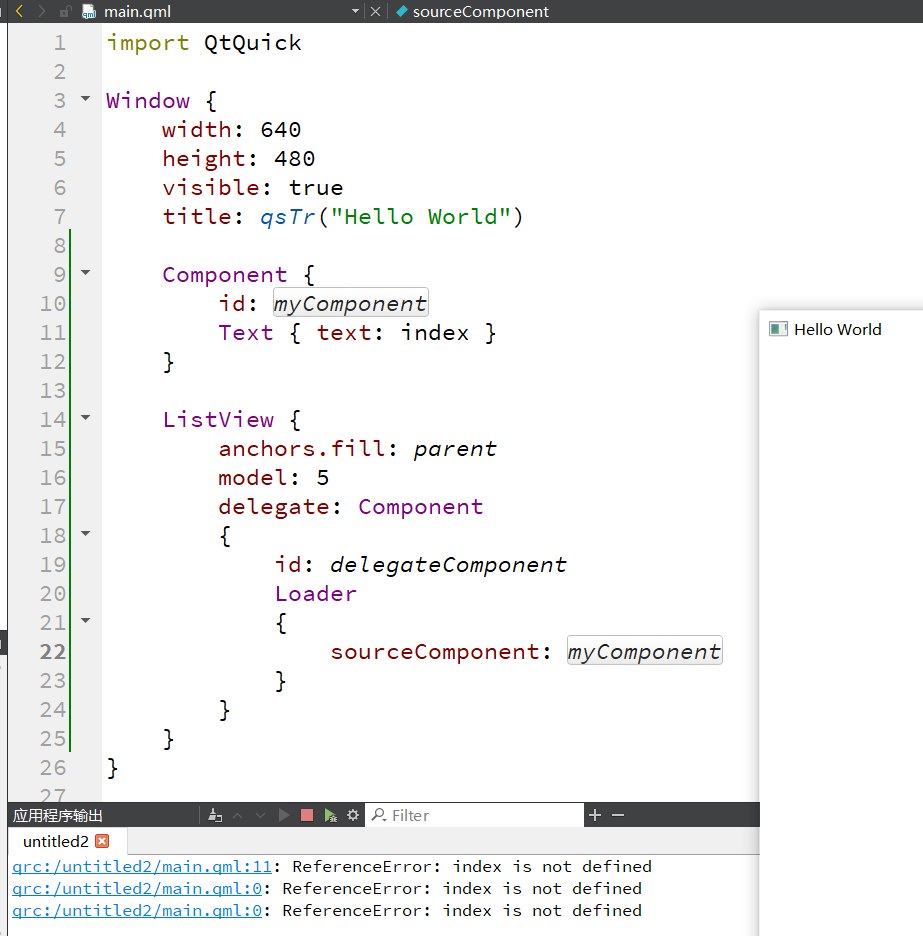
当使用 Loader 时外部的组件不能引用 index:
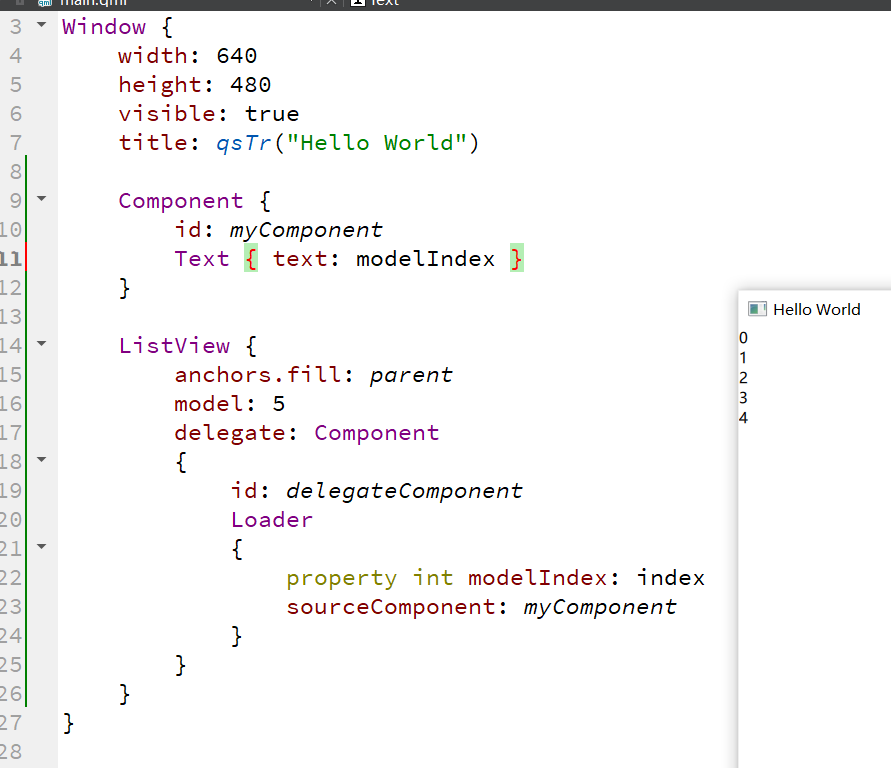
正确的用法:

或:
二、属性成员
1、active : bool
Loader 当前是否处于活动状态。默认为 true。
如果 Loader 处于非活动状态,则更改 source 或 sourceComponent 不会导致项目被实例化,直到 Loader 处于活动状态。
非活动加载程序的 status 始终为 Loader.Null。
2、asynchronous : bool
组件是否将被异步实例化。默认为 false。
当与 source 属性结合使用时,加载和编译也将在后台线程中执行。
3、【只读】item: QtObject
当前加载的顶级对象。
4、progress : real
从网络加载 QML 数据的进度,从 0.0(未加载)到 1.0(已完成)。大多数 QML 文件都非常小,因此该值会迅速从 0 变为 1。
5、source : url
要实例化的 QML 组件的 URL。
要卸载当前加载的对象,将此属性设置为空字符串,或将 sourceComponent 设置为 undefined。 将 source 设置为新的 URL 也会导致前一个 URL 创建的项目被卸载。
6、sourceComponent : Component
要实例化的组件。要卸载当前加载的对象,将此属性设置为 undefined。
Item {
    Component {
        id: redSquare
        Rectangle { color: "red"; width: 10; height: 10 }
    }

    Loader { sourceComponent: redSquare }
    Loader { sourceComponent: redSquare; x: 10 }
}7、status : enumeration
QML 加载的状态。
- Loader.Null:加载器处于非活动状态或未设置 QML 源
- Loader.Ready:QML 源代码已加载
- Loader.Loading:当前正在加载 QML 源
- Loader.Error:加载 QML 源时出错
三、信号成员
1、loaded()
当状态变为 Loader.Ready 或成功初始加载时发出此信号。
四、成员函数
1、object setSource(url source, object properties)
创建具有给定属性的给定源组件的对象实例。properties 参数是可选的。加载和实例化完成后,可以通过 item 属性访问该实例。
如果在调用此函数时 active 属性为 false,则不会加载给定的源组件,但会缓存源和初始属性。当加载器激活时,将使用初始属性集创建源组件的实例。
以这种方式设置组件实例的初始属性值不会触发任何关联的行为(比如属性动画)。
如果在调用此函数之后但在设置加载程序激活之前更改了源或源组件,则缓存的属性将被清除。
边栏推荐
- New function! Qianfan magic pen apaas December capability monthly report
- 解析 | 模-数(A/D)转换器
- Self supervised learning (SSL)
- Reinforcement learning series (I) -- basic concepts
- 论文阅读 (50):A Novel Matrix Game with Payoffs of Maxitive Belief Structure
- Alien world, real presentation, how does the alien version of Pokemon go achieve?
- 【win10 VS2019 opencv4.6 配置参考】
- MySQL transaction submission process
- The principle of MySQL index algorithm and the use of common indexes
- Self taught programming introduction, what language to learn first?
猜你喜欢

【C工具】------点阵模拟测试2
How to solve the problem that the esp8266-01s cannot connect to Huawei routers

Meituan Sanmian: how do you understand the principle of redis master-slave replication?

客服系统搭建教程_宝塔面板下安装使用方式_可对接公众号_支持APP/h5多租户运营...

iMeta | 南农沈其荣团队发布微生物网络分析和可视化R包ggClusterNet

Performance test bottleneck tuning in 10 minutes! If you want to enter a large factory, you must know

FPN characteristic pyramid network
esp8266-01s 不能连接华为路由器解决方法
![[mae]masked autoencoders mask self encoder](/img/08/5ab2b0d5b81c723919046699bb6f6d.png)
[mae]masked autoencoders mask self encoder

torch学习(一):环境配置
随机推荐
ACM players take you to play with the array!
[learning notes] tidb learning notes (III)
High availability solution practice of mongodb advanced applications (4)
SimpleDateFormat在多线程环境下存在线程安全问题。
Script to view the execution of SQLSERVER database stored procedures
Goframe framework: add tracing Middleware
How to make a badge
AMQP protocol
Postgresql_根据执行计划优化SQL
A set of code to launch seven golang web frameworks at the same time
论文阅读 (55):Dynamic Multi-Robot Task Allocation under Uncertainty and Temporal Constraints
Tencent three sides: how to duplicate 4billion QQ numbers?
Analysis of object class structure in Nanny level teaching (common class) [source code attached]
Kerberoasting without SPN
12. Manage network environment
qYKVEtqdDg
MySQL的 安装、配置、卸载
Analysis of three battery capacity monitoring schemes
Alien world, real presentation, how does the alien version of Pokemon go achieve?
How to design a seckill system?