当前位置:网站首页>Docker之MySQL主从连接提示:Communications link failure
Docker之MySQL主从连接提示:Communications link failure
2022-06-22 15:36:00 【在奋斗的大道】
今天在使用Apache ShardingSphere实现数据库读写分离功能,连接基于Docker的MySQL5.7 主从IP。SpringBoot程序提示如下错误信息:
com.mysql.jdbc.exceptions.jdbc4.CommunicationsException:Communications link failure
错误的原因:MySQL服务在长时间不连接之后断开了,断开之后的首次请求会抛出这个异常
原因分析:
1、既然是长时间不连接之后断开了,那这个时间应该是可以设定的,或者现在mysql用的还是默认的值
2、如何查看现在的时间值,以及如何修改基于docker服务启动的MySQL。
查看默认值:
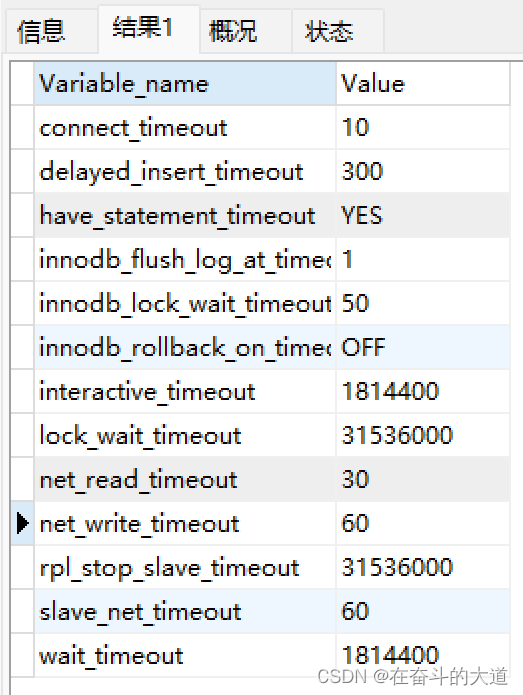
1、使用Native For MySQL客户端工具,执行如下指令:show variables like '%timeout%'

参数说明:
1)interactive_timeout:
参数含义:服务器关闭交互式连接前等待活动的秒数。交互式客户端定义为mysql_real_connect()中使用CLIENT_INTERACTIVE选项的客户端。
参数默认值:28800秒(8小时)
2)wait_timeout:
参数含义:服务器关闭非交互连接之前等待活动的秒数。在线程启动时,根据全局wait_timeout值或全局interactive_timeout值初始化会话wait_timeout值,取决于客户端类型(mysql_real_connect()的连接选项CLIENT_INTERACTIVE定义)。
参数默认值:28800秒(8小时)
温馨提示:在MySQL4 及其以下的版本,可以通过autoReconnect=true 配置属性解决连接自动恢复问题,如果是MySQL5及其以上版本,必须通过系统参数来控制。
结论:若要修改的话,需要同时修改这两个变量
连接时间值范围:在windows环境中:1-2147483s,
在Linux环境中:1-31536000s
Docker 下修改MySQL:MySQL5.7 在Docker 下的核心配置文件,是通过挂卷方式实现,所以我们仅仅只需要修改Docker 宿主主机所在挂载目录地址,修改对应文件即可。
docker 启动MySQL5.7:
 docker run -p 3307:3306 --name mysql-master \
  -v /usr/local/mysql-master/log:/var/log/mysql \
  -v /usr/local/mysql-master/data:/var/lib/mysql \
  -v  /usr/local/mysql-master/conf:/etc/mysql \
  -e MYSQL_ROOT_PASSWORD=root \
  -d mysql:5.7
MySQL5.7 配置文件所在宿主主机的文件目录地址:/usr/local/mysql-master/conf
在my.cnf 文件,添加超时时间配置。
[mysqld]
 ## 设置server_id,同一局域网中需要唯一
 server_id=101
 ## 指定不需要同步的数据库名称
 binlog-ignore-db=mysql
 ## 开启二进制日志功能
 log-bin=mall-mysql-bin
 ## 设置二进制日志使用内存大小(事务)
 binlog_cache_size=1M
 ## 设置使用的二进制日志格式(mixed,statement,row)
 binlog_format=mixed
 ## 二进制日志过期清理时间。默认值为0,表示不自动清理。
 expire_logs_days=7
 ## 跳过主从复制中遇到的所有错误或指定类型的错误,避免slave端复制中断。
 ## 如:1062错误是指一些主键重复,1032错误是因为主从数据库数据不一致
 slave_skip_errors=1062
 ## 设置超时时间
 wait_timeout=1814400
 interactive_timeout=1814400
重新启动Docker 服务及其重启MySQL服务,再查看连接时间配置:
边栏推荐
- for.. of vs. for.. In statement
- Qt Notes - qmap Custom key
- Bidirectional data binding V-model and v-decorator
- Make the code elegant (learn debugging + code style)
- Gridhome, a must-have static site generator for beginners
- Basic application of scala for
- System throughput, TPS (QPS), user concurrency, performance test concepts and formulas
- LETV group payment system architecture sharing for processing 100000 high concurrent orders per second
- 0基础如何入门软件测试,能转行成功吗?
- [C language] deeply analyze the storage of integer and floating-point types in memory
猜你喜欢
![[C language] deeply analyze the storage of integer and floating-point types in memory](/img/8b/12a4dc7a0c0e34e2add007592971dd.jpg)
[C language] deeply analyze the storage of integer and floating-point types in memory
![[wechat applet custom bottom tabbar]](/img/04/2ea4ab3fd8571499190a9b3c9990b2.png)
[wechat applet custom bottom tabbar]

IDEA安装总结
高可用性的ResourceManager

NLog自定义Target之MQTT
每秒處理10萬高並發訂單的樂視集團支付系統架構分享
![[pop up box 2 at the bottom of wechat applet package]](/img/31/266e6a1f4200347c9324ea37b78562.png)
[pop up box 2 at the bottom of wechat applet package]
Idea installation summary

linux系统维护篇:mysql8.0.13源码下载及安装之“傻瓜式”操作步骤(linux-centos6.8)亲测可用系列
试用了多款报表工具,终于找到了基于.Net 6开发的一个了
随机推荐
Redis implements the correct posture of the delay queue
MYSQL_ERRNO : 1292 Truncated incorrect date value At add_num :1
Qt笔记-QMap自定义键(key)
【心理学】情感心理学-当代思想和传统思想的碰撞(本篇文章将不定期持续更新)
jsp学习之(二)---------jsp脚本元素和指令
What is restful and what rules should be followed when designing rest APIs?
[C language] deeply analyze the relationship between pointer and array
How to open an account in flush? Is it safe to open an account online?
LETV group payment system architecture sharing for processing 100000 high concurrent orders per second
JSP学习之开发模式
win10的wifi断线后无法连接
从Application提交角度审视Executor
How to use IDM to accelerate Baidu cloud
linux系统维护篇:mysql8.0.13源码下载及安装之“傻瓜式”操作步骤(linux-centos6.8)亲测可用系列
jsp学习之(三)--------- jsp隐式对象
[Alibaba cloud server - install MySQL version 5.6 and reinstall]
[pop up box at the bottom of wechat applet package] I
MYSQL 存储过程异常处理 报错 错误代码: 1337
JMeter use case
[wechat applet custom bottom tabbar]