当前位置:网站首页>The latest and complete Flink series tutorials in 2021_ Preliminary exploration of Flink principle and flow batch integration API (II. V) V2
The latest and complete Flink series tutorials in 2021_ Preliminary exploration of Flink principle and flow batch integration API (II. V) V2
2022-07-24 13:44:00 【Hua Weiyun】
Kafka How to connect
Kafka Is message queuing
demand :
adopt Flink Write data elements to (producer) To Kafka in
~~~java
package cn.itcast.flink.sink;
import com.alibaba.fastjson.JSON;
import lombok.AllArgsConstructor;
import lombok.Data;
import lombok.NoArgsConstructor;
import org.apache.flink.api.common.functions.MapFunction;
import org.apache.flink.api.common.serialization.SimpleStringSchema;
import org.apache.flink.streaming.api.datastream.DataStreamSource;
import org.apache.flink.streaming.api.datastream.SingleOutputStreamOperator;
import org.apache.flink.streaming.api.environment.StreamExecutionEnvironment;
import org.apache.flink.streaming.connectors.kafka.FlinkKafkaProducer;
import org.apache.flink.streaming.connectors.kafka.internals.KafkaSerializationSchemaWrapper;
import org.apache.flink.streaming.connectors.kafka.partitioner.FlinkFixedPartitioner;
import org.apache.kafka.clients.producer.ProducerConfig;
import java.util.Properties;
/**
* Author itcast
* Date 2021/6/17 16:46
* demand : Encapsulate data elements into JSON character string Production to Kafka in
* step :
*
*/
public class KafkaProducerDemo {
public static void main(String[] args) throws Exception {
//1.env
StreamExecutionEnvironment env = StreamExecutionEnvironment.getExecutionEnvironment();
//2.Source Generate an element Student
DataStreamSource<Student> studentDS = env.fromElements(new Student(102, “Oking”, 25));
//3.Transformation
// Be careful : For now, we use Kafka Both serialization and deserialization are used directly using the simplest string , So first of all Student To string
//3.1 map Method take Student Convert to string
SingleOutputStreamOperator<String> mapDS = studentDS.map(new MapFunction<Student, String>() {
@Override
public String map(Student value) throws Exception {
// Can be called directly JSON Of toJsonString, It can also be changed to JSON
String json = JSON.toJSONString(value);
return json;
}
});
//4.Sink
Properties props = new Properties();
props.setProperty(ProducerConfig.BOOTSTRAP_SERVERS_CONFIG, “192.168.88.161:9092”);
// Instantiate according to parameters FlinkKafkaProducer
//4.1 If you don't need complex parameter settings , Just store the data in kafka Message queue , Use the first overloaded method
// If you need to set up complex kafka The configuration of , Use overloaded methods other than the first
// If you need to set semantics only once Semantic , You can use the last two
/FlinkKafkaProducer producer = new FlinkKafkaProducer(
“192.168.88.161:9092,192.168.88.162:9092,192.168.88.163:9092”,
“flink_kafka”,
new SimpleStringSchema()
);/
FlinkKafkaProducer<String> producer = new FlinkKafkaProducer<String>(
“flink_kafka”,
new KafkaSerializationSchemaWrapper(
“flink_kafka”,
new FlinkFixedPartitioner(),
false,
new SimpleStringSchema()
),
props,
// It supports submitting data only once semantically
FlinkKafkaProducer.Semantic.EXACTLY_ONCE
);
mapDS.addSink(producer);
// ds.addSink Land on kafka In the cluster
//5.execute
env.execute();
// test /export/server/kafka/bin/kafka-console-consumer.sh --bootstrap-server node1:9092 --topic flink_kafka
}
@Data
@NoArgsConstructor
@AllArgsConstructor
public static class Student {
private Integer id;
private String name;
private Integer age;
}
}
~~~
from kafka Consumption data in the cluster
- demand
Read kafka To the console
- Development steps
~~~java
/**
* Author itcast
* Date 2021/6/17 16:46
* demand : Encapsulate data elements into JSON character string Production to Kafka in
* step :
*
*/
public class KafkaProducerDemo {
public static void main(String[] args) throws Exception {
//1.env
StreamExecutionEnvironment env = StreamExecutionEnvironment.getExecutionEnvironment();
//2.Source Generate an element Student
DataStreamSource<Student> studentDS = env.fromElements(new Student(104, “chaoxian”, 25));
//3.Transformation
// Be careful : For now, we use Kafka Both serialization and deserialization are used directly using the simplest string , So first of all Student To string
//3.1 map Method take Student Convert to string
SingleOutputStreamOperator<String> mapDS = studentDS.map(new MapFunction<Student, String>() {
@Override
public String map(Student value) throws Exception {
// Can be called directly JSON Of toJsonString, It can also be changed to JSON
String json = JSON.toJSONString(value);
return json;
}
});
//4.Sink
Properties props = new Properties();
props.setProperty(ProducerConfig.BOOTSTRAP_SERVERS_CONFIG, “192.168.88.161:9092”);
// Instantiate according to parameters FlinkKafkaProducer
//4.1 If you don't need complex parameter settings , Just store the data in kafka Message queue , Use the first overloaded method
// If you need to set up complex kafka The configuration of , Use overloaded methods other than the first
// If you need to set semantics only once Semantic , You can use the last two
/FlinkKafkaProducer producer = new FlinkKafkaProducer(
“192.168.88.161:9092,192.168.88.162:9092,192.168.88.163:9092”,
“flink_kafka”,
new SimpleStringSchema()
);/
FlinkKafkaProducer<String> producer = new FlinkKafkaProducer<String>(
“flink_kafka”,
new KafkaSerializationSchemaWrapper(
“flink_kafka”,
new FlinkFixedPartitioner(),
false,
new SimpleStringSchema()
),
props,
// It supports submitting data only once semantically
FlinkKafkaProducer.Semantic.EXACTLY_ONCE
);
mapDS.addSink(producer);
// ds.addSink Land on kafka In the cluster
//5.execute
env.execute();
// test /export/server/kafka/bin/kafka-console-consumer.sh --bootstrap-server node1:9092 --topic flink_kafka
}
@Data
@NoArgsConstructor
@AllArgsConstructor
public static class Student {
private Integer id;
private String name;
private Integer age;
}
}
~~~
Flink Write to Redis database
Redis Is an in memory database that supports caching , Support persistence
Use scenarios
1. Thermal data processing , Caching mechanisms
2. duplicate removal
3. Five types of data String Hash set Zset Listdemand :
adopt Flink Writes data to Redis in
~~~java
package cn.itcast.flink.sink;
import org.apache.flink.api.common.functions.FlatMapFunction;
import org.apache.flink.api.java.tuple.Tuple;
import org.apache.flink.api.java.tuple.Tuple2;
import org.apache.flink.streaming.api.datastream.DataStream;
import org.apache.flink.streaming.api.datastream.KeyedStream;
import org.apache.flink.streaming.api.datastream.SingleOutputStreamOperator;
import org.apache.flink.streaming.api.environment.StreamExecutionEnvironment;
import org.apache.flink.streaming.connectors.redis.RedisSink;
import org.apache.flink.streaming.connectors.redis.common.config.FlinkJedisPoolConfig;
import org.apache.flink.streaming.connectors.redis.common.mapper.RedisCommand;
import org.apache.flink.streaming.connectors.redis.common.mapper.RedisCommandDescription;
import org.apache.flink.streaming.connectors.redis.common.mapper.RedisMapper;
import org.apache.flink.util.Collector;
/**
* Author itcast
* Desc
* demand :
* Receive messages and do WordCount,
* Finally, save the results to Redis
* Be careful : Store in Redis Data structure of : Use hash That is to say map
* key value
* WordCount ( word , Number )
/
public class ConnectorsDemo_Redis {
public static void main(String[] args) throws Exception {
//1.env execution environment
StreamExecutionEnvironment env = StreamExecutionEnvironment.getExecutionEnvironment();
//2.Source from socket Read data from
DataStream<String> linesDS = env.socketTextStream(“192.168.88.163”, 9999);
//3.Transformation
//3.1 Cut and record as 1
SingleOutputStreamOperator<Tuple2<String, Integer>> wordAndOneDS = linesDS
.flatMap(new FlatMapFunction<String, Tuple2<String, Integer>>() {
@Override
public void flatMap(String value, Collector<Tuple2<String, Integer>> out) throws Exception {
String[] words = value.split(" ");
for (String word : words) {
out.collect(Tuple2.of(word, 1));
}
}
});
//3.2 grouping
KeyedStream<Tuple2<String, Integer>, String> groupedDS = wordAndOneDS.keyBy(t -> t.f0);
//3.3 polymerization
SingleOutputStreamOperator<Tuple2<String, Integer>> result = groupedDS.sum(1);
//4.Sink
result.print();
// * Finally, save the results to Redis
// * Be careful : Store in Redis Data structure of : Use hash That is to say map
// * key value
// * WordCount ( word , Number )
//-1. establish RedisSink You need to create RedisConfig
// Connect stand-alone Redis
FlinkJedisPoolConfig conf = new FlinkJedisPoolConfig.Builder()
.setHost(“192.168.88.163”)
.setDatabase(2)
.build();
//-3. Create and use RedisSink
result.addSink(new RedisSink<Tuple2<String, Integer>>(conf, new RedisWordCountMapper()));
//5.execute
env.execute();
}
/*
* -2. Define a Mapper Used to specify storage to Redis Data structure in
*/
public static class RedisWordCountMapper implements RedisMapper<Tuple2<String, Integer>> {
@Override
public RedisCommandDescription getCommandDescription() {
// Which data type to use , key:WordCount
return new RedisCommandDescription(RedisCommand.HSET, “WordCount”);
}
@Override
public String getKeyFromData(Tuple2<String, Integer> data) {
// Storing data key
return data.f0;
}
@Override
public String getValueFromData(Tuple2<String, Integer> data) {
// Storing data value
return data.f1.toString();
}
}
}
~~~
problem
vmware Open the image file 15.5.x Upgrade to 16.1.0 , It can be upgraded to
fromSequece(1,10) , CPU 12 Threads , from <= to
The set parallelism is greater than the generated data , The degree of parallelism is 12, Generate data only 10 individual , Report this .
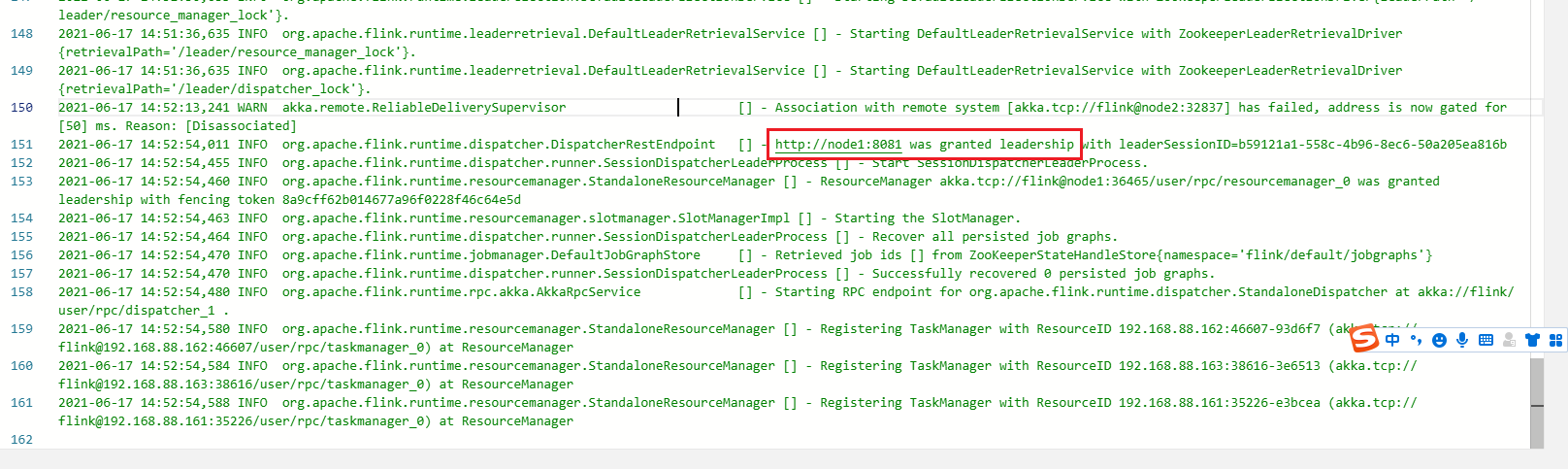
- Flink Standalone HA High availability
jobmanager -> log
summary
The above is 2021 New year Flink Series of tutorials _Flink On the principle of integration and batch flow API( Two . 5、 ... and )
May you have your own harvest after reading it , If you get something One key, three links once ~
边栏推荐
猜你喜欢

Paper notes: swing UNET: UNET like pure transformer for medicalimage segmentation

网络安全——中间人攻击渗透测试

WSDM 22 | graph recommendation based on hyperbolic geometry

rhcsa第六次笔记

ICML2022 | 分支强化学习
Icml2022 | branch reinforcement learning
Network security - file upload content check bypass

脑注意力机制启发的群体智能协同避障方法

Exploration of sustainable learning ability to support the application of ecological evolution of Pengcheng series open source large models

Explain the edge cloud in simple terms | 2. architecture
随机推荐
Network security -- man in the middle attack penetration test
申请了SSL数字证书如何进行域名验证?
R语言tidyr包的gather函数将从宽表转化为长表(宽表转化为长表)、第一个参数指定原多个数据列名称生成的新数据列名称、第二个参数指定原表内容值、第三个和第四个参数通过列索引指定不变的列名称列表
网络安全——WAR后门部署
R language uses the statstack function of epidisplay package to view the statistics (mean, median, etc.) of continuous variables and the corresponding hypothesis test in a hierarchical manner based on
Unity UGUI中scroll bar在游戏中启动界面时没有从最上面显示
Simple order management system small exercise
Bayesian width learning system based on graph regularization
R language uses the tablestack function of epidisplay package to make statistical summary tables (descriptive statistics based on the grouping of target variables, hypothesis testing, etc.), set the b
基于典型相关分析的多视图学习方法综述
CSDN garbage has no bottom line!
R language test sample proportion: use the prop.test function to perform a single sample proportion test to calculate the confidence interval of the p value of the successful sample proportion in the
简易订单管理系统小练习
R语言epiDisplay包的kap函数计算Kappa统计量的值(总一致性、期望一致性)、对多个评分对象的结果进行一致性分析、评分的类别为多个类别、如果评分中包含缺失值则标准误及其相关统计量则无法计算
游戏思考04总结:针对帧、状态、物理同步的总结(之前写的太长,现在简略下)
Network security - war backdoor deployment
第六章 总线
Chinese character style migration --- diversity regularization stargan for Chinese character multi font generation
Spelling words~
How to verify the domain name after applying for SSL digital certificate?