当前位置:网站首页>Aruba learning notes 05 configuration architecture WLAN configuration architecture
Aruba learning notes 05 configuration architecture WLAN configuration architecture
2022-07-23 14:26:00 【51CTO】

Lord To learn Source of material : http://www.cnblogs.com/yaoyaojcy/ And Huawei official website
1、WLAN Configuration architecture

So I understand building a WLAN, The main configuration is Virutal AP、RF、AP、QOS
2、AP group :
Aruba Wireless controller through AP Group To build a wireless network configuration parameter template . And many more AP Join in some AP Group To synchronize configuration parameters to each AP
- AP Groups are saved with the same configuration AP All parameters of
- All being AC Discovered AP( Not configured yet ) Are assigned to one by default "default" Of AP Group
- One AP It can only belong to one AP Group , Multiple AP Can belong to the same AP Group
- You can create new AP Group , Then put the specific AP Assign to new AP Group . You can modify AP Group parameters , Make the modified parameters apply to all that belong to this AP, It can also be applied to a specific AP Make parameter changes , The modified parameters will override AP Group corresponding parameters .
3、profile
Aruba With profile Decompose the wireless configuration parameters for the unit , According to the function of wireless configuration parameters , Decompose into independent profiles, The lower Profile It can be provided to multiple upper layers profile To use , The upper profile It can also include several lower layers with different functions profile
for example SSID Profile( contain AP The name of , Encryption and so on ), contain EDCA Parameters Station Profile(Clients To AP Traffic priority parameter ),EDCA Paramters AP Profile(AP To Clients Traffic priority parameter ),High-throughput SSID Profile(802.11n Of 40MH The use of ), These three Profile It can also be used by others SSID Profile contain
The following is a prifile Diagram for :
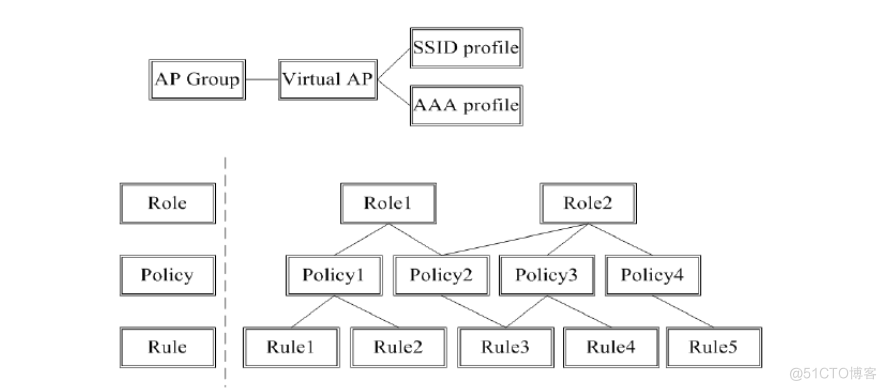
- SSID profile: Configure user visible ESSID, And its encryption method , Such as open、wep、wpa-tkip、wpa2-aes, And the use of pre-share key Static key or 802.1x.
- AAA profile: Configure user authentication mode (mac、802.1x、captive-portal、VPN), Associate corresponding AAA Authentication server (Radius、TACACS+、LDAP And Internal DB).
- Virtual-AP profile: Relate the above SSID profile and AAA profile To form a group WLAN Service template , And allocate them vlan.
- Role、Policy: I will explain it in detail later
4、Virtual AP Configuration architecture
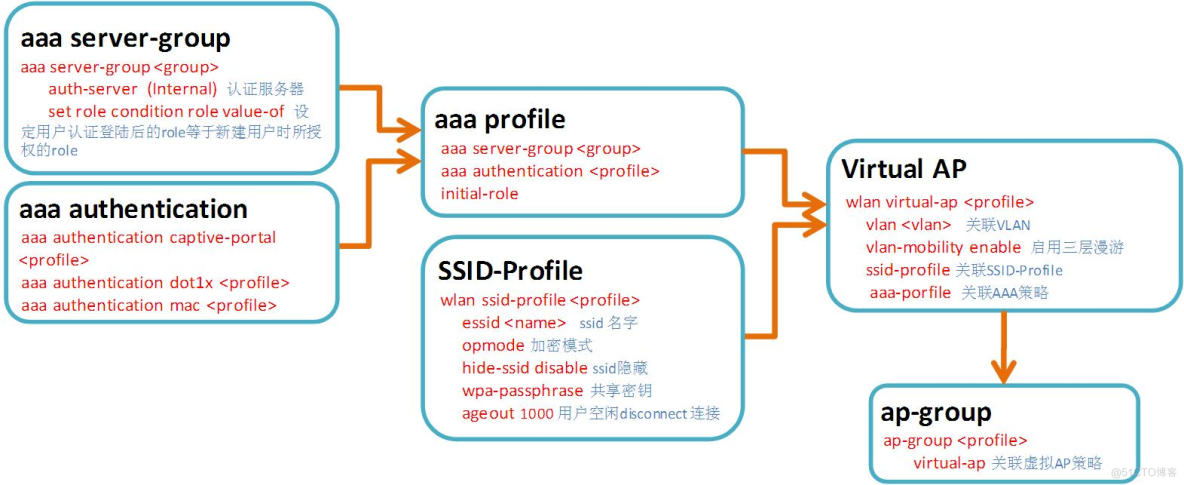
- AP Sent Beacon,probe respones The package contains WLAN Of SSID, authentication , Supported rates and other information ,STA Related to BSSID( Usually it is AP Of MAC Address )
- stay Aruba In the network ,AP In a WLAN Use a unique BSSID, A physical one AP Can support multiple WLAN,WLAN Configuration applies to a AP Of BSSID be called Virtual AP
- Virtual AP It can be configured to AP Groups and specific AP
1. AP、AP-Group and Virtual-AP The relationship between

Parse enumeration :
- AP1、AP3, Belong to AP-Group1, Release SSID=A;
- AP2、AP5, Belong to AP-Group2, Release SSID=B、SSID=C
- AP4, Belong to AP-Group3, Release SSID=A、SSID=B、SSID=C、SSID=D
2.Virtual-AP Configuration points of
2.1 authentication ----AAA Profile
- Ensure that all users accessing the wireless network are legal users
- The authentication method can choose no authentication , perhaps MAC、PSK、captive portal、802.1X And so on
- Realize role assignment in the authentication process
2.2 Encryption method ----SSID Profile
- Ensure the privacy of data transmission over the air
- You can choose not to encrypt (open)、 Layer 2 encryption (TKIP, AES) Or three-layer encryption (VPN)
2.3 VLAN Distribute ----VLAN-Name or VLAN-ID
- Assign... To wireless users accessing the wireless network VLAN, In order to get the right IP Address
边栏推荐
- Swift 16进制字符串与UIColor互转
- 【附下载】值得收藏的几款渗透测试常用的脚本
- Pagehepler lost the pit of the original SQL order by condition
- STM32输出正弦波+cubeMX配置+HAL库
- 采样和数据驱动
- Surrounded Regions
- How to judge whether an object is empty
- [baiqihang] Niuer education helps colleges and universities visit enterprises, expand posts and promote employment
- 第五天实验
- 动态规划-- 背包问题
猜你喜欢
Pagehepler lost the pit of the original SQL order by condition

Day 8 notes

LabVIEW运行中改变Chart的历史长度

多重背包!

剑指offer19 正则表达式

152. 乘积最大子数组

ThreadLocal 面试夺命11连问
Aruba学习笔记05-配置架构- WLAN配置架构

What level is rtx3090ti? What level is rtx3090ti graphics card? How about rtx3090ti graphics card
Day108. Shang Yitong: interface docking of hospital simulation system - query of hospital | Department | shift scheduling, addition, deletion, modification and paging conditions
随机推荐
Summary of JS data type judgment methods
Day 12 notes
将我理解的web3.0讲给你听
AppScan的安装与使用
强化學習——策略梯度理解點
[baiqihang] Niuer education helps colleges and universities visit enterprises, expand posts and promote employment
338. 比特位计数
拖拽----
What is Tianji 920 equivalent to a snapdragon? How much is Tianji 920 equivalent to a snapdragon? How about Tianji 920
寻找峰值[抽象二分练习]
强化学习——策略梯度理解点
10年软件测试工程师经验,很茫然....
多重背包!
视觉与智能学习近期期刊阅读与相关知识学习
第五天实验
UIScrollView(UICollectionView)禁止横向和竖向同时滑动
Process blocks and methods
152. 乘积最大子数组
第五天筆記
Pbootcms数据库转换教程(sqlite转mysql详细教程)