当前位置:网站首页>Day 5 experiment
Day 5 experiment
2022-07-23 14:13:00 【[white head]】
1,R6 by ISP You can only configure IP Address ,R1-R5 The loopback of is a private network segment
2, R67A15 Wanquanlian NGRE structure ,R1323 Power star topology ,Riz For the central site
3, All private network segments can communicate with each other , Private network segment use 05PF complete
[r1]int g 0/0/0
[r1-GigabitEthernet0/0/0]ip address 116.0.0.1 24
[r1-GigabitEthernet0/0/0]int g 0/0/1
[r1-GigabitEthernet0/0/1]ip address 16.0.0.1 24
[r1-GigabitEthernet0/0/1]int l0
[r1-LoopBack0]ip address 192.168.1.1 24
 [r2]int g 0/0/0
[r2-GigabitEthernet0/0/0]ip add 26.0.0.1 24
[r2-GigabitEthernet0/0/0]int l0
[r2-LoopBack0]ip add 192.168.2.1 24
 [r3]int g 0/0/0
[r3-GigabitEthernet0/0/0]ip add 36.0.0.1 24
[r3-GigabitEthernet0/0/0]int l0
[r3-LoopBack0]ip add 192.168.3.1 24
 [r4]int g 0/0/0
[r4-GigabitEthernet0/0/0]ip add 46.0.0.1 24
[r4-GigabitEthernet0/0/0]int l0
[r4-LoopBack0]ip add 192.168.4.1 24
 [r5]int g 0/0/0
[r5-GigabitEthernet0/0/0]ip add 56.0.0.1 24
[r5-GigabitEthernet0/0/0]int l0
[r5-LoopBack0]ip add 192.168.5.1 24


[isp]int g 0/0/0
[isp-GigabitEthernet0/0/0]ip add 16.0.0.2 24
[isp-GigabitEthernet0/0/0]int g 0/0/1
[isp-GigabitEthernet0/0/1]ip add 116.0.0.2 24
[isp-GigabitEthernet0/0/1]int g 0/0/2
[isp-GigabitEthernet0/0/2]ip add 26.0.0.2 24
[isp-GigabitEthernet0/0/2]int g 2/0/0
[isp-GigabitEthernet2/0/0]ip add 36.0.0.2 24
[isp-GigabitEthernet2/0/0]int g 3/0/0
[isp-GigabitEthernet3/0/0]ip add 46.0.0.2 24
[isp-GigabitEthernet3/0/0]int g 4/0/0
[isp-GigabitEthernet4/0/0]ip add 56.0.0.2 24
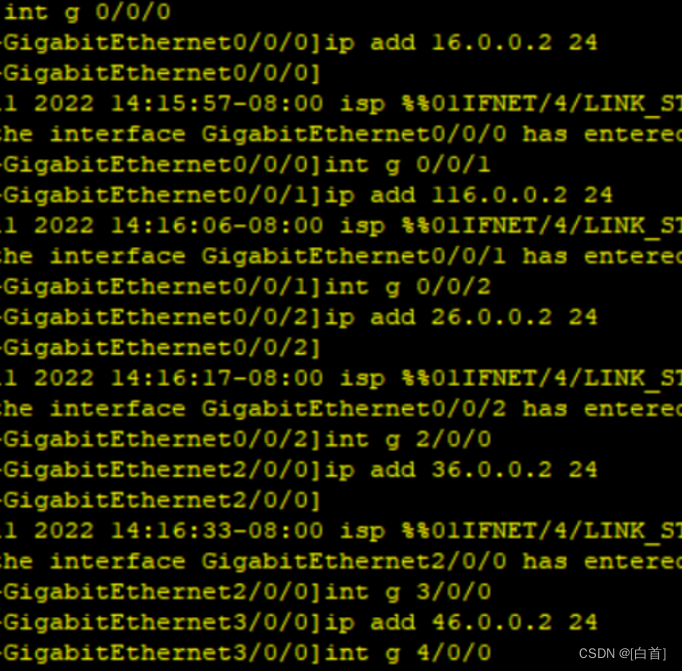 Configure loopback for each route
[R1]ip route-static 0.0.0.0 0 16.0.0.2
[R1]ip route-static 0.0.0.0 0 116.0.0.2
[R2]ip route-static 0.0.0.0 0 26.0.0.2
[R3]ip route-static 0.0.0.0 0 36.0.0.2
[R4]ip route-static 0.0.0.0 0 46.0.0.2
[R5]ip route-static 0.0.0.0 0 56.0.0.2

[r1]int t0/0/0
[r1-Tunnel0/0/0]ip add 10.0.0.1 24
[r1-Tunnel0/0/0]tunnel-protocol gre p2mp
[r1-Tunnel0/0/0]source 16.0.0.1
[r1-Tunnel0/0/0]nhrp network-id 100
[r1-Tunnel0/0/0]nhrp entry multicast dynamic
r4]int t0/0/0
[r4-Tunnel0/0/0]tunnel-protocol gre p2mp
[r4-Tunnel0/0/0]source 46.0.0.1
[r4-Tunnel0/0/0]nhrp network-id 100
[r4-Tunnel0/0/0]ip add 10.0.0.2 24
[r4-Tunnel0/0/0]tunnel-protocol gre p2mp
[r4-Tunnel0/0/0]source 46.0.0.1
[r4-Tunnel0/0/0]nhrp network-id 100
[r4-Tunnel0/0/0]nhrp entry multicast dynamic
[R1-Tunnel0/0/0]nhrp entry 10.0.0.2 46.0.0.1 register
[R1-Tunnel0/0/0]nhrp entry 10.0.0.3 56.0.0.1 register
[R4-Tunnel0/0/0]nhrp entry 10.0.0.1 16.0.0.1 register
[R4-Tunnel0/0/0]nhrp entry 10.0.0.3 56.0.0.1 register
[R5-Tunnel0/0/0]nhrp entry 10.0.0.1 16.0.0.1 register
[R5-Tunnel0/0/0]nhrp entry 10.0.0.2 46.0.0.1 register
[R2]int t 0/0/0
[R2-Tunnel0/0/0]ip add 11.0.0.2 24
[R2-Tunnel0/0/0]tunnel-protocol gre p2mp
[R2-Tunnel0/0/0]source GigabitEthernet 0/0/0
[R2-Tunnel0/0/0]nhrp network-id 200
[R2-Tunnel0/0/0]nhrp entry 11.0.0.1 116.0.0.1 register


structure ospf
[R1]ospf 1 router-id 1.1.1.1
[R1-ospf-1]a 0
[R1-ospf-1-area-0.0.0.0]network 192.168.1.0 0.0.0.255
[R1-ospf-1-area-0.0.0.0]network 10.0.0.0 0.0.0.255
[R1-ospf-1-area-0.0.0.0]network 11.0.0.0 0.0.0.255

[R2]ospf 1 router-id 2.2.2.2
[R2-ospf-1]a 0
[R2-ospf-1-area-0.0.0.0]network 192.168.2.0 0.0.0.255
[R2-ospf-1-area-0.0.0.0]network 11.0.0.0 0.0.0.255
[R3]ospf 1 router-id 3.3.3.3
[R3-ospf-1]a 0
[R3-ospf-1-area-0.0.0.0]network 192.168.3.0 0.0.0.255
[R3-ospf-1-area-0.0.0.0]network 11.0.0.0 0.0.0.255
[R4]ospf 1 router-id 4.4.4.4
[R4-ospf-1]a 0
[R4-ospf-1-area-0.0.0.0]network 192.168.4.0 0.0.0.255
[R4-ospf-1-area-0.0.0.0]network 10.0.0.0 0.0.0.255
[R5]ospf 1 router-id 5.5.5.5
[R5-ospf-1]a 0
[R5-ospf-1-area-0.0.0.0]network 192.168.5.0 0.0.0.255
[R5-ospf-1-area-0.0.0.0]network 10.0.0.0 0.0.0.255
modify R1/R2/R3 Of mgre Next ospf The working mode of the system is broadcast, Give Way R2,R3 Give up the election or let R1/R2/R3 Of ospf Change the network type to p2mp,R2/R3 Priority changed to 0, Abandon the election
[R1-Tunnel0/0/1]ospf network-type broadcast
[R2-Tunnel0/0/0]ospf network-type broadcast
[R2-Tunnel0/0/0]ospf network-type broadcast
[R2-Tunnel0/0/0]ospf dr-priority 0
[R3-Tunnel0/0/0]ospf dr-priority 0
In the end, all of OSPF The network type is set to P2MP



边栏推荐
- Overlayfs source code parsing
- Canvas eraser function
- Creo 9.0 键鼠操作进行模型观察
- How many processors is Tianji 1100 equivalent to snapdragon? How about Tianji 1100 equivalent to snapdragon
- Detailed introduction of RIP
- UIScrollView(UICollectionView)禁止横向和竖向同时滑动
- BERT 文章翻译
- 酷睿i5 12490f和i5 12600k差距大吗
- 第十天笔记
- 数据库连接池 & DBUtils
猜你喜欢

How about the performance of Ruilong R7 Pro 5875u? What level is it equivalent to

OSPF details (1)

What level is rtx3090ti? What level is rtx3090ti graphics card? How about rtx3090ti graphics card

Talent evaluation Core i7 12850hx and i7 12700h which to choose

【百企行】牛耳教育助力高校访企拓岗促就业专项行动

Day 8 notes

小米12S Pro和小米12Pro天玑版区别 两者配置对比
Google Earth engine -- a small bug in gee. Images of transcontinental boundaries cannot be obtained

Sampling and data driven

达人评测 酷睿i9 12950hx和i9 12900hx区别哪个强
随机推荐
设计例化和连接
Life essays: annoying projects in 2022
fastadmin更改默认表格按钮的弹窗大小
JS to obtain age through ID card
Network security note 1 - Security of Internet Protocol
pingbanceshi
BGP federal experiment
Best practices of JD cloud Distributed Link Tracking in financial scenarios
强化學習——策略梯度理解點
Talent evaluation Core i7 12850hx and i7 12700h which to choose
JS中不同的循环方式和注意事项总结
BERT 文章翻译
Fabric.js 基础笔刷
第四天笔记
How many processors is Tianji 720 equivalent to Xiaolong? How about Tianji 720 equivalent to Xiaolong
How to open the thought map pdf of postgraduate entrance examination in the small program of postgraduate entrance examination question bank
Canvas eraser function
采样和数据驱动
Swift hex string to uicolor
OSPF综合实验