当前位置:网站首页>Eureka service registration and discovery
Eureka service registration and discovery
2022-06-23 07:39:00 【Bitter candy】
1.Eureka Basic knowledge of
1.1 What is service governance ?

1.2 What is service registration


1.3Eureka Two components

2. stand-alone Eureka Build steps
2.1 IDEA Generate eurekaServer End services registry
2.1.1 build Module cloud-eureka-server7001
2.1.2 Change POM
<?xml version="1.0" encoding="UTF-8"?>
<project xmlns="http://maven.apache.org/POM/4.0.0" xmlns:xsi="http://www.w3.org/2001/XMLSchema-instance" xsi:schemaLocation="http://maven.apache.org/POM/4.0.0 http://maven.apache.org/xsd/maven-4.0.0.xsd">
    <parent>
        <artifactId>cloud2020</artifactId>
        <groupId>com.atguigu.springcloud</groupId>
        <version>1.0-SNAPSHOT</version>
    </parent>
    <modelVersion>4.0.0</modelVersion>

    <artifactId>cloud-eureka-server7001</artifactId>

    <dependencies>
        <!-- https://mvnrepository.com/artifact/org.springframework.cloud/spring-cloud-starter-eureka-server -->
        <dependency>
            <groupId>org.springframework.cloud</groupId>
            <artifactId>spring-cloud-starter-netflix-eureka-server</artifactId>
        </dependency>

        <dependency>
            <groupId>com.atguigu.springcloud</groupId>
            <artifactId>cloud-api-commons</artifactId>
            <version>${project.version}</version>
        </dependency>

        <!-- https://mvnrepository.com/artifact/org.springframework.boot/spring-boot-starter-web -->
        <dependency>
            <groupId>org.springframework.boot</groupId>
            <artifactId>spring-boot-starter-web</artifactId>
        </dependency>

        <!-- https://mvnrepository.com/artifact/org.springframework.boot/spring-boot-starter-web -->
        <dependency>
            <groupId>org.springframework.boot</groupId>
            <artifactId>spring-boot-starter-actuator</artifactId>
        </dependency>

        <!-- https://mvnrepository.com/artifact/org.springframework.boot/spring-boot-devtools -->
        <dependency>
            <groupId>org.springframework.boot</groupId>
            <artifactId>spring-boot-devtools</artifactId>
            <scope>runtime</scope>
            <optional>true</optional>
        </dependency>

        <!-- https://mvnrepository.com/artifact/org.projectlombok/lombok -->
        <dependency>
            <groupId>org.projectlombok</groupId>
            <artifactId>lombok</artifactId>
        </dependency>

        <!-- https://mvnrepository.com/artifact/org.springframework.boot/spring-boot-starter-test -->
        <dependency>
            <groupId>org.springframework.boot</groupId>
            <artifactId>spring-boot-starter-test</artifactId>
            <scope>test</scope>
        </dependency>
        <dependency>
            <groupId>junit</groupId>
            <artifactId>junit</artifactId>
        </dependency>

    </dependencies>
</project>
Eureka1.X and 2.X Comparative explanation of 
2.1.3 Change yml
server:
  port: 7001

eureka:
  instance:
    hostname: localhost  #eureka The instance name of the server
  client:
    register-with-eureka: false    # I don't register myself with the registry
    fetch-registry: false   # Say you're the registry , The responsibility is to maintain service instances , There's no need to retrieve Services
    service-url:
      defaultZone: http://${
    eureka.instance.hostname}:${
    server.port}/eureka/    # Set up with eureka server Both the interactive address query service and the registration service need to rely on this address
2.1.4 Write the startup class
package com.atguigu.springcloud;

import org.springframework.boot.SpringApplication;
import org.springframework.boot.autoconfigure.SpringBootApplication;
import org.springframework.cloud.netflix.eureka.server.EnableEurekaServer;

@EnableEurekaServer
@SpringBootApplication
public class EurekaMain7001 {

    public static void main(String[] args) {

        SpringApplication.run(EurekaMain7001.class,args);
    }
}
@EnableEurekaServer The annotation indicates that the service is Eureka Server node
2.1.5 test
http://localhost:7001/
2.2EurekaClient End cloud-provider-payment8001 Register into EurekaServer Become a service provider provider
2.2.1 Change pom
 <!-- https://mvnrepository.com/artifact/org.springframework.cloud/spring-cloud-starter-eureka-server -->
        <dependency>
            <groupId>org.springframework.cloud</groupId>
            <artifactId>spring-cloud-starter-netflix-eureka-client</artifactId>
        </dependency>
1.X and 2.X Comparative explanation of : More and more clear , Know is server End or end clinet End 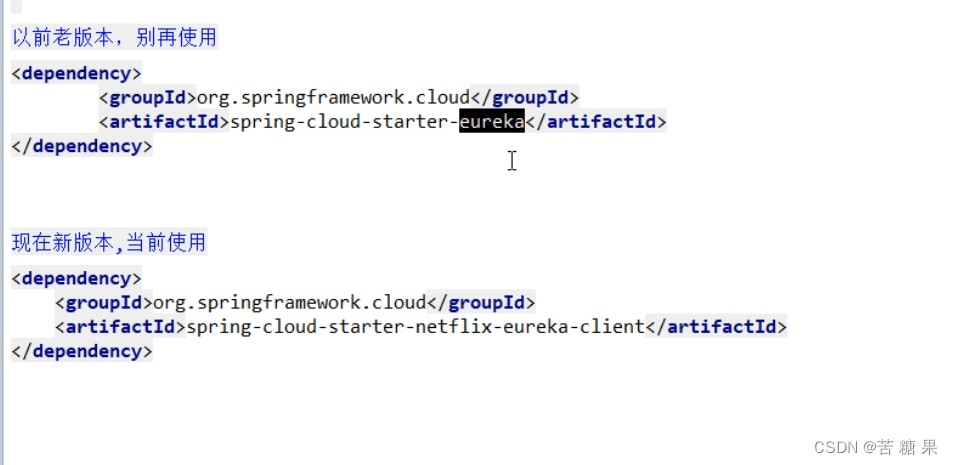
2.2.2 Change yml
eureka:
  client:
    register-with-eureka: true
    fetchRegistry: true
    service-url:
      defaultZone: http://localhost:7001/eureka
2.2.3 Change startup class
Annotate the annotation in the startup class @EnableEurekaClient: Indicates that the service is Eureka Client node
2.2.4 test
Start... First server End , Then start client End  The microservice name is registered to Eureka Name
  Self-protection mechanism
2.3EurekaClient End cloud-consumer-order80 Register into EurekaServer Become a service consumer consumer
The changes are similar to 2.2, Change yml Change the name of the microservice to :cloud-order-service, Others are the same .
3. colony Eureka Build steps
3.1Eureka Explanation of cluster principle

terms of settlement : build Eureka Registry cluster , Load balancing + Fault tolerance
3.2EurekaServer Cluster environment construction steps
3.2.1 newly build cloud-eureka-server7002
Reference resources cloud-eureka-server7001, Change POM
3.2.2 Modify the mapping configuration
find C:\Windows\System32\drivers\etc The next path hosts file , Add the following
127.0.0.1 eureka7001.com
127.0.0.1 eureka7002.com
3.2.3 Write YML
Register with each other , Watch each other
7001
server:
  port: 7001

eureka:
  instance:
    hostname: eureka7001.com    #eureka The instance name of the server
  client:
    register-with-eureka: false    # I don't register myself with the registry
    fetch-registry: false   # Say you're the registry , The responsibility is to maintain service instances , There's no need to retrieve Services
    service-url:
      defaultZone: http://eureka7002.com:7002/eureka/    # Set up with eureka server Both the interactive address query service and the registration service need to rely on this address
7002
server:
  port: 7002

eureka:
  instance:
    hostname: eureka7002.com #eureka The instance name of the server
  client:
    register-with-eureka: false    # I don't register myself with the registry
    fetch-registry: false   # Say you're the registry , The responsibility is to maintain service instances , There's no need to retrieve Services
    service-url:
      defaultZone: http://eureka7001.com:7001/eureka/     # Set up with eureka server Both the interactive address query service and the registration service need to rely on this address

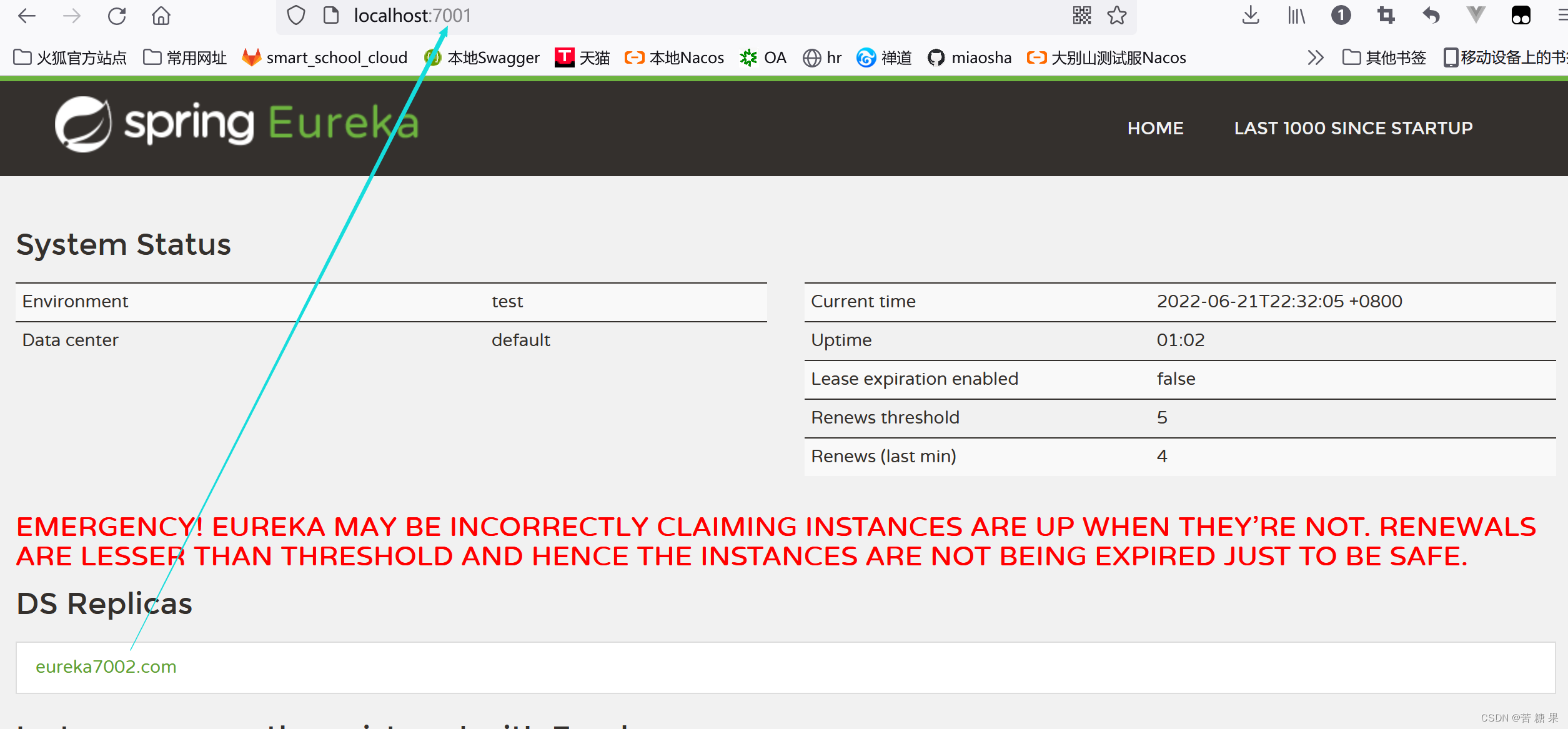
3.2.4 Main start
Main start ( Copy cloud-eureka-server7001 Main startup class to 7002 that will do )
3.2.5 Separately 80 and 8001 Sign up to Eureka colony
80 and 8001 Of yml I just need to change it defaultZone that will do .
service-url:
  defaultZone: http://eureka7001.com:7001/eureka,http://eureka7002.com:7002/eureka  # Cluster version
3.2.6 test
Start... First 7001 and 7002 form Eureka colony , Then start the provider 8001, Finally, start the consumer 80
3.2.7 Payment service providers 8001 Cluster environment construction
newly build cloud-provider-payment8002, Reference resources cloud-provider-payment8001
Change POM, Change yml, Changing the slogan , modify contoller, Bring the port number when returning , Convenient test
3.2.8 Load balancing
The order service access address cannot be written dead , Change to http://CLOUD-PAYMENT-SERVICE. That is, register to eureka The address of the provider in 
Use @LoadBalanced Note given RestTemplate The ability to load balance
3.2.9 The test again
 Find out 8002 Error report in execution , No corresponding mapper,8002 Of mapper The binding is 8001 Of dao, Names cause conflicts , Change 8002 by PaymentDao1, test OK
4.actuator The micro service information is perfect
4.1 Host name : Service name modification
instance:
    instance-id: payment8001
4.2 The access information is ip message
prefer-ip-address: true

introduce actuatorjar Package can be displayed ip Information 
5. Service discovery Discovery
5.1 For registering into eureka The micro service inside , Information about the service can be obtained through service discovery
modify cloud-provider-payment8001 Of Controller
@Resource
private DiscoveryClient discoveryClient;

@GetMapping(value = "/payment/discovery")
public Object discovery(){

    List<String> services = discoveryClient.getServices();
    for (String element : services) {

        log.info("***** element:"+element);
    }
    List<ServiceInstance> instances = discoveryClient.getInstances("CLOUD-PAYMENT-SERVICE");
    for (ServiceInstance instance : instances) {

        log.info(instance.getServiceId()+"\t"+instance.getHost()+"\t"+instance.getPort()+"\t"+instance.getUri());
    }
    return this.discoveryClient;
}
5.2 Start class
8001 Annotate the main startup class : @EnableDiscoveryClient
5.3 Self testing
Start first EurekaServer,7001/7002 service , Restart 8001 Main startup class , It's going to take a moment
http://localhost:8001/payment/discovery
6.Eureka Self protection
6.1 The fault phenomenon

6.2 The cause of the problem
In a word : At some point, a microservice is unavailable ,Eureka It won't clean up immediately , The information of the micro service will still be saved . Belong to CAP Inside AP Branch 


6.3 How to prohibit self-protection ( Self protection is not prohibited in general production environments , Turn off the development environment to facilitate debugging )
6.3.1 Registry Center eureakeServer End 7001
Factory default , The self-protection mechanism is open
eureka.server.enable-self-preservation = true
Use eureka.server.enable-self-preservation = false You can disable self-protection mode
server:
  enable-self-preservation: false
  eviction-interval-timer-in-ms: 2000
stay eurekaServer End 7001 Turn off the self-protection mechanism
6.3.2 Producer client eureakeClient End 8001
instance:
    lease-renewal-interval-in-seconds:  1
   lease-expiration-duration-in-seconds:  2

The default configuration :eureka.instance.lease-renewal-interval-in-seconds=30
eureka.instance.lease-expiration-duration-in-seconds=90
test :
7001 and 8001 All configured , Start... First 7001 Restart 8001, Shut down first 8001, It was deleted immediately .
边栏推荐
- 传智教育 | 项目发布前如何打tag标签及标签命名规范
- Arthas-thread命令定位线程死锁
- In depth learning series 47:stylegan summary
- 'Latin-1' codec can't encode characters in position 103-115: body ('string of Chinese ') is not valid Latin-1
- Pagoda forgot password
- [cloud computing event] vocational skill competition -- container development example pig rapid development framework
- codeforce 158B Taxi
- 【唠嗑篇】普通人到底该怎么学技术啊?
- C WPF realizes dynamic loading of controls through binding
- 作为思摩尔应对气候变化紧急事件的一项举措,FEELM加入碳披露项目
猜你喜欢

Yan's DP analysis
Both are hard disk partitions. What is the difference between C disk and D disk?

基于51单片机的温度检测监测报警系统设计

在线文本过滤小于指定长度工具

SimpleDateFormat 线程安全问题

论文写作之WPS安装Mathtype插件编写数学公式

Tp6+redis+think-queue+supervisor implements the process resident message queue /job task

How flannel works

The original cloud landed in deep water, and the cloud product family of Boyun container released four values

MySQL(四) — MySQL存储引擎
随机推荐
Chain tour airship development farmers' world chain tour development land chain tour development
1.概率论-组合分析
论文写作之WPS安装Mathtype插件编写数学公式
滚动播报效果的实现
In depth learning series 47:stylegan summary
Sstable details
MySQL Niuke brush questions
[pit stepping record] a pit where the database connection is not closed and resources are released
MySQL(五) — 锁及事务
yolov5检测小目标(附源码)
用户态和内核态
How MySQL converts a date to a number
Yan's DP analysis
Decoding and practice of cmaf Technology
leetcode210. Schedule II 207 Curriculum topology sorting DFS BFS
NTU-RGBD数据集下载及数据格式解析
User mode and kernel mode
SSTable详解
Spock sub piling
MySQL(八) — 执行计划(Explain)详解