当前位置:网站首页>[offline voice topic ④] Anxin VC offline voice development board secondary development voice control LED light
[offline voice topic ④] Anxin VC offline voice development board secondary development voice control LED light
2022-07-23 13:07:00 【Youxin Electronics】
List of articles
【 Offline voice topics ①】 Anxin can the latest offline voice module VC Series factory firmware tutorial ——SDK Open source ?
【 Offline voice topics ②】 Anxin can use the voice open platform ——VC series SDK Acquisition
【 Offline voice topics ③】 Anxinco VC Series offline voice SDK Development environment construction —— be based on Linux System
List of articles
Preface
After studying the previous two chapters , I believe you have understood the construction process of the development environment . Even compiled firmware , And tested . This article will start with product creation , Realize voice control step by step LED The function of .
Anxin can voice open platform :http://voice.ai-thinker.com/#/
One 、RGB Category product generation
stay Lamps and lanterns Category selection RGB The lamp , Choose a scene Select the pure offline scheme in the , Select module You can choose according to your actual hardware , I choose VC-02. Fill in product information The product name in is optional , Just choose Chinese as the language . Pull down to the bottom , Click on preservation .
1. Product function definition
stay voice SDK In the options , Front end signal processing 、Pin Foot configuration Keep default 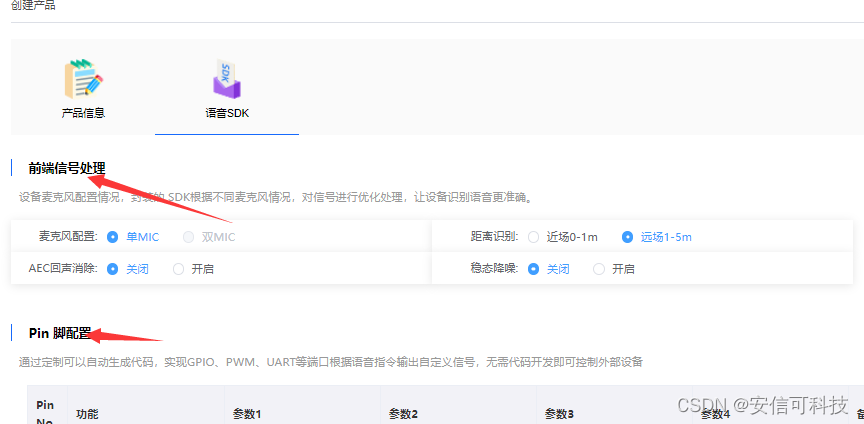
2. Define control LED Wake up words and replies

3. Define command words and responses
stay Basic information in
- Behavior : namely action, Used for internal code identification ,
Required - Command word : Voice command word , Instructions that need to be written to the module , Multiple commands with “ | ” separate ,
Required - Reply : That is, the reply corresponding to the command word , Multiple replies “ | ” separate ,
Required
4. Add control
stay Control details Add the control corresponding to the command word :
In the development board , By default, three LED The lamp , Corresponding GPIO Namely :
| LED | GPIO |
|---|---|
| Blue light (React) | GPIO_A25 |
| Warm light (Warn) | GPIO_B2 |
| Cold light (Cool) | GPIO_B3 |
You can add wake-up status lights , for example : The blue light is the wake-up status light 、 The warm light is controlled by the command word .
5. Complete production process ( contain SDK Generate )
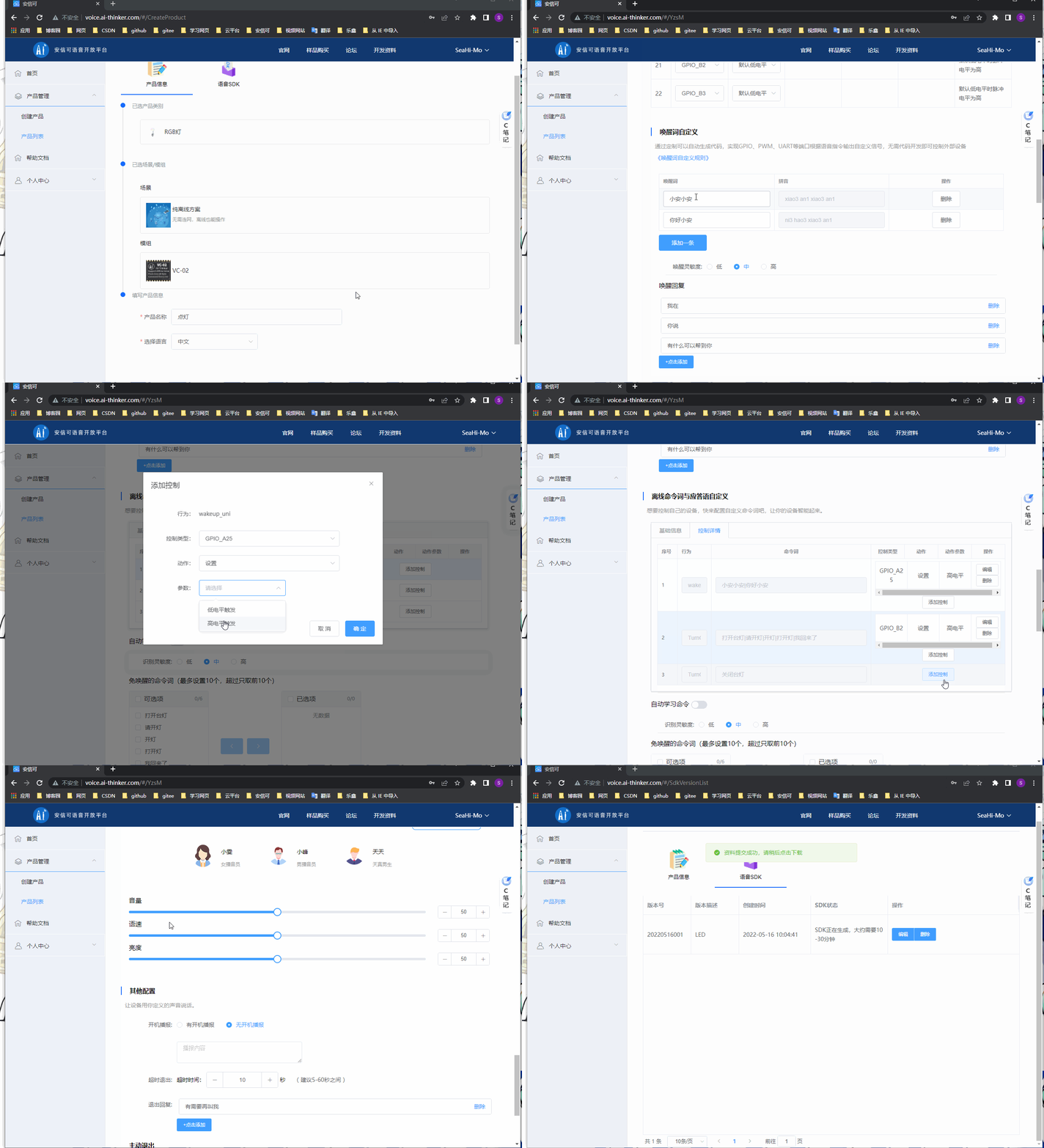
Two 、SDK Download and firmware download

SDK It takes time to generate , There's no need to worry .
If you don't need additional functions , You can directly choose firmware download , It can generate firmware consistent with customized functions , Then burn it .
If you need to add other functions , For example, exit wake-up and turn off the blue light . Just download SDK, Modify the source code to realize the function .
1. Firmware download
Firmware download is to compile the current firmware through the remote server SDK Firmware generated after , There are usually four firmware , They are :
- uni_app_debug.bin: Debug firmware , Debugging information output , You need a special debugger to burn
- uni_app_debug_update.bin: Debug version of serial port upgrade firmware , have access to UART Burn
- uni_app_release.bin: Official firmware , You need a special debugger to burn
- uni_app_release_update.bin: The official version of serial port upgrade firmware , have access to UART Burn

2.SDK download
SDK The downloaded file is in compressed format , Recommended Linux The system decompresses , Decompression instructions :
tar -xzvf uni_hb_m_solution-xxxxx-xxxxxxxx.tar.gz

3、 ... and 、 Code modification and compilation
We need to be here SDK Add an exit wake-up turn off blue LED The function of the lamp , So you need to look at the code . We made it to order SDK The default function is in user/src/examples/hb_auto_gpio.c in , What is used Demo yes USER_DEMO_AUTO_GPIO :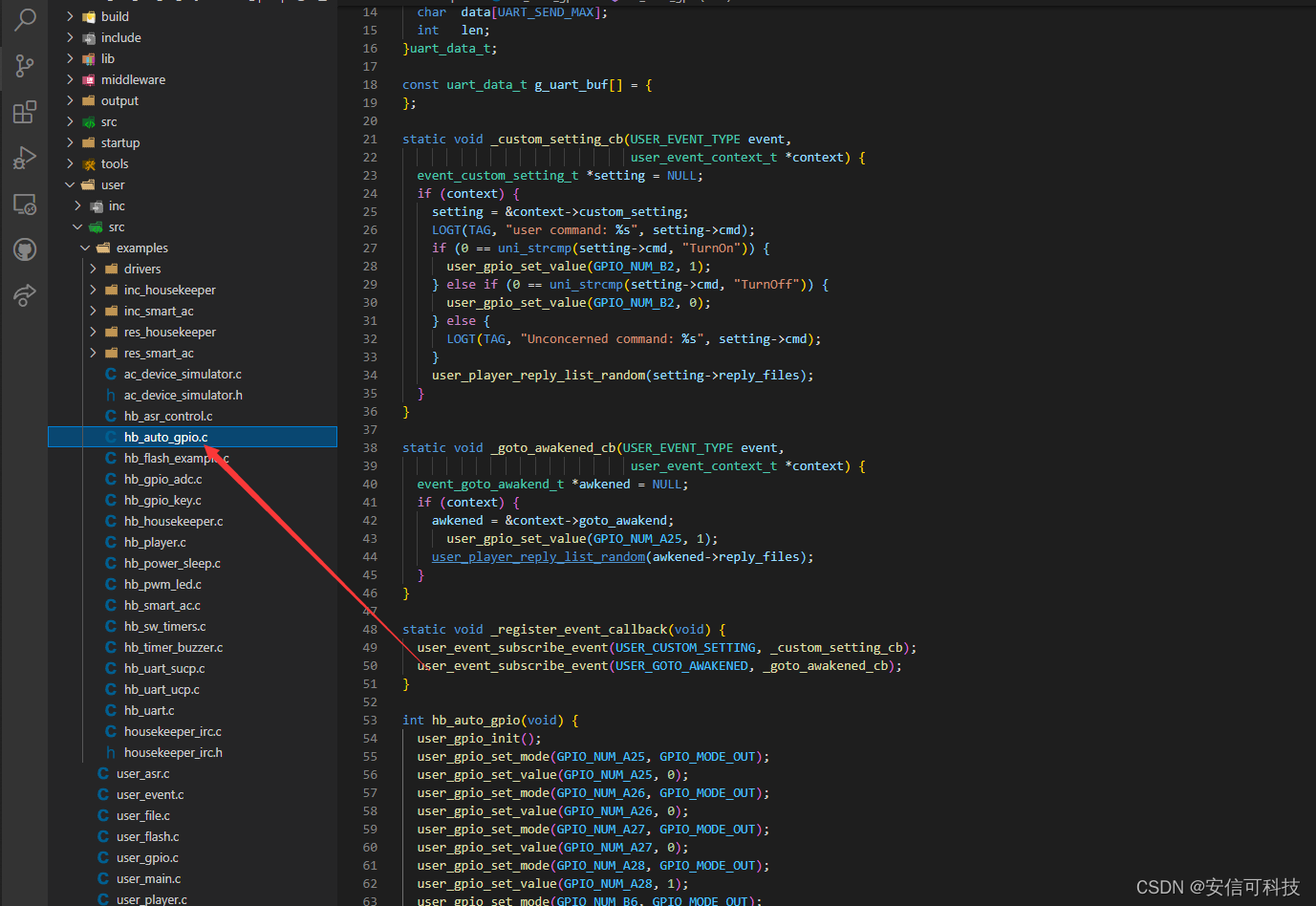
Register the exit wake-up event and its callback
In the original code . The callback of wake-up event has been registered by default . And lit blue in the callback LED The lamp (GPIO_A25 High level ), Functions to be added : Turn off blue when exiting wake-up LED The lamp , Modification steps :
- Register exit wake-up event
- Add the function of exiting the wake-up event callback
// Exit wake-up callback
static void _goto_sleeping_cb(USER_EVENT_TYPE event, user_event_context_t* context)
{

  event_goto_sleeping_t* sleeping = NULL;
  if (context)
  {

    sleeping = &context->goto_sleeping;
    user_gpio_set_value(GPIO_NUM_A25, 0);
    user_player_reply_list_random(sleeping->reply_files);
  }

}

static void _register_event_callback(void) {

 ....
  // Register exit wake-up callback
  user_event_subscribe_event(USER_GOTO_SLEEPING, _goto_sleeping_cb);
}
In order to facilitate burning, we use serial port to burn , In path uni_hb_m_solution/unione_lite_app_hb_m Execute compilation command :
./build.sh update
after , Use serial port upgrade to verify the function ,
Four 、 Friendship connection
Anxin can voice open platform :http://voice.ai-thinker.com
Official website :https://www.ai-thinker.com
Development DOCS:https://docs.ai-thinker.com
Official forum :http://bbs.ai-thinker.com
Technical support :[email protected]
边栏推荐
- Rhcsa - - parcourir le contenu du fichier, couper, uniq, trier, utiliser les commandes.tr
- Static routing principle and configuration
- ZABBIX monitoring detailed installation to deployment
- C语言-大端存储和小端存储
- Single arm routing configuration instance learning record
- 力扣 729. 我的日程安排表 I
- FTP configuration instance learning record
- Eth-Trunk 配置实例学习记录
- ACL 配置实例学习记录
- Telnet 配置实例学习记录
猜你喜欢






随机推荐
app编译打包部署手册
App compilation and packaging deployment manual
迷茫、工作没动力? 职业发展没希望? 看这篇文章就够了
ACL访问控制实验
将指定秒转为时分秒格式
Jenkins deployment
SAR成像之点目标仿真(二)—— Matlab仿真
将集合使用流进行分页
4D天线阵列布局设计
ftp部署
0 double pointer leetcode844. Compare strings with backspace
redis分布式锁实践
复杂网络-常用绘图软件和库
SAR成像之点目标仿真(三)—— 仿真结果分析
Ronge answer script production (latest in 2020)
TI单芯片毫米波雷达代码走读(二十五)—— 角度维(3D)处理流程
OpenVPN deployment
C#随机生成一个分数,判断其成绩等级(优、良、中、差、不及格)
Make local apt source offline installation
PPP 配置实例学习记录