当前位置:网站首页>PPP 配置实例学习记录
PPP 配置实例学习记录
2022-07-23 05:47:00 【业余幻想家】
PPP 配置实例
PPP(Point-to-Point Protocol)协议是一种点到点链路层协议,主要用于在全双工的同异步链路上进行点到点的数据传输。
文章目录
1、实验目标
通过 PPP 连接两台路由器,同时进行 PAP/CHAP 认证配置
2、网络拓扑图
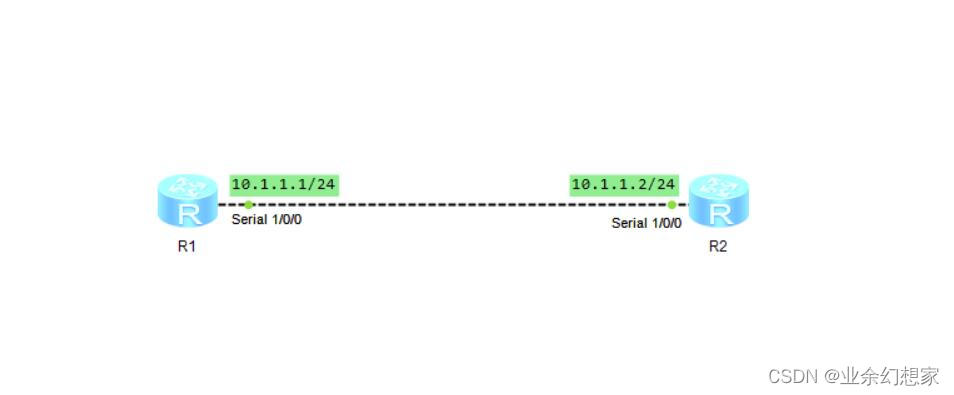
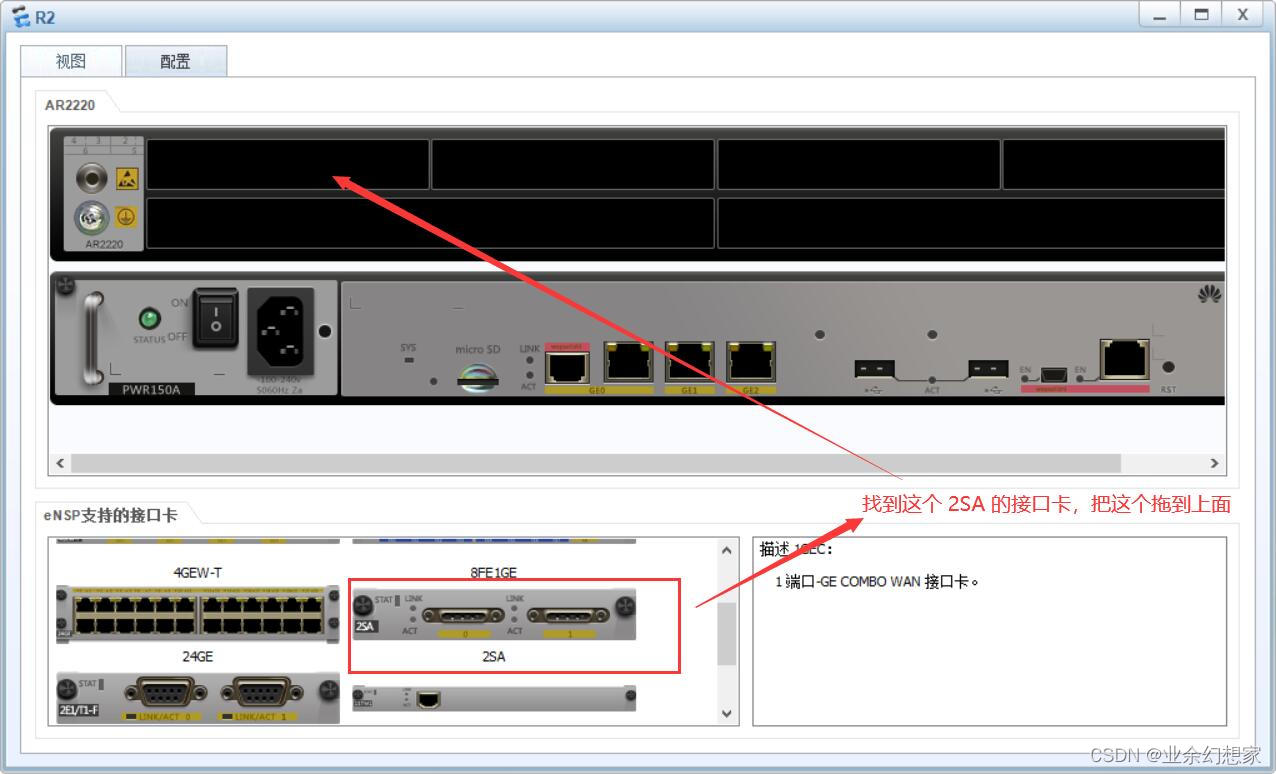
有些路由器默认是不带 Serial 接口的,但是可以通过手动添加 Serial 接口的硬件来实现,首先选中要添加 Seria l接口的路由器,点击右键,选择设置,进入视图,然后把 2SA 拉取到上面的排孔中,然后就可得到 Serial 接口了
注:添加接口卡只用在设备关闭的情况下才可以进行操作
3、配置步骤
(1)设置路由器端口 IP 地址及链路层协议
R1:
<Huawei>system-view  //进入系统视图
[Huawei]sysname R1  //重命名设备
[R1]interface Serial1/0/0
[R1-Serial1/0/0]ip address 10.1.1.1 24  //配置端口 IP 地址
[R1-Serial1/0/0]link-protocol ppp  //配置链路层协议为 PPP(该配置为默认配置)
[R1-Serial1/0/0]quit
R2:
<Huawei>system-view  //进入系统视图
[Huawei]sysname R2  //重命名设备
[R2]interface Serial1/0/0
[R2-Serial1/0/0]ip address 10.1.1.1 24  //配置端口 IP 地址
[R2-Serial1/0/0]link-protocol ppp  //配置链路层协议为 PPP(该配置为默认配置)
[R2-Serial1/0/0]quit
(2)配置认证
PPP 在创建连接时可以有选择的进行认证,将 R1 作为认证方,用户信息保存在本地,要求 R2 对其进行 PAP/CHAP 认证。
在 R1 上创建本地用户及域,并配置端口 PPP 认证为 PAP/CHAP,认证域为 test。
a、配置 R1 作为认证方
R1:
[R1]aaa
[R1-aaa]local-user [email protected] password cipher user123  //在本地创建用户 [email protected],并设置密码为 user123,期中 test 为用户所在域名
[R1-aaa]local-user [email protected] service-type ppp  //配置用户服务类型为 PPP
[R1-aaa]authentication-scheme system-mode  //创建一个认证模板 system-mode
[R1-aaa-authen-system-mode]authentication-mode local  //在该模板中设置认证时使用本地认证
[R1-aaa-authen-system-mode]quit
[R1-aaa]quit

//如配置端口 PPP 认证方式为 PAP方式,示例如下:
[R1]interface Serial1/0/0
[R1-Serial1/0/0]ppp authentication-mode pap domain test  //配置端口 PPP 认证方式为 PAP,并按照 test 域配置进行本地验证
[R1-Serial1/0/0]quit

//如配置端口 PPP 认证方式为 CHAP方式,示例如下:
[R1]interface Serial1/0/0
[R1-Serial1/0/0]ppp authentication-mode chap domain test  //配置端口 PPP 认证方式为 CHAP,并按照 test 域配置进行本地验证
[R1-Serial1/0/0]quit
b、配置 R2 作为被认证方
R2:
//如配置端口 PPP 被认证方式为 PAP方式,示例如下:
[R2]interface Serial1/0/0
[R2-Serial1/0/0]ppp pap local-user [email protected] password cipher user123  //端口以 PAP 方式被验证
[R2-Serial1/0/0]quit

//如配置端口 PPP 被认证方式为 CHAP方式,示例如下:
[R2]interface Serial1/0/0
[R2-Serial1/0/0]ppp pap local-user [email protected] password cipher user123  //端口以 CHAP 方式被认证
[R2-Serial1/0/0]quit
4、测试
(1)在路由器 R1 上查看端口配置信息
查看端口 Serial1/0/0 的配置信息,端口的物理层和链路层的状态都是 UP,并且 PPP 的 LCP 和 IPCP 都是 opened 状态,说明链路层的 PPP 协商已经成功完成
[R1]display interface Serial1/0/0  //查看端口 Serial1/0/0 的配置信息
Serial1/0/0 current state : UP  //端口物理层为 UP
Line protocol current state : UP  //端口链路层为 UP
Last line protocol up time : 2022-07-22 16:35:20 UTC-08:00
Description:HUAWEI, AR Series, Serial1/0/0 Interface
Route Port,The Maximum Transmit Unit is 1500, Hold timer is 10(sec)
Internet Address is 10.1.1.1/24
Link layer protocol is PPP
LCP opened, IPCP opened  //LCP 和 IPCP 都是 opened 状态
Last physical up time   : 2022-07-22 16:33:15 UTC-08:00
Last physical down time : 2022-07-22 16:33:10 UTC-08:00
Current system time: 2022-07-22 16:42:14-08:00
Physical layer is synchronous, Virtualbaudrate is 64000 bps
Interface is DTE, Cable type is V11, Clock mode is TC
Last 300 seconds input rate 6 bytes/sec 48 bits/sec 0 packets/sec
Last 300 seconds output rate 2 bytes/sec 16 bits/sec 0 packets/sec

Input: 113 packets, 3634 bytes
  Broadcast:              0,  Multicast:              0
  Errors:                 0,  Runts:                  0
  Giants:                 0,  CRC:                    0

  Alignments:             0,  Overruns:               0
  Dribbles:               0,  Aborts:                 0
  No Buffers:             0,  Frame Error:            0

Output: 112 packets, 1364 bytes
  Total Error:            0,  Overruns:               0
  Collisions:             0,  Deferred:               0
    Input bandwidth utilization  :    0%
    Output bandwidth utilization :    0%
(2)在 R1 上可以 ping 通 R2 的端口 IP 地址,说明链路层 PPP 正常
[R1]ping 10.1.1.2
  PING 10.1.1.2: 56  data bytes, press CTRL_C to break
    Reply from 10.1.1.2: bytes=56 Sequence=1 ttl=255 time=50 ms
    Reply from 10.1.1.2: bytes=56 Sequence=2 ttl=255 time=20 ms
    Reply from 10.1.1.2: bytes=56 Sequence=3 ttl=255 time=30 ms
    Reply from 10.1.1.2: bytes=56 Sequence=4 ttl=255 time=30 ms
    Reply from 10.1.1.2: bytes=56 Sequence=5 ttl=255 time=20 ms

  --- 10.1.1.2 ping statistics ---
    5 packet(s) transmitted
    5 packet(s) received
    0.00% packet loss
    round-trip min/avg/max = 20/30/50 ms
5、小结
PPP 的认证方式:
- 口令认证协议(PAP):PAP 是一种通过两次握手完成对等实体间相互信息确认的方法。只能在链路刚建立时使用,在链路存在期间不能重复使用 PAP 进行对等实体间的身份确认。
- 挑战握手认证协议(CHAP):CHAP 是一钟通过 3 次握手周期性验证对方身份的方法。在数据链路刚建立时使用,在整个数据链路存在期间可以重复使用。
PPP 协议有如下优点:
- 对物理层而言,PPP 既支持同步链路又支持异步链路,SLIP 仅支持异步链路。
- PPP 协议具有良好的扩展性,例如,当需要在以太网链路上承载 PPP 协议时,PPP 可以扩展为 PPPoE。
- 提供 LCP(Link Control Protocol)协议,用于各种链路层参数的协商。
- 提供各种 NCP(Network Control Protocol)协议(如 IPCP、IPXCP),用于各网络层参数的协商,更好地支持了网络层协议。
- 提供认证协议 CHAP(Challenge-Handshake Authentication Protocol)、PAP(Password Authentication Protocol),更好的保证了网络的安全性。
- 无重传机制,网络开销小,速度快。
文章如有错误之处,欢迎各位大佬批评指正
边栏推荐
猜你喜欢

Learning diary - (routing and switching technology) ACL access control list

How to write a web page with a common text editor

HCIP-第一次实验

Learning diary - (routing and switching technology) network address translation NAT Technology

OSPF综合实验

【读书笔记《凤凰架构》- 构架可靠的大型分布式系统.周志明】(一)
Routing extension configuration of OSPF and rip

C (CSharp) wechat official account development - basic configuration

Gameframework: package resources, publish packages with the app, package and generate folder instructions, upload resources to the server, download resources, gamefreamworklist DAT and gameframeworkve

@Requiredargsconstructor annotation use
随机推荐
psutil监控的简单使用
C language can also write Plants vs. Zombies
Htpasswd action
Unity3d+moba+ skill indicator (II)
Hcip - HDLC and PPP protocols
Explain various network protocols in detail
Learning diary - (routing and switching technology) OSPF Protocol
【读书笔记《凤凰架构》- 构架可靠的大型分布式系统.周志明】(一)
Instant messaging websocket
Hcip - first experiment
How to write a web page with a common text editor
In depth analysis of replication in redis
记一次日志文件IO系统的设计心得
详解TCP分段与IP分片
SQL server performance analysis, view slow queries
Unity3d:assetbundle simulation loading, synchronous loading, asynchronous loading, dependent package loading, automatic labeling, AB browser, incremental packaging
Overview of OpenSSL self visa process
Explain the release of TCP connection in detail
学习日记——(路由与交换技术)OSPF协议
《wireshark网络分析就是这么简单》知识点与技巧