当前位置:网站首页>FTP configuration instance learning record
FTP configuration instance learning record
2022-07-23 13:00:00 【Amateur visionary】
FTP Configure the instance
File transfer protocol (File Transfer Protocol,FTP) Is a set of standard protocols for file transfer on the network . and FTP The server is mainly used to transfer files , It is common in the Internet industry , It is also widely used .
List of articles
- FTP Configure the instance
- 1、 The goal of the experiment
- 2、 Network topology
- 3、 Configuration steps
- (1) Configure ports by topology IP Address
- (2) stay FTP The server (R1) On the configuration FTP Function and FTP User information
- (3) View the files in the device
- (4) From the client (R2) visit FTP
- (5) From the client (R2) Upload the file to FTP The server (R1) in
- (6) from FTP The server (R1) Get files to client (R2) in
- 4、 test
- 5、 Summary
1、 The goal of the experiment
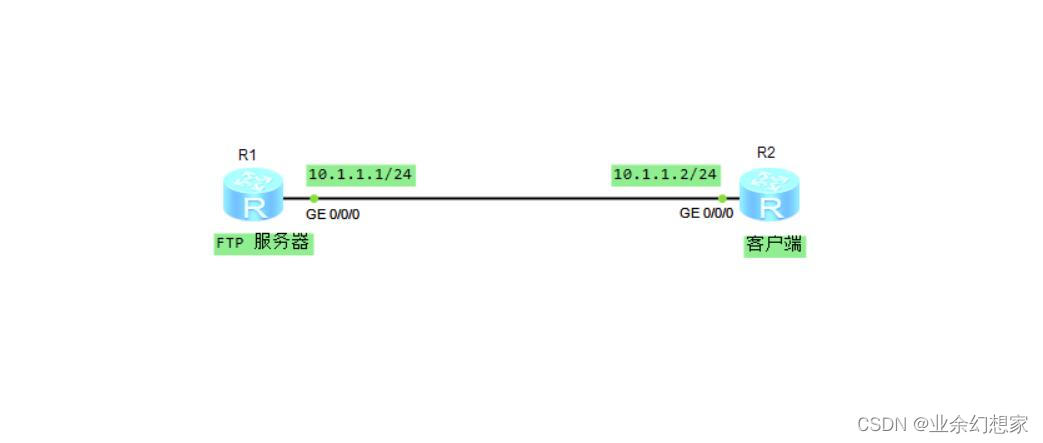
Put the device R1 As FTP The server , equipment R2 As client , Upload the files in the client to FTP The server , then FTP Download files from the server to the client , And separately in FTP Check whether the file is transferred successfully on the server and client
2、 Network topology
3、 Configuration steps
(1) Configure ports by topology IP Address
notes : The port of the device IP Just as FTP Server or client IP Address
a、 configure port IP Address
R1:
<Huawei>system-view  // Enter the system view
[Huawei]sysname R1  // Rename the device
[R1]interface GigabitEthernet0/0/0
[R1-GigabitEthernet0/0/0]ip address 10.1.1.1 24  // configure port  IP  Address
[R1-GigabitEthernet0/0/0]quit
R2:
<Huawei>system-view  // Enter the system view
[Huawei]sysname R2  // Rename the device
[R2]interface GigabitEthernet0/0/0
[R2-GigabitEthernet0/0/0]ip address 10.1.1.2 24  // configure port  IP  Address
[R2-GigabitEthernet0/0/0]quit
b、 Test the connectivity between devices
use FTP The server (R1) Go to ping client (R2) Of IP Address ( port IP Address ), It is found that it can be interconnected
[R1]ping 10.1.1.2
  PING 10.1.1.2: 56  data bytes, press CTRL_C to break
    Reply from 10.1.1.2: bytes=56 Sequence=1 ttl=255 time=70 ms
    Reply from 10.1.1.2: bytes=56 Sequence=2 ttl=255 time=30 ms
    Reply from 10.1.1.2: bytes=56 Sequence=3 ttl=255 time=20 ms
    Reply from 10.1.1.2: bytes=56 Sequence=4 ttl=255 time=10 ms
    Reply from 10.1.1.2: bytes=56 Sequence=5 ttl=255 time=20 ms

  --- 10.1.1.2 ping statistics ---
    5 packet(s) transmitted
    5 packet(s) received
    0.00% packet loss
    round-trip min/avg/max = 10/30/70 ms
Using the client (R2) Go to ping FTP The server (R1) Of IP Address ( port IP Address ), It can also be interconnected
[R2]ping 10.1.1.1
  PING 10.1.1.1: 56  data bytes, press CTRL_C to break
    Reply from 10.1.1.1: bytes=56 Sequence=1 ttl=255 time=50 ms
    Reply from 10.1.1.1: bytes=56 Sequence=2 ttl=255 time=30 ms
    Reply from 10.1.1.1: bytes=56 Sequence=3 ttl=255 time=20 ms
    Reply from 10.1.1.1: bytes=56 Sequence=4 ttl=255 time=20 ms
    Reply from 10.1.1.1: bytes=56 Sequence=5 ttl=255 time=30 ms

  --- 10.1.1.1 ping statistics ---
    5 packet(s) transmitted
    5 packet(s) received
    0.00% packet loss
    round-trip min/avg/max = 20/30/50 ms
(2) stay FTP The server (R1) On the configuration FTP Function and FTP User information
AAA The server receives the data sent by the data device FTP User authentication information ; According to the preset FTP The user account authenticates and authorizes the authentication information , It can be managed centrally FTP user .
[R1]ftp server enable  // Turn on  FTP  function
[R1]aaa
[R1-aaa]local-user ftptest password cipher ftptest123  // To configure  FTP  User information , user name :ftptest  password :ftptest123
[R1-aaa]local-user ftptest privilege level 15  // Configure the user's level
[R1-aaa]local-user ftptest service-type ftp  // Configure the service type
[R1-aaa]local-user ftptest ftp-directory flash:  // To configure  FTP  Catalog
[R1-aaa]quit
(3) View the files in the device
notes : To view files, you need to exit the system view , Use dir Command view file
R1:
[R1]quit  // Exit the system view
<R1>dir
Directory of flash:/

  Idx  Attr     Size(Byte)  Date        Time(LMT)  FileName
    0  drw-              -  Jul 19 2022 07:16:41   dhcp
    1  -rw-        121,802  May 26 2014 09:20:58   portalpage.zip
    2  -rw-          2,263  Jul 19 2022 07:16:36   statemach.efs
    3  -rw-        828,482  May 26 2014 09:20:58   sslvpn.zip

1,090,732 KB total (784,464 KB free)
R2:
[R2]quit  // Exit the system view
<R2>dir
Directory of flash:/

  Idx  Attr     Size(Byte)  Date        Time(LMT)  FileName
    0  drw-              -  Jul 19 2022 07:16:44   dhcp
    1  -rw-        121,802  May 26 2014 09:20:58   portalpage.zip
    2  -rw-          2,263  Jul 19 2022 07:16:39   statemach.efs
    3  -rw-        828,482  May 26 2014 09:20:58   sslvpn.zip

1,090,732 KB total (784,464 KB free)
(4) From the client (R2) visit FTP
notes : When entering the password, the password will not display the input
<R2>ftp 10.1.1.1  // visit  FTP  The server , Enter the user name and password you created before  FTP
Trying 10.1.1.1 ...

Press CTRL+K to abort
Connected to 10.1.1.1.
220 FTP service ready.
User(10.1.1.1:(none)):ftptest
331 Password required for ftptest.
Enter password:
230 User logged in.

[R2-ftp]
(5) From the client (R2) Upload the file to FTP The server (R1) in
[R2-ftp]put sslvpn.zip put.zip  // take  sslvpn.zip  Rename file to  put.zip  Upload to  FTP  The server ,put [ Source file ] [ Rename file ]
200 Port command okay.
150 Opening ASCII mode data connection for put.zip.
 1% 3% 5% 7% 9%11%13%15%17%19%21%23%25%27%29%31%33%35%37%39%
41%43%45%47%49%51%53%55%57%59%61%63%65%67%69%71%73%75%77%79%
81%83%85%87%88%90%92%94%96%98%
 100%
226 Transfer complete.
FTP: 828482 byte(s) sent in 3.030 second(s) 273.42Kbyte(s)/sec.
(6) from FTP The server (R1) Get files to client (R2) in
[R2-ftp]get portalpage.zip get.zip  // take  portalpage.zip  Rename file to  get.zip  Get to the client ,get [ Source file ] [ Rename file ]
200 Port command okay.
150 Opening ASCII mode data connection for portalpage.zip.
 2% 4 5 6% 7 9%101112%13%1516%171819%21%2324%25%28%30%34%36%39%41
%43%47%49%52%55%58%60%6364%66%69%71%7376%7778%798284%85%89%90%
93%95%97%99226 Transfer complete.
FTP: 121802 byte(s) received in 0.500 second(s) 243.60Kbyte(s)/sec.

[R2-ftp]quit
221 Server closing.
4、 test
(1) stay FTP The server (R1) View from client (R2) Upload the file to FTP The server (R1) Success in
notes : Use dir see file
<R1>dir
Directory of flash:/

  Idx  Attr     Size(Byte)  Date        Time(LMT)  FileName
    0  -rw-        828,482  Jul 19 2022 08:09:40   put.zip  // Files uploaded from the client
    1  drw-              -  Jul 19 2022 07:16:41   dhcp
    2  -rw-        121,802  May 26 2014 09:20:58   portalpage.zip
    3  -rw-          2,263  Jul 19 2022 07:16:36   statemach.efs
    4  -rw-        828,482  May 26 2014 09:20:58   sslvpn.zip

1,090,732 KB total (783,652 KB free)
(2) On the client side (R2) View from FTP The server (R1) Get the file to the client (R2) Success in
<R2>dir
Directory of flash:/

  Idx  Attr     Size(Byte)  Date        Time(LMT)  FileName
    0  drw-              -  Jul 19 2022 07:16:44   dhcp
    1  -rw-        121,802  Jul 19 2022 08:13:46   portalpage.zip
    2  -rw-          2,263  Jul 19 2022 07:16:39   statemach.efs
    3  -rw-        828,482  May 26 2014 09:20:58   sslvpn.zip
    4  -rw-        121,802  Jul 19 2022 08:15:15   get.zip  // from  FTP  Files obtained by the server

1,090,732 KB total (784,344 KB free)
5、 Summary
FTP Working in OSI The seventh layer of the model , TCP The fourth layer of the model , The application layer , Use TCP Transmission, not UDP, The client has to go through a “ Three handshakes ” The process of , Ensure that the connection between the client and the server is reliable , And it's connection oriented , Provide reliable guarantee for data transmission .
If there are mistakes in the article , Welcome to criticize and correct
边栏推荐
- OSPF 多区域配置实例学习记录
- Learning diary - (routing and switching technology) single arm routing
- Hcip ---- relevant knowledge points of GRE protocol, mGRE environment and OSPF Protocol
- Hcip --- HCIA knowledge review (I)
- [database] basic theory
- C#随机生成一个分数,判断其成绩等级(优、良、中、差、不及格)
- Query the cross compiled executable dependency Library
- FTP实验及概述
- @Requiredargsconstructor annotation use
- 0 dynamic programming leetcodde313. super ugly number
猜你喜欢

默认路由配置实例学习记录
Solution rapide: xshell ne peut pas glisser dans un dossier ou un paquet

手动配置DHCP服务

Do a Cisco experiment!

Learning diary - (routing and switching technology) layer 3 switch

Understanding of LSM tree (log structured merge tree)

Gameframework:resource loading, resource loading, dependency loading, task pool, object pool, reference count

MySQL performance optimization, index optimization

OSPF comprehensive experiment
Secret key remote login server to realize secret free login
随机推荐
Unity3d:ugui source code eventsystem input system FAQ
秘钥远程登录服务器实现免密登录实战
Gameframework: resource hot code analysis, check version information, download version files, verify version files, get the number of updated files, download files, taskpool
Unity3d+gameframework: resource analysis, resource dependency, circular dependency detection
在二叉排序树中删除节点
Quick solution: xshell can't drag into folders or software packages
C language can also write Plants vs. Zombies
Manually configure DHCP service
C#输入一个字母,判断其大小写
NFS service deployment notes
OSPF comprehensive experiment in hcip-mgre environment
C # enter a letter and judge its case
Depth first find all simple paths from vertex u to vertex v in the graph
Gameframework: package resources, publish packages with the app, package and generate folder instructions, upload resources to the server, download resources, gamefreamworklist DAT and gameframeworkve
Learning diary - (routing and switching technology) layer 3 switch
Hcip-hcia knowledge review (II)
DNS domain name resolution service
Understanding of LSM tree (log structured merge tree)
Unity3d+moba+ skill indicator (II)
Prefix and leetcode2100. Suitable for bank robbery days